June 2, 2026
How to Read an Email Header: A Complete Technical Breakdown
A step-by-step analysis of a real email header to understand SPF, DKIM, DMARC, ARC, and TLS encryption.

Mohammad Abir Abbas
3 min read
Have you ever clicked "Show Original" or "View Headers" in your email client and been met with a wall of confusing code? Email headers look like gibberish, but they are actually the digital passport of your message. They tell you exactly where an email came from, who handled it, and whether it is legitimate or a phishing attempt.
In this guide, we will break down a real-world email header sent from Proton Mail to Google Workspace to teach you how to read it like a cybersecurity professional.
What is an Email Header?
An email header is a set of metadata attached to every email message that details its journey from the sender to the recipient. It includes routing information, authentication results (SPF, DKIM, DMARC), encryption status, and timestamps. While the "body" of the email is what you read, the "header" is what mail servers use to verify security and route the message.
Case Study: Decoding a Real Email Header
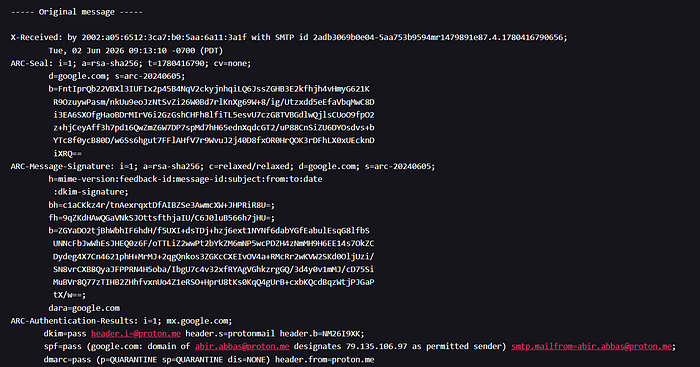
Let's analyze a real email header. In this scenario, an email was sent from abir.abbas@proton.me to a Google Workspace inbox (jobs@allformance.com).
1. The Routing Path (Received Headers)
Every time an email passes through a mail server, that server stamps a Received header at the very top. By reading them from top to bottom, you can trace the email's exact journey.
The Header:
Received: from mail-10697.protonmail.ch (mail-10697.protonmail.ch. [79.135.106.97]) by mx.google.com ...
The Breakdown: This tells us the email originated from Proton Mail's outbound server (IP address 79.135.106.97) and was successfully received by Google's inbound mail server (mx.google.com).
2. The Security Check: SPF, DKIM, and DMARC
This is the most critical part of the header for spotting spoofing and phishing. The receiving server (Google) checks the sender's identity using three main protocols.
The Header:
Authentication-Results: mx.google.com; dkim=pass ... spf=pass ... dmarc=pass (p=QUARANTINE sp=QUARANTINE dis=NONE) ...
The Breakdown:
- SPF (Sender Policy Framework) = Pass: Google checked the IP address (
79.135.106.97) and verified that Proton is explicitly authorized to send emails on behalf of@proton.me. - DKIM (DomainKeys Identified Mail) = Pass: The email contains a valid cryptographic signature proving it was indeed signed by Proton Mail and wasn't altered in transit.
- DMARC (Domain-based Message Authentication) = Pass: DMARC ties SPF and DKIM together.
p=QUARANTINE: This is the domain's policy. It tells receivers, "If an email fails SPF/DKIM, send it to the spam folder."dis=NONE: Because this specific email passed authentication, the disposition (action taken) was "None"—meaning it was delivered normally to the inbox.
3. The Forwarding Hero: ARC (Authenticated Received Chain)
Standard authentication (SPF/DKIM) often breaks when an email is forwarded or passes through a mailing list. ARC was created to fix this.
The Header:
ARC-Seal: i=1; a=rsa-sha256; t=1780416790; cv=none; d=google.com; ...
The Breakdown:
i=1: This indicates this is the first "seal" in the ARC chain.cv=none: "Chain Validation" is none, meaning there were no prior ARC seals (it wasn't forwarded before reaching Google).- Google added this seal to preserve the authentication results. If Google forwards this email to another server later, that next server will see Google's seal and know the original email was legitimate.
4. In-Transit Encryption (TLS)
Just because an email is authenticated doesn't mean it was encrypted while traveling across the internet.
The Header:
(version=TLS1_3 cipher=TLS_AES_256_GCM_SHA384 bits=256/256)
The Breakdown: This confirms that the connection between Proton's server and Google's server was encrypted using TLS 1.3 (the latest, most secure version of Transport Layer Security) with a strong 256-bit cipher. This prevents hackers from intercepting and reading the email while it is in transit.
5. Cryptographic Signatures and Metadata
At the bottom of the header, you will find the actual cryptographic keys and standard metadata.
The Header:
DKIM-Signature: v=1; a=rsa-sha256; c=relaxed/relaxed; d=proton.me; s=protonmail; ...Date: Tue, 02 Jun 2026 16:13:04 +0000Message-ID: <IA6Z_xufKlbV3diq...@proton.me>
The Breakdown:
- DKIM-Signature: The actual long string of text that acts as the digital fingerprint of the email.
d=proton.meis the signing domain, ands=protonmailis the specific DNS selector used to verify the key. - Message-ID: A globally unique identifier for this specific email, ensuring no two emails in the world have the exact same ID.
Frequently Asked Questions (FAQ)
What does "spf=pass" mean in an email header? It means the IP address sending the email is explicitly listed in the domain's SPF DNS records as an authorized sender. If it says "fail," the email is likely spoofed.
What is the difference between DKIM and SPF?
SPF verifies the server (IP address) sending the email, while DKIM attaches a cryptographic signature to the email itself to ensure the message body and headers haven't been tampered with in transit.
What does a DMARC policy of "QUARANTINE" mean?
It instructs the receiving mail server to place emails that fail DMARC checks into the recipient's spam or junk folder, rather than rejecting them outright (REJECT) or letting them into the inbox anyway (NONE).
What is ARC in email headers?
Authenticated Received Chain (ARC) allows intermediate mail servers (like forwarding services or mailing lists) to add their own authentication seal. This ensures the original SPF/DKIM/DMARC results aren't lost if the email is modified or forwarded.
How can I view an email header in Gmail?
Open the email, click the three vertical dots in the top right corner of the message box, and select "Show original." This will open a new tab displaying the full raw header and a breakdown of the authentication results.
Next time you get a suspicious email, don't just look at the sender name — check the headers!
Call to Action:
- ♻️ Repost to help your network stay safe.
- 💬 What's the weirdest phishing email you've ever received? Let me know below!
- 🔔 Follow for more cybersecurity and AI Tech breakdowns.