

Why Your File Uploads Are Garbage (And How TUS Fixes It)
Data saver? Netflix documentary enthusiast? Or just someone who tries to upload a 10GB file on a coffee shop Wi-Fi?
We've all been there. You're uploading very_important_backup.zip. It hits 99%. A gust of wind hits the router. Failed.
You scream. You refresh. You start from 0%.
This is madness. This is 2010 behavior. Why are we still doing this? multipart/form-data was designed when files were small and the internet was... well, simpler. It's a "all or nothing" deal. And usually, it's nothing.
Enter TUS. The protocol that says "Hold my beer" to network failures.
What is TUS? (The "Why Should I Care" Part)
TUS (Resumable File Uploads) is an open protocol that solves a problem you didn't know had a name: reliable, interruptible, resumable uploads.
Think of it like Netflix for uploads. You stop watching (uploading), you come back later, and it picks up exactly where you left the popcorn. No starting over. No drama.
It breaks your massive file into chunks. Tiny, digestible pieces. If one fails, you just retry that piece. You don't throw away the whole cake just because the cherry fell off.
How the Magic Works 🪄
It's surprisingly simple, which makes it suspicious. It's a conversation between client and server.
- POST: "Hey server, I have a file. It's 50GB. Can I upload it?"
- Server: "Sure, call it
file-123. Send it over." (Server creates an empty placeholder). - PATCH: "Here are bytes 0 to 1,000,000."
- Server: "Got 'em. Offset is now 1,000,000."
- Network crashes 💥
- Network comes back 🩹
- HEAD: "Yo server, how much of
file-123do you have?" - Server: "I got 1,000,000 bytes. Don't send them again."
- PATCH: "Cool, here is byte 1,000,001 to the end."
You see? It negotiates. It's diplomatic. It remembers.
Visualizing the Chaos 🎨
Here is what happens when everything goes wrong (and TUS fixes it):

The "Secret Sauce" Implementation 🧪
We're going to build this beast using Spring Boot (because we like enterprise-grade coffee) and MongoDB (because who needs schemas?).
The Stack
- Spring Boot 3.x: The mothership.
- tus-java-server: The library that does the heavy lifting so we don't have to write the protocol from scratch.
- MongoDB + GridFS: To store the massive files once they arrive. Why GridFS? Because MongoDB documents have a 16MB limit, and your files are definitely bigger than that. GridFS chunks it up.
- Vanilla JS: Because frameworks are overrated (and I'm lazy).
Configuration: The Boring but Necessary Part
First, grab the dependency. I used tus-java-server. It's like finding a cheat code on GitHub.
<dependency>
    <groupId>me.desair.tus</groupId>
    <artifactId>tus-java-server</artifactId>
    <version>1.0.0-3.0</version>
</dependency>
Then, configure the service bean. We tell it where to store the temporary chunks (on disk, because RAM is expensive).
@Configuration
public class TusConfig {

    @Value("${tus.storage-path}")
    String storagePath;

    @Bean
    public TusFileUploadService tusFileUploadService() {
        return new TusFileUploadService()
                .withStoragePath(storagePath) // The dump yard
                .withUploadExpirationPeriod(86400000L) // 24 hours to finish or we delete it
                .withUploadUri("/tus/upload"); // The magic endpoint
    }
}
Why expiration? Because people start uploads and never finish them. You don't want your disk full of ghost files.
The Implementation: Where the Code Lives
The Controller is where we intercept the traffic.
@RestController
@RequestMapping("/tus")
public class TusUploadController {

    // ... dependency injection ...

    @RequestMapping(value = {"/upload", "/upload/**"}, method = {POST, PATCH, HEAD, DELETE, GET})
    public void handleTusUpload(HttpServletRequest request, HttpServletResponse response) {

        // This one line handles the entire protocol negotiation. Seriously.
        tusService.process(request, response);

        // But wait! There's more.
        // We need to move the file to our permanent storage (MongoDB) when it's done.

        String uploadUri = request.getRequestURI();
        UploadInfo upload = tusService.getUploadInfo(uploadUri);

        if (upload != null && !upload.isUploadInProgress()) {
            // It's done! 🥳
            // The file is currently sitting in our temporary folder. Let's move it.

            try (InputStream is = tusService.getUploadedBytes(uploadUri)) {

                // Shoving it into MongoDB GridFS
                // This might take a while for 10GB files, so grab a coffee ☕
                ObjectId fileId = gridFsTemplate.store(is, upload.getFileName(), upload.getFileMimeType());

                // Save some metadata so we can find it later
                saveMetadata(upload.getFileName(), fileId);

                // Clean up the evidence (delete temp file from disk)
                tusService.deleteUpload(uploadUri);

            } catch (Exception e) {
                // Panic logic goes here
            }
        }
    }
}
The "Gotcha" Moment: For huge files (like the 5GB monster I tested), the gridFsTemplate.store part takes time. It has to stream 5GB from disk to DB. If you don't handle this, your UI will say "100%" but your backend is still sweating. We fixed this in the frontend (keep reading).
The Frontend (Thanks to claude): Making it Look Good
On the client side, we use tus-js-client. This little script is the real MVP. It handles the retries, the chunking, the "honey, the Wi-Fi is down" moments.
But we added a twist. Persisting Resume capability across browser restarts.
If you close the tab, the JS memory is gone. The upload URL is lost. So, we cheat. We save the URL in localStorage.
// Generate a fingerprint for the file
const fileKey = `tus_upload_${file.name}_${file.size}`;
const previousUploadUrl = localStorage.getItem(fileKey);

var upload = new tus.Upload(file, {
    endpoint: "http://localhost:8080/tus/upload",
    retryDelays: [0, 1000, 3000, 5000], // "I won't give up" logic
    uploadUrl: previousUploadUrl, // <--- The magic line. Resume if we know the URL.

    onProgress: function(bytesUploaded, bytesTotal) {
        var percentage = (bytesUploaded / bytesTotal * 100).toFixed(2);

        // Save the URL so we can resume if Chrome crashes
        if (upload.url) {
            localStorage.setItem(fileKey, upload.url);
        }

        // UI Trick:
        if (bytesUploaded === bytesTotal) {
            console.log("Saving to database... Hold on...");
        }
    },

    onSuccess: function() {
        console.log("Download %s from %s", upload.file.name, upload.url);
        localStorage.removeItem(fileKey); // Clean up
    }
});

upload.start();
The Output: Does it Work?
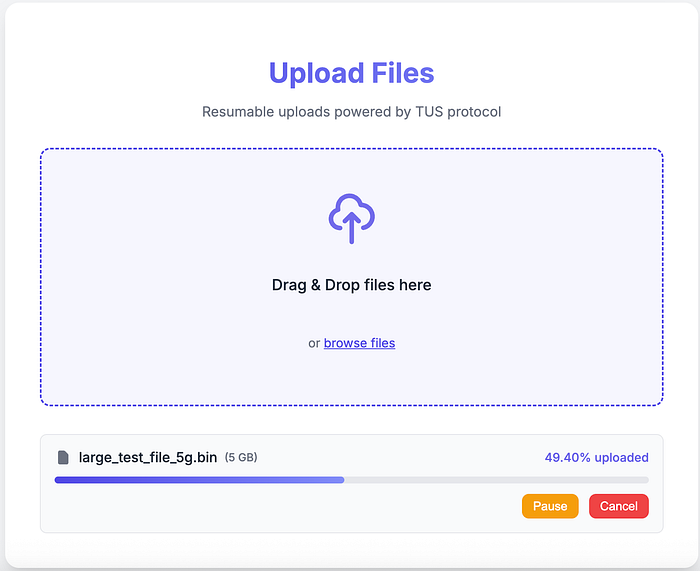
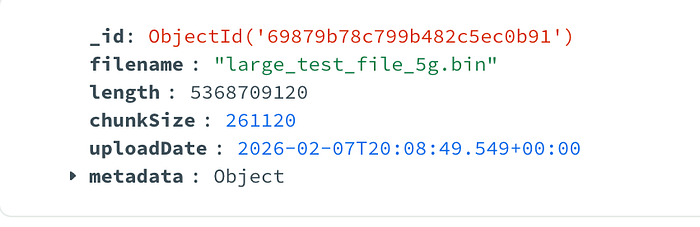
I generated a 5GB file (yes, really) using mkfile. I started the upload. I pulled the ethernet cable. (The upload stopped). I plugged it back in. (It resumed automatically). I closed the browser tab. I reopened it and selected the same file. It jumped straight to 50%.
The file landed in MongoDB GridFS safe and sound. My disk was cleaned up. No tears were shed.

The Cookbook 👨🍳 (Full Code)
pom.xml
<dependencies>
    <dependency>
        <groupId>org.springframework.boot</groupId>
        <artifactId>spring-boot-starter-data-mongodb</artifactId>
    </dependency>
    <dependency>
        <groupId>org.springframework.boot</groupId>
        <artifactId>spring-boot-starter-web</artifactId>
    </dependency>
    <dependency>
        <groupId>me.desair.tus</groupId>
        <artifactId>tus-java-server</artifactId>
        <version>1.0.0-3.0</version>
    </dependency>
</dependencies>
applications.yaml
spring:
  data:
    mongodb:
      uri: mongodb://localhost:27017
      database: tusimpl
  servlet:
    multipart:
      max-file-size: 10GB
      max-request-size: 10GB

tus:
  storage-path: ./tus-uploads
  max-upload-size: 10737418240  # 10GB
  upload-expiration-period: 86400000
TusConfig.java
package com.practice.tusimpl.config;

import me.desair.tus.server.TusFileUploadService;
import org.springframework.beans.factory.annotation.Value;
import org.springframework.context.annotation.Bean;
import org.springframework.context.annotation.Configuration;

import java.nio.file.Paths;

@Configuration
public class TusConfig {

    @Value("${tus.storage-path:./tus-uploads}")
    private String storagePath;

    @Value("${tus.upload-expiration-period:86400000}")
    private Long uploadExpirationPeriod;

    @Value("${tus.max-upload-size:1073741824000000}")
    private Long maxUploadSize;

    @Bean
    public TusFileUploadService tusFileUploadService() {
        return new TusFileUploadService()
                .withStoragePath(storagePath)
                .withUploadExpirationPeriod(uploadExpirationPeriod)
                .withMaxUploadSize(maxUploadSize)
                .withUploadUri("/tus/upload")
                .withThreadLocalCache(true);
    }
}
TusUploadController.java
package com.practice.tusimpl.controller;

import com.practice.tusimpl.model.FileMetadata;
import com.practice.tusimpl.repository.FileMetadataRepository;
import com.mongodb.client.gridfs.model.GridFSFile;
import jakarta.servlet.http.HttpServletRequest;
import jakarta.servlet.http.HttpServletResponse;
import me.desair.tus.server.TusFileUploadService;
import me.desair.tus.server.upload.UploadInfo;
import org.bson.types.ObjectId;
import org.slf4j.Logger;
import org.slf4j.LoggerFactory;
import org.springframework.data.mongodb.core.query.Criteria;
import org.springframework.data.mongodb.core.query.Query;
import org.springframework.data.mongodb.gridfs.GridFsResource;
import org.springframework.data.mongodb.gridfs.GridFsTemplate;
import org.springframework.http.HttpHeaders;
import org.springframework.http.HttpStatus;
import org.springframework.http.MediaType;
import org.springframework.http.ResponseEntity;
import org.springframework.web.bind.annotation.*;

import java.io.IOException;
import java.io.InputStream;
import java.time.LocalDateTime;
import java.util.List;

@RestController
@RequestMapping("/tus")
@CrossOrigin(origins = "*", maxAge = 3600)
public class TusUploadController {

    private static final Logger logger = LoggerFactory.getLogger(TusUploadController.class);

    private final TusFileUploadService tusService;
    private final GridFsTemplate gridFsTemplate;
    private final FileMetadataRepository fileMetadataRepository;

    public TusUploadController(TusFileUploadService tusService,
            GridFsTemplate gridFsTemplate,
            FileMetadataRepository fileMetadataRepository) {
        this.tusService = tusService;
        this.gridFsTemplate = gridFsTemplate;
        this.fileMetadataRepository = fileMetadataRepository;
    }

    @RequestMapping(value = { "/upload", "/upload/**" }, method = { RequestMethod.POST, RequestMethod.PATCH,
            RequestMethod.HEAD, RequestMethod.DELETE, RequestMethod.OPTIONS })
    public void handleTusUpload(HttpServletRequest request,
            HttpServletResponse response) {
        try {
            logger.info("Processing TUS request: {} {}", request.getMethod(), request.getRequestURI());

            tusService.process(request, response);

            String uploadUri = request.getRequestURI();
            UploadInfo upload = tusService.getUploadInfo(uploadUri);

            if (upload != null && !upload.isUploadInProgress()) {
                logger.info("Upload completed for file: {}", upload.getFileName());

                String filename = upload.getFileName();
                if (filename == null || filename.isEmpty()) {
                    filename = "uploaded-file-" + System.currentTimeMillis();
                    logger.warn("Filename was null/empty, using generated name: {}", filename);
                }

                try (InputStream is = tusService.getUploadedBytes(uploadUri)) {
                    logger.info("Attempting to store file in GridFS. Size: {} bytes", upload.getLength());

                    // Store file in GridFS
                    ObjectId fileId = gridFsTemplate.store(
                            is,
                            filename,
                            upload.getFileMimeType());

                    logger.info("File stored in GridFS SUCCESSFULLY with ID: {}", fileId);

                    // Save metadata
                    FileMetadata metadata = new FileMetadata();
                    metadata.setFilename(filename);
                    metadata.setFileSize(upload.getLength());
                    metadata.setContentType(upload.getFileMimeType());
                    metadata.setUploadedAt(LocalDateTime.now());
                    metadata.setGridFsId(fileId.toString());

                    fileMetadataRepository.save(metadata);
                    logger.info("File metadata saved for: {}", filename);

                    // Only delete if storage was successful
                    tusService.deleteUpload(uploadUri);
                    logger.info("TUS upload data cleaned up for: {}", uploadUri);

                } catch (IOException e) {
                    logger.error("Error storing file in GridFS", e);
                    // Do not delete TUS upload if storage failed so we can retry?
                    // response.setStatus(HttpServletResponse.SC_INTERNAL_SERVER_ERROR);
                    // Throwing exception might be better to alert client?
                    throw new RuntimeException("Failed to store file in GridFS", e);
                } catch (Exception e) {
                    logger.error("Unexpected error during GridFS storage", e);
                    throw new RuntimeException("Unexpected error during GridFS storage", e);
                }
            }
        } catch (Exception e) {
            logger.error("Error processing TUS upload", e);
            response.setStatus(HttpServletResponse.SC_INTERNAL_SERVER_ERROR);
        }
    }

    @GetMapping("/files")
    public ResponseEntity<List<FileMetadata>> listFiles() {
        try {
            List<FileMetadata> files = fileMetadataRepository.findAll();
            logger.info("Retrieved {} files", files.size());
            return ResponseEntity.ok(files);
        } catch (Exception e) {
            logger.error("Error listing files", e);
            return ResponseEntity.status(HttpStatus.INTERNAL_SERVER_ERROR).build();
        }
    }

    @GetMapping("/files/{id}")
    public ResponseEntity<byte[]> downloadFile(@PathVariable String id) {
        try {
            GridFSFile gridFSFile = gridFsTemplate.findOne(new Query(Criteria.where("_id").is(id)));

            if (gridFSFile == null) {
                return ResponseEntity.notFound().build();
            }

            GridFsResource resource = gridFsTemplate.getResource(gridFSFile);

            HttpHeaders headers = new HttpHeaders();
            headers.setContentType(MediaType.parseMediaType(gridFSFile.getMetadata().get("_contentType").toString()));
            headers.setContentDispositionFormData("attachment", gridFSFile.getFilename());

            return new ResponseEntity<>(resource.getContentAsByteArray(), headers, HttpStatus.OK);
        } catch (Exception e) {
            logger.error("Error downloading file", e);
            return ResponseEntity.status(HttpStatus.INTERNAL_SERVER_ERROR).build();
        }
    }

    @DeleteMapping("/files/{id}")
    public ResponseEntity<Void> deleteFile(@PathVariable String id) {
        try {
            gridFsTemplate.delete(new Query(Criteria.where("_id").is(id)));
            fileMetadataRepository.deleteByGridFsId(id);
            logger.info("Deleted file with ID: {}", id);
            return ResponseEntity.ok().build();
        } catch (Exception e) {
            logger.error("Error deleting file", e);
            return ResponseEntity.status(HttpStatus.INTERNAL_SERVER_ERROR).build();
        }
    }
}
index.html
<!DOCTYPE html>
<html>
<head>
    <script src="https://cdn.jsdelivr.net/npm/tus-js-client@3.0.0/dist/tus.min.js"></script>
</head>
<body>
    <input type="file" id="fileInput">
    <div id="progress"></div>

    <script>
        document.getElementById('fileInput').addEventListener('change', function(e) {
            var file = e.target.files[0];
            var fileKey = 'tus_' + file.name + '_' + file.size; // Fingerprint

            var upload = new tus.Upload(file, {
                endpoint: "http://localhost:8080/tus/upload",
                retryDelays: [0, 3000, 5000],
                uploadUrl: localStorage.getItem(fileKey), // Resume from local storage

                onProgress: function(bytesUploaded, bytesTotal) {
                    var percentage = (bytesUploaded / bytesTotal * 100).toFixed(2);
                    document.getElementById('progress').textContent = percentage + "%";

                    if(upload.url) localStorage.setItem(fileKey, upload.url); // Save URL

                    if(bytesUploaded === bytesTotal) {
                       document.getElementById('progress').textContent = "Saving to DB...";
                    }
                },
                onSuccess: function() {
                    console.log("Done!");
                    localStorage.removeItem(fileKey); // Clean up
                }
            });
            upload.start();
        });
    </script>
</body>
</html>