
A beginner-friendly walkthrough to generate and use your free Google Gemini API key.
Introduction
Google's Gemini API gives developers access to powerful multimodal AI models — capable of understanding text, images, code, and more. Whether you're building a chatbot, automating tasks, or experimenting with AI, the Gemini API is a great starting point. Best of all, it offers a generous free tier.
In this guide, I'll walk you through exactly how to get your Gemini API key using Google AI Studio. No credit card required to get started.
What You'll Need
- A Google account (Gmail)
- A browser (Chrome recommended)
- 5 minutes of your time
Step 1: Go to Google AI Studio
Open your browser and navigate to aistudio.google.com. This is Google's official platform for accessing and experimenting with Gemini models.
Step 2: Sign In with Your Google Account
Click Sign in in the top-right corner and log in with your Google account. If you're already logged in, you'll be taken directly to the AI Studio dashboard.
Step 3: Click on 'Get API Key'
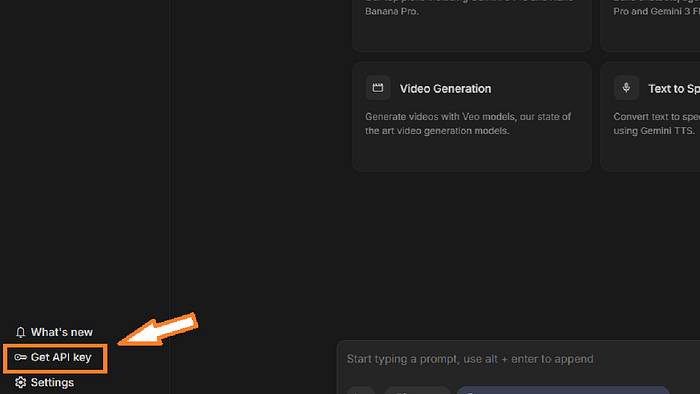
On the left-hand sidebar, look for the Get API key option. Click it to navigate to the API key management page.
Step 4: Create a New API Key
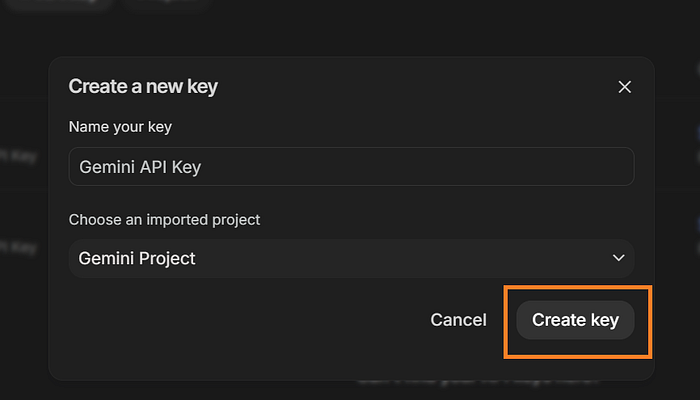
On the API keys page, click the Create API key button. You'll be prompted to either create a key in a new project or select an existing Google Cloud project.

💡 Note: If this is your first time, choose 'Create API key in new project' for the quickest setup.
Step 5: Copy and Save Your API Key
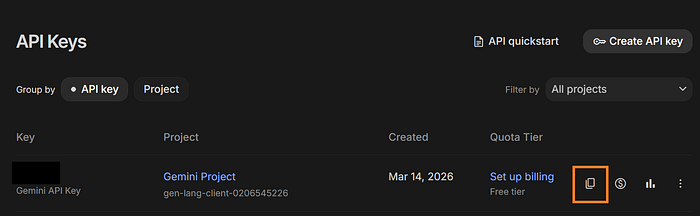
Once the key is generated, it will appear on screen. Click the copy icon next to the key to copy it to your clipboard. Store it somewhere safe, you won't be able to view the full key again after closing this dialogue.
🚨 Crucial Security Note: Never share your API key publicly or commit it to a public GitHub repo. Treat it like a password! Use environment variables (
.envfiles) to keep it hidden in your code.
Using Your API Key
You can now use your Gemini API key in your projects. Here's a quick example using Python's google-generativeai library:
Python
import google.generativeai as genai
# Configure the library with your API key
genai.configure(api_key='YOUR_API_KEY_HERE')
# Initialize the model
model = genai.GenerativeModel('gemini-1.5-flash')
# Generate a response
response = model.generate_content('Hello, Gemini!')
print(response.text)
Free Tier Limits
As of 2026, Google's free tier for the Gemini API (specifically gemini-1.5-flash) includes:
- 15 requests per minute (RPM)
- 1 million tokens per minute (TPM)
- 1,500 requests per day
💡 Note: Limits vary by model. Always check the official Google AI pricing page for the latest info.
Conclusion
Getting your Gemini API key takes less than five minutes and opens the door to building AI-powered applications with one of the most capable models available today. Whether you're prototyping an idea or building a production app, the Gemini API is a powerful tool to have in your developer toolkit.
Happy building! 🚀