

After more than four years of writing production code, one thing has become painfully clear: most developer tools don't last. They arrive with excitement, dominate conference talks for a year, and quietly disappear once teams realize they don't actually make life easier.
But once in a while, a tool shows up that genuinely changes how we work.
2026 is shaping up to be one of those moments.
The developer tooling world has matured rapidly since the AI assistant explosion of 2023–2024. The early panic — "AI will replace developers" — has mostly faded. What replaced it is something far more practical and interesting: tools that shorten the distance between intention and execution while reducing the operational pain we've been living with for years.
What's notable is that this shift isn't only about AI. The tools gaining real traction right now are tackling long-standing problems: fragile workflows, unreadable configuration files, frontend blind spots, broken local environments, and the ever-growing nightmare of dependency security.
I spend a lot of time reviewing pull requests, debugging production incidents, and talking with engineers who are actually shipping software — not just experimenting on side projects. The tools in this list stand out because they solve real problems that show up in real systems.
This isn't a hype list. It's not about GitHub stars. And it's definitely not about flashy demos.
These are tools already proving themselves in serious production environments — and they're only getting better.
1. Temporal Cloud 2.0 — Workflow Orchestration That Finally Feels Natural
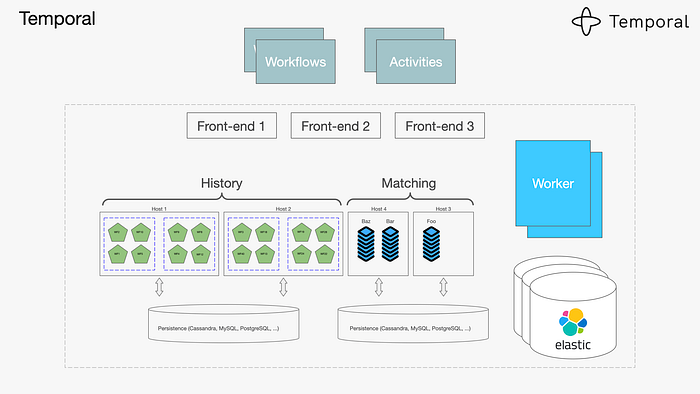
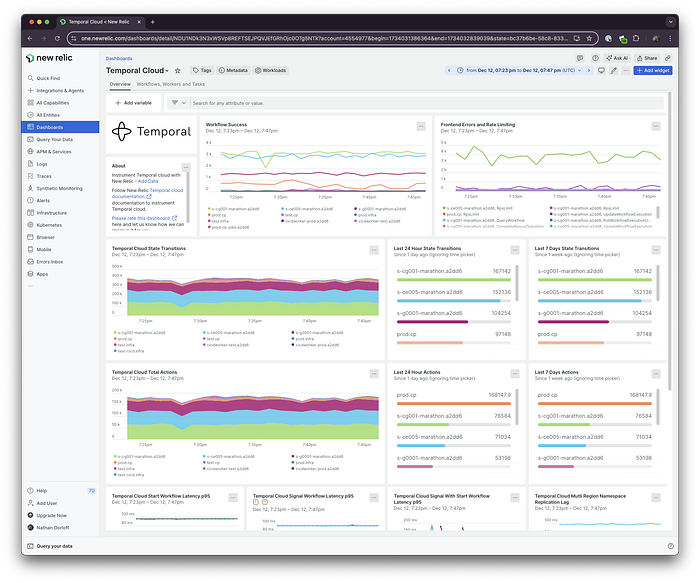
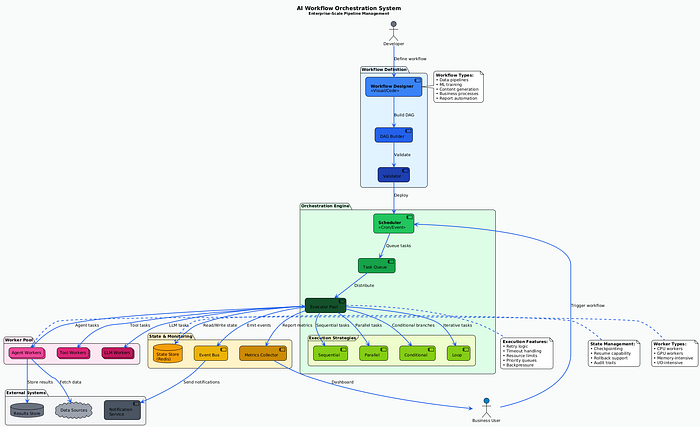
Temporal has technically existed for years, but the 2.0 release in late 2025 is what pushed it from "interesting idea" to "this belongs in our stack."
At its core, Temporal is a workflow orchestration platform — but that phrase barely scratches the surface.
The real problem it solves is this: modern systems are distributed by default. Even a "simple" feature often spans multiple services, third-party APIs, background jobs, retries, and failure scenarios. Traditionally, we glue this together with queues, cron jobs, state tables, and a lot of hope.
I first used Temporal on a system that coordinated payments, inventory updates, fraud checks, and customer notifications. The previous implementation worked… until it didn't. Failed messages would leave orders half-processed, and debugging required stitching together logs from five services at 3 a.m.
Temporal changes the model entirely.
Instead of building fragile state machines, you write workflows as normal application code — in Go, TypeScript, Python, or Java. Temporal guarantees that once a workflow starts, it will complete, even if servers crash, networks fail, or downstream services go offline temporarily.
Retries, timeouts, and state persistence are handled automatically.
What really makes Temporal 2.0 shine is its durable execution model. Your code behaves like standard imperative logic, but the runtime ensures progress is never lost. If a step fails, you know exactly where it failed — and why.
The newer event-driven features, like signals and updates, let external systems interact with running workflows without breaking encapsulation. That's huge for real-time systems.
The developer experience has also improved dramatically. The new dashboard gives a clear, visual timeline of each workflow execution, including retries and failure points. You can search workflows by business data — not just IDs — which is invaluable during incidents.
Local development is better too. The CLI now includes replay and time-travel debugging, letting you step through workflows and test changes against historical executions.
Yes, there's a learning curve. Concepts like determinism take time to internalize. But the payoff is real. After adopting Temporal, we saw a major drop in workflow-related incidents and cut debugging time from hours to minutes.
If you build systems that coordinate work across services, Temporal 2.0 is one of the most meaningful reliability upgrades you can make.
2. Pkl — Configuration Without the Pain
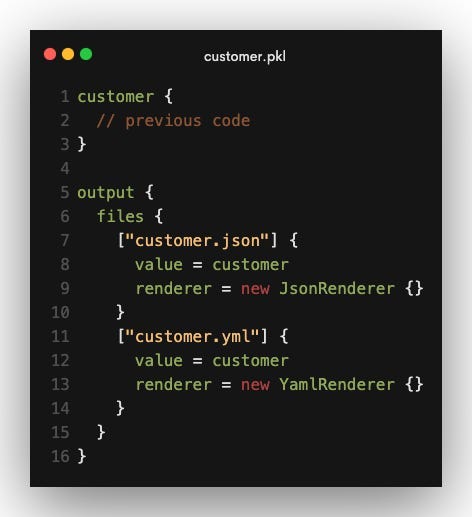

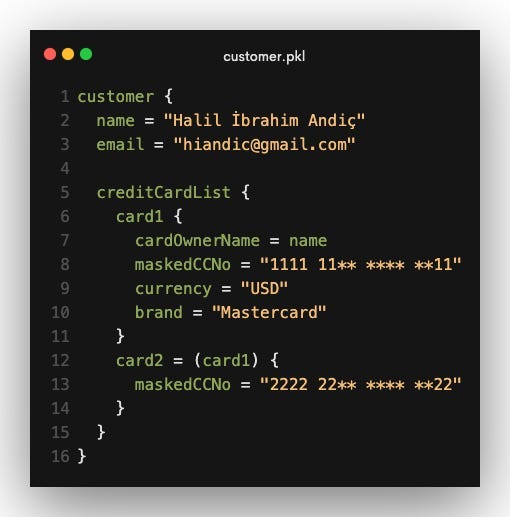
Another configuration language sounds like a bad joke — until you understand why Pkl exists.
Released by Apple's language engineering team, Pkl tackles a truth we've ignored for too long: configuration is code. And pretending it's just data has caused endless problems.
YAML files grow into unmaintainable monsters. JSON offers no validation or comments. HCL improves things but still relies heavily on templating tricks. The result is fragile infrastructure configuration that fails at runtime — often in production.
Pkl flips the model.
It's a typed configuration language designed specifically for complex systems. You get real types, validation rules, modules, and reuse — but without the risks of a general-purpose programming language. Pkl is intentionally not Turing-complete, which means configurations always terminate and remain predictable.
In practice, this is transformative.
Instead of copying Kubernetes YAML across services, you define a deployment structure once and instantiate it with different values. Pkl catches mistakes early — wrong types, missing fields, invalid ranges — before anything is deployed.
Environment differences become explicit and manageable. No more templating hacks for dev, staging, and production. You model the differences cleanly and generate environment-specific output.
The tooling is excellent. IDE autocomplete, inline errors, a solid CLI, and support for generating YAML, JSON, and other formats. Secrets are handled safely via external sources, so sensitive data never lives in version control.
Pkl won't replace every YAML file — and it shouldn't. But for large systems with real complexity, it eliminates entire classes of configuration bugs while making infrastructure easier to evolve.
3. Grafana Faro — Frontend Observability That Actually Helps

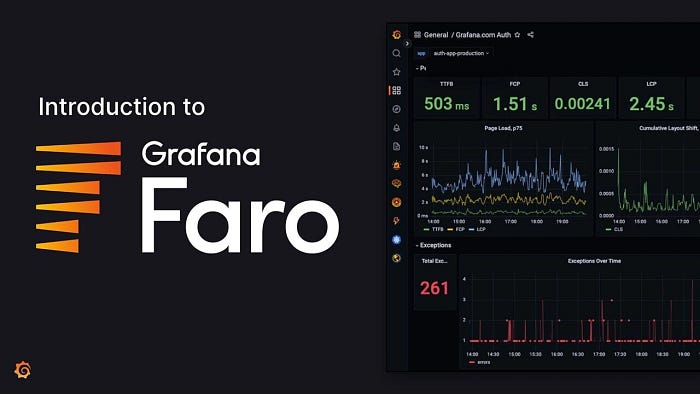
Backend observability is mature. Frontend observability has always lagged behind.
Grafana Faro finally closes that gap.
Unlike traditional error trackers, Faro understands that frontend issues happen in unpredictable environments — different devices, browsers, networks, and user behavior. Instead of flooding you with noise, it focuses on context.
Faro captures frontend errors alongside lightweight session replays, network activity, console logs, and user interactions. Crucially, it correlates all of this with backend traces.
That means when something breaks, you don't just see that it broke — you see the entire chain: user action → frontend error → backend call → service failure.
We used Faro to debug a performance issue affecting only mobile users on specific carriers. Backend metrics looked fine. Faro revealed the problem was network-level compression breaking JavaScript decoding. Without that visibility, we might never have found it.
Web Vitals support is excellent too. Instead of abstract averages, you can inspect real user sessions and understand exactly where performance degrades.
Privacy controls are thoughtful, the SDK is lightweight, and because Faro is open-source, your data stays under your control inside Grafana.
For modern frontend teams, Faro is a huge leap forward.
4. Devbox — Local Environments That Just Work

Everyone has felt the pain of broken local environments.
Devbox solves this problem by making development environments reproducible, fast, and boring — in the best way possible.
Built on top of Nix but hidden behind a friendly interface, Devbox lets you define all project dependencies in a single file. When you enter the Devbox shell, you get an isolated environment with exact versions — no conflicts, no global pollution.
Unlike Docker, Devbox starts instantly. Your files live in your normal filesystem. Your IDE works normally. Debugging feels native.
It shines during onboarding. Instead of lengthy setup docs, new developers run one command and start coding. We've reduced onboarding friction dramatically by eliminating environment drift.
Services like databases and queues can be defined alongside tools, and scripts always run in the correct context.
Devbox isn't perfect — edge cases exist — but for most teams, it removes one of the most persistent sources of frustration in software development.
5. Socket — Security for the Dependency Mess We've Created
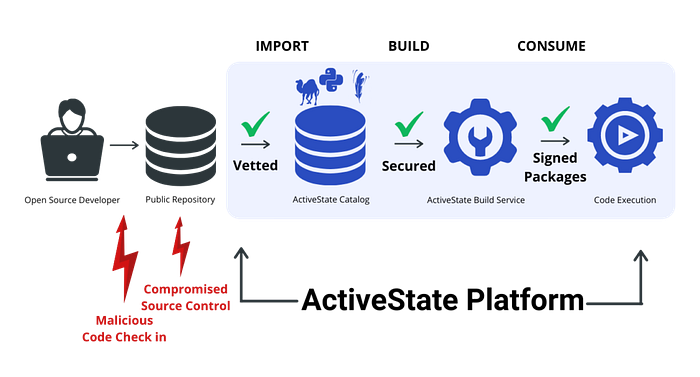
Modern applications depend on thousands of packages. That's not just complexity — it's risk.
Socket approaches dependency security differently. Instead of only checking known vulnerabilities, it analyzes what packages actually do.
Does a dependency suddenly start making network requests? Reading sensitive files? Running obfuscated scripts during install? Socket flags it — with context.
This behavioral approach catches threats traditional scanners miss, including typosquatting and zero-day attacks. We've personally blocked a malicious package before it ever reached CI thanks to Socket's alerts.
GitHub integration makes this seamless. Security insights appear directly in pull requests, turning dependency reviews into informed decisions instead of guesswork.
Socket doesn't replace existing tools — it complements them. And in an era of increasingly sophisticated supply-chain attacks, that extra layer matters.
Looking Ahead
What connects these tools isn't hype — it's maturity.
They address fundamental problems: reliability, correctness, visibility, consistency, and trust. They integrate into real workflows. And they make teams measurably more effective.
Developer tooling in 2026 isn't about flashy demos. It's about reducing cognitive load and letting engineers focus on solving real problems.
If you're deciding where to invest your attention — or your team's tooling budget — these five are worth serious consideration.
And the best part? We're still early. You can adopt them now, shape how they evolve, and build better systems along the way.
That's a rare and exciting place to be as a developer.