May 31, 2026
Claude Code’s Dynamic Workflows: The AI agent architecture that just rewrote 750,000 lines of code…
Anthropic’s most consequential Claude Code feature yet: how parallel subagent orchestration works, when to use it, and how to keep your…

lassiecoder
12 min read
Anthropic's most consequential Claude Code feature yet: how parallel subagent orchestration works, when to use it, and how to keep your token bill from exploding.
On May 28, 2026, Anthropic quietly shipped a feature that most developers scrolled past because the benchmark headlines for Opus 4.8 were louder. That feature, Dynamic Workflows in Claude Code, is architecturally the most important thing Anthropic has released for developers this year. And to understand why, you need to start with a codebase, not a benchmark.
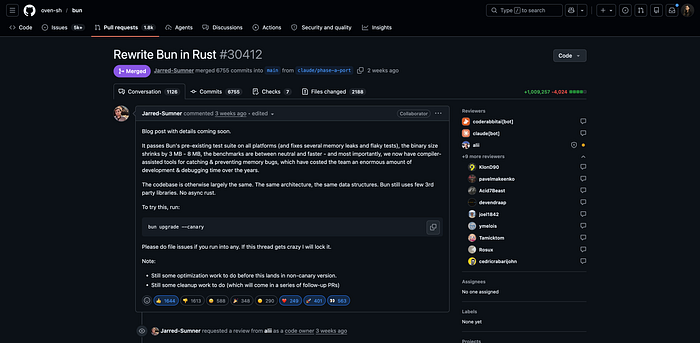
Jarred Sumner, creator of Bun (the JavaScript runtime that ships Claude Code itself to millions of users), needed to port roughly one million lines of Zig to Rust. Not rewrite, port, faithfully, file by file, with the existing test suite expected to pass at the end. The kind of task that used to be scoped in quarters and executed by teams. He did it in 6 days.
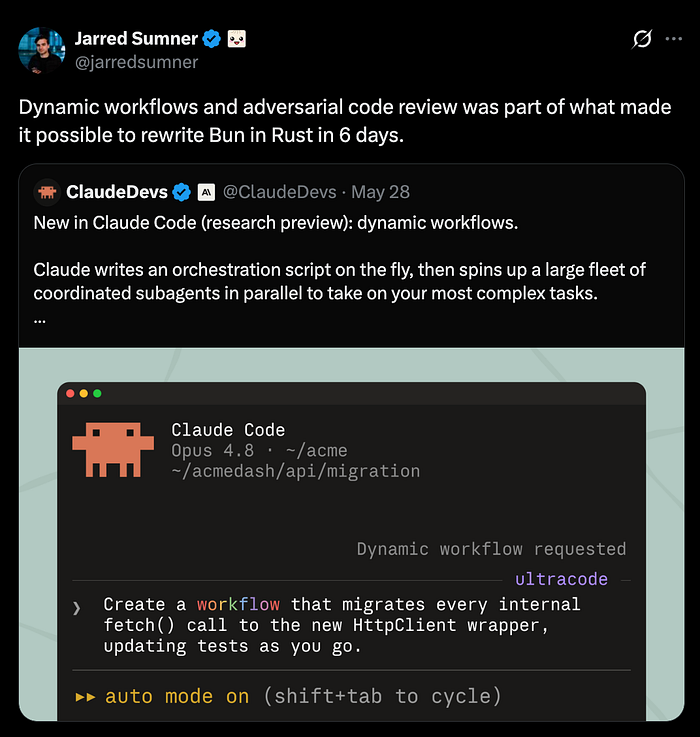
Not with a single mega-prompt. Not with a pair-programming session that ran all weekend. With Dynamic Workflows spinning up hundreds of parallel subagents, each writing a .rs file, each reviewed by two adversarial agents before anything was committed, with 99.8% of the test suite passing at the end.
That is the real product announcement.
If you prefer the quick visual version, watch my Short above, or keep reading for the full technical breakdown below.
Why your current AI coding workflow hits a wall
Before understanding Dynamic Workflows, it helps to understand the fundamental bottleneck they solve.
Every Claude Code session, every LLM session, really, runs against a context window. Every tool call result, every file Claude reads, every subagent it spawns, every intermediate result from a multi-step task: it all accumulates in that window. Claude is both the worker and the orchestrator. It reads a file, writes the result into its own context, decides what to do next based on everything it's seen so far, spawns another agent, reads that result back into context, and keeps going.
This architecture works beautifully for tasks that fit in a single conversation. It starts to degrade for anything that touches dozens of files, and it essentially breaks for anything at the scale of a real enterprise codebase, a security audit across 400 service endpoints, a framework migration spanning 500 files, a bug hunt that requires reading every API handler in a legacy monolith.
The previous tools in Claude Code's arsenal, subagents and skills, don't fundamentally solve this. With subagents, Claude still decides turn by turn what to spawn next, and every result lands in Claude's context. With skills (Markdown instruction files), Claude follows a sequence but still acts as the orchestrator. The plan lives in Claude's head. The plan is bounded by Claude's context.
Dynamic Workflows break that constraint by moving the plan into code.
The architecture shift: Plan as code, not conversation
Here is the core idea, stated plainly:
When a Dynamic Workflow kicks off, Claude writes a JavaScript orchestration script. A separate runtime executes that script. Intermediate results live in script variables, not in Claude's context window. Claude's context only ever sees the final answer.
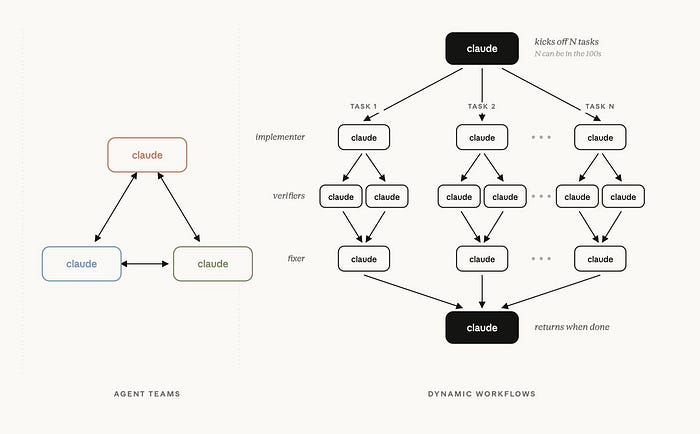
This is a subtle but deep architectural change. The JavaScript script holds the loop logic, the branching, the conditionals, the fan-out pattern. It decides what to spawn, in what order, with what arguments. Subagents run against that script, dozens or hundreds in parallel, and their results accumulate in variables outside the conversation, not inside a context window that grows with every step.
The practical consequences of this design are significant:
Scale. A workflow can coordinate up to 1,000 total agents per run, with up to 16 running concurrently. This isn't a context-window ceiling; it's a local resource ceiling, tuned to what a modern development machine can handle without grinding to a halt.
Resumability. Because progress is tracked in the script runtime rather than in a conversation, a workflow that's interrupted doesn't start over. It picks up from the last completed agent. Kill the session, come back, and the workflow continues from where it paused, within the same Claude Code session.
Repeatability. The orchestration script is a real artifact. You can save it as a slash command, share it with your team via .claude/workflows/, and rerun identical orchestration logic on future tasks. A codebase audit you ran last month becomes a command you run every release.
Adversarial verification. Because the script controls the flow, it can build quality patterns into the architecture itself, not just hope Claude remembers to double-check. Jarred Sumner's workflow for Bun is illustrative: Step 1, do the work. Step 2, two adversarial review agents try to break the result. Step 3, apply fixes, compile, run tests, commit only if they pass. That quality loop is baked into the script, not dependent on a prompt asking Claude to "please review carefully."
What dynamic workflows actually look like
You interact with Dynamic Workflows in Claude Code in two primary ways.
Trigger 1: The word "workflow" in your prompt
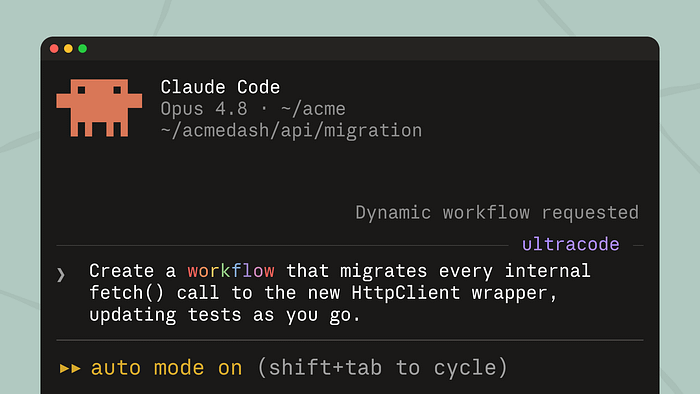
The simplest activation path is to include the word workflow anywhere in your prompt. Claude Code highlights it, and Claude generates an orchestration script for the task rather than working through it turn by turn.
Run a workflow to audit every API endpoint under src/routes/ for missing authentication checks
Claude reads the request, plans the fan-out, each endpoint gets its own agent, findings are collected and deduplicated, a final report is generated, shows you what's about to run, and asks for confirmation. You review the script, approve it, and watch the run in /workflows.
If you type the word accidentally, alt+w lets you skip the trigger for that prompt.
Trigger 2: Ultracode
The second path is a session-level setting: /effort ultracode. This combines xhigh reasoning effort with automatic workflow orchestration. With ultracode on, Claude decides when a task warrants a workflow — you don't have to specify it. A single request can become several workflows in sequence: one to understand the codebase structure, one to implement the change, one to verify correctness.
The tradeoff is explicit: ultracode is substantially more expensive per task. It's the right mode for the hardest work in a session, not routine coding. Drop back to /effort high for everyday work.
The built-in: /deep-research
Anthropic ships one built-in workflow out of the box: /deep-research. It fans out web searches across multiple angles on a question, fetches and cross-checks sources, votes on each claim, filters out findings that don't survive cross-checking, and returns a single cited report. It's a working demonstration of what adversarial verification looks like in a workflow context: claims aren't just collected, they're pressure-tested before they reach you.
The bun rewrite: A real world workflow anatomy
The Bun port is the most instructive real-world case study available right now, because Jarred Sumner published the actual workflow prompts he used. Walking through them reveals what good workflow design looks like in practice.
The project had three distinct phases, each structured as its own workflow:
Phase 1: Mapping. One workflow analyzed every struct field in the Zig codebase and mapped the correct Rust lifetime for each. This is the kind of task that would be nightmarishly inconsistent done by hand across hundreds of files, lifetimes are subtle, and a human making this call file by file at 2am would introduce drift. A workflow mapping the whole codebase at once, with a consistent rule set, produces a unified lifetime spec that the next phase can rely on.
Phase 2: Porting. Hundreds of agents in parallel, each taking one .zig file and producing a behavior-identical .rs file following the patterns established in Phase 1. Two reviewer agents per file, adversarially working to find flaws. Only files that survived review went forward.
The workflow prompt Sumner published captures the structure:
Write a workflow where for each finding in ./REPORT.md. Step 1: Fix the bug. Do not use any git or build commands to avoid stepping on another Claude running in the same branch. Step 2: Use 2 adversarial review agents to refute the bugfix. Uncover every flaw. Do not use any git or build commands. Step 3: Apply all the bugfixes, run the build and get the relevant tests to pass. Once passing, commit and make a PR.
The explicit Do not use any git or build commands instruction is worth noting. Parallel agents working on the same branch will conflict on git operations, Sumner's workflow design routes around this by isolating the heavy work and making the commit a gated final step.
Phase 3: Fix loop. A separate overnight workflow drove the build and test suite until both ran clean, opening a PR for each fix. This phase ran while the team slept. Not a single human was watching agents work through compilation errors one by one.
The result: 99.8% test suite compatibility, 6 days from first commit to merge.
When to use dynamic workflows (and when not to)
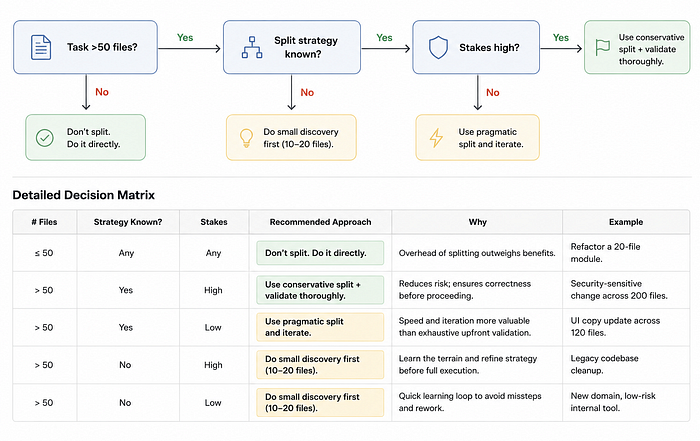
The most important skill with Dynamic Workflows is knowing when they're the right tool versus when you're reaching for a sledgehammer to crack a nut. Workflows use substantially more tokens than a conversation or a single subagent pass. Here's a practical decision framework:
Use a dynamic workflow when:
The task requires more agents than a single conversation can coordinate. If Claude would need to spawn dozens of workers and read all their results back into context, you've hit the architectural ceiling where workflows shine. Codebase-wide audits, large migrations, and multi-source research all fit this pattern.
The split strategy isn't known in advance. Workflows excel when the decomposition of a task needs to be dynamic, when Claude needs to analyze the codebase first, then decide how to partition the work. Skills and subagents work better when the structure is already understood.
You need adversarial verification baked in. If the stakes are high, a security audit, a breaking-change migration, a plan you'll present to leadership, a workflow that builds in cross-checking agents is structurally more reliable than a prompt that asks Claude to "please review your own work."
The work needs to be repeatable. If you're running the same category of task regularly (monthly dependency audits, pre-release security sweeps, onboarding new service patterns), saving the workflow as a team command pays off compounding dividends.
Stick with subagents or skills when:
The task fits in two or three steps Claude can hold in mind. A well-constructed subagent with a focused task scope is faster, cheaper, and adequate. Don't use a workflow to fix a single failing test.
You have a well-defined, predictable workflow. If you already know the exact sequence of operations and want consistent, cost-predictable execution, a custom subagent definition (.claude/agents/) is more efficient than a dynamically generated script.
Token budget is the primary constraint. Workflows are expensive. If you're on a plan with tight usage limits, a targeted subagent or a skill with compact context achieves the same quality for bounded tasks at a fraction of the cost.
Token cost management: Keeping your bill under control
This section is the one most articles skip. Dynamic Workflows can consume meaningfully more tokens than a typical Claude Code session. Anthropic's documentation uses the word "substantially." Here's how to manage that in practice.
Scope before you scale
Before running a codebase-wide workflow, run it on a subset. Point it at a single subdirectory, a single service, or a single file category. Use /cost and /workflows to see the token total. Then extrapolate. A workflow that costs X tokens on 10 files will cost roughly 100X on 1,000 files. Know the number before you authorize the run.
Route stages to cheaper models
Every agent in a workflow uses your session's model by default. But not every stage needs Opus. Ask Claude to use Sonnet for stages that are formulaic, file-by-file transforms, pattern matching, boilerplate generation, and reserve Opus for the synthesis, the adversarial review, and the final report. Specify this when you describe the task:
Run a workflow to port all files under src/legacy/ to the new API pattern. Use Sonnet for the initial port of each file, Opus for the adversarial review stage.
Use /effort high instead of ultracode for most sessions
ultracode is designed for sessions where most tasks justify workflow-level orchestration. For daily coding, it over-triggers. Run /effort high by default and add the word workflow to your prompt selectively, when a specific task genuinely needs it. This keeps the per-session cost predictable.
Add tools to your allowlist before a long run
Mid-run permission prompts halt individual agents and leave them pending. For a 200-agent workflow, one missing allowlist entry can create 200 pending confirmations. Before starting a large run, audit what tools the agents will need, shell commands, web fetches, MCP tools, and add them to your permissions. Clean runs are faster and cheaper than interrupted ones.
Save and reuse scripts instead of regenerating
Every time Claude generates a new workflow script for a task, it spends inference tokens on the generation. If you're running the same class of task regularly, save the script: open /workflows, select the run, press s. Share it in .claude/workflows/ so the whole team uses the same optimized orchestration rather than each person generating a fresh one.
Use /compact in the main session
Workflows run in the background, but your main session accumulates context too. Run /compact before triggering a large workflow to keep the orchestrating session lean. The agents don't inherit your session context, they get task-specific context from the script, but compacting the main thread prevents the surrounding conversation from bloating.
Plan availability and Setup
Dynamic Workflows shipped May 28, 2026, in research preview, requiring Claude Code v2.1.154 or later.
To activate: either include the word "workflow" in a prompt, or enable ultracode with /effort ultracode. The first time a workflow triggers, Claude Code shows you the planned phases and asks for confirmation before starting the run.
To disable for yourself: toggle Dynamic Workflows off in /config, or set "disableWorkflows": true in ~/.claude/settings.json, or set CLAUDE_CODE_DISABLE_WORKFLOWS=1 in your environment.
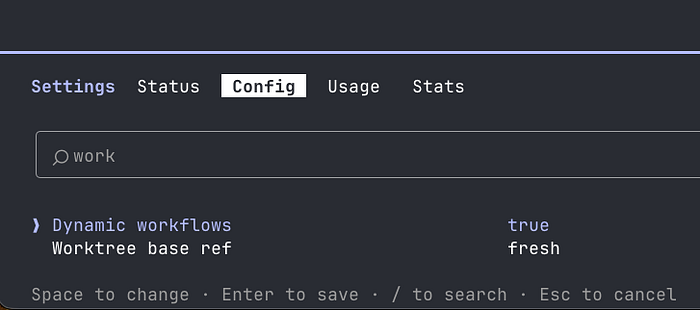
For organization-wide policy, set "disableWorkflows": true in managed settings, or use the admin toggle on the Claude Code settings page.
What this changes
Dynamic Workflows are not a productivity improvement. They're a category shift.
The prior model of AI-assisted software engineering looked like this: a developer and Claude working through a problem together, turn by turn, with Claude bounded by what could fit in a context window. The human held the large-scale plan; Claude executed the steps. The collaboration was powerful, but it scaled with human attention.
The new model looks like this: a developer describes the large-scale objective; Claude writes the orchestration; hundreds of agents execute in parallel in the background; the developer comes back to a finished result. The human still reviews, still approves, still decides what to do next. But the execution layer now scales independently of human attention.
This is why the Bun rewrite is the right framing for the feature. A million-line language port, done faithfully, in 6 days, is not something a single developer and a single Claude session could produce, not in 6 days, not with that test suite compatibility. It required an architecture that could hold the whole task in code, not in context.
The tasks that used to be scoped in quarters are now being scoped in days. Developers who learn to work at this scale, who learn to think in workflows rather than in prompts, are going to operate differently from those who don't.
Getting started: A practical first workflow
If you want to see Dynamic Workflows in action without committing to a large run, try this:
- Update to Claude Code v2.1.154 or later.
- Open a project you know well — a codebase with a clear structure.
- Run:
/deep-research What changed in Node.js v22's permission model compared to v20? - Select Yes when Claude Code asks to confirm the run.
- Open
/workflowsand watch the phases.
This gives you a live feel for the progress view, the phase structure, the agent counts, and the token totals, without touching your own codebase. Once you're comfortable reading a workflow's output and managing a run, try a scoped task on your own code: pick one directory, not the whole repo, and ask Claude to create a workflow to audit it for a specific issue.
From there, the step to saving workflows, sharing them with your team, and building repeatable quality patterns into your engineering process follows naturally.
Dynamic Workflows are what happens when you stop treating the AI as a participant in a conversation and start treating it as an infrastructure layer for engineering work. The architectural insight, move the plan from Claude's context into a runnable script, run agents against that script in parallel, return only the final answer, is straightforward. The implications for what's now within reach for a solo developer or a small team are not.
750,000 lines, 6 days, 99.8% test compatibility. That's the proof of concept. Now it's a public research preview, available on every paid plan.
The question isn't whether this changes software development. It already has. The question is how fast the rest of us learn to work at this scale.
Did this help? Follow me for more deep dives on AI tooling and developer productivity. If you're using Claude Code for something interesting, I'd love to hear about it in the comments.