Navigating the world of modern data architectures can often feel like a complex journey, and a recent customer evaluation I undertook really brought this to light. The goal was to build a flexible and future-proof data lakehouse on Google Cloud, and Apache Iceberg was the clear choice for the open table format. However, the moment we turned to the BigQuery ecosystem, we were faced with a dizzying array of options: BigLake Metastore, BigQuery tables for Apache Iceberg, and read-only Iceberg external tables. I know it can be painful to keep track of so many names and offerings that all seem to refer to the same thing. What's the difference, and when should you use each one? In this post, I'll break down the analysis, sharing a clear side-by-side comparison to help you choose the right path for your specific use case.
Side-by-Side Comparison
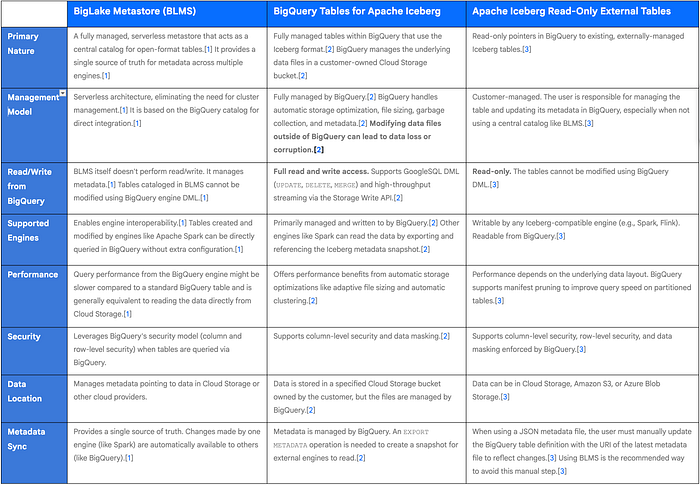
Preferred Use Cases
1. BigLake Metastore (BLMS)
BigLake Metastore is the recommended metastore on Google Cloud and is ideal for organizations building a true open-format data lakehouse where multiple analytics engines need to operate on the same data with a consistent view of the tables.
- Interoperability: The primary use case is when you need to use both BigQuery and open-source engines like Apache Spark to read and write to the same Iceberg tables.[1] For example, a data engineering team can use Spark for complex ETL transformations to create or modify an Iceberg table, and a data analysis team can immediately query that same table in BigQuery without any synchronization steps.[1]
- Centralized Metadata Management: It is best for scenarios that require a single, unified catalog for all open-format tables, eliminating metadata silos and simplifying data governance across different platforms like Dataproc, Spark stored procedures, and BigQuery.[1]
- Migrating from Hive Metastore: BLMS is the target for migrating from a self-managed Hive Metastore (like Dataproc Metastore) to a serverless, fully managed solution on Google Cloud.[1]
2. BigQuery Tables for Apache Iceberg
This option is best suited for users who want the benefits of the open Iceberg format while retaining the simplicity and fully managed experience of native BigQuery tables.
- BigQuery-Centric Workloads: Ideal for teams that primarily use BigQuery for their analytics, DML operations, and streaming ingestion but want their data stored in an open format for long-term flexibility or for occasional reads from other engines.[2]
- Simplified Management: Use this when you want Google to handle all the complex table maintenance tasks, such as file compaction, garbage collection, and performance optimization, just like it does for standard BigQuery tables.[2]
- Open Format with BigQuery Features: This is the preferred choice when you need to combine the Iceberg format with BigQuery-native features like time travel, seamless streaming with the Storage Write API, and automatic storage optimization.[2]
3. Apache Iceberg Read-Only External Tables
These tables are designed for querying existing Iceberg datasets that are managed and written to by external systems.
- Querying Existing Iceberg Tables: The main use case is to provide BigQuery users with read-only access to Iceberg tables that are already created and maintained by other processes or engines (e.g., a Spark cluster running on-premises or in another cloud).[3]
- Multi-Cloud Analytics: Perfect for when your Iceberg data resides in AWS S3 or Azure Blob Storage and you want to query it from BigQuery without moving the data.[3]
- Fine-Grained Access Control: Use this to apply and enforce BigQuery's granular security policies — such as row-level security, column-level security, and data masking — on your existing Iceberg data for consumption by BigQuery users.[3] It is the recommended approach, in conjunction with BigLake Metastore, to provide governed, read-only access to your open data lake.
So, while the number of options for Iceberg on Google Cloud might seem daunting at first, it's actually a reflection of a mature ecosystem designed to fit different needs. There isn't one "best" way — only the way that's best for you. If you're building a true multi-engine lakehouse, the BigLake Metastore is your central nervous system. If you love the simplicity of BigQuery but need an open format, the native Iceberg tables are a perfect fit. And if you just need to grant governed, read-only access to your existing Iceberg data, external tables have you covered. The key is to understand that these aren't competing products but rather complementary tools in your data strategy. By aligning your architectural needs with the right offering, you can unlock the full power of an open and flexible data platform on Google Cloud.