

My tables were partitioned. Clustering made sense. Joins were readable and reasonable. Still, a few recurring queries felt slower than they should have been.
What I'd missed was something simpler: BigQuery could already learn from repeated executions — I just hadn't enabled it.
After enabling BigQuery's history-based (adaptive) query optimizations, the same query went from roughly 5.3 seconds to 2.3 seconds after a few runs. No refactoring. No hints. No structural changes.
This article explains what actually happened, what BigQuery really does under the hood, and where expectations should stay realistic.

Traditional Query Optimization Has Limits
Most query optimizers — including BigQuery's — start by building a plan using table statistics, estimated cardinalities, and cost models. Those estimates are necessarily imperfect. Cardinality estimation errors are common, especially with multi-table joins, skewed data, and correlated filters.
Historically, many systems would make the same mistakes repeatedly, because they had limited feedback from real executions. Modern engines do adapt in various ways, but they still struggle when estimates are far from reality.
The core problem isn't that optimizers are "dumb" — it's that estimates at cases can't fully capture real workloads.
What BigQuery's History-Based Optimizations Actually Do
BigQuery's history-based optimizations allow the optimizer to incorporate runtime statistics from previous executions of similar queries.
Specifically, BigQuery may learn from actual row counts flowing through joins, observed join selectivity, runtime filter effectiveness, and resource utilization patterns. This feedback can influence future planning decisions for queries with the same logical shape.
Here's an important clarification: BigQuery does not cache or freeze execution plans. It re-optimizes every run, but may bias decisions using historical signals.
Think of it less like "the optimizer locked in a perfect plan" and more like "the optimizer gets smarter about making estimates for queries it's seen before."
What Happens Across Repeated Executions
In my case — and in Google's examples — improvements appeared after multiple executions of the same query shape.
A realistic pattern looks like this:
First executions: Baseline behavior using standard cost estimates.
Subsequent executions: The optimizer may reorder joins, apply semi-join reductions, push filters earlier, or adjust parallelism.
Later executions: Improvements tend to stabilize as long as data characteristics remain similar.
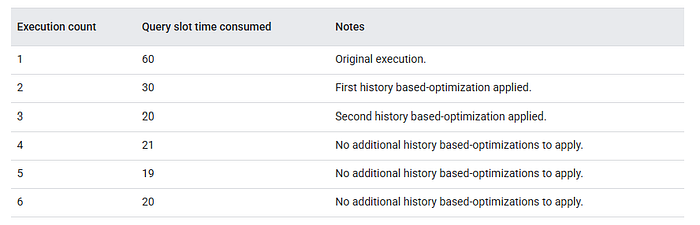
Here's what you need to know: there's no guaranteed number of runs (like "always 3 executions") after which optimization is complete. Improvements may appear gradually, plateau, or never materialize — depending on the query and your data.
Google's documentation shows an example where major improvements happened by execution 2–3, but that's illustrative, not universal.
What the Performance Numbers Look Like in Practice
Let me show you what this looked like in my environment. For one recurring ETL job (in my case, a Dataform pipeline), I tracked repeated executions after enabling history-based optimizations:
Execution Elapsed Time (ms) Baseline ~5,358 Optimized runs ~2,200–2,400
That's roughly a 55–58% latency improvement for this specific query.
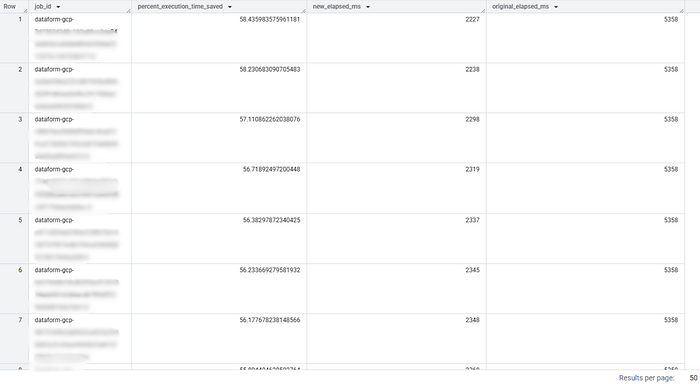
Important caveat: this does not imply similar gains elsewhere. Simple scans or already-optimal joins often see little change. Improvements are workload-specific.
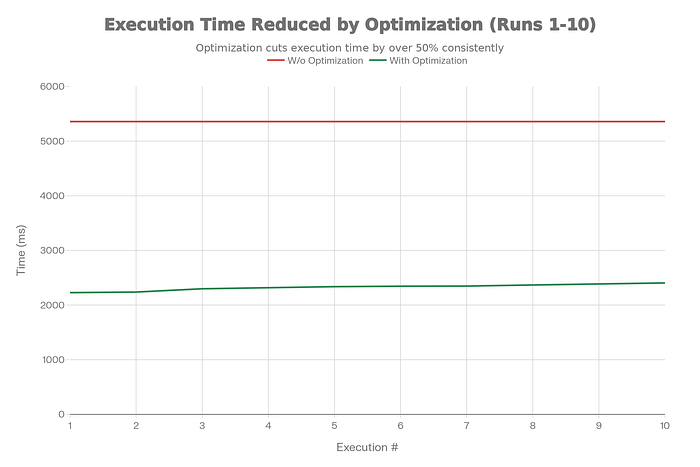
Your mileage will absolutely vary based on query complexity, data distribution, and how well the optimizer could estimate cardinalities before.
About Cost Savings
Here's where I need to correct something from my initial testing: faster execution does not automatically mean lower cost in BigQuery.
On-demand pricing is driven primarily by bytes processed. Many optimizations improve latency, not scan volume.
Cost savings are most relevant for slot-based reservations, slot-constrained environments, and workloads where optimizations reduce intermediate data movement.
Latency improvements are still valuable — especially for dashboards and SLAs — but cost impact depends heavily on billing mode. If you're on on-demand billing, you might see zero cost reduction despite faster queries.
How to Enable History-Based Optimizations
For an existing project, history-based optimizations can be enabled via:
ALTER PROJECT `your-project-id`
SET OPTIONS (
  `region-us.default_query_optimizer_options` = 'adaptive=on'
);
A few notes:
- Region must match your dataset location
- Organization-level changes require admin permissions
- Many newer projects(org level) already have this enabled by default
There are no tuning knobs, but enabling it doesn't guarantee improvements for every query. It just gives the optimizer permission to use runtime feedback when it thinks it'll help.
How to Verify It's Working
BigQuery exposes applied optimizations via INFORMATION_SCHEMA.JOBS_BY_PROJECT.
The field query_info.optimization_details will be populated with JSON if adaptive techniques were applied:
SELECT
  job_id,
  query_info.optimization_details
FROM `PROJECT_NAME.region-LOCATION.INFORMATION_SCHEMA.JOBS_BY_PROJECT`
WHERE job_id = 'your_job_id'
LIMIT 1;
If you see NULL, no history-based optimizations were applied to that specific job.
Here's what the JSON looks like when optimizations are applied:
{
  "optimizations": [
    {"semi_join_reduction": "web_sales.web_date,RIGHT"},
    {"join_commutation": "web_returns.web_item"},
    {"parallelism_adjustment": "applied"}
  ]
}
Each entry tells you what the optimizer changed:
semi_join_reduction: Pre-filtered the right side of a join to reduce data volumejoin_commutation: Swapped which table goes on which side of the joinparallelism_adjustment: Changed how many parallel workers handle the query
This is the most reliable way to confirm the feature is actually doing something.
What BigQuery Is Actually Optimizing
When history-based optimizations are enabled, BigQuery can apply several adaptive techniques. Here are the most common:
Semi-join reduction: Pre-filters one side of a join using keys from the other. This is particularly effective when you're joining a large fact table to a filtered dimension table.
Join commutation/reordering: Chooses a more efficient build/probe side based on observed sizes. If the optimizer's initial estimate said "table A is smaller" but runtime showed "actually table B is way smaller," future runs can swap the join order.
Filter pushdown: Applies selective predicates earlier when proven effective. The optimizer might discover that a filter it thought was mildly selective is actually extremely selective.
Parallelism calibration: Adjusts initial parallelism using observed runtime behavior. This helps avoid over- or under-provisioning compute resources.
These optimizations may stack — but not always. The optimizer applies what it thinks will help based on the runtime feedback it's collected.
When History Based Optimization Helps (and When It Doesn't)
Works best when:
- Queries repeat regularly
- Join cardinality estimates are significantly wrong
- Data distributions are relatively stable
Helps less when:
- Queries are ad hoc (no history to learn from)
- Data changes shape daily (yesterday's statistics don't predict today)
- Workloads are dominated by raw scan cost (no join complexity to optimize)
- Queries are already optimal (nothing to improve)
If you're running the same dashboard query 50 times a day and it involves complex joins, you're in the sweet spot. If you're running one-off analytics queries on constantly changing data, the benefits will be minimal.
The Real Mental Shift
The biggest change for me wasn't the performance gain — it was where I stopped spending time.
Instead of manually reordering joins, over-engineering query structure, and chasing micro-optimizations, I focused on data modeling, partitioning and clustering, and system-level architecture.
History-based optimizations don't replace fundamentals — but they reduce the need to micromanage execution details that the engine can learn on its own.
What To Expect When You Enable This
Enable the feature on one project. Run your recurring queries without changes. Check INFORMATION_SCHEMA after a few executions to see what improved.
WITH
    jobs AS (
      SELECT
        *,
        query_info.query_hashes.normalized_literals AS query_hash,
        TIMESTAMP_DIFF(end_time, start_time, MILLISECOND) AS elapsed_ms,
        IFNULL(
          ARRAY_LENGTH(JSON_QUERY_ARRAY(query_info.optimization_details.optimizations)) > 0,
          FALSE)
          AS has_history_based_optimization,
      FROM region-us.INFORMATION_SCHEMA.JOBS_BY_PROJECT
      WHERE EXTRACT(DATE FROM creation_time) > DATE_SUB(CURRENT_DATE(), INTERVAL 10 DAY)
    ),
    most_recent_jobs_without_history_based_optimizations AS (
      SELECT *
      FROM jobs
      WHERE NOT has_history_based_optimization
      QUALIFY ROW_NUMBER() OVER (PARTITION BY query_hash ORDER BY end_time DESC) = 1
    )
  SELECT
    job.job_id,
    100 * SAFE_DIVIDE(
      original_job.elapsed_ms - job.elapsed_ms,
      original_job.elapsed_ms) AS percent_execution_time_saved,
    job.elapsed_ms AS new_elapsed_ms,
    original_job.elapsed_ms AS original_elapsed_ms,
  FROM jobs AS job
  INNER JOIN most_recent_jobs_without_history_based_optimizations AS original_job
    USING (query_hash)
  WHERE
    job.has_history_based_optimization
    AND original_job.end_time < job.start_time
  ORDER BY percent_execution_time_saved DESC
  LIMIT 10;
You'll probably see improvements on some queries but not others. Complex multi-table joins with suboptimal cardinality estimates are the most likely candidates for gains. Simple aggregations or already-fast queries won't change much.
The future of query optimization isn't about writing more clever SQL. It's about building systems that learn from real workloads and adapt automatically.
Try it on a recurring query this week and see how much faster your dashboards run.
Key Takeaways
- History-based optimizations improve performance on recurring, join-heavy queries by learning from actual runtime statistics rather than estimated cardinalities.
- Gains are workload-specific — latency improvements don't always reduce cost, especially on on-demand pricing where bytes processed matters most.
- Verification via
INFORMATION_SCHEMAgives you confidence the feature is working and shows exactly which optimizations were applied. - Focus on fundamentals (partitioning, clustering, data modeling) and let BigQuery handle micro-optimizations like join ordering.
For more details on history-based optimizations, see Google's official documentation.
🗞️ For more updates
Follow me on Linkedin
Thanks for reading 🙏