

Why most enterprise C# code is secretly bloated. The advanced patterns using ValueTask, thread pools, and concurrency limits that eliminate allocation overhead.
The moment async and await arrived in C#, they became our silver bullet for writing scalable, responsive applications. They made I/O-bound operations (database calls, HTTP requests) trivial to manage.
But the simplicity of async Task has hidden a severe performance tax that plagues every high-throughput .NET API today: unnecessary memory allocation.
The reality is, most enterprise C# code is secretsly bloated because developers follow the "Async All the Way" mantra without understanding the underlying cost of the primary abstraction: the Task object.
This masterclass reveals why your "perfect" async code is slowing down your application and provides the high-performance patterns — centered around ValueTask and judicious synchronization—that eliminate heap allocation overhead and unlock true scalability.
I. The Performance Tax of Task
The single biggest enemy of high-performance .NET is memory allocation. Every time you create a new object on the heap, the Garbage Collector (GC) eventually has to clean it up.1 In a high-throughput system, these repeated allocations lead to GC pressure, causing your CPU to spend more time cleaning and less time processing.2
The problem starts with the core type:
The Task Pitfall: Unnecessary Heap Allocation
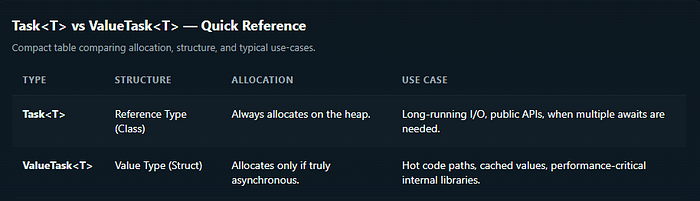
A Task is a reference type (class).3 Every time you return a Task or Task<T>, you are creating an object on the heap.4 This is acceptable for genuinely long-running, I/O-bound operations.
However, consider common application scenarios like:
- Cache Hits: Retrieving a value from an in-memory cache is a synchronous operation.5
- Validation: Input validation that requires no I/O is synchronous.
- Short-Circuit Logic: An early exit in a method.6
If you use async Task<T> for these methods, and the result is retrieved synchronously, the runtime still must create and return a completed Task<T> via Task.FromResult(value).
Result: A heap allocation occurs for an operation that never ran asynchronously. If this method is called millions of times a day, the GC overhead becomes crippling.
II. The Masterclass: ValueTask for Zero-Allocation Code
ValueTask is the C# architect's tool for eliminating the unnecessary heap tax. Since it is a struct, it's usually stack-allocated.7
The runtime uses clever tricks: if the operation completes immediately (synchronously), the struct holds the result directly, bypassing the heap allocation entirely.8
The Caching Scenario: Task vs. ValueTask
Consider a service method that checks a cache before hitting the database.
The Allocated (Slow) Way:
// Unnecessary allocation on every cache hit
public async Task<User> GetUserAsync(int userId)
{
    if (_cache.TryGetValue(userId, out var user))
    {
        return user; // Allocates a Task<User> on the heap
    }

    var dbUser = await _repository.GetUserFromDbAsync(userId);
    _cache.Set(userId, dbUser);
    return dbUser;
}
The Allocation-Free (Fast) Way:
// Zero allocation on every cache hit!
public async ValueTask<User> GetUserAsync(int userId)
{
    if (_cache.TryGetValue(userId, out var user))
    {
        // 🔑 Returns the struct directly, avoiding heap allocation.
        return user;
    }

    // 🔑 If truly async (DB call), it internally wraps a Task.
    var dbUser = await _repository.GetUserFromDbAsync(userId);
    _cache.Set(userId, dbUser);
    return dbUser;
}
By switching to ValueTask, you achieve the best of both worlds: asynchronous readiness when needed, but zero overhead when the result is available immediately.
The Value-Task Constraint
ValueTask is not a drop-in replacement. Due to its struct nature, it is generally designed to be consumed only once.9
Never await a
ValueTaskmore than once. Doing so can lead to subtle, catastrophic runtime errors.
Therefore, Task should remain your default for public APIs, complex orchestration with Task.WhenAll, or any scenario requiring multiple waits. ValueTask is for your performance-critical internal implementation details.
III. Advanced Async Pitfalls and Architectural Solutions
Beyond allocation, blocking and thread context switching are primary enemies of scalability.10
Pitfall 1: The Deadlock Trap (.Result / .Wait())
This is the most famous pitfall. Calling .Result or .Wait() on a Task in synchronous code leads to a classic deadlock in environments with a Synchronization Context (like older ASP.NET or UI applications).11
The thread is blocked waiting for the task to complete, but the task's continuation is waiting for the thread to be free. Deadlock!
- The Fix: Async All the Way. If you cannot do that, use
GetAwaiter().GetResult()which bypasses the Synchronization Context capture and minimizes the deadlock risk (but is still a blocking anti-pattern).
Pitfall 2: The Context Capturing Tax (.ConfigureAwait(true))
By default, when you await a Task in a context-aware application, the runtime captures the current thread context (the SynchronizationContext) to ensure the code after the await resumes on the same thread.12
While essential for UI apps, this is pure overhead for ASP.NET Core APIs, where performance is gained by not sticking to a single thread.
- The Fix: Use
await SomeOperationAsync().ConfigureAwait(false); ConfigureAwait(false)tells the runtime: "I don't care which thread the continuation runs on."- Benefit: It prevents context capturing, reduces thread switching, and makes your application more scalable. Always use this in library code and deep within ASP.NET Core request pipelines.
Pitfall 3: Controlling Concurrency (lock vs. SemaphoreSlim)
In high-concurrency environments, you need to limit access to shared resources without blocking threads.13
- The Problem with
lock: Thelockstatement (a synchronous construct) cannot contain anawait. 14If it did, the thread holding the lock could change after theawait, violating the core safety principle and causing an error. - The Fix:
SemaphoreSlim SemaphoreSlimis designed for asynchronous concurrency control. It has a non-blockingWaitAsync()method.15- Use it to limit the number of tasks (not threads) that can access a resource simultaneously (e.g., limiting concurrent calls to a third-party API).
private readonly SemaphoreSlim _limiter = new SemaphoreSlim(5); // Allow 5 concurrent tasks

public async Task ExecuteThrottledAsync()
{
    await _limiter.WaitAsync(); // Non-blocking wait
    try
    {
        // Critical section: e.g., third-party API call
        await _externalApi.CallAsync();
    }
    finally
    {
        _limiter.Release(); // CRITICAL: Must be released!
    }
}
Conclusion
The evolution of C# asynchronous programming is a story of constantly fighting overhead. While Task remains the default for readability and safety, the modern .NET architect must reach for ValueTask to eliminate allocations in performance-critical code paths.
By combining ValueTask mastery with the disciplined use of ConfigureAwait(false) and SemaphoreSlim, you stop paying the hidden performance tax and unlock the true potential of scalable, high-throughput C# applications.
If this deep dive into C# Asynchronous Performance helped you audit your code for hidden costs, follow me for the next master-level guide on architecture, code quality, and performance engineering. I publish new technical insights multiple times a month.