

At BlaBlaCar, like at many tech companies, we're always looking for the next big innovation. But as an engineering team, we also face a more down-to-earth reality: the "stuck" project.
I'm talking about large-scale, necessary code migrations. The kind of work that is highly repetitive, tedious, and, let's be honest, a little bit boring. For our frontend web engineering chapter, several of these migrations were running in parallel, but some were stalled simply because no one had the time — or the desire — to chip away at them.
We've learned that the most impressive work is often the most practical: successfully refining and scaling a tool within our real-world operational processes. Our "boring" migrations were the perfect candidate. We didn't need a "wow effect"; we needed a workhorse. We found one in the GitHub Copilot agent.
Choosing Our Testbeds: One Safe, One Tricky
We didn't just unleash this on our entire codebase. We strategically picked two very different migrations to test the AI's capabilities.
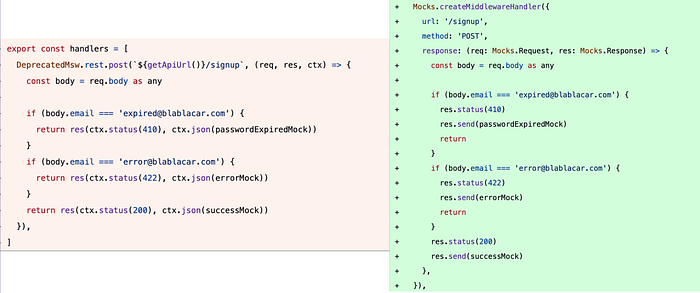
Testbed 1: migrating from one mock solution to a new one(Low risk)
Our first experiment was migrating from one old and deprecated mock solution to our new one. This has been identified as the perfect candidate for automation because it was low-risk.
- The Challenge: A large volume of repetitive "find-and-replace-style" work that was easy to put off.
- Why It Was a Good Candidate: We were completely backed up by our test suite. This provided a robust safety net. If the AI misunderstood something and broke a mock, our test pipeline would immediately turn red and catch the error. This low-risk environment gave us the confidence to let the agent work in batches, rapidly clearing out the backlog.
Testbed 2: Selenium to Playwright
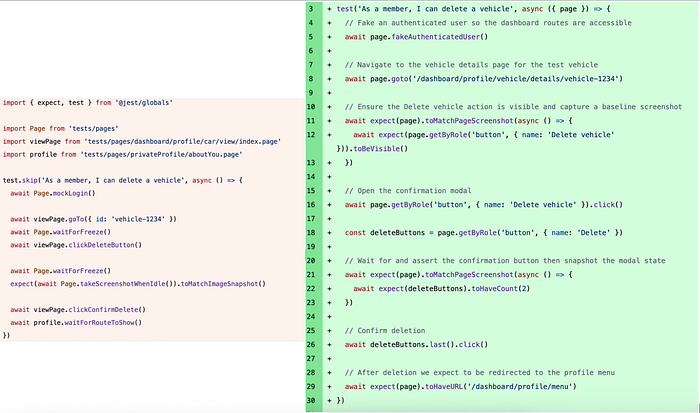
The second migration was far trickier. We needed to rewrite legacy Selenium tests to Playwright.
- The Challenge: We moved away from the traditional "Page Object" model — where selectors are abstracted away in separate files — to a more modern approach where each test defines its own element access using role-based accessors (e.g., getByRole) for better isolation and maintainance This required the AI to do two things simultaneously:
- Understand the business logic hidden inside the old Page Objects.
- Rewrite the tests to interact with the page like a real user (clicking a "button" named "Delete" rather than finding a CSS class like .btn-danger).
- Why It Was a Good Candidate: Unlike the mock migration, we had no safety net to automatically confirm the new tests were as good as the old ones. The only way to ensure a file was successfully migrated was through careful human review. This made it a perfect candidate for a "co-pilot" approach, where the AI would handle the first draft, but we would iterate cautiously, one small PR at a time. Each PR removing old screenshots and creating new ones, making the review easier by just comparing these screenshots.
Building the Agent's Brain
Our initial goal wasn't to build a fully autonomous system. It was to answer a simple question: could this even work? The task was too complex for a simple find-and-replace script, so I started with a small, manual experiment.
I fired up the VSCode Copilot coding agent and tried to migrate just one example. The efficiency was immediately obvious. The AI could understand the intent of the code and perform the migration successfully.
This small win was the proof of concept I needed. The next step was to scale it. Instead of me manually running the agent, we defined our needs in a Github Copilot prompt file. This allowed us to create migration pull requests at a speed we never could have managed manually.
The key to our success was building a "brain" for the agent within these prompt files. We learned that the agent's performance is directly proportional to the quality of its instructions and examples.
Here's what made our prompts so effective:
- Assigning a Persona: We told the AI it was a "Senior QA engineer and a Senior frontend engineer with deep expertise". This puts it in the right mindset.
- Providing Direct Context: We embedded file paths directly into the prompt (e.g., #file:dev-tools/mocks/src/index.ts). This was a game-changer. It gave the agent instant access to the APIs and tools it needed, eliminating back-and-forth queries and making the process far more efficient.
- Learning from the Past: We created a knowledge base by labeling all relevant pull requests (e.g., migration:msw), whether they were human- or AI-created. We then instructed the AI to use the search_pull_requests tool from the Github MCP to find these examples and learn from our established patterns. This meant the agent got smarter and more consistent with each PR it opens.
---
mode: agent
description: Migrate MSW mocks to mock-server mocks
model: GPT-5 mini
tools: ['search_pull_requests', 'editFiles', 'runCommands', 'codebase', 'search', 'searchResults']
---

#Role:
* You are a Senior QA engineer and a Senior frontend engineer with a deep expertise on MSW and mock-server

#Context:
* We are migrating from MSW to mock-server. MSW mocks are in apps/kairos/src/mocks/deprecated-mswmocks/index.ts while mock-server mocks live in their feature folder.

#Task:
* Ensure you are on the master branch and all local changes are stashed
* Create a new branch named `scout-msw-migration-<mockToMigrate>` (e.g. `scout-msw-migration-changepassword`)
* Migrate #file:${input:mockToMigrate} to #file:${input:pathToFeature} using apis exposed by @blablacar/mocks (#file:dev-tools/mocks/src/index.ts)
* Ask for these paths as input right when you start
* Remove the file path from apps/kairos/src/mocks/deprecated-mswmocks/index.ts. Prefer to remove the line rather than commenting it out
* When creating new handlers, make sure to name the variable `handlers` and export it
* Make sure to add the new handlers you create to apps/kairos/src/mocks/routes.ts
* Delete MSW mock files (and folders if they are empty) from apps/kairos/src/mocks/deprecated-mswmocks/<path> using shell `rm` command. Do not use any other tool for this
* Only migrate to mock-server if we don't have an already existing one covering the mock case. Otherwise, delete the old MSW mock
* Prefer asking for sanity checks rather than trying to execute commands like `pnpm run typings`
* Push the branch to the remote repository and create a pull request with a descriptive title and description of the changes made using github CLI tool. Add the migration:msw label (ex: `gh pr create --title "scout(msw): Migrate ChangePassword from MSW to mock-server" --body "This PR migrates the ChangePassword mock from MSW to mock-server. It includes the following changes: ..." --label "migration:msw"`)

#Example:
* Find examples in the PR #search_pull_requests with the label "migration:msw"

#Shell Command Guidelines:
* For git commit messages, use single-line format to avoid shell parsing issues
* For GitHub CLI PR creation, use simple single-line descriptions instead of multi-line markdown
* Example of branch creation: `git checkout -b scout-msw-migration-changepassword`
* Example good commit: `git commit -m "scout(msw): Migrate ChangePassword from MSW to mock-server"`
* Example good PR creation: `gh pr create --title "scout(msw): Migrate ChangePassword from MSW to mock-server" --body "This PR migrates the ChangePassword mock from MSW to mock-server. It includes the following changes: ..." --label "migration:msw"`
From Experiment to Factory Line
Defining the prompt was only the first step. To actually execute these migrations, our workflow evolved through three distinct stages, each delegating more responsibility to the agent:
- The "Over-the-Shoulder" Phase (VS Code): We started by running the prompt file directly in VS Code. This allowed us to "watch" the agent work line-by-line. It was essential for debugging our prompt instructions, as we could immediately see if the AI misunderstood a directive.
- The Local Batch Phase (Copilot CLI + Git Workspaces): Once we trusted the prompt, we needed speed. We launched the prompt through the Copilot CLI across multiple terminals using git workspaces. This marked the beginning of parallel migrations. We successfully delegated the coding — our only job was to review and merge PRs. However, running multiple AI agents locally severely stressed our computers and still required non-negligible human monitoring.
- The "Set and Forget" Phase (GitHub Copilot Coding Agent): The final unlock was launching agents directly from GitHub. This moved the heavy lifting entirely off our local machines. We no longer had overheating laptops or context switching — just a steady stream of finished Pull Requests waiting for us in the end.
What We Learned (Especially What Surprised Us)
This experiment taught us a lot about leveraging AI for practical engineering tasks.
- Go for the "Mini" Model. You don't always need the most powerful, expensive model. We learned this the hard way. While working on the complex Selenium migration, I burned through 30% of my budget testing larger models. We later discovered that for this type of simple, iterative task, a smaller model like GPT-5 mini was more than sufficient and much more cost-effective.
- Consistency is the Hidden Superpower. Beyond just speed, the AI provided a level of consistency that's hard to achieve with multiple engineers working over several months. Every pull request followed the exact same pattern. This made reviews easier and kept the code predictable.
- Iterative Learning via Pull Requests. By enabling the agent to search past PRs, we created a powerful feedback loop. If the AI made a mistake, we didn't just fix the prompt; we fixed the code in the PR, pushed the commit, and merged it. The agent then "read" that new PR and corrected itself for the next batch. It turned the review process into a training mechanism, making the agent smarter with every step without constant prompt fine-tuning.
- We Solved "Migration Fatigue." This was perhaps the biggest win. These migrations were stuck because they were tedious. By delegating the repetitive, "boring" parts to the AI, we maintained momentum on projects that engineers might otherwise find less engaging. Of course, a common concern with automated coding is "Review Fatigue" — the fear that generating mass PRs simply shifts the burden from coding to reviewing. We mitigated this by keeping our scope small and atomic. Because the changes were highly scoped and the AI's output was predictable, validating them took seconds rather than minutes. The engineers driving the initiative were the ones reviewing the output, ensuring that the extra volume was always manageable and high-quality.
The first AI-assisted migration is now officially done. By treating the AI as a tireless, focused developer who follows instructions perfectly, we turned a "stuck" project into a finished one. We proved that AI's real value isn't just in the futuristic "wow" moments, but in its power to unblock us from the tedious work of today.