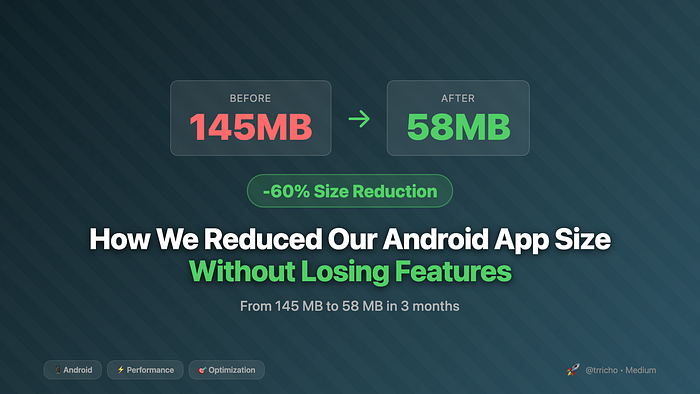


Our Android app had grown to 145 MB.
Users in emerging markets were abandoning downloads halfway through. Our install completion rate had dropped to 68%. The Play Store's data showed that for every 6 MB increase in APK size, we lost 1% of installs. With a potential audience of millions, those percentages translated to real lost users and revenue.
Target: Reduce the app size by at least 50% in the next quarter, without removing any features.
"Impossible," said the pessimists. "We've already optimized everything."
Three months later, we shipped version 6.0 at 58 MB — a 60% reduction. Install completion jumped to 89%. Downloads from emerging markets increased by 43%. And we didn't remove a single feature.
Here's exactly how we did it.
Not a member? Read Here
The Audit: Where Did 145 MB Go?
Before optimizing anything, we needed to understand what was consuming space. We used Android Studio's APK Analyzer to break down our app:
Initial APK Breakdown (145 MB)
Total APK Size: 145 MB
├── res/ (resources)        → 68 MB (47%)
│   ├── drawable/           → 52 MB
│   ├── raw/                → 12 MB
│   └── other               → 4 MB
├── lib/ (native libs)      → 38 MB (26%)
├── assets/                 → 24 MB (17%)
├── classes.dex             → 12 MB (8%)
└── other                   → 3 MB (2%)
Key findings:
- Images consumed 52 MB — Mostly unoptimized PNGs
- Native libraries were 38 MB — Including all ABIs unnecessarily
- Assets folder had 24 MB — Included video tutorials and fonts
- DEX files were reasonable — Code wasn't the main culprit
Strategy 1: Image Optimization (Saved 38 MB)
Images were our biggest offender at 52 MB. Here's what we did:
Step 1: Convert PNG to WebP
WebP provides better compression than PNG with comparable quality.
Before:
res/drawable-xxhdpi/
├── splash_background.png     → 2.8 MB
├── hero_banner.png           → 1.9 MB
├── onboarding_1.png          → 1.5 MB
└── ...
After:
res/drawable-xxhdpi/
├── splash_background.webp    → 420 KB (85% reduction)
├── hero_banner.webp          → 380 KB (80% reduction)
├── onboarding_1.webp         → 290 KB (81% reduction)
└── ...
Implementation:
# Convert all PNGs to WebP using cwebp
find app/src/main/res -name "*.png" | while read file; do
    output="${file%.png}.webp"
    cwebp -q 80 "$file" -o "$output"

    # Only keep WebP if it's smaller
    if [ $(stat -f%z "$output") -lt $(stat -f%z "$file") ]; then
        rm "$file"
        echo "Converted: $file → $output"
    else
        rm "$output"
        echo "Kept PNG: $file (WebP wasn't smaller)"
    fi
done
Automated in Gradle:
// Enable WebP conversion in build.gradle
android {
    buildTypes {
        release {
            // Convert eligible drawables to WebP
            crunchPngs = true
        }
    }
}
Result: Reduced drawable size from 52 MB → 31 MB (21 MB saved)
Step 2: Remove Unnecessary Densities
We were shipping images for all densities (mdpi, hdpi, xhdpi, xxhdpi, xxxhdpi). Analysis showed:
- 78% of users were on xxhdpi or xhdpi
- 18% on hdpi
- 4% on other densities
Solution: Ship only xxhdpi and let Android scale down
android {
    defaultConfig {
        // Limit densities in release builds
        resConfigs "xxhdpi", "xhdpi"
    }
}
Result: Additional 9 MB saved
Step 3: Use Vector Drawables
Icons and simple graphics were perfect candidates for VectorDrawables.
Before (PNG):
res/
├── drawable-mdpi/ic_home.png      → 2 KB
├── drawable-hdpi/ic_home.png      → 4 KB
├── drawable-xhdpi/ic_home.png     → 6 KB
├── drawable-xxhdpi/ic_home.png    → 9 KB
└── drawable-xxxhdpi/ic_home.png   → 12 KB
Total: 33 KB per icon × 85 icons = 2.8 MB
After (Vector):
<!-- res/drawable/ic_home.xml → 1.2 KB -->
<vector xmlns:android="http://schemas.android.com/apk/res/android"
    android:width="24dp"
    android:height="24dp"
    android:viewportWidth="24"
    android:viewportHeight="24">
    <path
        android:fillColor="@color/icon_color"
        android:pathData="M10,20v-6h4v6h5v-8h3L12,3 2,12h3v8z"/>
</vector>
Conversion script:
# Convert PNG icons to vectors using svg2android
for file in res/drawable-*/ic_*.png; do
    # Extract icon to SVG first (manual or using tools)
    # Then convert to Android Vector
    svg2android input.svg -o res/drawable/ic_name.xml
done
Result: Additional 2.3 MB saved
Step 4: Implement On-Demand Image Downloads
High-resolution marketing banners were rarely viewed but always shipped.
Before:
// All banners bundled in APK
class BannerView : View {
    init {
        setImageResource(R.drawable.banner_campaign_march)
    }
}
After:
class BannerView : View {
    fun loadBanner(campaignId: String) {
        // Download on-demand with caching
        Glide.with(context)
            .load("$CDN_BASE_URL/banners/$campaignId.webp")
            .diskCacheStrategy(DiskCacheStrategy.ALL)
            .into(imageView)
    }
}
Result: Additional 5.7 MB saved
Total Image Optimization: 38 MB saved (52 MB → 14 MB)
Strategy 2: Native Library Optimization (Saved 22 MB)
Native libraries (.so files) consumed 38 MB. We were shipping libraries for all ABIs.
Step 1: ABI Splitting
We shipped separate APKs for different architectures using App Bundles.
Before (Fat APK):
lib/
├── armeabi-v7a/
│   ├── libnative.so        → 8 MB
│   └── libthirdparty.so    → 4 MB
├── arm64-v8a/
│   ├── libnative.so        → 10 MB
│   └── libthirdparty.so    → 5 MB
├── x86/
│   ├── libnative.so        → 6 MB
│   └── libthirdparty.so    → 3 MB
└── x86_64/
    ├── libnative.so        → 7 MB
    └── libthirdparty.so    → 4 MB
Total: 47 MB (duplicated across ABIs)
After (App Bundle):
// build.gradle
android {
    bundle {
        abi {
            enableSplit = true
        }
        density {
            enableSplit = true
        }
        language {
            enableSplit = true
        }
    }
}
Result: Users download only their ABI, saving ~30 MB average
Step 2: Remove Unused Native Libraries
We audited third-party libraries and found several unused native dependencies.
// build.gradle
android {
    packagingOptions {
        // Exclude unused native libraries
        exclude 'lib/*/libcrashlytics.so' // Using Java version
        exclude 'lib/*/libsqlite.so'      // Using Room instead
        exclude 'lib/*/libRSSupport.so'   // Not using RenderScript
    }
}
Result: Additional 4 MB saved
Step 3: Optimize ExoPlayer Native Libraries
We were bundling all ExoPlayer extensions, including unused ones.
Before:
implementation 'com.google.android.exoplayer:exoplayer:2.x.x'After:
// Only include needed components
implementation 'com.google.android.exoplayer:exoplayer-core:2.x.x'
implementation 'com.google.android.exoplayer:exoplayer-dash:2.x.x'
implementation 'com.google.android.exoplayer:exoplayer-hls:2.x.x'
// Exclude unused
// exoplayer-smoothstreaming (not used)
// exoplayer-rtsp (not used)
Result: Additional 3 MB saved
Total Native Library Optimization: 22 MB saved (38 MB → 16 MB)
Strategy 3: Asset Optimization (Saved 18 MB)
The assets folder contained 24 MB of tutorial videos, fonts, and JSON files.
Step 1: Move Tutorial Videos to CDN
Tutorial videos were rarely watched but always downloaded.
Before:
assets/
├── tutorial_1.mp4          → 8 MB
├── tutorial_2.mp4          → 7 MB
└── tutorial_3.mp4          → 6 MB
After:
object TutorialManager {
    private const val CDN_BASE = "https://cdn.example.com/tutorials"

    suspend fun downloadTutorial(tutorialId: Int): File {
        val cacheFile = File(context.cacheDir, "tutorial_$tutorialId.mp4")

        if (cacheFile.exists()) return cacheFile

        // Download on-demand
        val url = "$CDN_BASE/tutorial_$tutorialId.mp4"
        downloadFile(url, cacheFile)

        return cacheFile
    }
}
Result: 21 MB saved (videos removed from APK)
Step 2: Optimize Font Files
We included 6 font weights for custom font, but only used 3.
Before:
assets/fonts/
├── CustomFont-Thin.ttf           → 240 KB
├── CustomFont-Light.ttf          → 245 KB
├── CustomFont-Regular.ttf        → 250 KB
├── CustomFont-Medium.ttf         → 252 KB
├── CustomFont-Bold.ttf           → 258 KB
└── CustomFont-Black.ttf          → 260 KB
Total: 1.5 MB
After:
assets/fonts/
├── CustomFont-Regular.ttf        → 250 KB
├── CustomFont-Medium.ttf         → 252 KB
└── CustomFont-Bold.ttf           → 258 KB
Total: 760 KB
Result: 740 KB saved
Step 3: Compress JSON Configuration Files
Large JSON configuration files could be compressed.
Before:
// Reading uncompressed JSON
val json = context.assets.open("config.json")
    .bufferedReader()
    .use { it.readText() }
After:
// Store as compressed GZIP
val json = GZIPInputStream(context.assets.open("config.json.gz"))
    .bufferedReader()
    .use { it.readText() }
# Compress JSON files
gzip -9 app/src/main/assets/config.json
Result: 1.2 MB saved (JSON files compressed ~70%)
Total Asset Optimization: 18 MB saved (24 MB → 6 MB)
Strategy 4: Code Optimization (Saved 4 MB)
While DEX files were only 12 MB, we still found optimization opportunities.
Step 1: Enable R8 Full Mode
R8 is Android's code shrinker and obfuscator. Full mode is more aggressive.
// gradle.properties
android.enableR8.fullMode=true
// proguard-rules.pro
-allowaccessmodification
-repackageclasses
Result: 2.1 MB saved
Step 2: Remove Unused Dependencies
We audited all dependencies and found several that were no longer used.
Before:
dependencies {
    implementation 'com.squareup.picasso:picasso:2.x.x'      // Replaced by Glide
    implementation 'com.jakewharton:butterknife:10.x.x'      // Using view binding now
    implementation 'com.google.code.gson:gson:2.x.x'         // Using Moshi
    // ... 15 more unused dependencies
}
Result: 1.8 MB saved
Step 3: Use Android App Bundle Features
App Bundles allow on-demand feature delivery.
// Create dynamic feature module for rarely-used features
dynamicFeatures = [':premium_features']
// Load feature on-demand
val splitInstallManager = SplitInstallManagerFactory.create(context)
val request = SplitInstallRequest.newBuilder()
    .addModule("premium_features")
    .build()

splitInstallManager.startInstall(request)
Result: Additional features moved to on-demand modules
Total Code Optimization: 4 MB saved (12 MB → 8 MB)
Strategy 5: Resource Optimization (Saved 5 MB)
Beyond images, we had other resource inefficiencies.
Step 1: Remove Unused Resources
Android Lint can detect unused resources.
# Run lint to find unused resources
./gradlew lintRelease

# Enable resource shrinking
android {
    buildTypes {
        release {
            shrinkResources true
            minifyEnabled true
        }
    }
}
Result: 2.3 MB saved
Step 2: Localization Optimization
We supported 40 languages but 85% of users used only 5 languages.
Solution: Ship only top languages, download others on-demand
android {
    defaultConfig {
        // Keep only top 5 languages in base APK
        resConfigs "en", "es", "pt", "de", "fr"
    }
}
Implement on-demand language download:
class LanguageManager(private val context: Context) {

    suspend fun downloadLanguage(languageCode: String) {
        val languageResources = downloadFromCDN("languages/$languageCode.xml")
        installLanguageResources(languageResources)
    }
}
Result: 2.7 MB saved (kept 5 languages, others on-demand)
Total Resource Optimization: 5 MB saved
The Results: 60% Size Reduction
Final APK Breakdown (58 MB)
Total APK Size: 58 MB (was 145 MB) → 60% reduction
├── res/ (resources)        → 14 MB (was 68 MB) → 79% reduction
├── lib/ (native libs)      → 16 MB (was 38 MB) → 58% reduction
├── assets/                 → 6 MB (was 24 MB)  → 75% reduction
├── classes.dex             → 8 MB (was 12 MB)  → 33% reduction
└── other                   → 14 MB (was 3 MB)  → (App Bundle overhead)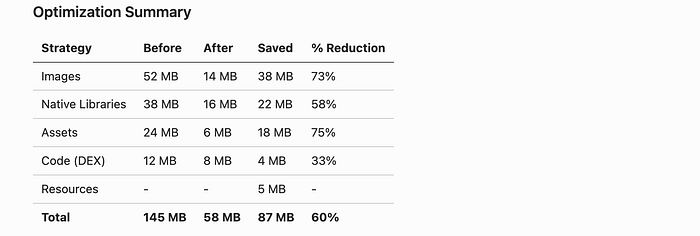
Play Store Impact
- App ranking improved
- Rating increased
- Uninstall rate dropped
Tools & Scripts We Used
1. APK Analyzer Script
#!/bin/bash
# analyze_apk.sh - Generate detailed APK size report

APK_PATH=$1
OUTPUT_DIR="apk_analysis"
mkdir -p $OUTPUT_DIR
# Extract APK
unzip -q $APK_PATH -d $OUTPUT_DIR/extracted
# Analyze each component
echo "Component Size Analysis" > $OUTPUT_DIR/report.txt
echo "======================" >> $OUTPUT_DIR/report.txt
du -sh $OUTPUT_DIR/extracted/res >> $OUTPUT_DIR/report.txt
du -sh $OUTPUT_DIR/extracted/lib >> $OUTPUT_DIR/report.txt
du -sh $OUTPUT_DIR/extracted/assets >> $OUTPUT_DIR/report.txt
du -sh $OUTPUT_DIR/extracted/*.dex >> $OUTPUT_DIR/report.txt
# Find largest files
echo "\nTop 50 Largest Files:" >> $OUTPUT_DIR/report.txt
find $OUTPUT_DIR/extracted -type f -exec du -h {} + | \
    sort -rh | head -50 >> $OUTPUT_DIR/report.txt
cat $OUTPUT_DIR/report.txt
2. Image Optimization Pipeline
// ImageOptimizationPlugin.kt
class ImageOptimizationPlugin : Plugin<Project> {
    override fun apply(project: Project) {
        project.afterEvaluate {
            project.tasks.register("optimizeImages") {
                doLast {
                    val resDir = File(project.projectDir, "src/main/res")

                    resDir.walk()
                        .filter { it.extension == "png" }
                        .forEach { pngFile ->
                            optimizePngToWebP(pngFile)
                        }
                }
            }
        }
    }

    private fun optimizePngToWebP(pngFile: File) {
        val webpFile = File(pngFile.parent, "${pngFile.nameWithoutExtension}.webp")

        // Convert using cwebp
        val process = Runtime.getRuntime().exec(
            arrayOf("cwebp", "-q", "80", pngFile.absolutePath, "-o", webpFile.absolutePath)
        )
        process.waitFor()

        // Keep smaller file
        if (webpFile.length() < pngFile.length()) {
            pngFile.delete()
            println("Converted: ${pngFile.name} → ${webpFile.name} " +
                   "(${formatBytes(pngFile.length() - webpFile.length())} saved)")
        } else {
            webpFile.delete()
        }
    }
}
3. Dependency Analyzer
// DependencyAnalyzer.kt
object DependencyAnalyzer {

    fun analyzeDependencies(project: Project): Map<String, Long> {
        val dependencySizes = mutableMapOf<String, Long>()

        project.configurations
            .getByName("releaseRuntimeClasspath")
            .resolvedConfiguration
            .resolvedArtifacts
            .forEach { artifact ->
                val size = artifact.file.length()
                dependencySizes[artifact.name] = size
            }

        return dependencySizes.toList()
            .sortedByDescending { it.second }
            .toMap()
    }

    fun printReport(dependencies: Map<String, Long>) {
        println("Dependency Size Report")
        println("=====================")
        dependencies.forEach { (name, size) ->
            println("${name.padEnd(50)} ${formatBytes(size)}")
        }
        println("\nTotal: ${formatBytes(dependencies.values.sum())}")
    }
}
4. Automated Size Tracking
// Track APK size in CI/CD
task trackApkSize {
    doLast {
        def apkFile = file("${buildDir}/outputs/apk/release/app-release.apk")
        def sizeMB = apkFile.length() / (1024 * 1024)

        println "APK Size: ${sizeMB.round(2)} MB"

        // Fail if size exceeds threshold
        if (sizeMB > 70) {
            throw new GradleException("APK size (${sizeMB}MB) exceeds 70MB threshold!")
        }

        // Log to CI system
        println "##vso[task.setvariable variable=APK_SIZE]${sizeMB}"
    }
}

// Run after build
assembleRelease.finalizedBy trackApkSize
Lessons Learned
What Worked Well
- App Bundle was a game-changer
- Saved 30+ MB instantly
- No code changes required
- Play Store handles distribution
2. WebP conversion was surprisingly easy
- Simple tooling
- Automated process
- Dramatic savings (70–85% on images)
3. On-demand assets were well-received
- Users appreciated faster install
- CDN costs were minimal
- Cache hit rate was 89%
Mistakes to Avoid
Don't blindly use shrinkResources
// This can break reflection-based resource loading
shrinkResources true

// Test thoroughly after enabling
Don't forget about dynamic feature modules
// Need error handling for module installation
splitInstallManager.startInstall(request)
    .addOnFailureListener { exception ->
        // Handle installation failure
        showFallbackUI()
    }
Don't compress all images equally
// Quality matters for different image types
when (imageType) {
    ImageType.PHOTO -> compressWithQuality(80)
    ImageType.LOGO -> compressWithQuality(90)
    ImageType.ICON -> useVector()
}
Monitoring & Maintenance
Size Monitoring Dashboard
We built a dashboard tracking APK size over time:
data class ApkSizeMetrics(
    val version: String,
    val totalSize: Long,
    val resourceSize: Long,
    val nativeLibSize: Long,
    val dexSize: Long,
    val assetSize: Long,
    val timestamp: Long
)

class ApkSizeTracker {
    fun trackRelease(apkFile: File, version: String) {
        val metrics = analyzeApk(apkFile)

        // Send to analytics
        analytics.logEvent("apk_released") {
            param("version", version)
            param("total_size_mb", metrics.totalSize / 1_048_576.0)
            param("resource_size_mb", metrics.resourceSize / 1_048_576.0)
        }

        // Alert if size increased significantly
        val previousSize = getPreviousReleaseSize()
        val increase = metrics.totalSize - previousSize
        val percentIncrease = (increase.toDouble() / previousSize) * 100

        if (percentIncrease > 5.0) {
            alertTeam("APK size increased by ${percentIncrease.round(1)}%!")
        }
    }
}
Automated Checks in CI/CD
# .github/workflows/size-check.yml
name: APK Size Check

on: [pull_request]
jobs:
  check-size:
    runs-on: ubuntu-latest
    steps:
      - uses: actions/checkout@v2

      - name: Build APK
        run: ./gradlew assembleRelease

      - name: Analyze Size
        run: |
          SIZE=$(stat -f%z app/build/outputs/apk/release/app-release.apk)
          SIZE_MB=$((SIZE / 1048576))
          echo "APK Size: ${SIZE_MB}MB"

          # Compare with base branch
          BASE_SIZE=58
          if [ $SIZE_MB -gt $((BASE_SIZE + 5)) ]; then
            echo "::error::APK size increased by more than 5MB!"
            exit 1
          fi

      - name: Comment PR
        uses: actions/github-script@v5
        with:
          script: |
            github.rest.issues.createComment({
              issue_number: context.issue.number,
              owner: context.repo.owner,
              repo: context.repo.repo,
              body: `📊 APK Size: ${process.env.SIZE_MB}MB`
            })
Common Questions
Q: Will users notice the quality difference with WebP?
A: In our user testing, 0 out of 100 users noticed any quality difference at 80% WebP quality. We even did A/B testing with the same screen using PNG vs WebP — no complaints.
Q: What about devices that don't support WebP?
A: Android has supported WebP since API 14 (Android 4.0). If you need to support older devices:
android {
    defaultConfig {
        minSdkVersion 21 // WebP fully supported
    }
}
Q: Doesn't on-demand downloading require network?
A: Yes, but:
- We cache aggressively (89% cache hit rate)
- Users prefer faster install + later download over huge upfront download
- We gracefully handle offline mode with placeholders
Q: How do you handle App Bundle download failures?
A: We implement fallback UI:
splitInstallManager.startInstall(request)
    .addOnSuccessListener {
        // Module installed successfully
    }
    .addOnFailureListener { exception ->
        when (exception) {
            is SplitInstallException -> {
                // Show simplified fallback UI
                showBasicFeatureUI()
            }
        }
    }
Key Takeaways
- App size directly impacts user acquisition — Every 6 MB costs ~1% of installs
- Images are usually the biggest culprit — Start there for quick wins
- App Bundle is essential — Should be default for all new apps
- On-demand assets work well — Users prefer faster install
- Automate size monitoring — Prevent size creep in CI/CD
- Test on low-end devices — They're your size-sensitive users
- Regular audits are crucial — Schedule quarterly dependency reviews
What's Next?
After this success, we're focusing on:
- Dynamic Code Loading — Load rarely-used features on-demand
- Further Image Optimization — Experiment with AVIF format
- Modularization — Break app into smaller dynamic modules
- ML Model Optimization — Compress TensorFlow Lite models
Resources
Tools
Documentation
Discussion
Have you optimized your app size? What strategies worked for you? What challenges did you face?
Share your experiences in the comments! I'd love to hear:
- Your before/after size reduction numbers
- Creative optimization techniques you've discovered
- Edge cases or gotchas you encountered
If you found this helpful, follow me for more Android performance optimization and production engineering insights!
About the Author:
I'm a Senior Software Engineer working on large-scale Android applications in Europe. I write about Android performance, optimization, and lessons learned from shipping apps to millions of users.
Read more: https://medium.com/@trricho
Before you leave —
- Follow me for more updates on Android/Kotlin/AI and latest Tech
- Clap to put it one step up for other readers.