
Disclosure: I use GPT search to collection facts. The entire article is drafted by me.
The hard truth about AI memory: It's not about storing more — it's about retrieving what matters, when it matters, without corruption.
Yesterday's Clawdbot → Moltbot naming drama grabbed headlines, but the real story lies deeper: how does an agent maintain reliable long-term memory in production? Not the marketing pitch of "infinite context" or "perfect recall," but the unglamorous engineering reality of managing finite context windows, lossy compression, and tool output bloat.
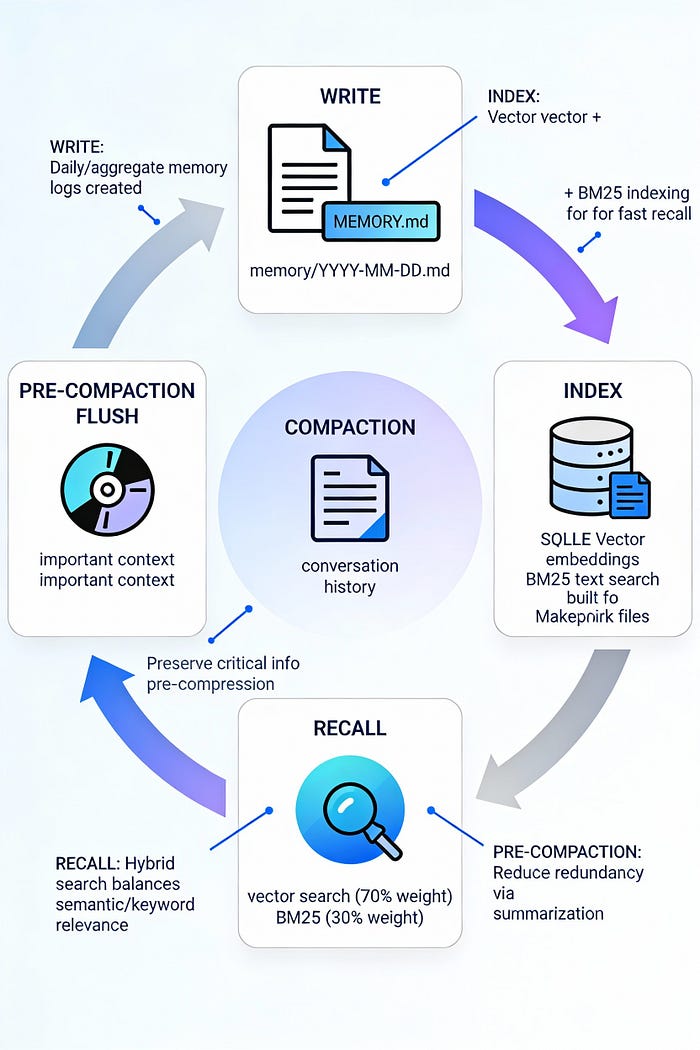
Clawdbot's answer is deliberately unsexy: treat memory as Markdown files, retrieval as tool calls, and loss prevention as a pre-compaction flush gate. This design prioritizes three properties that matter more than novelty: explainability, editability, and portability.
Let's examine why this matters — and how it works.
The Core Problem: Context vs. Memory
Before diving into Clawdbot's implementation, establish the fundamental distinction:
Context = what the model sees during this request. Bounded by the model's context window (typically 128K-200K tokens for Claude 3.5 Sonnet, 1M+ for Gemini). Expensive (charged per token), temporary (cleared after response), and subject to "context rot" — performance degradation as the window fills.
Memory = what persists between requests. Stored on disk, unbounded in size, cheap (no API cost), and durable (survives restarts). But memory is inert — the model can't "see" it unless explicitly loaded into context via retrieval.
The memory management challenge for long-running agents boils down to: how do you decide what to retrieve from unbounded memory into a bounded context, when to persist critical information before compression destroys it, and how to prevent tool outputs from drowning signal in noise?
Clawdbot's solution operates on three axes: file-based canonical storage, hybrid retrieval, and pre-compaction insurance.
Architecture Layer 1: Files as Memory — The Canonical Source of Truth
Clawdbot stores memory as plain Markdown files in the agent workspace (default: ~/clawd/):
~/clawd/
├── MEMORY.md                    # Layer 2: Curated long-term facts
└── memory/
    ├── 2026-01-28.md           # Layer 1: Today's append-only log
    ├── 2026-01-27.md           # Yesterday (auto-loaded)
    └── 2026-01-26.md           # Older (retrieved on-demand)
Design rationale:
- Session start behavior: Agent loads
MEMORY.md+ today + yesterday on every session start. This creates a ~2-day rolling window of immediate context. - Write separation: Daily logs (
memory/YYYY-MM-DD.md) capture running narrative—low friction, append-only.MEMORY.mdholds refined, stable facts—manually curated or agent-promoted from daily logs. - Group chat isolation:
MEMORY.mdis never loaded in group contexts—only in main private sessions. This prevents personal context leakage into shared channels. - Git-friendly: Markdown files are human-readable, diffable, and version-controllable. Users can inspect, edit, and correct agent memories directly.
Critical constraint: Write operations use standard file tools — no specialized memory_write API. Memory is just "files the agent writes to". This keeps the abstraction clean: if you can read/write Markdown, you can manage memory.
Workspace Context Files: The Agent's Operating Instructions
Beyond memory logs, Clawdbot injects workspace files into every session's system prompt:
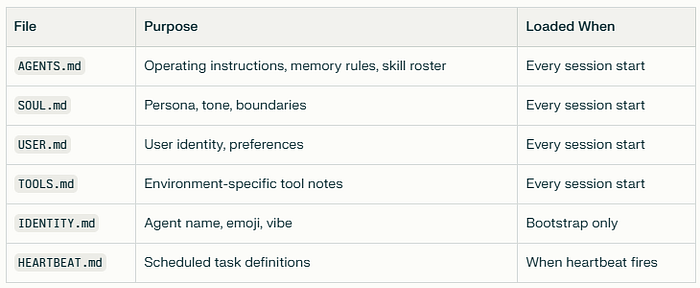
Large files are truncated at 20,000 characters to prevent context overflow. This injection happens before conversation history loads, establishing the agent's foundational context.
Architecture Layer 2: Hybrid Retrieval — BM25 + Vector Search
File-based memory is only useful if the agent can retrieve relevant chunks efficiently. Clawdbot provides two retrieval tools:
Tool 1: memory_search (Hybrid Semantic + Keyword)
Signature:
memory_search(
  query: string,
  maxResults?: number,    // default 6
  minScore?: number       // default 0.35
)
Returns: Array of memory chunks (~700 chars max per chunk) with:
text: snippet contentfile: source path (e.g.,memory/2026-01-27.md)startLine/endLine: exact location in filescore: relevance score (0-1)provider/model: embedding metadata
Key design choice: Returns snippets with pointers, not full files. This prevents context pollution while maintaining traceability.
Tool 2: memory_get (Direct File Read)
Signature:
memory_get(
  relPath: string,        // e.g., "MEMORY.md"
  startLine?: number,     // 1-indexed
  lines?: number          // line count
)
Returns: Raw file content. Used for:
- Reading full context from known locations
- Fetching the surrounding context after
memory_searchidentifies a line range - Loading structured files (e.g., project notes)
Security boundary: Rejects paths outside MEMORY.md / memory/ directory.
Hybrid Search: Why BM25 Matters
Pure vector search excels at semantic similarity but fails on high-signal exact tokens:
Vector search struggles with:
- Short identifiers (commit hashes:
a828e60,b3b9895a) - Configuration paths (
memorySearch.query.hybrid.vectorWeight) - Error strings (
"sqlite-vec unavailable") - Environment variables (
CLAWDBOT_NO_ONBOARD)
BM25 (keyword search) excels at:
- Exact term matching (case-insensitive)
- Rare token prioritization (IDF weighting)
- Deterministic, explainable ranking
Clawdbot's hybrid approach runs both searches in parallel and fuses scores:
- Retrieve candidates: Each method fetches
maxResults × candidateMultipliercandidates (default multiplier: 4) - Normalize BM25 scores: Convert rank to 0–1 score via
textScore = 1 / (1 + max(0, bm25Rank)) - Weighted fusion:
finalScore = vectorWeight × vectorScore + textWeight × textScore - Sort and return: Top
maxResultsby final score
Default weights:
agents.defaults.memorySearch.query.hybrid:
  enabled: true
  vectorWeight: 0.7      # Semantic similarity
  textWeight: 0.3        # Keyword precision
  candidateMultiplier: 4
Graceful degradation:
- If SQLite FTS5 is unavailable → fallback to vector-only
- If
sqlite-vecextension unavailable → fallback to in-process cosine similarity (slower but functional)
Architecture Layer 3: Index Management — Derived, Rebuildable State
Memory retrieval depends on two indices stored in SQLite (one DB per agent):
Index location: ~/.clawdbot/memory/<agentId>.sqlite
Index Contents:
- Vector embeddings: Each memory chunk (target: ~400 tokens, 80-token overlap) embedded via configured provider
- BM25 full-text index: SQLite FTS5 table for keyword search
- Metadata: File paths, line ranges, chunk boundaries, timestamps
Automatic Reindexing Triggers
Clawdbot tracks an "embedding fingerprint":
indexFingerprint = hash(
  embeddingProvider,    // "openai" | "gemini" | "local"
  embeddingModel,       // "text-embedding-3-small"
  endpointURL,
  chunkParams           // size, overlap, separator
)
If fingerprint changes (e.g., switching from OpenAI to local embeddings), Clawdbot automatically reindexes the entire memory store. Users don't manually clear indexes.
Freshness: File-Watching with Debounced Sync
Changes to MEMORY.md or memory/*.md mark the index "dirty" (debounced 1.5 seconds). Sync occurs:
- On session start
- On
memory_searchinvocation (if dirty) - On background scheduler (configurable interval)
Session transcripts (stored as JSONL) use delta-size thresholds to trigger background sync without blocking the agent loop.
Embedding Provider Selection
Clawdbot auto-selects the embedding provider based on available credentials:
Priority order:
- Local model (
memorySearch.local.modelPath) if file exists - OpenAI if API key is resolvable
- Gemini if API key is resolvable
- Disabled if none configured
Critical note: Codex OAuth tokens (used for Claude chat/completion) do not cover embeddings. Remote embeddings still require separate API keys.
Default local model:
hf:ggml-org/embeddinggemma-300M-GGUF/embeddinggemma-300M-Q8_0.gguf(~600MB, auto-downloads to cache on first use)
Set up requirement: node-llama-cpp needs native build approval:
pnpm approve-builds  # select node-llama-cpp
pnpm rebuild node-llama-cpp
If the local setup fails and memorySearch.fallback = "openai" is set, Clawdbot transparently switches to remote embeddings and logs the reason.
The Insurance Policy: Pre-Compaction Memory Flush
Here's where Clawdbot's design diverges from typical RAG systems: it doesn't trust compression alone.
Why Compression is Lossy
Long conversations inevitably hit context limits. When this happens, agents typically apply compaction: summarize older messages into a compact representation, persist the summary to session JSONL, and keep recent messages verbatim.
The problem: Summarization is inherently lossy. LLMs are trained to be concise — they drop details that seem unimportant at compression time but may be critical later.
Example scenario:
Turn 50: User mentions "update the staging API key to sk-1234"
Turn 51-80: Unrelated discussion about UI changes
Turn 81: Context nears limit → compaction triggered
Turn 82: User asks "what was that API key?"
If compaction at Turn 81 summarizes Turn 50 as "discussed API configuration" without preserving sk-1234, the agent loses critical information.
Solution: Pre-Compaction Flush
Clawdbot implements a proactive write-before-compress pattern:
Trigger condition:
if (estimatedTokens > contextWindow - reserveTokensFloor - softThresholdTokens) {
  runMemoryFlush()
}
Default values:
reserveTokensFloor: 20,000 (minimum headroom for tools/output)softThresholdTokens: 4,000 (flush trigger margin)- Example: For 200K context window → flush at ~176K tokens
Flush sequence:
- Silent turn injection: Clawdbot inserts a system directive:
systemPrompt: "Session nearing compaction. Store durable memories now." userPrompt: "Write any lasting notes to memory/YYYY-MM-DD.md; reply with NO_REPLY if nothing to store."2. Agent writes: Model reviews conversation, extracts key facts, writes to the daily log or MEMORY.md
3. Suppression: Agent replies starting with NO_REPLY token → Clawdbot suppresses both final message delivery AND streaming output (prevents half-rendered content leaking to user)
4. Compaction proceeds: Now safe to compress — critical info already on disk
5. Frequency control: Flush runs once per compaction cycle. Tracked via memoryFlushCompactionCount in session state.
Configuration:
agents.defaults.compaction.memoryFlush:
  enabled: true
  softThresholdTokens: 4000
  prompt: "Write lasting notes to memory; reply NO_REPLY if done."
  systemPrompt: "Session nearing compaction. Store memories now."
Why NO_REPLY streaming suppression matters:
Before v2026.1.10, if the model started outputting "NO_REPLY I've stored…" during flush, the user would see "NO_REP" in their chat UI before suppression kicked in. The fix: suppress streaming the moment a chunk begins with NO_REPLY.
Beyond Compaction: Session Pruning for Tool Noise
Compaction handles conversational history. But long-running agents face another bloat source: tool results.
Scenario:
- Agent runs
exec("npm install")→ 50KB terminal output - Agent fetches 5 webpages → 200KB HTML
- Agent reads 10 large files → 500KB content
If tool results stay in context indefinitely, they:
- Consume context faster than messages
- Reduce cache hit rates (Anthropic prompt caching has 5-min TTL; expired cache = expensive rewrite)
- Bury signal in noise (model sees 50KB of npm logs when deciding next action)
Session Pruning: Surgical Tool Result Removal
Clawdbot's pruning operates before each LLM call, removing tool results from the in-memory message array without rewriting session JSONL history.
Default strategy: cache-ttl
Only prune if:
timeSinceLastAnthropicCall > configured_ttlGoal: Shrink the first request after cache expiration to minimize cacheWrite token costs.
Two pruning modes:
- Soft trim (default for recent tool calls):
- Keep the first N chars + the last M chars of the tool result
- Insert
...in middle - Skip if the result contains image blocks
- Default:
maxChars: 4000
2. Hard clear (older tool calls):
- Replace entire tool result with placeholder:
"[Old tool result content cleared]"Protection: Last keepLastAssistants assistant messages (default: 3) are exempt—their tool results stay intact.
Configuration:
agent.contextPruning:
  mode: "cache-ttl"       # or "never" | "always"
  ttl: "5m"               # match Anthropic cache TTL
  keepLastAssistants: 3
  minPrunableToolChars: 50000  # only prune if result > 50K
  softTrim:
    maxChars: 4000
  hardClear:
    placeholder: "[Old tool result content cleared]"
Key insight: Compaction handles "conversation too long." Pruning handles "tools too noisy." Both are necessary for long-horizon stability.
Memory Lifecycle in Practice: A 30-Turn Example
Let's trace memory flow through a realistic session:
Turns 1–10: Normal operation
- Context grows organically (~500 tokens/turn average)
- Tool results accumulate (exec, file reads, web fetches)
- No memory operations yet
Turn 15: Explicit write
User: "Remember my API key is sk-proj-abc123"
Agent: [Writes to memory/2026-01-28.md]
        "User API key: sk-proj-abc123"
Turn 25: Memory search
User: "What was my API key again?"
Agent: [Calls memory_search("API key")]
       [Retrieves snippet from memory/2026-01-28.md:37-39]
       "Your API key is sk-proj-abc123"
Turn 28: Approaching compaction
- Estimated context: ~178K tokens (threshold: 176K)
- Trigger: Pre-compaction flush
- Silent turn:
System: "Session nearing compaction. Store memories." Agent: [Reviews turns 1-28] [Writes to memory/2026-01-28.md]: "Session focused on API integration. Key decision: use sk-proj-abc123 for staging env. User prefers verbose error logging." [Replies]: "NO_REPLY"- User sees: Nothing (suppressed)
Turn 29: Safe to compact
- Clawdbot summarizes turns 1–20 into a compact representation
- Persists summary to
~/.clawdbot/sessions/main-abc123.jsonl - Keeps turns 21–28 verbatim
- Context drops to ~80K tokens
Turn 30: Tool result pruning kicks in
- 6 minutes elapsed since the last Anthropic call (cache expired)
- Pruning activated:
- Turns 1–10 tool results → hard cleared (placeholder)
- Turns 21–25 tool results → soft trimmed (first 2K + last 2K chars)
- Turns 26–28 tool results → kept intact (within
keepLastAssistants) - Context further drops to ~60K tokens
- Next Anthropic call: Cheaper
cacheWritedue to a smaller payload
Turn 31–60: Cycle repeats
- New tool results accumulate
- Next flush at ~turn 58
- Gradual session evolution with a bounded memory footprint
Implementation Details: What Makes This Work
Chunking Strategy
Target: ~400 tokens per chunk, 80-token overlap
Why overlap? Ensures semantic continuity across chunk boundaries. Example:
Chunk N: "...user prefers verbose logs. The staging"
Chunk N+1: "The staging environment uses API key sk-123..."
Overlap ensures search for "staging API key" hits both chunks, improving recall.
NO_REPLY Token Mechanics
Critical implementation detail:
- Recognition: Clawdbot checks if the assistant output starts with an exact string
NO_REPLY(case-sensitive, no extra tokens) - Streaming suppression: If the first chunk contains
NO_REPLY, immediately setshouldSuppressStreaming = true(prevents UI flicker) - Final delivery suppression: Strip
NO_REPLYfrom the final message, don't send to the user - Tool message handling: If the message contains only messaging tool calls (e.g.,
send_message) +NO_REPLY, preserve tool execution but suppress text delivery
Edge case: What if the model outputs NO_REPLY mid-sentence by accident?
- Answer: Only suppressed if it's the first token. Mid-sentence
NO_REPLYpasses through normally.
SQLite FTS5 Configuration
Clawdbot uses SQLite's FTS5 virtual table for keyword search:
Virtual table creation:
CREATE VIRTUAL TABLE memory_fts USING fts5(
  content TEXT,
  file_path TEXT UNINDEXED,
  start_line INTEGER UNINDEXED,
  tokenize = 'porter unicode61'
);
Tokenizer: porter unicode61 provides:
- Porter stemming (e.g., "running" → "run")
- Unicode support (handles non-ASCII characters)
- Case-insensitive matching
BM25 scoring: FTS5's rank column uses BM25 by default—no configuration needed.
Vector Search: HNSW vs. Brute Force
Current implementation: Clawdbot uses brute-force search (full scan).
Why not HNSW? For most agent workloads, the memory corpus is small (<100K chunks). Brute-force is:
- Faster at this scale (no index overhead)
- Simpler (no hyperparameter tuning)
- More accurate (no approximation error)
When to upgrade to HNSW: If memory exceeds ~500K chunks or search latency becomes critical (typically at 10M+ vectors).
External HNSW options (if needed):
sqlite-vecwith HNSW (when available—currently roadmap feature)vectorlite(uses hnswlib, 2-40× faster than alternatives)
Performance Characteristics: Measured Tradeoffs
Memory Recall Benchmarks
LongMemEval (multi-session memory benchmark):
- Full-context baseline (GPT-4o): 68% accuracy
- Clawdbot-style memory (20B backbone): 83.6% accuracy
- Best prior open system: 75.78%
LoCoMo (long-conversation memory):
- Full-context baseline: 63% accuracy
- Clawdbot-style memory: 75.30% accuracy
- Memory length reduction: 52.20% (shorter recalls are faster + cheaper)
Latency: Memory Search
Hybrid search p50/p95 latency:
- Search phase: 0.148s / 0.200s
- Total latency (search + generation): 1.091s / 2.590s
Compare to full-context approach (26K tokens):
- Total latency: 9.870s / 17.117s (17× slower at p95)
Token Cost Savings
Pre-compaction flush enables 90%+ token reduction vs. full-context:
- Full conversation: 26,000 tokens every turn
- With memory + flush: ~2,600 tokens (recent context) + retrieval overhead
- Net savings: 90% reduction in input tokens for mature sessions
Index Storage
Typical memory footprint:
- 10K daily log lines → ~400 chunks → ~300KB vectors (768-dim) + ~50KB FTS5 index
- Total: ~350KB per 10K lines
Operational Patterns: How to Use This in Production
Pattern 1: Explicit Memory Writes
Prompt engineering:
# In AGENTS.md
When user says "remember this" or "don't forget":
1. Write to memory/YYYY-MM-DD.md immediately
2. Include context: who, what, when, why
3. Confirm to user: "Recorded in memory."
Anti-pattern: Relying on automatic flush alone. Explicit writes capture user-signaled importance.
Pattern 2: Retrieval Before Answering
Prompt engineering:
# In AGENTS.md
Before answering questions about:
- Past decisions
- User preferences
- Project context
- Specific facts/numbers

ALWAYS:
1. Call memory_search(query) with user's question
2. Review retrieved chunks
3. Answer based on retrieved facts + current context
Why: Prevents "hallucinated consistency" (model making up answers that sound plausible).
Pattern 3: Daily Log Promotion
Weekly review pattern:
# In AGENTS.md
On Sunday (or user request):
1. Read last 7 days from memory/2026-01-*.md
2. Extract durable facts (decisions, preferences, learnings)
3. Write to MEMORY.md under relevant section
4. Optional: Summarize week in daily log
Goal: Keep MEMORY.md curated and high-signal.
Pattern 4: Group Chat Context Isolation
Configuration:
# Never load MEMORY.md in group sessions
# Group agents get:
# - AGENTS.md (filtered for group rules)
# - SOUL.md (group-appropriate persona)
# - Today's memory only (group-specific context)
Why: Personal context (API keys, preferences, private decisions) must not leak into shared channels.
Pattern 5: Backup and Version Control
Recommended setup:
cd ~/clawd
git init
git add AGENTS.md SOUL.md MEMORY.md memory/
git commit -m "Initial memory snapshot"

# Add private remote
git remote add origin git@github.com:user/clawd-private.git
git push -u origin main

# Set up daily auto-backup (cron or systemd timer)
0 4 * * * cd ~/clawd && git add -A && git commit -m "Daily backup" && git push
Benefit: Memory becomes auditable, restorable, and transferable across machines.
Debugging Workflows: When Memory Fails
Issue 1: Search Returns Irrelevant Results
Diagnosis:
clawdbot context detail # Check if embedding model changedLikely causes:
- Embedding provider switched (e.g., OpenAI → local), but index not rebuilt
- Query too vague ("everything about X" vs. "X decision on 2026–01–15")
- Vector weight too high (semantic drift)
Fixes:
- Check index fingerprint:
~/.clawdbot/memory/<agentId>.sqlitemetadata - Force reindex: Delete SQLite file (will auto-rebuild)
- Tune weights: Increase
textWeightto 0.5 for keyword-heavy queries - Refine query: Use specific terms (dates, names, IDs)
Issue 2: Flush Not Triggering
Diagnosis:
clawdbot status # Check context usageLikely causes:
- Workspace read-only (
workspaceAccess: "ro") - Flush disabled in config (
memoryFlush.enabled: false) softThresholdTokenstoo large (never hits trigger)
Fixes:
- Verify config:
agents.defaults.compaction.memoryFlush: enabled: true softThresholdTokens: 40002. Check workspace permissions: test -w ~/clawd && echo "writable" || echo "read-only"
3. Manually trigger flush: /compact command (forces immediate compaction + flush)
Issue 3: Tool Results Bloating Context
Diagnosis:
clawdbot context list # Shows tool result sizesLikely causes:
- Pruning disabled (
contextPruning.mode: "never") minPrunableToolCharsthreshold too high (e.g., 100K when results are 60K)- Cache TTL mismatch (pruning at 5min but cache is 1hr)
Fixes:
- Enable pruning:
agent.contextPruning: mode: "cache-ttl" ttl: "5m"2. Lower threshold: minPrunableToolChars: 10000 for aggressive pruning
3. Increase keepLastAssistants: 5 if recent tool results are being pruned too soon
Issue 4: Local Embeddings Failing
Diagnosis:
pnpm rebuild node-llama-cppLikely causes:
- Native build not approved (
node-llama-cpprequires explicit approval) - Model file missing (auto-download failed)
- Incompatible Node version (requires ≥22)
Fixes:
- Approve and rebuild:
pnpm approve-builds # select node-llama-cpp pnpm rebuild node-llama-cpp2. Verify model download: Check ~/.clawdbot/cache/ for GGUF file
3. Set fallback:
memorySearch.fallback: "openai" memorySearch.openai.apiKey: "sk-..."The Constraints That Make It Work
Clawdbot's memory system succeeds not despite constraints, but because of them:
1. Markdown-only storage
- Constraint: No specialized memory database
- Benefit: Human-readable, git-versionable, portable across machines
2. Tool-based retrieval
- Constraint: Agent must explicitly call
memory_search - Benefit: Retrieval is auditable, debuggable, and doesn't "just happen" mysteriously
3. Pre-compaction flush
- Constraint: Adds latency (one extra model turn before compression)
- Benefit: Prevents silent information loss at the compression boundary
4. Session pruning
- Constraint: Old tool results become inaccessible
- Benefit: Bounded context growth, cheaper cache writes
5. Two-layer memory
- Constraint: Agent must decide "daily log vs. long-term memory."
- Benefit: Forces prioritization, keeps
MEMORY.mdhigh-signal
These constraints create explicit decision points instead of black-box automation. When memory fails, you know where to look: Markdown files, retrieval logs, flush triggers, pruning rules.
The Anti-Patterns to Avoid
Don't:
- Treat memory as an append-only dump: Leads to noise accumulation. Periodically promote/summarize/prune.
- Skip explicit writes: "The agent will remember" is false. Write it down.
- Ignore search failures: If retrieval returns garbage, fix the query or tune weights — don't work around it.
- Disable flush: "My sessions are short" is true until they're not. Insurance costs nothing until you need it.
- Leave MEMORY.md unmaintained: A 10MB long-term memory file is a retrieval disaster. Keep it curated.
Where This Design Falls Short
Limitations to acknowledge:
- Brute-force search: Scales to ~100K chunks. Beyond that, needs HNSW or an external vector DB.
- Single-agent focus: Multi-agent coordination (shared memory, conflict resolution) is out of scope.
- No automatic fact extraction: Agent must decide what's "worth remembering." No background distillation.
- Flush is reactive: Waits until near-compaction. No proactive "session summary" without an explicit trigger.
- Markdown structure is free-form: No enforced schema for memory files. An agent can write unstructured blobs.
Future directions:
- Structured memory layers: Separate "world facts" vs. "personal experiences" vs. "beliefs" (Hindsight-style)
- Entity tracking: Automatic extraction of people/places/projects with relationship graphs
- Confidence-bearing memories: Facts tagged with confidence scores + evidence pointers
- Offline-first embeddings: Ship local models by default, no cloud dependency
The Engineering Philosophy: Memory as Debuggable Asset
Clawdbot's memory system rejects two popular trends:
Trend 1: "Infinite context solves memory".
- Reality: 1M+ token windows still hit cost/latency walls. Context rot remains real.
- Clawdbot's stance: Bounded context + explicit retrieval scales better.
Trend 2: "RAG is memory".
- Reality: RAG is stateless retrieval. Memory requires state evolution (write, update, delete).
- Clawdbot's stance: Memory is persistent, editable files. Retrieval is a tool, not the memory itself.
Instead, Clawdbot treats memory as a debuggable system component:
- Files = state snapshots
- Tools = state accessors
- Flush = insurance checkpoint
- Pruning = resource management
When something breaks, you inspect files, logs, and tool calls — not opaque embeddings.
Closing: Why "Explainability" Beats "Cleverness"
The pre-compaction flush is not clever. It's:
- One extra model turn (latency cost)
- Silent operation (user doesn't see it)
- Defensive programming (works around compression loss)
But it's auditable: You can trace exactly when the flush was fired, what was written, and whether compression lost anything important.
Compare to:
- Automatic summarization (what got dropped?)
- Prompt caching (why did retrieval miss this fact?)
- Context window expansion (why is this taking 30 seconds?)
Clawdbot's philosophy: Make failure modes observable. If memory breaks, you should know:
- What was written (check files)
- What was indexed (check SQLite)
- What was retrieved (check logs)
- What was flushed (check session state)
This is not the sexiest AI memory system. It won't win "most innovative architecture" awards.
But it's the one I'd bet on for production: explainable, fixable, and built on the assumption that memory systems will fail — so make the failures debuggable.
If you'd like to show your appreciation, you can support me through:
✨ Patreon ✨ Ko-fi ✨ BuyMeACoffee
Every contribution, big or small, fuels my creativity and means the world to me. Thank you for being a part of this journey!