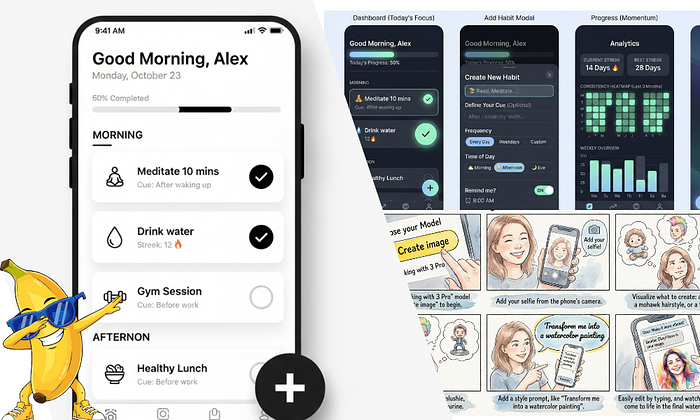


Yes, it got better, and with this new upgrade, it has finally understood me.
I have been testing it on some design tasks to see if it's good enough or better than Google Stitch, and it turns out it's better than before.
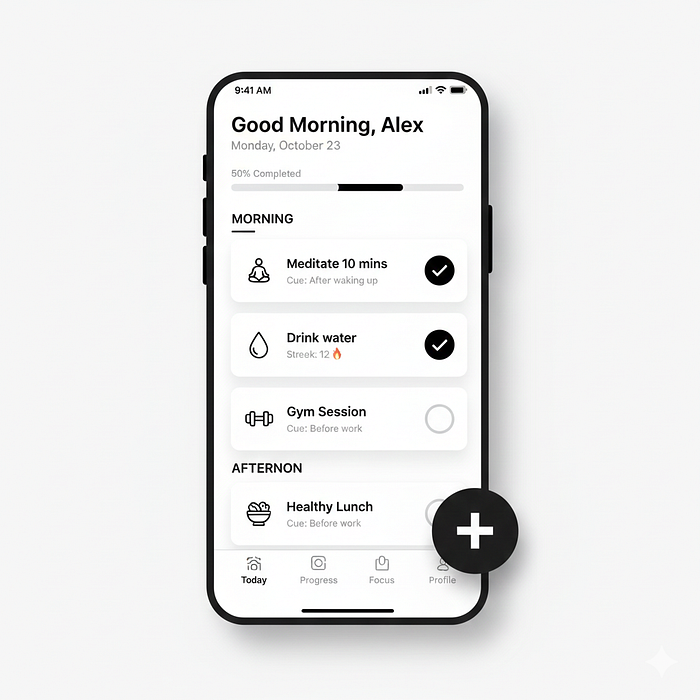
As you can see in the image above, it gave me a good design for a few prompts and even some wireframes.
But in my testing process, the most impressive part was its ability to provide detailed design thinking that is not only useful for presentations but also great for turning this design into an actual app.
So if it's this good in design, what else did I find out?
In this post, I want to save you time and show you what Google Nano Banana Pro is and what you can do with it.
But just a quick pause:
If you are new to my content, I'm Joe. I publish daily reviews of AI models and tools here on Medium. You should consider following me for future updates — thank you!
So,
What is Google Nano Banana Pro?

Google Nano Banana Pro is the newest image generation and editing model built on Gemini 3 Pro.
Released in November 2025, Nano Banana Pro replaces the previous Nano Banana model.
Google rebuilt this from the ground up using Gemini 3's reasoning engine.
It understands context, applies real-world knowledge, and thinks through design decisions.
Nano Banana Pro can generate accurate text in images, handle up to 14 image inputs at once, and maintain consistency across multiple characters or design elements.
For designers and developers, this translates to faster prototyping, better mockups, and designs that require less manual refinement.
The model connects to Google Search's knowledge base, and it can pull real-time information when generating infographics, diagrams, or data visualizations.
This integration makes it useful for creating educational content, technical documentation, or any design work that needs accuracy.
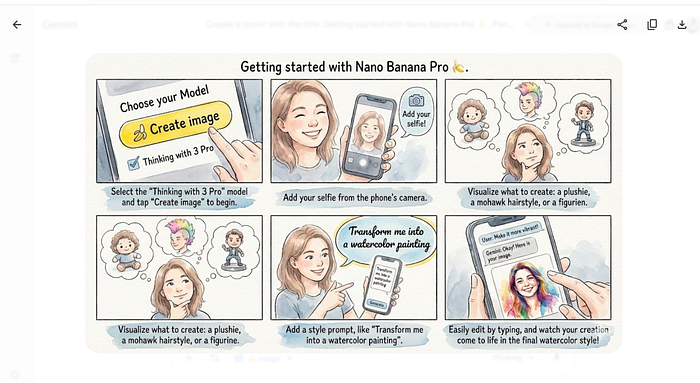
During my testing, I discovered Nano Banana Pro doesn't just generate pretty pictures.
It provides detailed design specifications, explains its reasoning, and creates outputs that developers can use immediately.
We'll explore how this works in the section ahead — Testing Nano Banana Pro for Real Design Work
First,
I wanted to test Nano Banana Pro with a challenge that designers face daily: creating a full-stack app wireframe from scratch.
My prompt was simple:
I want to design a full-stack app wireframe.
It's a modern Habits app that helps users stay focused and build
productive habits.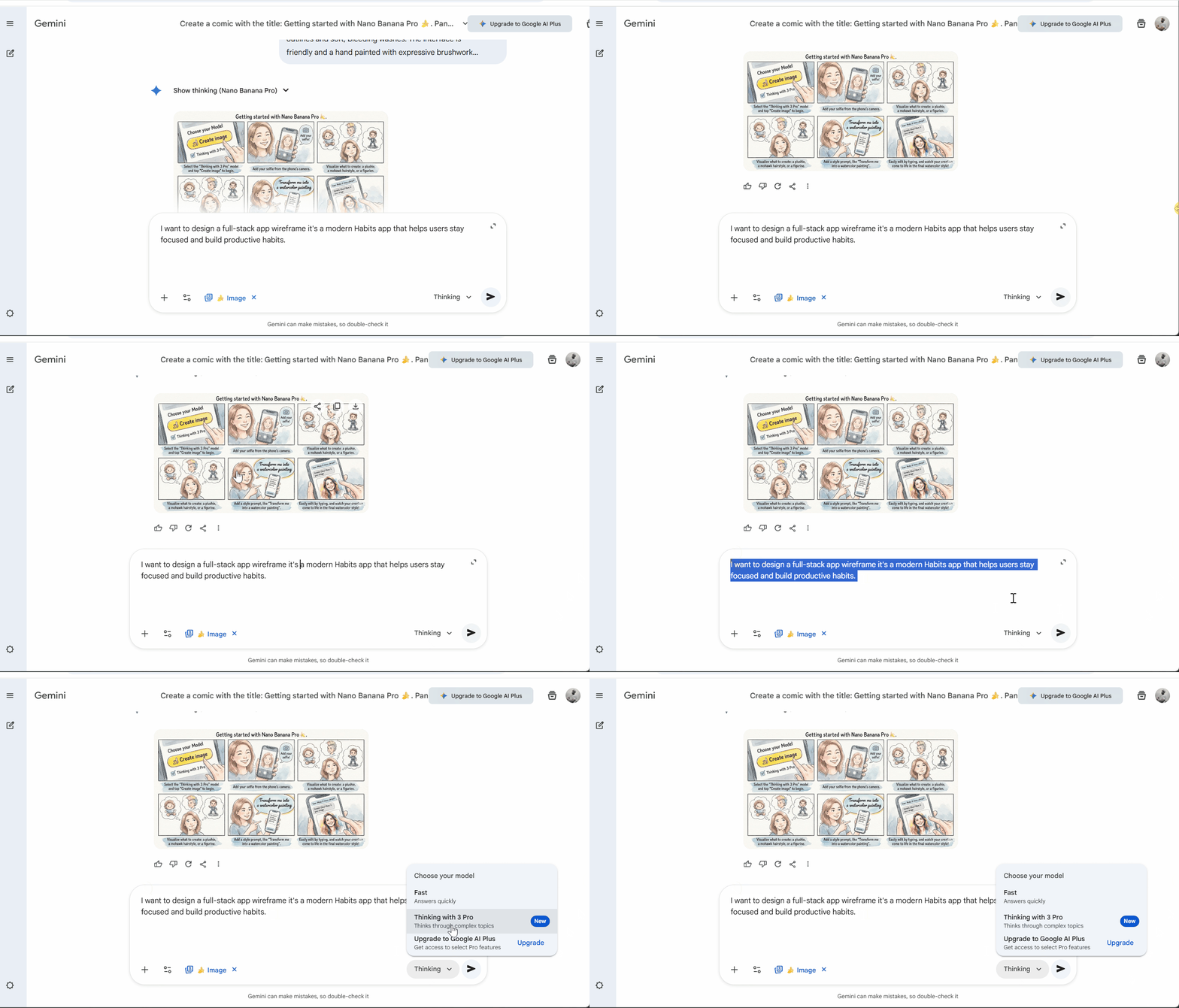
Nano Banana Pro started thinking through the design problem.
It outlined the app philosophy, identified core features, and mapped the user flow before generating any visuals.
Nano Banana Pro understands that good design starts with strategy, not aesthetics.
The model broke down the design philosophy into five core principles:
- Focus on "Today" to reduce cognitive overload
- Frictionless completion as the easiest action
- Streak psychology to leverage loss aversion
- Contextual cues for habit formation
- Integrated focus timer bridging planning and execution
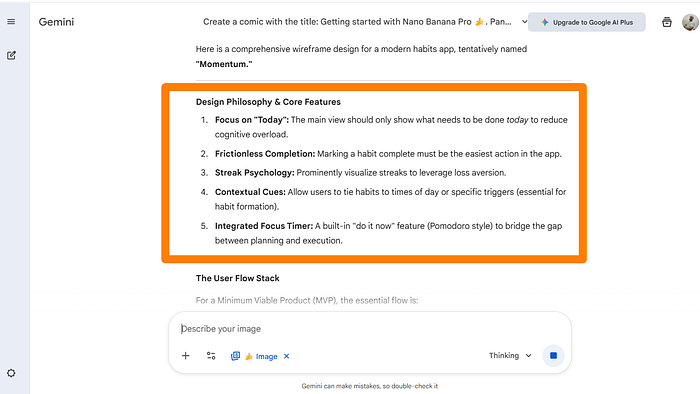
Specific, actionable principles that inform every screen and interaction in the app.
Nano Banana Pro, then came the wireframe structure, and mapped out the essential user flow for a minimum viable product:
- Auth: Sign up and login
- Onboarding: Create the first three habits
- Dashboard: View today's tasks and complete them
- Creation: Add new habits as needed
- Review: Check analytics weekly to adjust goals
It prioritizes the core loop without overcomplicating the MVP with features users don't need first.

The model proposed a bottom navigation bar structure with four tabs: Today (Home), Progress, Focus (Timer), and Profile (Settings).
Again, this shows understanding of mobile UX conventions while keeping the interface minimal and focused.
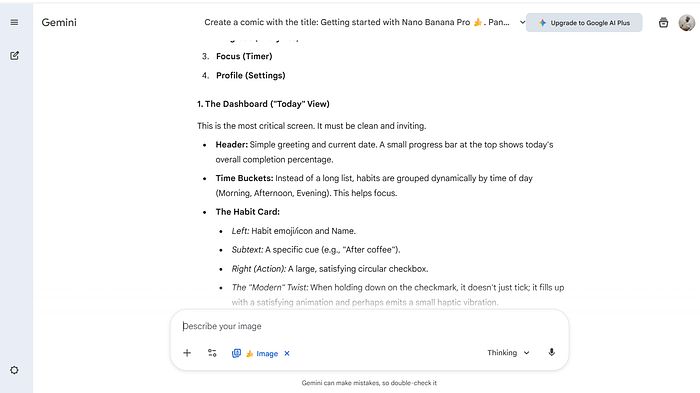
For the dashboard view — the most critical screen — it didn't just list features. It explained each element:
- The header shows a simple greeting with the current date and a progress bar indicating today's completion percentage. This gives users immediate feedback without overwhelming them with data.
- Time buckets group habits by time of day: Morning, Afternoon, Evening. This helps users focus on what's relevant right now, not everything they need to do today.
- Each habit card includes the emoji/icon, name, specific cue (like "After coffee"), and a large, satisfying checkbox on the right.
The "modern twist" Nano Banana Pro added: holding down the checkmark triggers a satisfying animation and haptic vibration, rather than just ticking a box.
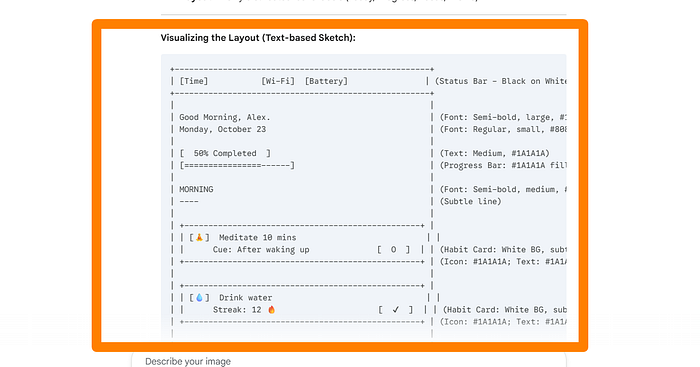
Nano Banana Pro structured information to make the design buildable.
The ASCII wireframe it generated shows exact placement, hierarchy, and relationships between elements — something I can hand to a developer without additional explanation.
After reviewing the wireframes, I pushed Nano Banana Pro further.
I wanted to see if it could transform those text-based wireframes into actual, high-fidelity mockups.
My next prompt was specific:
I want you now to take this to the next level and give me a detailed layout.
I prefer a minimalistic, clean UI with white and black colors using modern UI
 trends, and I want one screen first ONLY.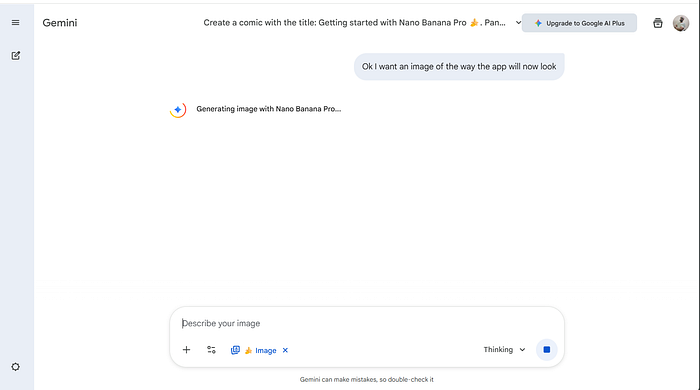
From my previous testing, this is where most AI image generators struggle.
They can create pretty designs, but they rarely understand the constraints of real product design: hierarchy, spacing, typography, color systems, and how these elements work together to create usable interfaces.
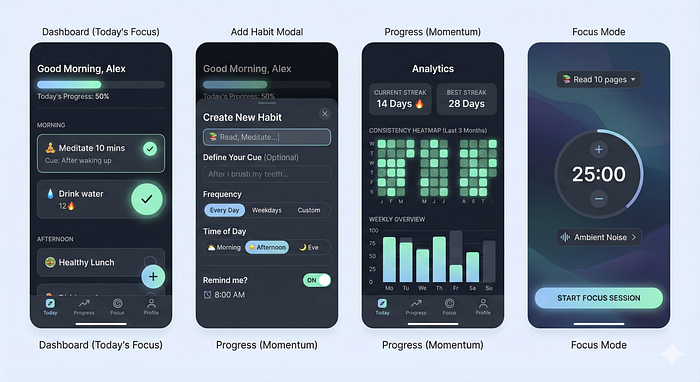
Nano Banana Pro generated four screens in a single go, including the dashboard, habit creation modal, progress analytics, and focus mode.
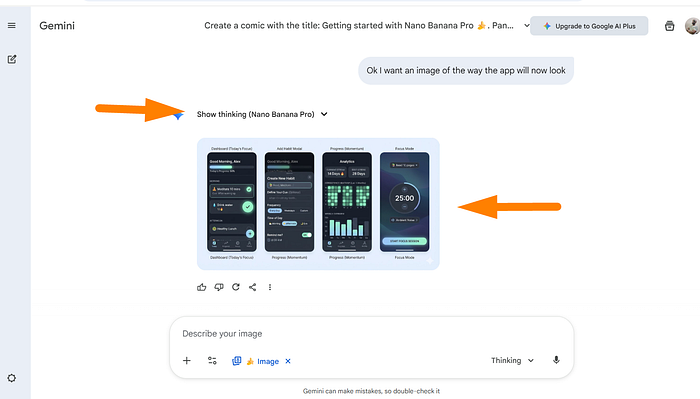
The designs were clean, modern, and followed the minimalist brief I requested.
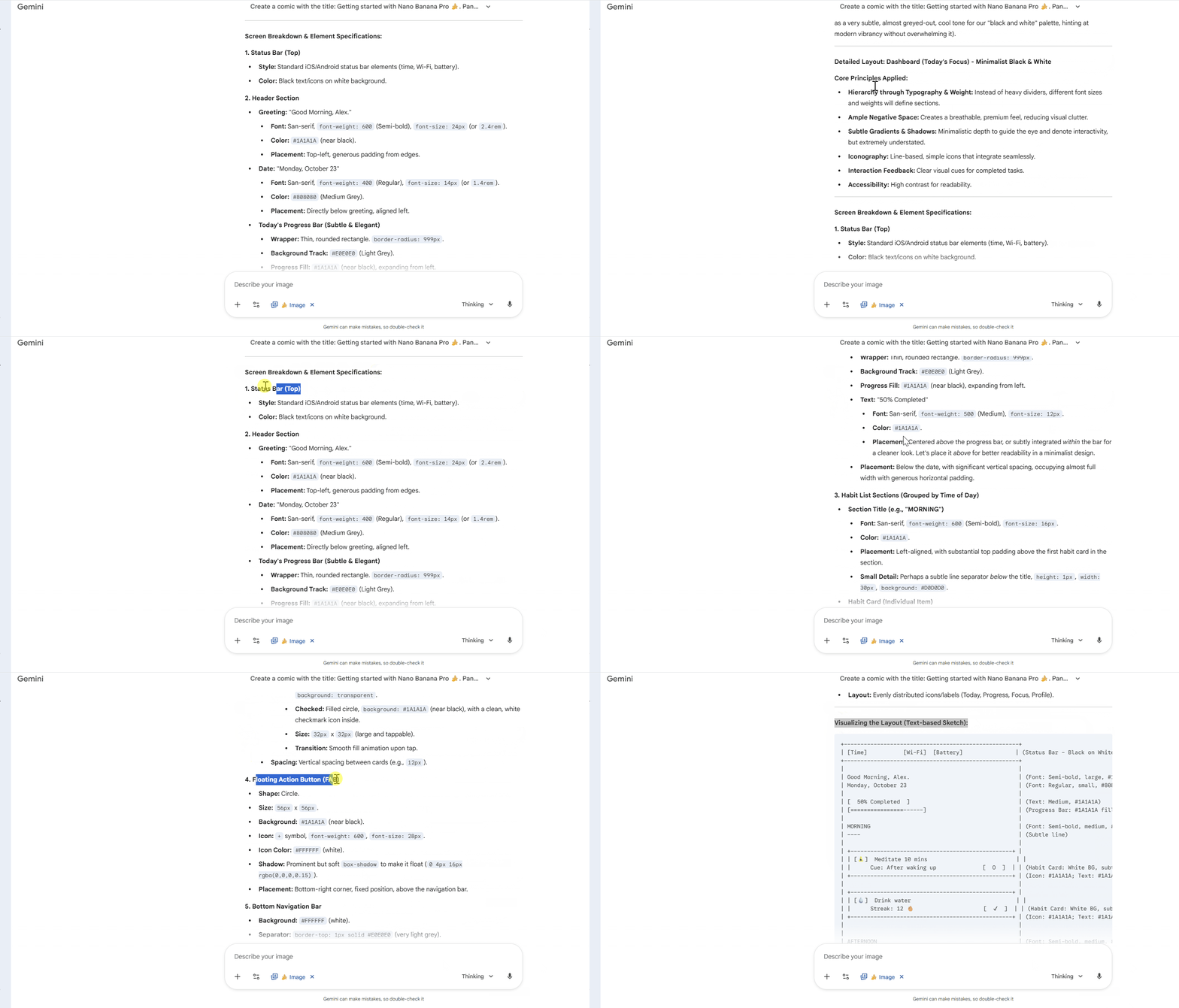
When I asked for the detailed breakdown, Nano Banana Pro provided comprehensive design specifications.
It specified:
- White background with subtle shadow for depth
- Icon in #1A1A1A at the left
- Habit name and cue text with proper hierarchy
- Large circular checkbox on the right (the key interaction point)
| [Time]    [Wi-Fi] [Battery]        | (Status Bar)
+-------------------------------------+
|                                     |
| Good Morning, Alex.                 | (Greeting)
| Monday, October 23                  | (Date)
|                                     |
| [ 50% Completed ]                   | (Progress Bar)
| [================------]            |
|                                     |
| MORNING                             | (Section Header)
| ----                                |
|                                     |
| +----------------------------------+|
| | [🔥] Meditate 10 mins         [O]|| (Habit Card)
| |      Cue: After waking up        ||
| +----------------------------------+|
This text-based representation makes it easy to understand the structure at a glance and communicate with developers who prefer to think in code rather than visual mockups.
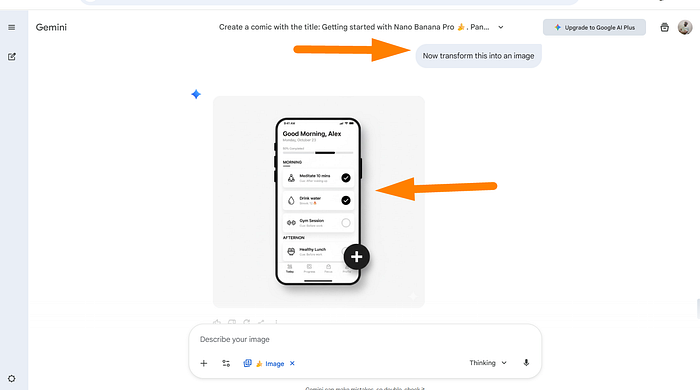
The final generated mockup matched the specifications exactly.
Clean white interface, black text, minimal design with appropriate shadows and spacing.
The habit cards looked tappable, the floating action button stood out without dominating, and the overall hierarchy guided the eye naturally from greeting to progress to today's habits.
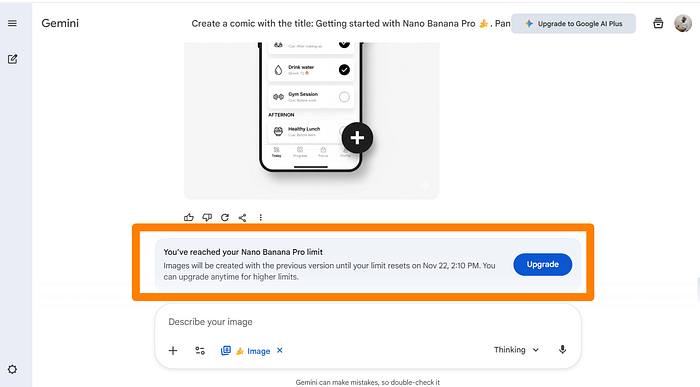
One limitation I hit: Nano Banana Pro has generation limits.
After several iterations, I reached the daily cap. Images will be created with the previous version until the limit resets.
This is worth noting if you plan to use it for extensive design work in one session.
What Nano Banana Pro Can Do Beyond UI Design
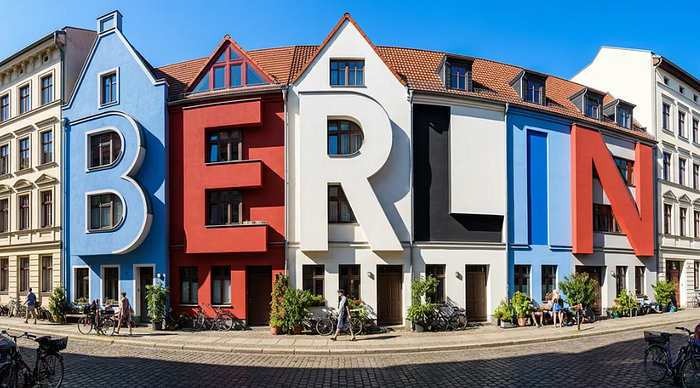
After testing Nano Banana Pro's UI capabilities, I wanted to understand its full range of features.
The model isn't limited to wireframes and app mockups.
Google built it with much broader creative capabilities.
Text Rendering
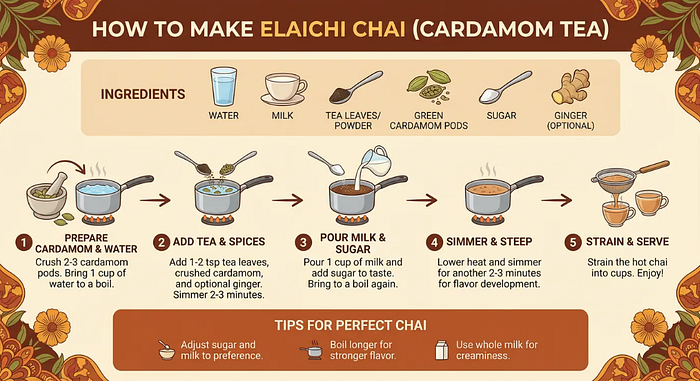
The most significant upgrade in Nano Banana Pro is text handling.
Previous AI image generators struggled with spelling, legibility, and maintaining text quality across different fonts and languages.
Nano Banana Pro can generate correctly rendered, legible text in images — whether you need a short tagline or a full paragraph.
The model understands depth and nuance in typography, which unlocks serious possibilities for designers working on posters, storyboards, branding materials, and localized content.

Google's examples show storyboards with proper text labels, architectural typography integrated into buildings, expressive calligraphy that matches word meanings, and translation of product packaging text while maintaining design integrity.
This matters for UI work too, especially when you're designing screens with multiple text elements — buttons, labels, descriptions, error messages — having an AI that renders text correctly the first time saves hours of manual correction.
Multilingual Support
Gemini 3's enhanced multilingual reasoning enables Nano Banana Pro to generate and translate text across multiple languages while maintaining design consistency.
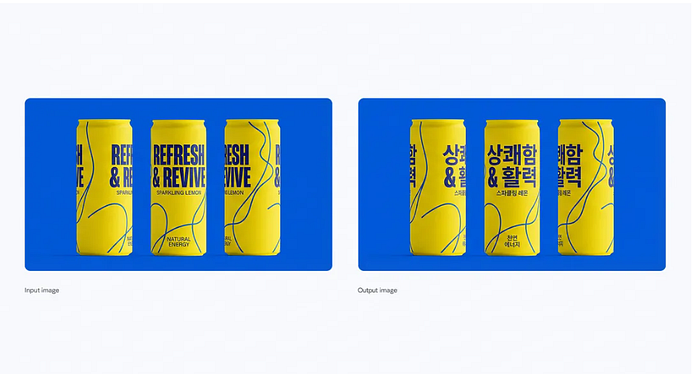
For teams building global products, this is valuable. You can create a mockup in English, then ask for Korean, German, or Arabic versions without redesigning the entire interface.
The model handles grammar, spelling, and even some cultural nuances, though Google notes it still struggles with idiomatic phrases.
Consistency Across Multiple Elements
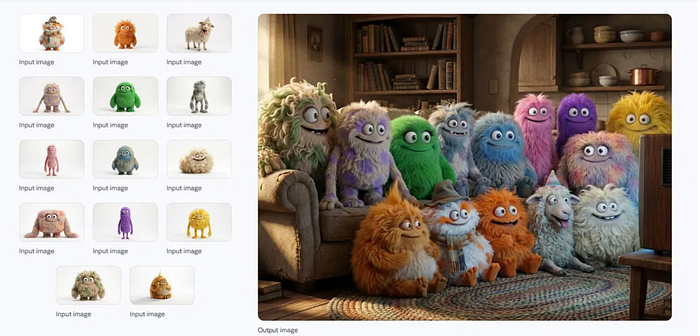
Nano Banana Pro can blend up to 14 images while maintaining consistency across up to 5 people or characters.
This opens up possibilities for creating design systems, brand libraries, and multi-screen flows where visual consistency matters.
For UI designers, this means you can establish a visual style on one screen and apply it across an entire user flow.
Upload your brand colors, typography, and component styles, then ask Nano Banana Pro to generate variations while maintaining consistency.
Google's examples show this working with character designs, lifestyle photography, and even complex architectural visualizations.
The same principle applies to UI work: establish your design language once, then scale it across dozens of screens without manual recreation.
Real-Time Information Integration
One feature that sets Nano Banana Pro apart is its connection to Google Search.
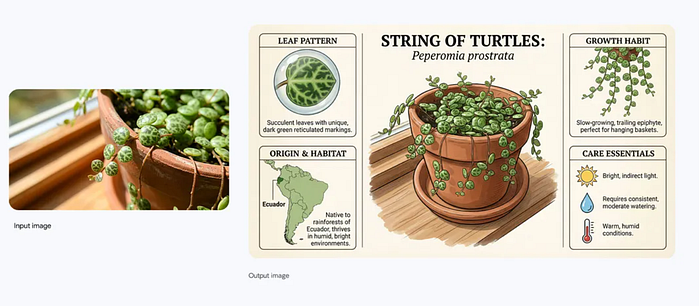
The model can pull real-time information when generating infographics, diagrams, weather displays, recipe cards, or any content that benefits from current data.
For designers creating dashboards, data visualizations, or information-rich interfaces, this integration means mockups can show realistic, current data rather than placeholder content.
Your prototypes feel more real because they contain actual information.
Google Nano Banana Limitations
Google is transparent about limitations. Nano Banana Pro can still struggle with:
- Small faces and fine details
- Accurate spelling in complex scenarios
- Data and factual accuracy in infographics
- Complex lighting changes (day to night transitions)
- Advanced masked editing and image blending
- Character feature consistency (though this is improving)
For UI work, the most relevant limitations are text accuracy and complex edits.
You still need to verify text output, especially in buttons, labels, or error messages where typos matter.
Complex state changes (like showing the same screen in light mode vs dark mode) may require separate generations rather than a single edit.
Safety and Watermarking
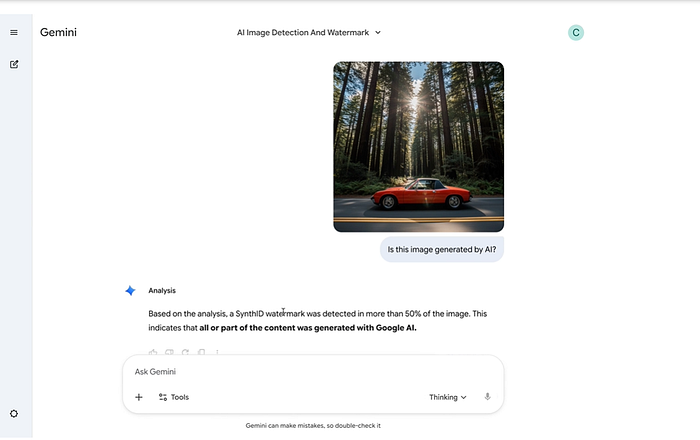
All Nano Banana Pro images include imperceptible SynthID watermarking.
This enables the detection of AI-generated content, which is important for transparency in professional work.
If you're creating mockups for client presentations, the watermarking ensures it's clear how the designs were created.
Google also applies extensive filtering and safety measures to minimize harmful content and ensure appropriate representation across demographics.
Google Nano Banana Pro Use Cases
Nano Banana Pro is good for the early stages of design.
When you need to move from idea to visual concept quickly, it eliminates hours of manual wireframing.
The model's ability to think through design problems — proposing user flows, identifying core features, and explaining its reasoning — makes it useful for strategy work.
For solo developers or small teams without dedicated designers, Nano Banana Pro can produce professional-looking mockups that are good enough to validate ideas, pitch to stakeholders, or guide development.
The text rendering capability is genuinely impressive.
If your work involves creating mockups with lots of UI text, signage, posters, or multilingual interfaces, Nano Banana Pro handles these tasks better than previous AI image generators.
Nano Banana Pro doesn't replace design expertise.
It lacks the understanding of user behavior, business constraints, and brand identity that experienced designers bring.
The model can propose a reasonable user flow, but it won't optimize for your specific users' needs or challenge assumptions about what features matter most.
The designs it generates follow established patterns, which is both a strength and a limitation.
You'll get interfaces that look familiar and usable, but you won't get innovative approaches that push boundaries or solve problems in unexpected ways.
Complex design systems with intricate component libraries, accessibility requirements, and edge case handling still require human creativity.
Nano Banana Pro can be an exciting technology, but real products need designs that gracefully handle errors, loading states, empty states, and user mistakes.
Here's where I see Nano Banana Pro fitting into actual workflows:
- Rapid Prototyping: When you need to test multiple design directions quickly, Nano Banana Pro can generate variations in minutes. Instead of spending hours in Figma exploring different layouts, you can prompt the model with different approaches and see what resonates.
- Client Presentations: For early-stage pitches where you need visuals to communicate concepts, Nano Banana Pro produces mockups that look professional enough for stakeholder feedback without requiring full design system implementation.
- Developer Handoff: The detailed specifications (font sizes, colors, spacing, component breakdown) make it easier to communicate design intent to developers. Instead of just showing images, you're providing the measurements and values needed for implementation.
- Design Education: For people learning UI/UX design, Nano Banana Pro demonstrates design thinking in action. Seeing how it breaks down problems, proposes solutions, and explains its reasoning can help beginners understand the process behind good design.
- Content Creation: If you create tutorials, courses, or documentation that needs UI examples, Nano Banana Pro can generate consistent mockups faster than manually designing each screen.
Getting Better Results
Through testing, I found a few approaches that produced better output:
- Be specific about constraints.
Instead of "design an app," specify "design a mobile app with a minimalist white and black color scheme using modern UI trends." The more parameters you provide, the more focused the output.
2. Ask for iterations.
Generate a rough version first, then refine based on what works and what doesn't. Nano Banana Pro responds well to feedback like "make the buttons larger" or "use more spacing between sections."
3. Request detailed specifications.
If you need developer-ready output, ask for font sizes, colors, spacing values, and component breakdowns. The model can provide this information when you prompt for it.
4. Use the thinking mode.
When Nano Banana Pro shows its reasoning process, pay attention. This often reveals better approaches or considerations you might have missed.
How to Get Started
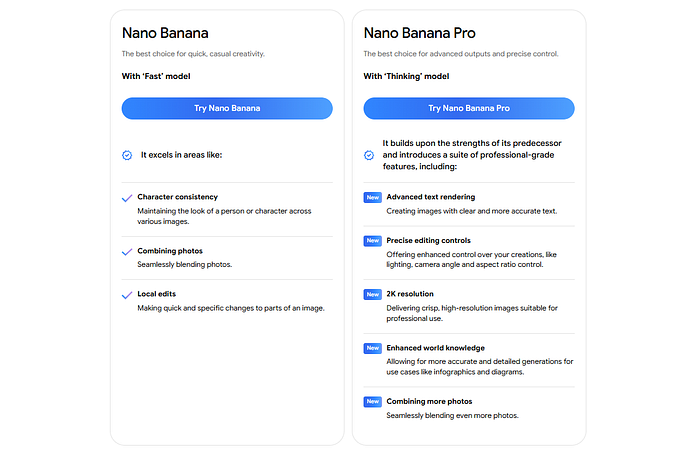
Nano Banana Pro is now available on Gemini. You can access it through:
- Gemini web interface for quick testing and prototyping
- Google AI Studio for more advanced prompting and iteration
- Gemini API, if you want to integrate it into your own tools and workflows
- Vertex AI Studio for enterprise applications
Final Thoughts
Nano Banana Pro is powerful for accelerating design work in the early stages.
But I am sure AI will never replace skilled designers, but it changes what's possible for small teams, solo developers, and anyone who needs to move from concept to visual mockup quickly.
The model's ability to generate accurate text, maintain consistency across multiple screens, and provide detailed specifications makes it more useful than previous AI image generators for serious design work.
The integration with Google Search and real-world knowledge means mockups can contain realistic, current information rather than placeholder content.
For UI/UX designers, Nano Banana Pro is worth learning because it handles time-consuming tasks — wireframing, generating variations, and creating specifications.
Have you tried Google Nano Banana Pro? What are your thoughts? Let us know in the comments below.
Let's Connect!
If you are new to my content, my name is Joe Njenga
Join thousands of other software engineers, AI engineers, and solopreneurs who read my content daily on Medium and on YouTube where I review the latest AI engineering tools and trends. If you are more curious about my projects and want to receive detailed guides and tutorials, join thousands of other AI enthusiasts in my weekly AI Software engineer newsletter
If you would like to connect directly, you can reach out here:
Follow me on Medium | YouTube Channel | X | LinkedIn