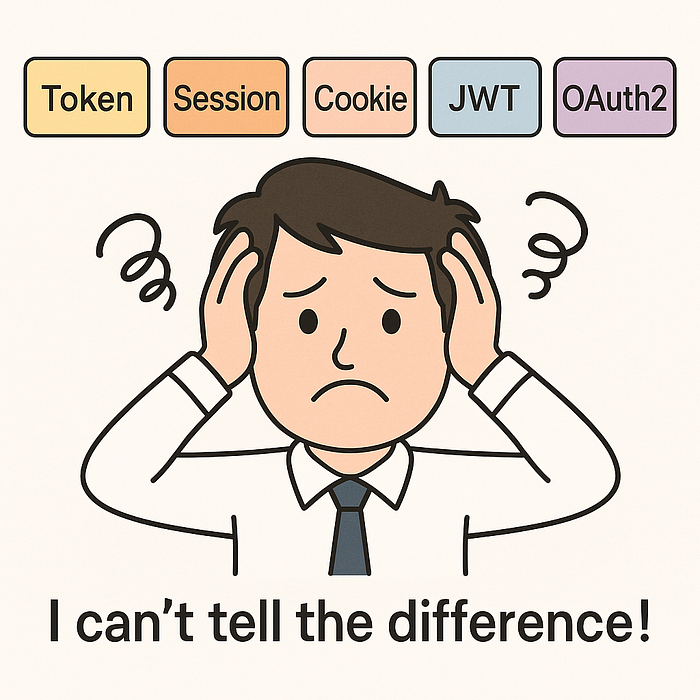

Some people may have encountered this kind of confusion at work:
- When implementing login functionality, should we use Session or JWT?
- What is the relationship between OAuth2 and Token?
- Why do some solutions store the token in a cookie?
This article will discuss this topic with you today, and I hope it will be helpful.
I. Let's start with the restaurant dining model. 🍽️
To help you understand better, let me first use the analogy of dining in a restaurant to explain these concepts:
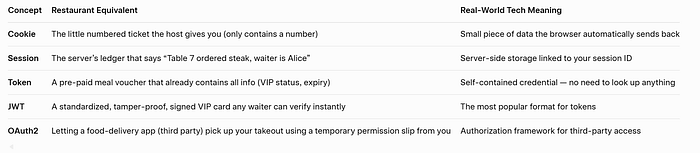
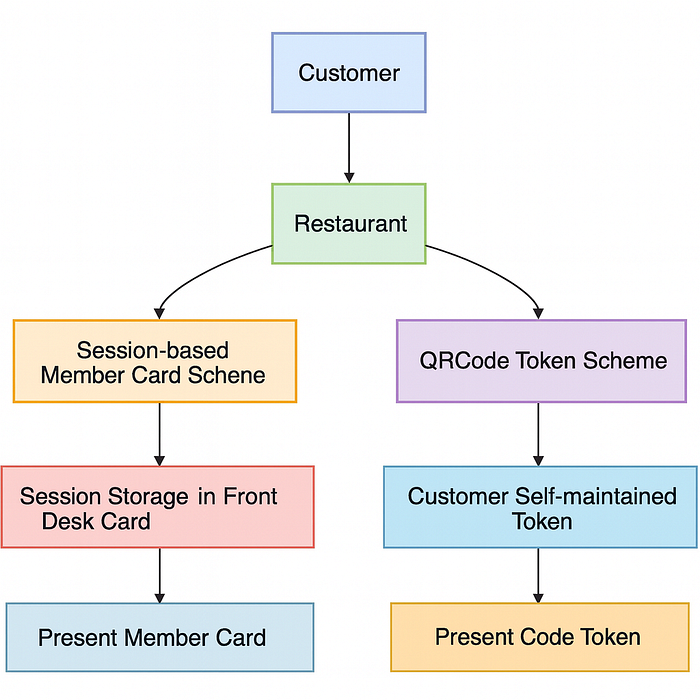
Now, let's delve into the technical details of each concept.
II. Cookie: HTTP's Global Identity Card 🍪
2.1 What is a Cookie?
Cookies are small pieces of text data stored on the browser side. They are sent to the browser by the server through a field in the HTTP response header Set-Cookie, and the browser will automatically send them back to the server in the header on each subsequent request.
- Working principle: The browser acts as the carrier, automatically transmitting the data for the server to maintain state.
2.2 Practical Cookie Code
// Server sets the Cookie
@PostMapping("/login")
public ResponseEntity login(@RequestBody User user, HttpServletResponse response) {
    if (authService.authenticate(user)) {
        Cookie cookie = new Cookie("session_id", generateSessionId());
        cookie.setMaxAge(3600); // 1 hour validity
        cookie.setHttpOnly(true); // Prevent XSS attack
        cookie.setSecure(true); // HTTPS transmission only
        cookie.setPath("/"); // Valid for the entire site
        response.addCookie(cookie);
        return ResponseEntity.ok().build();
    }
    return ResponseEntity.status(401).build();
}

// Read the Cookie
@GetMapping("/profile")
public ResponseEntity getProfile(@CookieValue("session_id") String sessionId) {
    User user = sessionService.getUserBySession(sessionId);
    return ResponseEntity.ok(user);
}
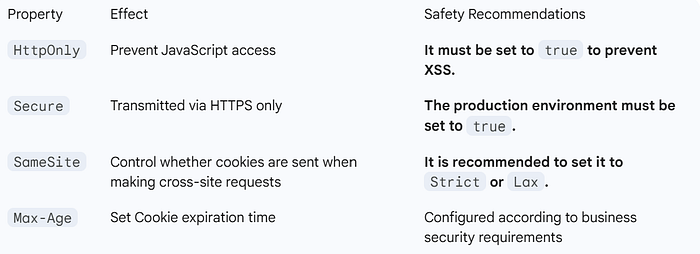
2.3 Key Attributes of Cookies
III. Session: Server-side user profile 💾
3.1 What is a Session?
A session is user state information stored on the server side. The server creates a unique session ID for each user and typically passes this ID to the browser via a cookie (the Session ID cookie). The browser includes this ID in subsequent requests, allowing the server to identify the user and retrieve their stored state.
- Session storage structure:
// Typical Session data structure
public class UserSession {
    private String sessionId;
    private String userId;
    private String username;
    private Date loginTime;
    private Date lastAccessTime;
    private Map<String, Object> attributes; // Custom attributes
    // Omitted getter/setter
}
3.2 Session Practical Code
// Spring Session based implementation
@PostMapping("/login")
public String login(@RequestParam String username,
                    @RequestParam String password,
                    HttpSession session) {
    User user = userService.authenticate(username, password);
    if (user != null) {
        // Store user information in Session
        session.setAttribute("currentUser", user);
        session.setAttribute("loginTime", new Date());
        return "redirect:/dashboard";
    }
    return "login?error=true";
}

@GetMapping("/dashboard")
public String dashboard(HttpSession session) {
    // Get user information from Session
    User user = (User) session.getAttribute("currentUser");
    if (user == null) {
        return "redirect:/login";
    }
    return "dashboard";
}
3.3 Session Storage Scheme
- Memory storage (default): Simple, but not suitable for clusters.
# application.yml
server:
  servlet:
    session:
timeout: 1800 # 30 minutes expiration time- Redis distributed storage: Solves the cluster synchronization issues.
@Configuration
@EnableRedisHttpSession // Enable Redis Session storage
public class SessionConfig {
    @Bean
    public LettuceConnectionFactory connectionFactory() {
        return new LettuceConnectionFactory();
    }
}- Session cluster synchronization issues: In a load-balanced environment, requests might hit different servers. Distributed storage (like Redis or database) is required to ensure session consistency across all servers.
IV. Token: Decentralized Identity Token 🔑
4.1 What is a Token?
A token is a self-contained identity credential. The server does not necessarily need to store session state; all necessary authentication information is often contained within the token itself (especially for structured tokens like JWT). This is the foundation of stateless authentication.
Key DifferencesSessionTokenState StorageServer-side (heavy load on server memory/store)Client-side (token itself is stored by the client)ScalabilityPoor for distributed environments (requires session sharing)Excellent (stateless, easy to scale)Cross-DomainDifficult (Cookie restrictions)Easy (passed in HTTP Header)
4.2 Practical Token Code
The following example uses the JWT standard for token implementation:
// Generate Token
public String generateToken(User user) {
    long currentTime = System.currentTimeMillis();
    return JWT.create()
            .withIssuer("myapp") // Issuer
            .withSubject(user.getId()) // User ID
            .withClaim("username", user.getUsername())
            .withClaim("role", user.getRole())
            .withIssuedAt(new Date(currentTime)) // Issued time
            .withExpiresAt(new Date(currentTime + 3600000)) // Expiration time
            .sign(Algorithm.HMAC256(secret)); // Signing key
}

// Validate Token
public boolean validateToken(String token) {
    try {
        JWTVerifier verifier = JWT.require(Algorithm.HMAC256(secret))
                .withIssuer("myapp")
                .build();
        DecodedJWT jwt = verifier.verify(token);
        return true;
    } catch (JWTVerificationException exception) {
        return false;
    }
}
V. JWT: A Modern Token Standard 🛡️
5.1 What is JWT?
JWT (JSON Web Token) is an open standard (RFC 7519) for securely transmitting information as a JSON object between parties.
This information can be verified and trusted because it is digitally signed.
- JWT structure:
header.payload.signature- Decoding example:
// Header
{
  "alg": "HS256",
  "typ": "JWT"
}

// Payload
{
  "sub": "1234567890",
  "name": "John Doe",
  "iat": 1516239022,
  "exp": 1516242622
}

// Signature
HMACSHA256(
  base64UrlEncode(header) + "." +
  base64UrlEncode(payload),
  secret)
5.2 JWT Practical Code
// Create JWT
public String createJWT(User user) {
    return Jwts.builder()
            .setHeaderParam("typ", "JWT")
            .setSubject(user.getId())
            // ... claims, issuer, etc.
            .setExpiration(new Date(System.currentTimeMillis() + 3600000))
            .claim("username", user.getUsername())
            .signWith(SignatureAlgorithm.HS256, secret.getBytes())
            .compact();
}

// Parse JWT
public Claims parseJWT(String jwt) {
    return Jwts.parser()
            .setSigningKey(secret.getBytes())
            .parseClaimsJws(jwt)
            .getBody();
}
// Using JWT in Spring Security
@Component
public class JwtFilter extends OncePerRequestFilter {
    @Override
    protected void doFilterInternal(HttpServletRequest request,
                                   HttpServletResponse response,
                                   FilterChain chain) {
        String token = resolveToken(request);
        if (token != null && validateToken(token)) {
            Authentication auth = getAuthentication(token);
            SecurityContextHolder.getContext().setAuthentication(auth);
        }
        chain.doFilter(request, response);
    }
}
5.3 Best Practices for JWT
- Secure storage:
- Not recommended:
localStorage(vulnerable to XSS attacks). - Recommended:
HttpOnlyCookie (prevents XSS) or in-memory storage in the frontend. - Token refresh mechanism: Implement a dual-token strategy to mitigate the risk of long-lived tokens being compromised.
- Access Token: Short-term validity (e.g., 1 hour).
- Refresh Token: Long-term validity (e.g., 7 days).
// Dual Token Mechanism: Access Token + Refresh Token
public class TokenPair {
    private String accessToken;  // Short-term validity: 1 hour
    private String refreshToken; // Long-term validity: 7 days
}

// Refresh Token interface
@PostMapping("/refresh")
public ResponseEntity refresh(@RequestBody RefreshRequest request) {
    String refreshToken = request.getRefreshToken();
    if (validateRefreshToken(refreshToken)) {
        String userId = extractUserId(refreshToken);
        String newAccessToken = generateAccessToken(userId);
        return ResponseEntity.ok(new TokenPair(newAccessToken, refreshToken));
    }
    return ResponseEntity.status(401).build();
}
VI. OAuth 2.0: The King of Authorization Frameworks 👑
6.1 What is OAuth 2.0?
OAuth 2.0 is an authorization framework that allows third-party applications to access protected resources on behalf of users after obtaining their authorization.
OAuth 2.0 Roles:
- Resource Owner: User
- Client: Third-party application
- Authorization Server: Issues access tokens
- Resource Server: Hosts protected resources
6.2 OAuth 2.0 Authorization Code Process
6.3 Practical Code for OAuth 2.0
// Spring Security OAuth2 Configuration
@Configuration
@EnableAuthorizationServer
public class AuthorizationServerConfig extends AuthorizationServerConfigurerAdapter {

    @Autowired
    private AuthenticationManager authenticationManager;

    @Override
    public void configure(ClientDetailsServiceConfigurer clients) throws Exception {
        clients.inMemory()
            .withClient("clientapp")
            .secret(passwordEncoder.encode("123456"))
            .authorizedGrantTypes("authorization_code", "refresh_token")
            .scopes("read", "write")
            .redirectUris("http://localhost:8080/callback");
    }

    @Override
    public void configure(AuthorizationServerEndpointsConfigurer endpoints) {
        endpoints.authenticationManager(authenticationManager)
            .tokenStore(tokenStore())
            .accessTokenConverter(accessTokenConverter());
    }
}


// Resource Server Configuration
@Configuration
@EnableResourceServer
public class ResourceServerConfig extends ResourceServerConfigurerAdapter {

    @Override
    public void configure(HttpSecurity http) throws Exception {
        http.authorizeRequests()
            .antMatchers("/api/public/**").permitAll()
            .antMatchers("/api/private/**").authenticated()
            .antMatchers("/api/admin/**").hasRole("ADMIN");
    }
}
VII. Comparison of Five Major Concepts 📊
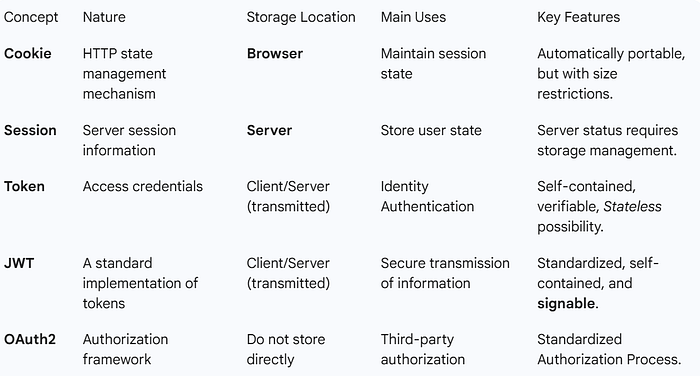
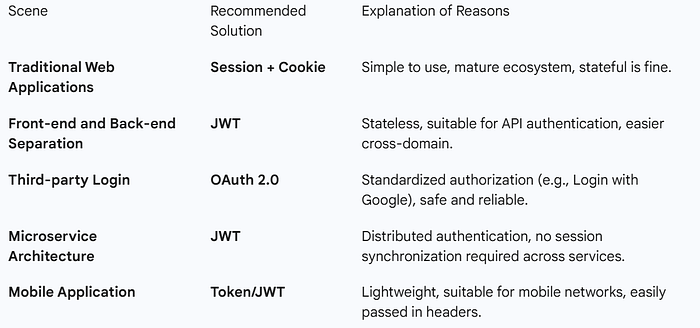
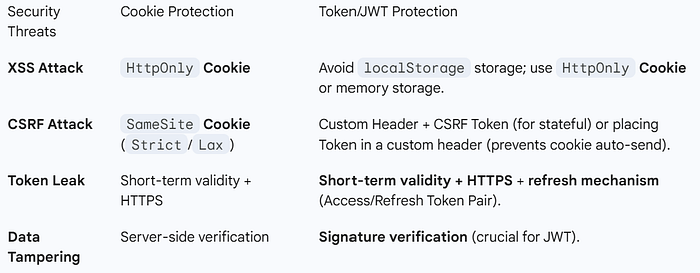
To help everyone better understand the relationships and differences between these five concepts, here is a comparison table:
7.1 Functional Positioning Comparison
7.2 Comparison of Application Scenarios
7.3 Comparison of Safety Considerations
Summarize ✨
Through today's in-depth discussion, we can draw the following conclusions:
- Cookies are carriers: The state management mechanism of the HTTP protocol, and one of the mediums for transmitting session IDs and tokens.
- Session refers to state: The server-side user state that needs to be implemented using a carrier (like a Cookie with a Session ID).
- A token is a credential: A credential for authentication and authorization, which can be placed in a cookie, header, or URL.
- JWT is a standard: A standardized implementation of tokens that is self-contained, verifiable, and trustworthy due to its signature.
- OAuth2 is a framework: An authorization framework that defines a complete third-party authorization process.
Final Recommendation:
- Simple Web Applications: Session + Cookie
- Front-end and Back-end Separation / Microservices: JWT + HTTP Header
- Third-party Authorization: OAuth 2.0 + JWT
There is no best solution, only the most suitable solution.
Below is the mind map for quick reference -
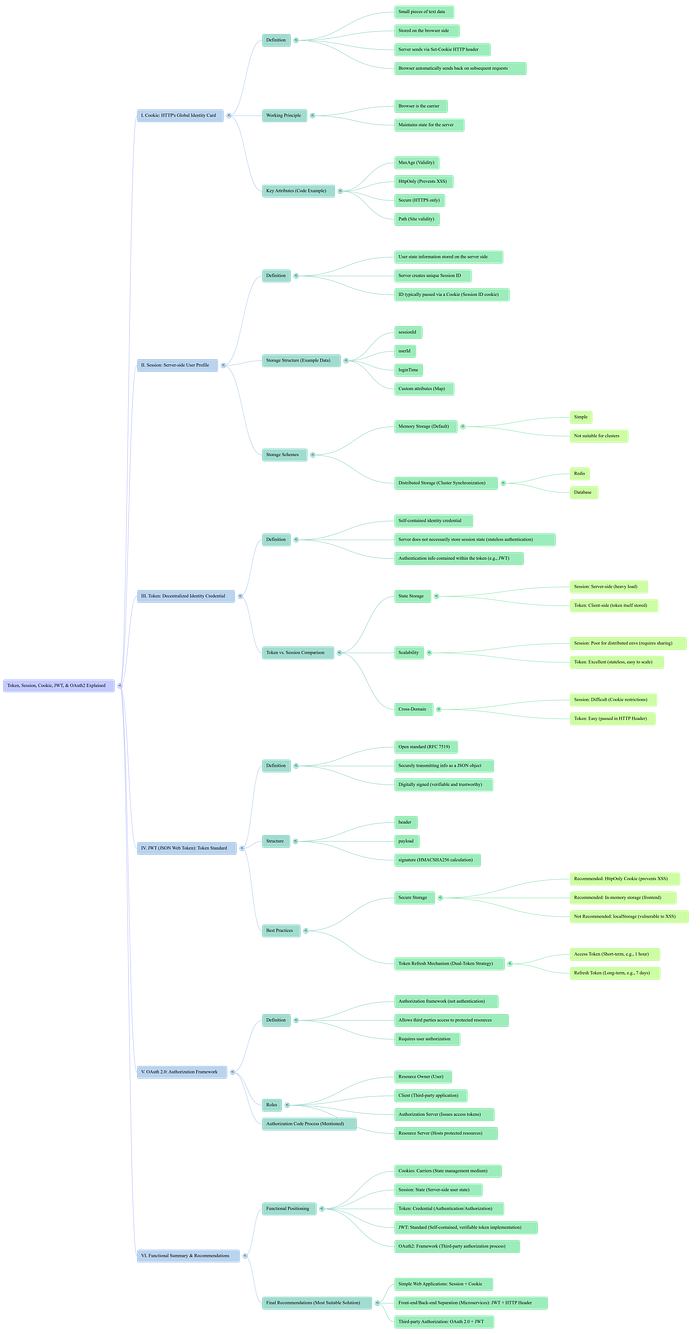
Understanding the essence and applicable scenarios of each technology is essential for making the right architectural decisions.
Thank you for your patience in reading this article!
If you found this article helpful, please give it a clap 👏, and share it with your friends and follow me for more insights.
😊Your support is my biggest motivation to continue to output technical insights!