
With the rise of lakehouse architectures, we now store both data and metadata together in formats like Delta or Iceberg. Downstream systems such as Databricks with Spark can then rely on these formats to manage the metadata and efficiently fetch the data, without having to worry about low‑level file organization.
As the data warehouse continues to grow, both data and metadata files expand rapidly. With hundreds or even hundreds of thousands of tables, lack of proper maintenance can severely impact performance. Over time, queries become slower because the system must scan an increasing number of files and metadata entries to retrieve results efficiently.
Table maintenance is a crucial yet often overlooked task. Although it may seem tedious, neglecting it can lead to serious performance and storage issues over time. Regular maintenance typically involves a few key activities:
- Rewriting data files for optimal size and layout
- Expiring outdated snapshots to free up metadata overhead
- Removing orphaned files that no longer belong to any active table state.
Let's understand each topic and how do we can handle them:
Compaction of small files by re-writing
File compaction becomes a critical concept when designing a layer where all the data is dumped. When there are fewer, larger files, queries run faster because the metadata layer does not have to track and scan a huge number of small files. In other words, compacting small files into fewer, larger ones reduces metadata overhead and improves query performance.
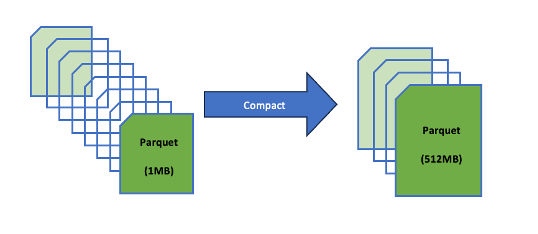
A simple file compaction code snippet which Iceberg is offering in the batch mode is:
        try (TableLoader tableLoader = TableLoader.fromHadoopTable(tablePath)) {
            tableLoader.open();
            Table table = tableLoader.loadTable();

            RewriteDataFilesActionResult result =
                    Actions.forTable(table)
                            .rewriteDataFiles()
                            .execute();
        } catch (Exception e) {
            e.printStackTrace();
        }
Expire Snapshots
Each write to an Iceberg table creates a new snapshot, or version, of a table. Snapshots can be used for time-travel queries, or the table can be rolled back to any valid snapshot. — Iceberg Documentation
Over time, hundreds or thousands accumulate, bloating the metadata file (e.g., metadata.json in Iceberg)
Why do we want to expire snapshots?
Increase in the metadata size: Every time there is a snapshot, it is added to the table's history, which will slow the query planning.
Wastage of storage: Old data files won't be deleted until all snapshots referencing them expires.
Slower operations: Time travel, rollbacks and compaction will get slow with too many snapshots.
So in Iceberg, the snapshots get accumulated until they are expired by the expireSnapshots operation. One should regularly expire the snapshots and it is also recommended because it will keep the size of table metadata small.
try (TableLoader tableLoader = TableLoader.fromHadoopTable(tablePath)) {
    tableLoader.open();
    Table table = tableLoader.loadTable();

    long tsToExpire = System.currentTimeMillis() - (3L * 24 * 60 * 60 * 1000);

    table.expireSnapshots()
            .expireOlderThan(tsToExpire)
            .commit();
Delete Orphan files
Sometimes, even after snapshot expiration, certain files remain undeleted. These unreferenced files are known as orphan files because they're no longer tracked in the table's metadata but still occupy storage space. Identifying and removing these orphan files is essential, as it helps reclaim storage and improve efficiency.
In a Flink–Iceberg setup, the process of deleting orphan files typically looks like this:
TableLoader tableLoader = TableLoader.fromCatalog(
        CatalogLoader.hadoop("iceberg-warehouse", hadoopConf, catalogProperties),
        TableIdentifier.of(database, tableName)
 );

TableMaintenance.forTable(env, tableLoader, lockFactory)
        .add(DeleteOrphanFiles.builder()
                .minAge(Duration.ofDays(2)).scheduleOnInterval(Duration.ofSeconds(1)) ).append(); // Set minimum age for orphan files
The TriggerLockFactory is an interface that defines several methods. In my class, I implemented this interface and customized the createLock and createRecoveryLock methods slightly. This step is crucial because locks enable proper coordination when deleting orphan files—preventing multiple users from running the deletion process simultaneously. To explore more about how lock management works: https://iceberg.apache.org/docs/1.10.0/flink-maintenance/#lock-management
Always execute in this sequence to maximize efficiency and safety(opiniated):
- File compaction first: Merges small files into optimal sizes (e.g., 128–512 MB targets), improving query performance.
- Snapshot expiration next: Removes old snapshots (e.g., >7 days, retain last 10), deleting their unreferenced files.
- Orphan file deletion last: Cleans files not tracked by any metadata (e.g., older than 3–5 days), reclaiming space.
For File compaction, go with the continuous(write-heavy) or daily(low-traffic)
For Snapshot expiration, the frequency should be daily.
For deletion of orphan files, the frequency should be weekly or after expiration.
The frequency will change according to your data, keep adapting to it.
The order of execution of these jobs also can change, like going through the data and expire the snapshots at first, delete the orphan files and then you can do the file compaction. There is no order to it, just pick whatever suits for your needs.
Conclusion
Iceberg table maintenance matters because it preserves fast query planning, predictable storage growth, and reliable time-travel semantics. Without it, metadata balloons, small-file proliferation slows scans, and orphaned files waste space and risk inconsistencies.