

Every senior developer has been there. You open a pull request, scan the first few lines, and immediately know you're looking at junior code. Not because it doesn't work, it probably does. But because it smells.
Code smells aren't bugs. They're red flags. Warning signs that scream this will be painful to maintain. After analyzing thousands of code reviews and studying common antipatterns across major open-source projects, eight smells consistently reveal inexperience. Let's dig into what they are, why juniors fall into these traps, and how to fix them.
Copy-Paste Programming: The Viral Code Infection
You've seen it. A function that works perfectly in one file suddenly appears, with minor tweaks, in three other files. Then five. Then everywhere.
The smell: Identical or near-identical code blocks scattered across your codebase. Same logic, different variable names. Same structure, slightly different conditions.
Junior developers copy-paste for a simple reason: it works right now. Why reinvent the wheel when Stack Overflow has the answer? But here's the problem, every copy is a bug waiting to multiply. Fix the original? You now need to hunt down every clone.
// BAD: Copy-pasted validation everywhere
function validateUserEmail(email) {
  if (!email) return false;
  if (email.length > 255) return false;
  if (!email.includes('@')) return false;
  return true;
}

function validateAdminEmail(email) {
  if (!email) return false;
  if (email.length > 255) return false;
  if (!email.includes('@')) return false;
  return true;
}

// GOOD: Single source of truth
function isValidEmail(email) {
  return email && email.length <= 255 && email.includes('@');
}

// Use it everywhere
const userValid = isValidEmail(user.email);
const adminValid = isValidEmail(admin.email);
A study of code smell detection tools found that duplicated code is one of the most frequent smells in software projects, with copy-paste programming acting like a virus that spreads through codebases. One developer reported finding the same 10-line function copied to six different files, each version slightly broken in its own unique way.
The fix: Follow the Rule of Three. Write it once. Use it twice. On the third use, extract it into a reusable function. And when you do copy code to understand it, delete the original and rewrite it in your own words.
Poor Variable Naming: The Single-Letter Nightmare
x, temp, data, obj, arr, i, j, k, and the dreaded ii, jj, iii.
The smell: Variables that tell you nothing about what they contain or why they exist.
Juniors use single-letter variables because it's faster to type. Or because they learned loops with i and never questioned it. One developer confessed to reviewing code where variables were named pig, cow, and dog, with no explanation.
# BAD: What is this even doing?
def p(d, x):
    r = []
    for i in d:
        if i > x:
            r.append(i)
    return r

# GOOD: Instantly understandable
def filter_products_above_price(products, minimum_price):
    expensive_products = []
    for product in products:
        if product.price > minimum_price:
            expensive_products.append(product)
    return expensive_products
A data science developer studying variable naming found that poor names like X, y, xs, and tmp dominated beginner code. The worst part? Even the author forgets what they mean after a few weeks.
The fix: Name variables like you're explaining them to someone six months from now, because that someone is you. Use full words. Be specific. If you can't describe it in one clear phrase, your variable is probably doing too much.
Magic Numbers: The Mystery Constants
if (status == 3), price * 1.15, array[52], what do these numbers mean?.
The smell: Bare numbers scattered through your code with zero context.
Junior developers hardcode numbers because it's the simplest solution right now. But magic numbers are dangerous for two reasons: nobody knows what they represent, and changing them requires finding every single occurrence.
// BAD: What's 86400? What's 1.08?
long millisecondsPerDay = 86400 * 1000;
double priceWithTax = basePrice * 1.08;

if (userLevel == 3) {
    grantAdminAccess();
}

// GOOD: Self-documenting code
private static final int SECONDS_PER_DAY = 86400;
private static final double TAX_RATE = 0.08;
private static final int ADMIN_LEVEL = 3;

long millisecondsPerDay = SECONDS_PER_DAY * 1000;
double priceWithTax = basePrice * (1 + TAX_RATE);

if (userLevel == ADMIN_LEVEL) {
    grantAdminAccess();
}
One developer working on a legacy system found 0xFFFFFFFF hardcoded throughout the codebase as an error marker. It worked fine on 32-bit systems. On 64-bit? Complete failure. The lesson: magic numbers create invisible dependencies.[13]
The fix: Define named constants for any number that isn't self-evident. MAX_LOGIN_ATTEMPTS = 3 beats attempts > 3 every single time.
God Objects: The Class That Does Everything

One class. 2,000 lines. Handles authentication, database queries, API calls, validation, logging, and somehow also manages UI state.
The smell: A single class that knows too much or does too much, the infamous God Object.
Juniors create God Objects because everything needs to talk to everything, right? So why not put it all in one place? The problem: this violates the Single Responsibility Principle. Your class has 47 reasons to change instead of one.
// BAD: God Object doing everything
class UserManager {
  // Handles database
  async saveUser(user) { /* ... */ }
  async loadUser(id) { /* ... */ }

  // Handles validation
  validateEmail(email) { /* ... */ }
  validatePassword(pass) { /* ... */ }

  // Handles authentication
  login(username, password) { /* ... */ }
  logout() { /* ... */ }

  // Handles UI
  renderUserProfile() { /* ... */ }
  updateProfileDisplay() { /* ... */ }

  // Handles notifications
  sendWelcomeEmail() { /* ... */ }
  notifyAdmins() { /* ... */ }
}
// GOOD: Separated responsibilities
class UserRepository {
  async save(user) { /* ... */ }
  async findById(id) { /* ... */ }
}

class UserValidator {
  validateEmail(email) { /* ... */ }
  validatePassword(pass) { /* ... */ }
}

class AuthenticationService {
  constructor(repository, validator) {
    this.repository = repository;
    this.validator = validator;
  }

  async login(username, password) { /* ... */ }
}
Research on antipatterns found that God Objects are one of the most damaging smells because they create tight coupling across the entire system. One Flutter developer described reviewing a single widget that handled network calls, state management, database access, AND UI rendering, all in 800 lines.
The fix: Ask yourself: Can I describe this class in one sentence without using 'and'? If not, split it. Each class should have one reason to change.
Deeply Nested Conditionals: The Arrow Code
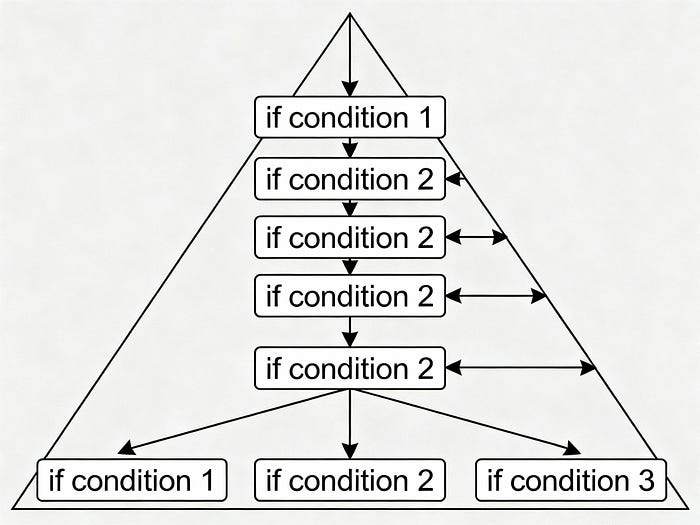
Seven levels deep. if inside if inside for inside try inside if, creating what developers call arrow code because the indentation looks like an arrow pointing right.
The smell: Conditional logic nested so deep you lose track of which branch you're in.
Juniors nest conditions because they're thinking step-by-step: First check this, then check that, then if this other thing…. But deeply nested code becomes impossible to reason about.
# BAD: The Arrow of Doom
def process_order(order):
    if order is not None:
        if order.items:
            if order.customer:
                if order.customer.is_verified:
                    if order.total > 0:
                        if order.payment_method:
                            if order.shipping_address:
                                # Finally do the work
                                process_payment(order)
                            else:
                                raise Exception("No address")
                        else:
                            raise Exception("No payment")
# GOOD: Guard clauses flatten the logic
def process_order(order):
    # Early returns handle edge cases
    if order is None:
        raise ValueError("Order cannot be None")
    if not order.items:
        raise ValueError("Order has no items")
    if not order.customer:
        raise ValueError("Order has no customer")
    if not order.customer.is_verified:
        raise ValueError("Customer not verified")
    if order.total <= 0:
        raise ValueError("Invalid order total")
    if not order.payment_method:
        raise ValueError("No payment method")
    if not order.shipping_address:
        raise ValueError("No shipping address")

    # Now do the actual work
    process_payment(order)
Research on code complexity found that nested conditionals are a nasty code smell because they grow more complicated over time, developers keep adding conditions without refactoring. One developer described reviewing code with eight levels of nesting that included loop iteration counters named i, ii, iii, and iiii.
The fix: Use guard clauses and early returns. Handle error cases at the top of your function, then do the happy path. Your code becomes linear instead of pyramidal.
Ignoring Error Handling: The "It Works on My Machine" Syndrome
No try-catch. No validation. No null checks. Just raw, optimistic code that assumes everything always works perfectly.
The smell: Functions that blow up with cryptic errors when given unexpected input.
Juniors skip error handling because handling errors is boring. The fun part is making features work. Plus, errors mean the code is broken, and acknowledging that feels like admitting failure.
// BAD: What if user doesn't exist? What if fetch fails?
async function getUserProfile(userId) {
  const response = await fetch(`/api/users/${userId}`);
  const data = await response.json();
  return data.profile.name; // What if profile is null?
}
// GOOD: Defensive programming
async function getUserProfile(userId) {
  if (!userId) {
    throw new Error('User ID is required');
  }

  try {
    const response = await fetch(`/api/users/${userId}`);

    if (!response.ok) {
      throw new Error(`HTTP ${response.status}: ${response.statusText}`);
    }

    const data = await response.json();

    if (!data || !data.profile) {
      throw new Error('Invalid user data structure');
    }

    return data.profile.name || 'Unknown User';

  } catch (error) {
    console.error('Failed to fetch user profile:', error);
    throw new Error(`Unable to load user ${userId}: ${error.message}`);
  }
}
A study on error handling found that ignoring errors is the biggest mistake developers make in any language. Not catching errors early leads to follow-up errors that are much harder to track down than the original problem.
The fix: Add error handling as you write the code, not after. Ask What could go wrong here? at every external call, every user input, every null reference. And always log errors with context.
Premature Optimization: Fixing Problems That Don't Exist
Spending three days optimizing a function that runs once at startup. Replacing a simple array search with a hand-rolled binary search tree because it's O(log n).
The smell: Complex, clever code written to solve performance problems before measuring whether they exist.
Juniors optimize prematurely because they want to write professional code. They've read that performance matters, so they optimize everything. But this wastes time and often makes code slower by preventing compiler optimizations.
# BAD: Premature optimization
class OptimizedUserCache:
    def __init__(self):
        self.cache = {}
        self.access_count = {}
        self.lru_queue = []

    def get_user(self, user_id):
        # 40 lines of complex cache management
        # for a cache that stores 5 users
        # and gets called once per minute
        pass
# GOOD: Simple and clear
class UserCache:
    def __init__(self):
        self.cache = {}

    def get_user(self, user_id):
        if user_id not in self.cache:
            self.cache[user_id] = load_user_from_db(user_id)
        return self.cache[user_id]

    # Optimize LATER if profiling shows it's needed
Donald Knuth famously said: Premature optimization is the root of all evil. He meant optimizing small efficiencies before profiling is wasteful. One developer spent weeks optimizing loop increments in test code, saving milliseconds, but the tests took 4 seconds minimum just to launch.
The fix: Write clear code first. Profile later. Optimize only what the profiler identifies as slow. Focus on algorithmic complexity (O(n²) vs O(n)), not micro-optimizations.
Outdated Comments: The Lies in Your Code
Comments that describe code that no longer exists. Documentation explaining a parameter that was removed three refactors ago. Function descriptions that contradict what the function actually does.
The smell: Comments and code that tell different stories.
Juniors write comments, then change the code but forget to update the comments. Or they inherit commented code and trust it blindly. The result: comments that lie.
// BAD: Comment describes old behavior
/**
 * Validates user email and sends confirmation
 * Returns true if email sent successfully
 */
public boolean validateUser(User user) {
    // Code changed - now just validates, doesn't send email
    return user.email != null && user.email.contains("@");
}
// GOOD: Code is self-documenting, comments explain WHY
public boolean isValidEmail(String email) {
    // Email validation kept simple per security team requirement:
    // Full RFC 5322 validation causes false negatives for international domains
    return email != null && email.contains("@");
}
Research on code-comment consistency found that outdated comments are dangerous and harmful because they mislead developers about what code actually does. One study detected outdated comments with over 90% precision using machine learning. The most common cause? Code changes without comment updates.
The fix: Update comments when you change code, or delete them. Comments should explain why, not what. If the code is clear, you might not need comments at all.
The Pattern Behind the Smells
Notice something? These eight smells share a root cause: short-term thinking.
Copy-paste gets it working now. Magic numbers are faster to type. God Objects avoid thinking about architecture. Nested conditionals follow the first solution that comes to mind. Skipping error handling means fewer lines of code. Premature optimization feels productive. Outdated comments are invisible until they bite you.
Junior developers aren't lazy or incompetent. They're optimizing for the wrong metric: making code work today instead of making it maintainable tomorrow.
Three questions to ask before committing:
- Will another developer understand this in six months? (Even if that developer is you)
- What happens when requirements change? (They always do)
- Can I test this easily? (If not, it's probably too complex)
The good news? Recognizing these smells is the first step to eliminating them. Every senior developer wrote code that stank when they were junior. The difference is they learned to smell it themselves before someone else did.
What code smells have you caught yourself writing? Drop a comment with your most embarrassing junior moment, we've all been there.
Resources & Further Reading
- Anti-patterns that every developer should know
- 6 Types of Anti Patterns to Avoid in Software Development
- Stop Code Duplication from Destroying Your Codebase
- What are some super common beginner mistakes?
- The Danger of Copy-Paste Learning
- Is it normal for a junior developer to reuse a lot of code at work?
- Data Scientists Your Variable Names Are Awful Heres How To Fix Them
- Bad Variable Names
- Bad Naming Conventions
- Antipatterns: Magic Numbers
- Lesson 9. Pattern 1. Magic numbers
- 5 Most Common Anti-Patterns in Programming and How to Avoid Them
Enjoyed? Clap 👏, Share, Subscribe, and Follow for more!