
Yes — especially if you're not regularly updating your knowledge on new features, tips, and tricks that are evolving with each passing day.
I write about Claude Code updates every day, and sometimes I feel like I'm behind the curve since the AI coding space is changing rapidly.
In the last few months, I have discovered several tips, tricks, and hacks that every pro developer using Claude Code should master.
And I have summarized them into this one article that will improve your knowledge of Claude Code and make your Claude Code coding more efficient.
But,
If you missed out on my year of Claude Code updates, where I covered every new feature, tip, and trick, I got you covered — check out the complete list of Claude Code tutorials here, and do not forget to follow me here on Medium and my Claude Code Masterclass newsletter.
Let's get started.
1. The "Plan Before You Code" Discipline
Amateurs jump straight into coding.
Pros use a structured Research → Plan → Implement → Validate flow.
This is perhaps the most foundational workflow that separates experienced Claude Code users from beginners.
The temptation to let Claude start coding immediately is strong — but it's almost always the wrong move for complex tasks.
- Use Plan Mode (Shift+Tab twice) for read-only codebase exploration before writing anything
- Explicitly tell Claude: "Read the relevant files, but don't write any code yet."
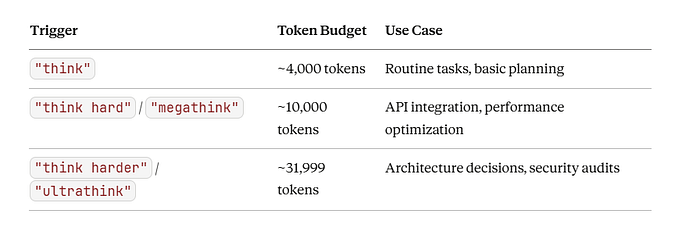
- Use thinking triggers that map to increasing levels of thinking budget:
"think"→"think hard"→"think harder"→"ultrathink" - Ask Claude to create a plan document before implementing so you can course-correct early
Pro Workflow:
The most underrated productivity technique is aggressive context clearing. Use /clear often—every time you start something new. Don't let unrelated context from previous tasks pollute your current work.
Claude tends to jump straight to coding a solution. While sometimes that's what you want, asking Claude to research and plan first improves performance for problems requiring deeper thinking upfront.
2. Strategic CLAUDE.md Architecture
Amateurs either skip CLAUDE.md or stuff it with everything.
Pros keep it lean, specific, and hierarchical.
Frontier thinking LLMs can follow approximately 150–200 instructions with reasonable consistency.
As instruction count increases, instruction-following quality decreases uniformly — meaning Claude doesn't just ignore newer instructions, it begins to ignore all of them.
Claude Code's system prompt already contains around 50 individual instructions.
That's nearly a third of the instructions your agent can follow before your CLAUDE.md even starts.
Pro Workflow:
- Keep CLAUDE.md under 50 lines for hobby projects
- Never send an LLM to do a linter's job — use deterministic tools for code style, not instructions
- Use the
.claude/rules/directory for modular organization (separate files for code-style, testing, security) - Use
@path/to/importsyntax to reference files dynamically rather than embedding content - If you have extensive documentation elsewhere, don't @-mention those files in your CLAUDE.md (this bloats context). Instead, mention the path and pitch Claude on why and when to read it: "For complex usage or if you encounter a FooBarError, see path/to/docs.md for advanced troubleshooting steps."
3. Context Window Mastery
Amateurs let context bloat until Claude forgets earlier instructions.
Pros treat context like a scarce resource.
A fresh session in a monorepo costs a baseline ~20k tokens (10%) with the remaining 180k for making changes — which can fill up fast.
You can think of context like disk space that fills up as you work on a feature.
Pro Workflow:
- Run
/contextmid-session to understand your token usage - Avoid auto-compaction — it's opaque, error-prone, and not well-optimized
- Use
/clearfor simple reboots - For complex tasks, use the "Document & Clear" method: have Claude dump its plan and progress into a
.mdfile,/clearthe state, then start a new session by telling it to read the.mdand continue - Never exceed 60% context — clear context between each phase of work
- Disable unused MCP servers with
/mcpbefore compacting to maximize available context
My golden rule is to split work into 4 phases: Research → Plan → Implement → Validate, and then clear context between each.
4. Git Worktrees for Parallel Development
Amateurs run one Claude session at a time.
Pros run multiple agents simultaneously on isolated branches.
Git worktrees solve the context switching problem by letting you run multiple Claude Code sessions in parallel, each with its own isolated context.
No more context switching or lost momentum.
Pro Workflow
Setup Example
# Create isolated worktrees for parallel features
git worktree add ../my-project-feature-a -b feature-a main
git worktree add ../my-project-bugfix -b hotfix main

# Run separate Claude sessions in each
cd ../my-project-feature-a && claude- Each worktree has its own independent file state, perfect for parallel Claude Code sessions
- Changes in one worktree won't affect others, preventing Claude instances from interfering
- All worktrees share the same Git history
- For long-running tasks, you can have Claude working in one worktree while you continue development in another
Caution: Parallelism is a double-edged sword. The conflicts you have to resolve can sometimes take up more time than if you had worked sequentially.
For critical, major refactors, stick with a planned, sequential approach. After completing a checkpoint, make it a habit to pull and merge updates from the main branch.
5. Test-Driven Development as a Feedback Loop
Amateurs ask Claude to build features.
Pros give Claude verifiable targets through tests first.
Test-driven development becomes even more powerful with agentic coding. Claude performs best when it has a clear, verifiable target.
Tests provide this explicit target, allowing Claude to make changes, evaluate results, and incrementally improve.
Pro Workflow
TDD Approach
- Ask Claude to write tests based on expected input/output pairs
- Be explicit that you're doing test-driven development so it avoids creating mock implementations
- Tell Claude to run tests and confirm they fail (no implementation code yet)
- Commit the failing tests
- Ask Claude to implement until tests pass
- At this stage, ask Claude to verify with independent subagents that the implementation isn't overfitting to the tests
Pro Tips:
- Leverage CLAUDE.md to establish project-wide TDD conventions and quality standards
- Use hooks to automatically run test suites after any file edit
- Course correct early and often — be an active collaborator
6. Custom Slash Commands for Repeatable Workflows
Amateurs type the same prompts repeatedly.
Pros encode workflows as reusable commands.
Pro Workflow
How to Set Up:
- Store prompt templates in
.claude/commands/folder as Markdown files - Use
$ARGUMENTSfor parameterized commands - Check commands into git for team consistency
Example Command (.claude/commands/fix-github-issue.md):
Please analyze and fix the GitHub issue: $ARGUMENTS

Follow these steps:
1. Use `gh issue view` to get the issue details
2. Understand the problem described in the issue
3. Search the codebase for relevant files
4. Implement the necessary changes to fix the issue
5. Write and run tests to verify the fix
6. Ensure code passes linting and type checking
7. Create a descriptive commit message
8. Push and create a PR
Pro Tip:
Keep slash commands simple — shortcuts for frequently used prompts, nothing more. If you have a long list of complex custom commands, you've created an anti-pattern.
The entire point of an agent like Claude is that you can type almost whatever you want and get a useful, mergeable result.
7. Hooks for Deterministic Automation
Amateurs rely on Claude to "remember" to run linters and tests.
Pros use hooks to guarantee it happens.
Claude Code hooks are deterministic triggers that run shell commands at specific points in Claude Code's lifecycle.
Prompts are great for suggestions; hooks are guarantees.
Pro Workflow
Key Hook Events:
- PreToolUse: Block risky operations (like writing to
.envor.git/) - PostToolUse: Auto-format files after edits, run tests automatically
- SessionStart: Inject context, load recent tickets
- Notification: Desktop alerts when Claude needs input
Example: Auto-format TypeScript after edits
{
  "hooks": {
    "PostToolUse": [{
      "matcher": "Edit|Write",
      "hooks": [{
        "type": "command",
        "command": "npx prettier --write \"$file_path\""
      }]
    }]
  }
}
Example: Block writes to sensitive files
{
  "hooks": {
    "PreToolUse": [{
      "matcher": "Edit|Write",
      "hooks": [{
        "type": "command",
        "command": "python3 -c \"import json, sys; data=json.load(sys.stdin); path=data.get('tool_input',{}).get('file_path',''); sys.exit(2 if any(p in path for p in ['.env', 'package-lock.json', '.git/']) else 0)\""
      }]
    }]
  }
}
The transformation: Hooks turn Claude Code from a helpful assistant into a repeatable engineering system.
8. Subagents for Context-Efficient Research
Amateurs have one agent do everything.
Pros delegate research to subagents to preserve the main context.
Pro Workflow
How Subagents Help:
A complex task requires X tokens of input context, accumulates Y tokens of working context, and produces a Z token answer. Running N tasks means (X + Y + Z) × N tokens in your main window.
Subagents farm out the (X + Y) work to specialized agents, which only return the final Z token answers, keeping your main context clean.
When to Use:
- Early in a conversation or task, use subagents to verify details or investigate particular questions — this preserves context availability without much downside in efficiency
- Delegate codebase exploration, research, and verification tasks
- Run multiple subagents in parallel: "Explore the codebase using 4 tasks in parallel. Each agent should explore different directories."
Caution:
Custom subagents can gatekeep context, for example, if you make a PythonTests subagent, your main agent can no longer reason holistically about a change.
It's now forced to invoke the subagent just to know how to validate its own code.
9. MCP Server Integration for Real-World Connectivity
Amateurs use Claude as an isolated coding assistant.
Pros connect Claude to their entire development ecosystem.
Pro Workflow
High-Value MCP Integrations Examples:
- GitHub: "Add the feature described in JIRA issue ENG-4521 and create a PR"
- Sentry: "Check Sentry to analyze errors for the feature described in ENG-4521"
- Databases: "Find emails of 10 random users who used feature ENG-4521, based on our PostgreSQL database"
- Puppeteer: Visual testing with browser screenshots
- Figma: Convert designs to production code
Setup:
claude mcp add --transport http github https://mcp.github.com
claude mcp add --transport http sentry https://mcp.sentry.com
Pro Tip:
Share MCP configurations with your team by checking in a
.mcp.jsonfile in your project root. Every engineer working on your repo can use these out of the box.
10. Visual Iteration Loop
Amateurs describe what they want.
Pros show Claude what they want and let it iterate visually.
Like humans, Claude's outputs tend to improve significantly with iteration. While the first version might be good, after 2–3 iterations it will typically look much better.
Give Claude the tools to see its outputs for the best results.
Pro Workflow:
- Give Claude a visual mock (paste/drag-drop image or provide file path)
- Use Puppeteer MCP to take browser screenshots
- Ask Claude to implement, screenshot the result, and iterate until it matches
I also found that specifically telling Claude to make outputs "aesthetically pleasing" helps remind it that it's optimizing for a human viewing experience
11. The Extended Thinking Spectrum
Amateurs use ultrathink for everything.
Pros match thinking levels to task complexity.
Claude Code has built-in preprocessing that maps keywords to thinking budgets:
Pro Workflow
Mistake to Avoid:
Using ultrathink for everything burns through your API budget and slows everything down. Ultrathink is a scalpel, not a hammer.
When to Use Each:
- Basic thinking: Refactor this class, add error handling, fix simple errors
- Enhanced thinking: Design a caching strategy, plan database migration
- Ultrathink: Design scalable architecture for 10M users, comprehensive security audit, migration of monolith to microservices
Pro tip: Toggle verbose mode with
Ctrl+Oto see Claude's thinking process displayed as gray italic text.
12. Session Management Mastery
Amateurs start fresh every time.
Pros leverage session persistence and resumption.
Pro Workflow:
- Give sessions descriptive names with
/renameto find them later - Use
claude --resumea session from days ago to ask Claude to summarize how it overcame a specific error—then use that to improve your CLAUDE.md - Session history is stored in
~/.claude/projects/—you can run meta-analysis on these logs looking for common exceptions and error patterns
Key Commands:
claude --continue(or-c): Continue the most recent conversationclaude --resume(or-r): Opens an interactive session picker/resume(inside Claude): Switch to a different conversation
Power Move:
Use /rewind or press Esc twice to access the checkpoint system. You can restore:
- Conversation only: Rewind to a user message while keeping code changes
- Code only: Revert file changes while keeping the conversation
- Both: Restore both to a prior point
13. Checkpoints for Fearless Experimentation
Amateurs fear making big changes.
Pros use checkpoints to experiment aggressively.
Claude Code automatically tracks all changes made by its file editing tools.
This safety net lets you pursue ambitious, wide-scale tasks knowing you can always return to a prior code state.
Pro Workflow
5 Recovery Patterns:
- Code-only restore: Multi-file refactor breaks everything, but Claude understands what you're trying to do
- Conversation-only restore: Reset Claude's context while keeping code changes
- Full restore: Go back to a clean slate
- Branching exploration: Try approach A, restore, try approach B
- Quick experimentation: "Convert all routes to controller pattern" → Review →
/rewindif you hate it
Critical Limitation:
Bash commands are NOT tracked.
If Claude runs
rm,mv, orcp, those changes are permanent. Checkpoints only capture edits made through Claude's file editing tools.
14. Headless Mode for CI/CD Integration
Amateurs use Claude only interactively.
Pros integrate Claude into their automation pipelines.
Claude Code includes headless mode for non-interactive contexts like CI, pre-commit hooks, build scripts, and automation.
Pro Workflow
Basic Usage:
# Simple one-shot command
claude -p "Update all copyright headers to 2025" --json

# With stdin input
cat src/utils.ts | claude -p "Find potential bugs"
# With specific permissions
claude -p "Fix the failing test in auth.test.js" \
  --allow-tools Edit,View,Bash \
  --output-format json
GitHub Actions Example:
name: Claude Code Review
on:
  pull_request:
    types: [opened, synchronize]

jobs:
  review:
    runs-on: ubuntu-latest
    steps:
      - uses: actions/checkout@v4
      - uses: anthropics/claude-code-action@v1
        with:
          anthropic_api_key: ${{ secrets.ANTHROPIC_API_KEY }}
          prompt: |
            Review this PR for:
            - Code quality issues
            - Potential bugs
            - Security concerns
Two Primary Patterns:
- Fanning out: Handle large migrations by generating a task list, then looping through tasks calling Claude for each
- Pipelining:
cat build-error.txt | claude -p 'explain the root cause' > output.txt
15. Agent Skills for Domain Expertise
Amateurs repeat the same instructions every session.
Pros package expertise into reusable Skills.
Agent Skills are organized folders of instructions, scripts, and resources that Claude can discover and load dynamically.
They extend Claude's capabilities by packaging your expertise into composable resources.
Pro Workflow
How Skills Work:
- At startup, Claude loads only the name and description of each available Skill
- When your request matches a Skill's description, Claude automatically loads and applies it
- Skills operate through progressive disclosure — loading information only as needed
Creating a Custom Skill:
# .claude/skills/my-skill/SKILL.md
---
name: pr-review
description: Review pull requests using our team's coding standards and security checklist
---

# PR Review Skill
When reviewing PRs, always check:
1. Security vulnerabilities
2. Test coverage
3. Documentation updates
4. Performance implications
[Additional instructions...]
Pre-built Skills:
- PowerPoint (pptx): Create and edit presentations
- Excel (xlsx): Spreadsheets, data analysis, charts
- Word (docx): Document creation and formatting
- PDF (pdf): Generate formatted documents
Pro Tip:
Skills enforce a process that turns a smart assistant into a truly structured collaborator.
They channel the raw intelligence of your agents, ensuring every mission is executed with precision.
16. Voice Prompting for Speed
Amateurs type every prompt.
Pros leverage voice for 3x faster input.
The average speech is about 3x the average typing speed. Speaking is overpowered when it comes to productivity when working with a coding LLM.
Pro Workflow:
- Speak your ideas using dictation software
- Refine or expand with Claude
- Review through text-to-speech
Options:
- Wispr Flow: Dictate prompts directly into Claude Code
- Voicy: Privacy-focused speech-to-text that works in any text field
- VoiceMode MCP: Brings natural voice conversations to Claude Code
Using dictation software increases your speed by an average of 3x. You can write longer, more detailed prompts that result in better outputs.
17. The Multi-Claude Orchestra
Amateurs work sequentially.
Pros orchestrate multiple Claude instances like a symphony.
The most advanced workflow involves running multiple Claude instances in parallel, each serving a specific purpose.
Pro Workflows
Pattern 1: Writer + Reviewer
A simple but effective approach is to have one Claude write code while another reviews or tests it.
Pattern 2: Specialized Teams
Agent-1 and Agent-2: Work on different component folders in parallel
Agent-3 and Agent-4: Update tests as components are completed
Agent-5: Regenerate documentation after all refactoring is done
Agent-6: Run performance benchmarks on the new components
Final Thoughts
After observing hundreds of developers use Claude Code, the best pattern that is clear can be summed up:
Pros treat Claude Code as a system to be engineered, not just a tool to be prompted.
The differentiators are:
- Workflow discipline over prompt engineering
- Context management as a first-class concern
- Deterministic automation (hooks, commands) over hoping Claude remembers
- Parallelization through worktrees and subagents
- Verifiable targets (tests, visual mocks) instead of vague instructions
The prompts were never the problem. The difference between a mediocre Claude Code session and a great one has almost nothing to do with prompt syntax.
It's about workflow, context loading, and tool mastery.
I would recommend you start with one improvement, master it, then add another.
Within weeks, you'll be operating at a level that would have seemed impossible when you first installed Claude Code.
What workflows have transformed your Claude Code experience? I'd love to hear what's working for you.
Claude Code Course
Every day, I'm working hard to build the ultimate Claude Code course, which demonstrates how to create workflows that coordinate multiple agents for complex development tasks. It's due for release soon.
It will take what you have learned from this article to the next level of complete automation.
New features are added to Claude Code daily, and keeping up is tough.
The course explores Agents, Hooks, advanced workflows, and productivity techniques that many developers may not be aware of.
Once you join, you'll receive all the updates as new features are rolled out.
This course will cover:
- Advanced subagent patterns and workflows
- Production-ready hook configurations
- MCP server integrations for external tools
- Team collaboration strategies
- Enterprise deployment patterns
- Real-world case studies from my consulting work
If you're interested in getting notified when the Claude Code course launches, click here to join the early access list →
( Currently, I have 3000+ already signed-up developers)
I'll share exclusive previews, early access pricing, and bonus materials with people on the list.
Let's Connect!
If you are new to my content, my name is Joe Njenga
Join thousands of other software engineers, AI engineers, and solopreneurs who read my content daily on Medium and on YouTube where I review the latest AI engineering tools and trends. If you are more curious about my projects and want to receive detailed guides and tutorials, join thousands of other AI enthusiasts in my weekly AI Software engineer newsletter
If you would like to connect directly, you can reach out here:
Follow me on Medium | YouTube Channel | X | LinkedIn