
- Learn wtf is Kafka.
- Put my Go learning into practice.
Yeah, before I started the project, I did not even know what Kafka is, and I was a Golang newbie who barely knew how to write a for loop.
So, What is Kafka?
"a distributed persistent, append-only log"
Externally, It is seen as a message broker, receiving messages from some clients called "Producers", and messages can be then read from the broker by other clients "consumers".

Consumers are allowed to read a stream of messages starting at offset X, and until the end. They can replay messages they already read before. A message can be also consumed multiple times by multiple readers, and Kafka offers a retention policy that will let the message be available to be read for a predefined period of time (default is 7 days), before it gets deleted so storage does not grow indefinitely. Real Apache Kafka is a distributed system, which means that there are multiple brokers not a single one. Message gets written in one of them before it's then replicated to the others. Kafka before required a Zookeeper instance for coordinating nodes, but now it uses KRAFT algorithm to elect a leader among the nodes that can coordinate others in a cluster of Kafka brokers. Kafkafka is not a distributed system. It's currently a single node clone that works alone, simulating the internal operations expected from a Kafka node.
How is it internally structured?
Here I'm talking about the behavior of my clone, Kafkafka. It's not working in a very different way from the real Kafka, but of course it won't be as complex, mature and big as the real one. Every time you get closer to it, you get to know the amount of problems you face, edge cases you need to cover, and decisions/trade-offs you have to make to design a reliable high-performant system.
Kafkafka consists of multiple layers of abstractions that interface a main package: the Log package. The log is the package responsible for all the IO that happens under the hood when you produce/consume messages. Every log instance consists of 2 disk files:
- the
.logfile: the actual data, appended in order as they come to the end of the file. - the
.indexfile: a persisted mapping from the offset of the message (acts message identifier here) to the actual write offset where the message is written at the log. This index lives in memory for fast reads, and on writes, it is both updated in memory and persisted on disk. I will get back to this log package soon, but I wanna give a high level view of the system layers first. Each log consists a bigger entity: the Partition. Partitions, as it comes from their name, exist to split up the data into multiple buckets. A message is written in one and only one partition. Partitions together form a Topic. A topic is like the category of messages. You can think of it as the table name in a database. When you create a topic, you define how many partitions it has. When a topic's message is produced, it goes into a partition, based on a key or round-robin if there is no provided key, and you append the message to the end of the partition's log. A Broker is the external interface that accepts the produce/consume requests. It is basically a TCP server which handles clients' requests.
"Problems shape development"
As long as I started to understand how the system I'm about to build should be structured, I thought about multiple problems that I will need to solve in order to get it working. Some are solved by design, and some by implementation. Some of them were there from the beginning, but most of them are problems I encountered during the development. I will take you through the journey of the message from producer to consumer to see the details of how it works. I can tell that the development of Kafkafka went through 2 major phases:
- a basic working version
- an IO optimized version
v1: Produce a message, Consume it
The first version of Kafkafka could internally just write one message per request, and read one message too, even if it externally allowed to perform a bulk read, it internally could only do one read per IO.
1.1 From Producer to Broker
A producer first establishes a connection with the listening Broker. When the connection is ready, it can then send Produce requests to the broker. When a producer sends a message, it goes through the layers of the system until it lands at the Log package. The produced message consists of:
- Topic: which message belongs to.
- Payload: the actual data to write.
- Key: used to determine which partition to write the message to.
The write operation is all about how that log.Append(message) call. It goes into the upcoming steps:
1. Serialization
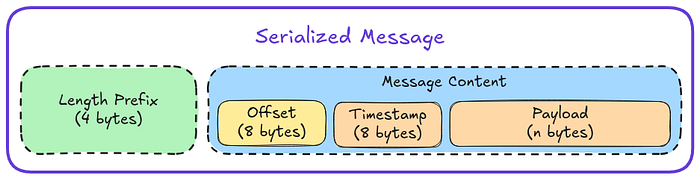
The log package uses the serialization package to serialize the message to form that it will be written as. At this point, a problem arises: How will you be able to read a message only knowing it's start write offset? like how will you know where the end of the message is? This is a problem that is solved by the design of the serialized form of the message. Each message is prefixed with its length. The first 4 bytes represent the length of the message, allowing to write messages up to 64-bits length (which is more than enough). To read the message, you go to its write offset (from the mapping index), read the message's length prefix, and then you know where the end of the message is, so you can read the message from its beginning to the end.
2. Write the message
In order to be able to handle concurrent writes, there is a log level mutex that you have to lock before you do any IO either to memory or log disk files. A Write is actually writing data to both memory and disk. To ensure atomicity, the order of operations here matters. The one that happens first should be able to somehow infer the second in case the second fails, or system as whole crashes before the second occurs. And here I chose to write to disk first. After acquiring the log's mutex, I write the serialized message (let's just call it message) to the .log file. This write returns the write offset, that I then serialize its mapping offset:writeOffset as an index entry, and I write it to the .index file. What if a crash happens before index entry is written? When the log is initiated, the index gets loaded into memory and validated against the actual log file. If the validation check shows that the index is invalid, it gets reconstructed from the actual log file using the method log.reconstructIndexFromLog(). After data is written to both disk files, the index entry is appended the index memory map. We call fsync on both the .log & .index files (yeah it is expensive, but at this point, I only cared about building something that will work, will always work) and then release the log's mutex.
3. Respond
Message is written? respond to its producer with the message's offset (aka index), and partition where message has been written.
Real Kafka
While Kafkafka have only one log file (per partition) that will have all the written data, Kafka has a maximum size per log file, that when it's done, it creates a new one and it continues writing at it. Also, Kafka uses an indexing technique called Sparse Index. It does not store complete mapping from all messages' offsets to their write offsets at index (in both memory & disk), but it stores one every n bytes, and at read time, it reads the nearest segment to the offset you wanna start reading at. For simplicity & the scope of my project, Kafkafka differs at these points.
1.2 From Broker to Consumer
Consumers too have to establish connection with the broker. A Consume request, is sent with three parameters:
- Topic: which you wanna read from.
- Partition: which you wanna read from (too).
- Offset: of first message to read.
- Max: number of messages to read
As I said before, this version could only perform one read per IO. So, if max is greater than 1, then it will loop for n times, where n = max and perform n reads (if there are messages available).
Here is what happens per one read:
- Lock
log.mutex. - Hit the memory's
log.indexwith the offset, if it's found you get the actual write offset. If it's not found, then request will fail. Yeah, this is simply a 404. - Seek the
.logfile at the write offset. We don't need t open the file, as file is already opened at start time when initiating the log. - Fill a 4 bytes buffer with first 4 bytes you find, de-serialize to get the message's length.
- Allocate a buffer of message length size, and read to it.
- De-serialize the message.
- Unlock
log.mutex. - Respond. This happens n times in order to read n messages. Of course terrible performance is expected, but it works, and that's what I cared about.
A small win
At bulk reads, if one read fails, the request as whole does not. The Consume request returns an array of messages, and an array of errors. If a read
ifails, thenmessages[i]will benil, anderrors[i]will have the error that happened. This was inspired by JavaScript's Promise.AllSettled(), which has a similar behavior.
v1 Benchmarks
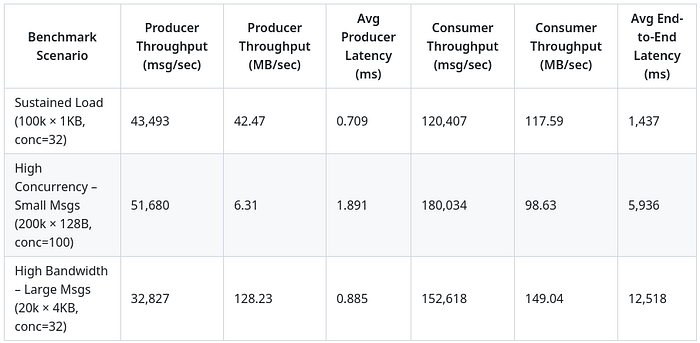
Here are the benchmarks of the first version, pretty solid.
v2: Batches, Batches, Batches
I made 2 simple performance optimizations that helps to do less IO, but they trade off the speed for being less reliable. In v1, when your write is acknowledged then it's 100% resident their in disk, whereas in v2, acknowledging your write means it will eventually be written (at-most-once). This means 2 problems:
- A write may be lost in case write fails or system crashes before it's done.
- You cannot immediately read what you have written.
But this comes as a price for the performance optimization it caused, so let's break it down.
2.1 Batched Writes
It means that writes are buffered before they are written to perform less IO. Instead of writing the message as soon as it comes, we collect a bucket of messages and then flush them all at once. When the log is initiated, I run an infinite loop in a separate go-routine, called WritesBatcher. A produce request is now acknowledged once the message is sent through the batcher's channel. The batcher will flush in 2 cases:
- a per-defined flush interval has passed.
- maximum buffer size has been reached.
The batcher also eliminates the need for a mutex, as only one flush will happen at a time. It also has the .log & .index files opened inside it in append mode, so you don't need to seek files' end at write time. Besides, fsync is called on both files per batch to be 100% sure the batch is flushed and OS does not cache it.
2.2 Batched (Bulk) Reads
Instead of fake v1's bulk reads, v2 could really do it. The idea is to move the o(n) IO to be a memory problem instead of n disk reads. Here is what happens on log.BulkRead:
- lock
log.mutex. - Call a function
getOffsetsRangeSlicewith the parameters of the read (offset & max). It loops looking for offsets at thelog.indexmap, and each one it finds, its write offset gets pushed into the result slice. How to make sure the loop won't go infinite? we have to maintain a propertylog.lastIndexedOffsetthat we check if we surpassed before incrementing offset. We now have a slice of write offsets that is ready to be read. - loop over write offsets getting their min & max.
- read last written message's length
- allocate the one big read buffer with the suitable size:
size := LastMessageWriteOffset + lastMessageLength - firstMessageWriteOffset- seek the first message at log file
- do the big read into the buffer.
- loop over write offsets slice, de-serializing one-by-one from the buffer, where the buffer offset is same as write offset, subtracting the
firstMessageWriteOffset. - Unlock
log.mutex - Respond.
why min & max?
Why do we need to find minimum and maximum write offsets and not assume first slice's element is the min, and last is max?. This is a tricky bug I fall into, and I did not find it until I tested the system with +100,000 messages. The thing is that messages can be written to disk in different order than their offset's order. For example message of offset 5000 may be written to disk after the message 5001. So we fix this by looking for first and last messages using the write offsets.
v2 Benchmarks
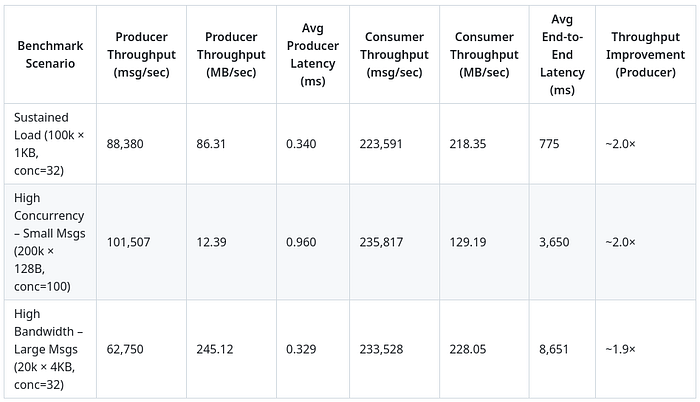
Benchmarking the second version shows 2x performance optimization, Phew!
Conclusion
I'm pretty satisfied with the progress I made during this project. I learned a lot of things about Kafka (which again I did not even know what it is), Golang features & behavior and distributed systems and dealing with concurrency in real systems. I'm sure my current version still has it's issues, but I don't care as I made it clear from the beginning: the whole thing was meant to be instructive, and it delivered.
Source Code: https://github.com/ehabhosam/kafkafka
Btw, AI did not write more than 10% of scattered snippets of the source code, I used the old way.