

Why Mobile App Bug Bounties Are Still Underrated in 2026
Most bug bounty hunters are fighting over the same web login forms.
Meanwhile, the real money is quietly sitting inside mobile apps.
Here's the part that surprises people: On platforms like YesWeHack, HackerOne, and Bugcrowd, thousands of active programs allow mobile app testing. Mobile vulnerabilities are not "out of scope" — they're waiting to be found.
Yet most hunters skip mobile testing entirely.
Not because it's harder — but because of myths.
"The setup is complicated." "I need expensive phones." "Mobile hacking requires deep reverse-engineering skills." "Web apps are easier and safer."
None of that is true.
While 10,000 hunters test the same web endpoints, less than 100 touch the mobile app — even though it often talks to the same backend, sometimes with worse security.
The reality looks like this:
- 🕒 Environment setup: 15 minutes (free tools)
- 📱 Devices: Free Android emulators work perfectly
- 🧠 Skills needed: Same mindset as web app testing
That gap — high scope, low competition — is exactly why mobile app bug bounties still work in 2026.
This guide walks you from zero to your first mobile vulnerability, step by step. No theory. No fluff. Just real techniques, real commands, and real results.
Why Mobile Apps Are Gold Mines (The Reality Check)
The Numbers Don't Lie
According to data from major bug bounty platforms in 2025–2026:
✅ Mobile apps often share backend APIs with web apps (same bugs, different interface) ✅ Developers focus security on web, neglect mobile (weaker client-side controls) ✅ Mobile apps store sensitive data locally (easier to extract than server-side) ✅ Less hunters = higher chance of unique findings = less duplicates ✅ Many critical bugs (insecure storage, hardcoded keys, weak encryption)
Common Mobile Vulnerabilities
These are bugs found regularly in mobile apps:
- Hardcoded API Keys — AWS, Firebase, Stripe keys in app code
- Insecure Data Storage — Passwords saved in plain text
- Weak SSL/TLS — No certificate pinning = easy MITM
- Insecure Authentication — Tokens stored insecurely
- Deep Link Hijacking — Malicious apps can intercept data
- Intent Manipulation — Bypass authentication via intents
- WebView Vulnerabilities — XSS in embedded web views
- Binary Protection Bypass — Root/jailbreak detection that can be bypassed
Android vs iOS: Which Should You Start With?
Android (Recommended for Beginners)
Pros:
- ✅ Completely free tools
- ✅ Emulators work perfectly (no real device needed)
- ✅ Easier to decompile (Java/Kotlin → readable code)
- ✅ More programs accept Android testing
- ✅ Rooting is simpler
Cons:
- ❌ More hunters test Android (still way less than web)
iOS
Pros:
- ✅ Even fewer hunters (very niche)
- ✅ Often higher severity bugs
- ✅ Premium apps (banking, fintech)
Cons:
- ❌ Requires macOS for proper testing
- ❌ Jailbreaking more complex
- ❌ Tools are less accessible
Verdict: Start with Android. Master it. Then expand to iOS if you have a Mac.
Android Mobile Hacking Lab Setup (15 Minutes, Free Tools)
Let's destroy the myth. Here's how to set up a complete Android hacking lab.
Option 1: Emulator Setup (No Device Needed)
What you need:
- A computer (Windows, Mac, or Linux)
- 8GB RAM minimum (16GB recommended)
- 20GB free disk space
Step 1: Install Android Studio
# Linux (Ubuntu/Debian)
sudo apt update
sudo apt install android-studio

# Or download directly:
 https://developer.android.com/studio

# Windows/Mac: Download installer from official site
What this does: Android Studio includes AVD (Android Virtual Device) Manager, which creates emulators.
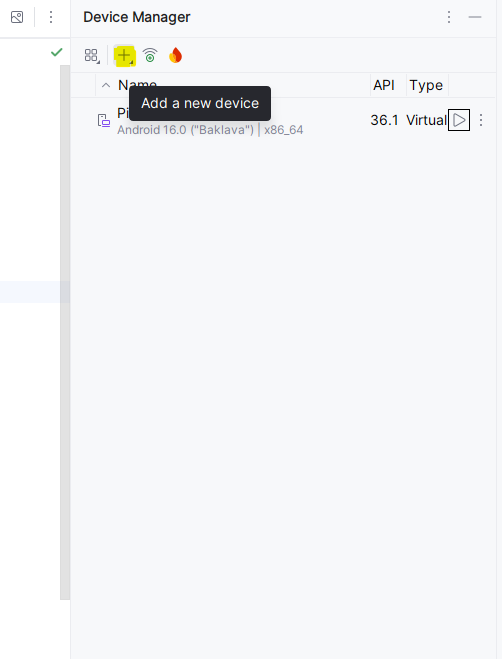
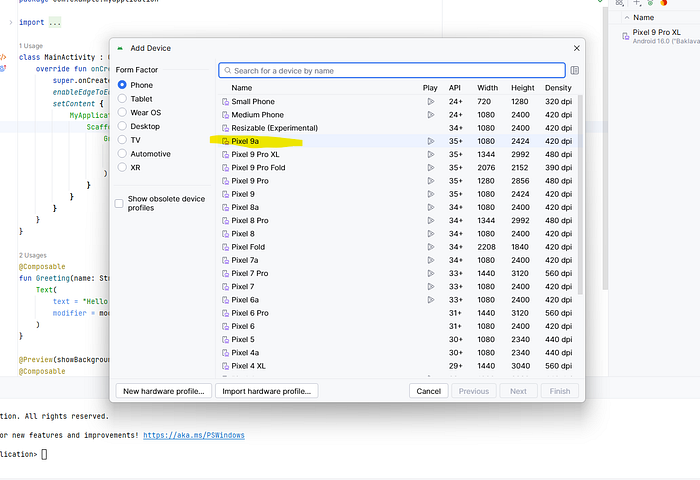
Step 2: Create Virtual Device
- Open Android Studio
- Go to: Tools → Device Manager
- Click "Create Device"
- Choose: Pixel 5 (common device)
- Select System Image: Android 11 or Android 12
- ⚠️ Important: Choose image WITHOUT "Google Play" (we need root access)
- Pick "Google APIs" version instead
- Click Finish
Why this matters: Google Play images can't be rooted. "Google APIs" images give you full control.
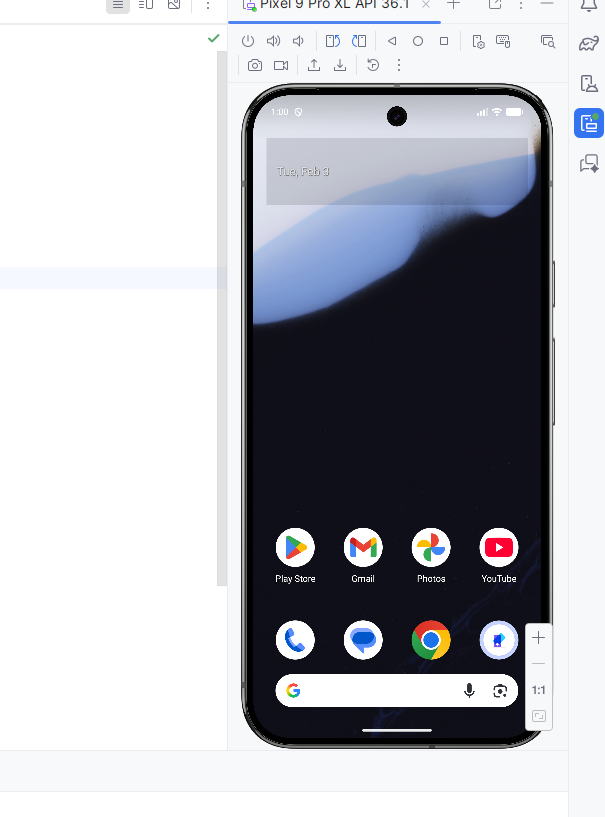
Step 3: Start Emulator
Click the ▶️ play button next to your device. Wait 2–3 minutes for it to boot.
You now have a working Android device on your computer!

Step 4: Verify Root Access
Open emulator terminal:
adb shell
su
If you see # instead of $, you have root access! ✅
Explanation:
adb: Android Debug Bridge (communicates with emulator)shell: Opens command line inside Androidsu: Switch user to root (admin)
Option 2: Real Device Setup (Optional but Recommended)
Why use a real device?
- Some apps detect emulators and refuse to run
- Biometric features (fingerprint, face unlock) work properly
- Realistic testing environment
What you need:
- Old Android phone (any brand, doesn't need to be expensive)
- USB cable
Steps:
- Enable Developer Options:
- Settings → About Phone
- Tap "Build Number" 7 times
- Go back to Settings → Developer Options
- Enable "USB Debugging"
3. Connect via USB
4. Install Magisk (for root):
- Download: https://github.com/topjohnwu/Magisk/releases
- Install Magisk APK
- Patch boot image (varies by device)
- Flash patched boot via fastboot
This looks complicated but there are detailed guides for every device model. Search: "[Your Phone Model] Magisk root tutorial"
Essential Mobile App Hacking Tools for Bug Bounty Hunters
Static Analysis Tools (Code Review Without Running App)
1. APKTool (Decompile APK)
# Install
sudo apt install apktool

# Or download:
wget https://github.com/iBotPeaches/Apktool/releases/latest/download/apktool_2.9.3.jar
What it does: Converts APK (Android app file) into readable code and resources.
2. JADX (View Java Code)
# Download
wget https://github.com/skylot/jadx/releases/latest/download/jadx-1.5.0.zip
unzip jadx-1.5.0.zip
cd jadx-1.5.0/bin
./jadx-gui
What it does: Shows Java/Kotlin source code from APK in readable format.
3. MobSF (Mobile Security Framework)
# Install via Docker
docker pull opensecurity/mobile-security-framework-mobsf
docker run -it -p 8000:8000 opensecurity/mobile-security-framework-mobsf:latest
# Access at: http://localhost:8000
What it does: Automated security scanner. Upload APK, get vulnerability report.
Dynamic Analysis Tools (Testing While App Runs)
1. Burp Suite (Traffic Interception)
# Download Burp Suite Community (free)
# https://portswigger.net/burp/releases

# Or via apt
sudo apt install burpsuite
What it does: Captures all network traffic from app to server (like for web apps).
2. Frida (Runtime Manipulation)
# Install Frida on computer
pip install frida-tools

# Download Frida Server for Android

# https://github.com/frida/frida/releases

# Choose: frida-server-16.2.1-android-arm64.xz

# Push to device/emulator
adb push frida-server /data/local/tmp/
adb shell "chmod 755 /data/local/tmp/frida-server"
adb shell "/data/local/tmp/frida-server &"
What it does: Lets you modify app behavior in real-time (bypass SSL pinning, root detection, etc.)
3. Objection (Frida Made Easy)
# Install
pip install objection

# Use (while app is running)
objection -g com.example.app explore
What it does:
Frida is a mobile security testing tool that lets you change how an app behaves while it is running. You don't need the app's source code or to rebuild it. You connect Frida from your computer to an Android phone/emulator and control the app live. Security testers use Frida to bypass things like SSL pinning, root detection, or to see what data the app sends to the server. For example, if an app blocks rooted phones, Frida can force the app to think the phone is not rooted while it's running.
Objection is a tool built on top of Frida that makes everything much easier. Instead of writing scripts, you run simple commands. You attach Objection to a running app and then disable SSL pinning, bypass root checks, or inspect app data with one-line commands. In short, Frida is powerful but advanced, and Objection is Frida in easy mode, mostly used by bug bounty hunters and mobile security testers.
Complete Workflow: From APK to Bug Report
Phase 1: Get the APK
Method 1: From Your Device
# List installed apps
adb shell pm list packages

# Find your target
adb shell pm list packages | grep -i "target"

# Get APK path
adb shell pm path com.target.app

# Output: package:/data/app/com.target.app-1/base.apk

# Pull APK to computer
adb pull /data/app/com.target.app-1/base.apk target.apk
Method 2: From Online Sources
- APKMirror.com (reputable, safe)
- APKPure.com
- Directly from Google Play (use browser extensions)
Phase 2: Static Analysis (Without Running App)
Step 1: Decompile with APKTool
apktool d target.apk -o target_decoded
cd target_decoded
What you get:
target_decoded/
├── AndroidManifest.xml (app permissions, components)
├── res/ (resources, images, strings)
├── smali/ (decompiled code)
├── assets/ (additional files)
└── lib/ (native libraries)
Step 2: Analyze AndroidManifest.xml
cat AndroidManifest.xmlWhat to look for:
<!-- Dangerous permissions -->
<uses-permission android:name="android.permission.READ_EXTERNAL_STORAGE"/>
<uses-permission android:name="android.permission.INTERNET"/>

<!-- Exported components (can be accessed by other apps) -->
<activity
    android:name=".AdminActivity"
    android:exported="true">  ← VULNERABLE!
</activity>

<!-- Backup allowed (app data can be backed up) -->
<application
    android:allowBackup="true"  ← POTENTIAL ISSUE
    android:debuggable="true">  ← HUGE VULNERABILITY IF IN PRODUCTION
If you find android:exported="true" on sensitive activities:
# You can launch that activity directly!
adb shell am start -n com.target.app/.AdminActivity
This might bypass authentication!
Real vulnerability example:
Static analysis means you analyze the Android app without running it. You just take the APK file and look inside it to understand how the app is built and where security mistakes exist. Using APKTool, you decompile the app so it becomes readable. After running apktool d target.apk, you get folders like AndroidManifest.xml (rules and permissions of the app), res (texts and images), and smali (app logic in low-level code).
The most important file is AndroidManifest.xml. This file tells what permissions the app uses and which screens (activities) other apps can access. For example, if you see android.permission.INTERNET, the app can send data online. If you see android:debuggable="true" in a production app, it's a big security mistake because attackers can debug and inspect the app. Another dangerous issue is android:exported="true" on sensitive activities, like an admin page.
Simple real example: imagine the app has an Admin screen that should open only after login. If that activity is marked android:exported="true", an attacker can directly open it using a command like adb shell am start -n com.target.app/.AdminActivity. This means the attacker may skip login completely and access admin features, which is a serious vulnerability. That's why static analysis is powerful — you can find bugs without even opening the app 🔥
Step 3: Search for Secrets
# Search for API keys
grep -r "api_key" .
grep -r "API_KEY" .
grep -r "apiKey" .

# Search for AWS credentials
grep -r "AKIA" .  # AWS Access Key pattern
grep -r "aws_secret" .

# Search for Firebase
grep -r "firebaseio.com" .

# Search for passwords
grep -r "password" .
grep -r "pwd" .

# Search for tokens
grep -r "token" .
grep -r "bearer" .
Real example output:
./res/values/strings.xml:    <string name="api_key">sk_live_abc123xyz789</string>
./res/values/strings.xml:    <string name="firebase_url">https://myapp.firebaseio.com</string>
This is a critical bug! Hardcoded API keys can be extracted by anyone.
Step 4: Use JADX for Better Code View
# Open JADX GUI
jadx-gui target.apk
Navigate to interesting classes:
com.app.util.ApiClient(API calls)com.app.auth.LoginActivity(authentication)com.app.storage.DatabaseHelper(data storage)
Look for:
// Bad: Hardcoded credentials
String apiKey = "sk_live_abc123xyz789";

// Bad: Weak encryption
String password = Base64.encode(userPassword);  // Base64 is NOT encryption!

// Bad: Insecure storage
SharedPreferences prefs = context.getSharedPreferences("user_data", MODE_WORLD_READABLE);
prefs.edit().putString("password", userPassword).commit();
Step 5: Automated Scan with MobSF
- Open: http://localhost:8000
- Upload target.apk
- Wait 2–5 minutes
- Review report
MobSF checks:
- Hardcoded secrets
- Insecure permissions
- Code vulnerabilities
- Network security
- And 100+ other checks
Phase 3: Dynamic Analysis (Run the App and Test)
Step 1: Install App on Emulator
adb install target.apk //run this on the Conmmand line where apk file is located Step 2: Set Up Traffic Interception
Configure Burp Suite:
- Burp → Proxy → Options
- Bind to address:
0.0.0.0:8080(all interfaces)
Configure Android Emulator:
# Get computer IP
ip addr show  # Linux
ipconfig  # Windows

# Set proxy on Android
Settings → Network & Internet → Wi-Fi → Long press on WiFi → Modify Network
→ Advanced → Manual Proxy
→ Hostname: [YOUR_COMPUTER_IP]
→ Port: 8080
Install Burp Certificate:
# Export Burp certificate
# Burp → Proxy → Options → Import/Export CA Certificate → Export (DER format)

# Convert to Android format
openssl x509 -inform DER -in cacert.der -out cacert.pem
openssl x509 -inform PEM -subject_hash_old -in cacert.pem | head -1

# Output: 9a5ba575
# Rename
mv cacert.pem 9a5ba575.0

# Push to Android
adb root
adb remount
adb push 9a5ba575.0 /system/etc/security/cacerts/
adb shell chmod 644 /system/etc/security/cacerts/9a5ba575.0
adb reboot
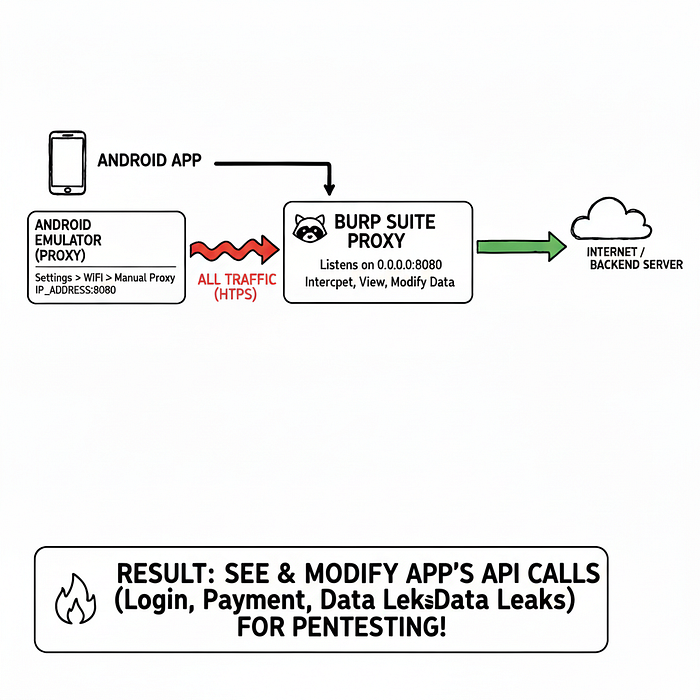
Now all app traffic flows through Burp!
Explain with a real example
This traffic interception setup is used to see and modify the data an Android app sends to the internet. You use Burp Suite as a middleman between the app and the server. So instead of the app talking directly to the backend, all traffic passes through your computer, where you can view it.
Simple example: imagine an app sends your login email and password to the server. With Burp, you can see that request, edit it, replay it, or check if the app is insecure.
First, you configure Burp Proxy to listen on 0.0.0.0:8080. This just means: "Burp, listen on port 8080 from any device". Then you set the Android emulator Wi-Fi proxy to your computer's IP and port 8080. Now the emulator sends all internet traffic to Burp instead of directly to the server.
Next, you install the Burp certificate on Android. This is needed because apps use HTTPS encryption. Without the certificate, traffic looks like garbage. Installing the Burp certificate tells Android: "Trust Burp as a safe HTTPS inspector". After pushing the certificate into the system folder and rebooting, Android fully trusts Burp.
End result: when the app runs, every API call (login, booking, payment, profile) appears in Burp Suite. For example, if the app sends
POST /login email=abc@test.com password=123456, you can see it live.
That's why pentesters use this to find broken auth, weak APIs, and data leaks 🔥
Step 3: Bypass SSL Pinning (If App Has It)
Many apps use SSL pinning to prevent traffic interception. Bypass it with Frida.
# Start Frida server (if not running)
adb shell "/data/local/tmp/frida-server &"

# Use Objection to bypass SSL pinning
objection -g com.target.app explore

# Inside objection console:
android sslpinning disable

# Now traffic will flow through Burp despite SSL pinning!
Step 4: Test the App
Open the app and use it normally:
- Login
- View profile
- Make purchases
- Change settings
Watch Burp for requests. Look for:
Insecure API Calls:
GET /api/user/profile?user_id=123 HTTP/1.1
Host: api.target.com
Authorization: Bearer abc123xyz
Test IDOR (Change user_id):
GET /api/user/profile?user_id=124 HTTP/1.1If you see another user's data → IDOR vulnerability!
Weak Authentication:
POST /api/login HTTP/1.1
Content-Type: application/json

{"username":"admin","password":"admin"}
Response:
{
  "status": "success",
  "token": "eyJhbGc...",
  "user_id": 1,
  "is_admin": false  ← Can we change this to true?
}
Test changing response:
Burp → Proxy → Options → Match and Replace
Add rule:
- Replace:
"is_admin":false - With:
"is_admin":true
If app grants admin access → Authentication bypass!
Step 5: Test Local Data Storage
# Access app data directory
adb shell
run-as com.target.app
cd /data/data/com.target.app

# Check databases
cd databases
sqlite3 user.db
.tables
SELECT * FROM users;

# Check shared preferences
cd ../shared_prefs
cat com.target.app_preferences.xml
What to look for:
<string name="password">plaintextPassword123</string>  ← BAD!
<string name="token">Bearer_abc123xyz</string>  ← MIGHT BE SENSITIVE
<boolean name="isPremium">false</boolean>  ← CAN WE CHANGE TO TRUE?
If passwords or tokens are stored unencrypted → Critical vulnerability!
Real Exmaple
This step checks what data the Android app saves locally on the phone. Using adb shell and run-as, you enter the app's private folder (/data/data/com.target.app). Inside this folder, apps store databases and settings. In the databases folder, you open files like user.db to see saved data such as users, emails, or tokens. In the shared_prefs folder, you check XML files that store app settings.
Simple example: if you find
<string name="password">plaintextPassword123</string>
it means the app is saving the password without encryption, which is a serious security bug. If you see a token like
<string name="token">Bearer_abc123xyz</string>,
an attacker could steal it and log in as the user. If you find something like
<boolean name="isPremium">false</boolean>, changing it to true might unlock paid features. That's why storing sensitive data locally in plain text is a critical vulnerability 🔥
Step 6: Test Deep Links
Deep links allow apps to open specific pages from URLs.
Find deep links in AndroidManifest.xml:
<intent-filter>
    <action android:name="android.intent.action.VIEW"/>
    <category android:name="android.intent.category.BROWSABLE"/>
    <data android:scheme="targetapp"
          android:host="reset-password"/>
</intent-filter>
Test it:
adb shell am start -W -a android.intent.action.VIEW -d "targetapp://reset-password?user_id=123"Can you reset other users' passwords? → Critical vulnerability!
Deep links let an Android app open a specific screen using a URL, just like opening a web link. For example, clicking a link in email can open the app directly on a reset‑password page instead of the home screen. These links are defined in AndroidManifest.xml using an intent-filter.
In this example, the app allows links like
targetapp://reset-password.
When you run the command
adb shell am start -a android.intent.action.VIEW -d "targetapp://reset-password?user_id=123"you are manually opening the reset‑password screen from outside the app, without normal navigation.
Simple vulnerability example: if this link opens the reset password page without checking login or ownership, you could change user_id=123 to another number and reset someone else's password. If proper validation is missing, this becomes a critical security bug 🔥
Advanced Techniques (Secret Weapons)
Technique #1: Bypass Root Detection
Many apps detect rooted devices and refuse to run.
Method 1: Magisk Hide
# If using Magisk (on real device)
# Magisk app → Settings → Magisk Hide → Enable
# Select target app from list
Method 2: Frida Script
// save as bypass-root.js
Java.perform(function() {
    // Hook common root detection methods
    var RootBeer = Java.use("com.scottyab.rootbeer.RootBeer");
    RootBeer.isRooted.implementation = function() {
        console.log("[*] Root detection bypassed!");
        return false;
    };
});
Run:
frida -U -f com.target.app -l bypass-root.jsTechnique #2: Modify APK Behavior
Want to remove ads, enable premium features, or change app logic?
Step 1: Decompile
apktool d target.apk -o target_decodedStep 2: Modify Smali Code
Find the check you want to bypass:
# Original smali code
.method public isPremium()Z
    .locals 1
    const/4 v0, 0x0  # false
    return v0
.end method
Change to:
.method public isPremium()Z
    .locals 1
    const/4 v0, 0x1  # true
    return v0
.end method
Step 3: Recompile
apktool b target_decoded -o modified.apkStep 4: Sign APK
# Generate keystore
keytool -genkey -v -keystore my-key.keystore -alias my-key -keyalg RSA -keysize 2048 -validity 10000

# Sign APK
jarsigner -verbose -sigalg SHA1withRSA -digestalg SHA1 -keystore my-key.keystore modified.apk my-key

# Install
adb install modified.apk
This technique is used to change how an Android app behaves by editing the APK itself. Instead of controlling the app while it's running (like Frida), here you modify the app code, rebuild it, and install the changed version. Security testers use this to check weak logic, client-side checks, and premium bypass issues.
Simple example: imagine an app checks isPremium() to decide if ads should show. In the original code, it returns false, so ads appear. You change that value to true, rebuild the APK, and reinstall it. Now the app thinks you are a premium user, ads disappear, and paid features unlock. If this works, it means the app relies on client-side logic, which is a serious security flaw 🔥
Technique #3: Intercept and Modify Binary Protocols
Some apps don't use HTTP/JSON. They use binary protocols (Protobuf, custom formats).
Solution: Frida Hooks
// Intercept specific function
Java.perform(function() {
    var TargetClass = Java.use("com.target.app.NetworkManager");

    TargetClass.sendData.overload('[B').implementation = function(data) {
        console.log("[*] Original data:", hexdump(data));

        // Modify data
        data[0] = 0xFF;

        console.log("[*] Modified data:", hexdump(data));

        // Call original function with modified data
        return this.sendData(data);
    };
});
Real Example Some apps don't send data as normal HTTP/JSON, so tools like Burp can't read or edit the traffic. Instead, they use binary data (random-looking bytes), like Protobuf or custom formats. In this case, you can't modify requests on the network — you must change the data inside the app before it's sent.
This Frida hook attaches to the app's code and intercepts a function that sends network data. Before the data leaves the app, Frida prints the original bytes, changes them, and then sends the modified data to the server.
Simple example: suppose the app sends binary data saying
isPremium = false.
With this hook, you change one byte so it becomes
isPremium = true before it reaches the server.
If the server accepts it, that means the app has weak validation, which is a serious security issue 🔥
Technique #4: Extract Encryption Keys
Apps often encrypt data with hardcoded keys.
Method: Search memory
# While app is running
frida-ps -U  # List processes
frida -U -n com.target.app

# Inside Frida console
Java.perform(function() {
    var cipher = Java.use("javax.crypto.Cipher");
    cipher.getInstance.overload('java.lang.String').implementation = function(transformation) {
        console.log("[*] Cipher transformation:", transformation);
        return this.getInstance(transformation);
    };

    var secretKeySpec = Java.use("javax.crypto.spec.SecretKeySpec");
    secretKeySpec.$init.overload('[B', 'java.lang.String').implementation = function(key, algorithm) {
        console.log("[*] Encryption key:", hexdump(key));
        console.log("[*] Algorithm:", algorithm);
        return this.$init(key, algorithm);
    };
});
This logs encryption keys when app uses them!
Common Vulnerabilities Checklist
Use this checklist for every app:
Information Disclosure
□ Hardcoded API keys (search strings.xml, code)
□ Hardcoded passwords
□ Firebase URLs (check if publicly readable)
□ AWS credentials (AKIA* pattern)
□ Debug logs exposing sensitive data
□ Backup enabled (allowBackup="true")
□ Debuggable in production (android:debuggable="true")
Insecure Data Storage
□ Passwords in SharedPreferences (unencrypted)
□ Tokens stored insecurely
□ SQL databases without encryption
□ Sensitive files in external storage
□ Session data in logs
Insecure Communication
□ HTTP instead of HTTPS
□ No SSL certificate pinning
□ Accepting all SSL certificates
□ Weak SSL/TLS versions
□ Sensitive data in URL parameters
Insecure Authentication
□ Weak password policy
□ No rate limiting (brute force possible)
□ Session tokens predictable
□ Tokens never expire
□ Remember me feature insecure
Authorization Issues
□ IDOR in API calls
□ Missing access control checks
□ Privilege escalation possible
□ Can modify user_id/role in requests
Client-Side Issues
□ WebView allows JavaScript
□ WebView doesn't validate URLs
□ Deep links exploitable
□ Exported components accessible
□ Intent manipulation possible
□ SQL injection in Content Providers
Code Quality
□ Obfuscation missing (code easily readable)
□ Debug symbols present
□ Weak cryptography (MD5, Base64)
□ Hardcoded secrets
□ Code injection possible
Real-World Bug Examples (From Disclosed Reports)
Example 1: Hardcoded AWS Keys
App: Mobile banking app Finding: AWS credentials in strings.xml Impact: Full access to production S3 buckets How to find:
apktool d target.apk
grep -r "AKIA" target_decoded/
Example 2: IDOR in Profile API
App: Social media app Finding: Can view any user's private photos How to find:
GET /api/profile/photos?user_id=123

# Change to:
GET /api/profile/photos?user_id=124
# If you see user 124's private photos → IDOR!
Example 3: Insecure Data Storage
App: Healthcare app Finding: Patient data stored unencrypted How to find:
adb shell
run-as com.healthcare.app
cd databases
sqlite3 patients.db
SELECT * FROM medical_records;

# If you see unencrypted patient data → Critical!
Example 4: Deep Link Exploitation
App: E-commerce app Finding: Deep link allows changing order status How to find:
# Found in AndroidManifest.xml:
# targetapp://orders/complete?order_id=123

# Test:
adb shell am start -a android.intent.action.VIEW -d "targetapp://orders/complete?order_id=124"
# If order 124 (not yours) gets marked complete → Critical!
Writing the Perfect Mobile Bug Report
Bad Report
Title: XSS in app

Description: I found XSS.
Steps: Open app, type <script>alert(1)</script>
Please fix.
This will be rejected.
Good Report
Title: Stored XSS in Profile Name Allows Account Takeover

Severity: High

Description:
The mobile app's profile name field does not sanitize user input,
allowing stored XSS that executes when other users view the profile.
This can be exploited to steal session tokens and take over accounts.

Steps to Reproduce:
1. Environment:
   - App Version: 2.5.1
   - Device: Android 12 (Pixel 5 Emulator)
   - Testing Tool: Burp Suite Pro

2. Install app and create account:
   - Email: test@test.com
   - Username: testuser
3. Navigate to Profile → Edit Name

4. Intercept request in Burp Suite:
   POST /api/profile/update
   {"name": "John Doe"}

5. Modify name parameter to XSS payload:
   {"name": "<img src=x onerror='alert(document.cookie)'>"}
6. Response shows 200 OK, profile updated

7. View profile from another account:
   - XSS executes
   - Alert box shows session cookie

Impact:
- Attacker can steal session tokens from any user viewing their profile
- Session tokens can be used for account takeover
- Affects all X users of the platform
- No user interaction required beyond viewing profile

Proof of Concept:
[Video recording showing exploit]
[Screenshots of malicious profile and alert box]

Request/Response:
POST /api/profile/update HTTP/1.1

Host: api.target.com

Authorization: Bearer abc123xyz

Content-Type: application/json
{"user_id":123,"name":"<img src=x onerror='alert(document.cookie)'>"}

Response:
HTTP/1.1 200 OK
{"status":"success","message":"Profile updated"}

Remediation:
1. Implement input validation on server-side
2. Sanitize output when displaying profile names
3. Use Content Security Policy headers
4. HTML-encode special characters

References:
- OWASP Mobile Top 10: M7 - Client Code Quality
- CWE-79: Cross-site Scripting
This gets accepted and paid.
Tools Cheat Sheet
Installation Quick Reference
# APKTool
sudo apt install apktool

# JADX
wget https://github.com/skylot/jadx/releases/latest/download/jadx-1.5.0.zip
unzip jadx-1.5.0.zip

# MobSF
docker pull opensecurity/mobile-security-framework-mobsf
docker run -it -p 8000:8000 opensecurity/mobile-security-framework-mobsf

# Frida
pip install frida-tools

# Download frida-server from GitHub releases
# Objection
pip install objection

# ADB (usually comes with Android Studio)
sudo apt install adb
Command Quick Reference
# ADB Commands
adb devices                    # List connected devices
adb install app.apk            # Install APK
adb uninstall com.app.name     # Uninstall
adb shell                      # Access device shell
adb pull /path/file local.txt  # Copy file from device
adb push local.txt /path/      # Copy file to device
adb logcat                     # View logs

# APKTool
apktool d app.apk              # Decompile
apktool b folder/              # Recompile

# Frida
frida-ps -U                    # List processes
frida -U -n com.app.name       # Attach to app
frida -U -f com.app.name -l script.js  # Run with script

# Objection
objection -g com.app.name explore
android sslpinning disable     # Inside objection
android root disable           # Bypass root detection
The Learning Path
Week 1: Setup and Basics
- Install Android Studio and create emulator
- Install all tools (APKTool, JADX, Burp, Frida)
- Practice on DIVA (Damn Insecure and Vulnerable App)
- Download: https://github.com/payatu/diva-android
Week 2: Static Analysis
- Decompile 5 apps from APKMirror
- Search for hardcoded secrets
- Analyze AndroidManifest.xml
- Practice with JADX
Week 3: Dynamic Analysis
- Set up traffic interception with Burp
- Install certificate on emulator
- Capture app traffic
- Modify requests and responses
Week 4: Advanced Techniques
- Learn Frida basics
- Bypass SSL pinning
- Bypass root detection
- Modify app behavior
Month 2+: Real Hunting
- Choose 3 bug bounty programs with mobile scopes
- Test their apps systematically
- Submit first reports
- Learn from rejections
Resources
Practice Apps
- DIVA: https://github.com/payatu/diva-android
- InsecureBank: https://github.com/dineshshetty/Android-InsecureBankv2
- OWASP GoatDroid: https://github.com/jackMannino/OWASP-GoatDroid-Project
🎥 Video Tutorials
- Mobile Pentesting by Intigriti
- Hacker101 — Mobile Crash Course
- Android Bug Bounty Playlist
- How to Hack Android Apps (Frida)
- How to Bypass SSL Pinning
- How to Root Android Emulator in 2 Minutes
- Intercepting Android App Traffic with BurpSuite
- Mobile Application Pentesting
- Finding Sensitive Data in Android Apps with Nerdwell
- Exploiting Android Deep Links and Exported Components
- Mobile App Pentesting by Hacking Simplified
- Android Security Testing
- Full Android Penetration Testing Course Playlist
- Android App Penetration Testing — OWASP Top 10
- Bypass Biometrics in Mobile Apps
- Intercept traffic with Objection and Burp
- Hacking and Pentesting Android Apps
- Hacking and Pentesting iOS Apps
- Android Application Pen-testing Course
Guides, Cheatsheets, Github repo
- Android Pentesting Checklist (HackTricks)
- Android Pentesting Checklist (GitHub)
- Awesome Mobile CTF Resources
- Mobile App Pentest Cheatsheet
- All Things Android Security
- Android Bug Bounty Reports & Resources
Learn Android Bug Bounty
💬 Want an iOS version of this guide?
This article focuses on Android app security testing. If you want a deep-dive iOS bug bounty guide (Jailbreak setup, iOS tooling, real attack flows), Drop a comment and like this post— I'll publish the iOS version next.
Transparency Note
This guide is based on official documentation from Android Developers, OWASP Mobile Security Testing Guide, YesWeHack's Android lab guide, Bugcrowd's Mobile Hacking Resource Kit, community resources from GitHub, and established mobile security testing methodologies. All tools mentioned are open-source and free. Examples use publicly available vulnerable apps or hypothetical scenarios. Always follow responsible disclosure and bug bounty program rules when testing real applications.
Tags: #BugBounty #MobileSecurity #AndroidSecurity #EthicalHacking #CyberSecurity #Pentesting #AppSec