
HexStrike -AI acts as a Model Context Protocol (MCP) server, bridging LLMs (like ChatGPT or Google's Gemini) to real-world security utilities. In practice, you can issue natural-language prompts and HexStrike will autonomously run tools such as Nmap, Burp Suite, Ghidra, or Metasploit in sequence. For example, the v6.0 release equips AI agents (GPT, Claude, Copilot, etc.) with an arsenal of 150+ tools, enabling automated penetration testing and vulnerability research. Its goal is to transform LLMs into "world-class cybersecurity experts" by having them conduct multi-stage attack chains and recon tasks with minimal human intervention.
HexStrike's role is to accelerate pen-testing workflows: it can perform network scans, subdomain enumeration, web vulnerability scans, exploit generation, binary analysis, and report generation — all directed by an AI. Integration with LLMs means ChatGPT or Gemini can be used as control brains. For instance, HexStrike's documentation describes issuing prompts like "Audit our GraphQL API for security flaws" and the system will run Amass, Nmap, Nuclei, pull CVE intelligence, even auto-generate exploits, presenting a step-by-step report. Gemini CLI (Google's LLM terminal client) is also supported: Kali includes the gemini-cli package ("brings the power of Gemini into your terminal") which provides an mcp command for adding HexStrike as an MCP server. In short, HexStrike turns LLMs into autonomous red-team agents by tightly coupling them to classic security tools.
Installation Instructions
HexStrike is packaged in Kali 2025.4, so installation is straightforward. Update your package list and install the hexstrike-ai metapackage:
sudo apt update
sudo apt install hexstrike-ai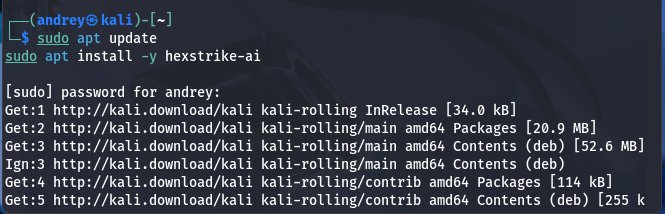
This will pull in all required dependencies (Python3, python3-mcp, requests, etc.) automatically. If a dependency fails, you can try installing missing Python libraries manually or use pip inside a virtualenv (the GitHub repo also provides a requirements.txt and demo scripts).

Browser Agent (optional): To use HexStrike's advanced headless-browser module, install Chrome or Chromium and its WebDriver. For example:
Troubleshooting: If apt install hexstrike-ai reports missing packages, check your Kali repo settings or try:
apt search hexstrike-aito verify availability. Also ensure essential tools are installed: run commands like which nmap gobuster nuclei. If any are missing, install them via apt (e.g., sudo apt install nmap gobuster nuclei). HexStrike will warn of "Security Tools Not Found" if required tools aren't in your PATH.

Configuration Guide
Starting HexStrike Server
Once installed, launch the HexStrike server. In Kali, you can run the provided Python script directly. For example:
# Start the HexStrike MCP server (default port 8888)
hexstrike_server
O run on different port:
hexstrike_server --port 8090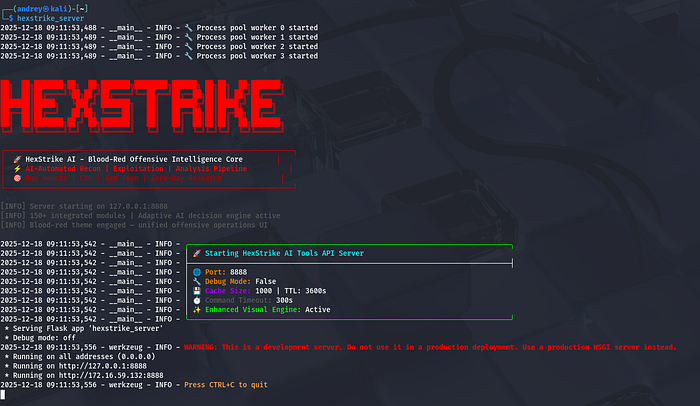
A successful start will print info like "Server starting on 127.0.0.1:8888". For first-time setup, you may append --debug to get verbose logging. After starting, you can verify the server is up by checking its health endpoint:
curl http://localhost:8888/health
Connecting to ChatGPT (OpenAI API)
HexStrike itself does not bundle an LLM; you connect it to an external model via the MCP interface. To use OpenAI's ChatGPT, obtain an API key from OpenAI and set it in your environment. For example:
export OPENAI_API_KEY=sk-…You can find/create your OpenAI API Key here:
https://platform.openai.com/api-keys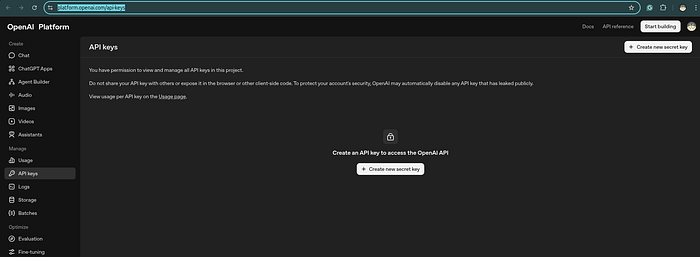
HexStrike (or any LLM client you use) will use this key to call the ChatGPT API. You may need to install the OpenAI Python library (pip install openai) if you plan to write custom scripts or use an LLM shell. With the key set, HexStrike can issue ChatCompletion requests to OpenAI's servers. (Ensure your Kali VM has internet access; check firewall/proxy settings if needed.)
Connecting to Google Gemini
For Google's Gemini (via the Google GenAI API), the setup is similar. You'll need a Google Cloud project with the Gemini API enabled and an API key. Then set:
export GEMINI_API_KEY=AIza… # your Google API keyWhere to get your Gemini API key
Step 1 — Open Google AI Studio
Go to:
Sign in with your Google account.
Step 2 — Create an API key
- Click "Get API key"
- Choose:
- Create API key
- Select:
- New project (recommended) or an existing Google Cloud project
Alternatively, you can use gemini-cli, Google's open-source LLM CLI. In Kali:
sudo apt install gemini-cli
This provides a gemini command. To integrate HexStrike, edit the Gemini settings file (~/.gemini/settings.json) and add an MCP server entry. For example:
If it doesn't exist yet, create it:
mkdir -p ~/.gemini
nano ~/.gemini/settings.json
{
  "mcpServers": {
    "hexstrike-ai": {
      "command": "python3",
      "args": ["/usr/bin/hexstrike_mcp.py", "--server", "http://localhost:8888"],
      "trust": false
    }
  }
}

#Maybe in different location like: /usr/share/hexstrike-ai/hexstrike_mcp.py
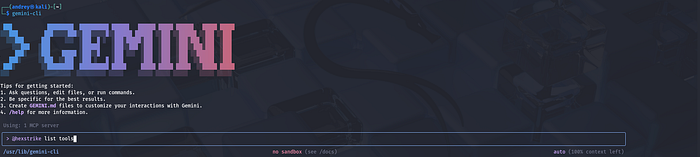
This tells Gemini CLI to launch the HexStrike MCP client (via hexstrike_mcp.py) and connect to your running HexStrike server. The Gemini documentation provides a similar JSON template. Once configured, any prompts in the Gemini CLI can invoke HexStrike's tools. (You may need to authenticate gemini-cli with your Google account on first use; see gemini login.)
Test:
gemini-cli "Say hello"
Other Configuration Files
HexStrike doesn't have a heavy config file by default — most settings are via command-line arguments or environment variables. However, you should ensure any LLM clients (ChatGPT GUIs, VS Code extensions, etc.) trust the HexStrike server. For example, if using VS Code's LLM features or Anthropic's Claude Desktop, you'd add hexstrike-ai under their MCP server settings (as shown in the GitHub README) github.com. In all cases, the key is pointing the LLM's MCP client to http://<your-kali-ip>:8888 and setting any API keys needed.
HexStrike reael use exaple. A Full-Lifecycle Pentesting Guide for Metasploitable
For this guide I run MetasploitableVM:

Phase 1: Reconnaissance (Attack Surface Mapping)
The goal is to let the IntelligentDecisionEngine identify the most vulnerable entry points.
HexStrike Strategy: Instead of a basic port scan, ask for an analysis of the target's posture.
- Actionable Prompt:
> "Perform an intensive service discovery on 172.16.59.128.
Identify all open ports, fingerprint their versions,
and categorize each service by its 'Exploitation Confidence'
(High/Medium/Low) based on known vulnerabilities."
- What HexStrike does: It will autonomously run
nmap -sVand use its CVEIntelligenceManager to cross-reference every version it finds against real-time vulnerability data.

Phase 2: Vulnerability Discovery (The "Hit List")
HexStrike excels at finding "chainable" flaws that manual testers might miss.
HexStrike Strategy: Direct the AI to look for specific "low-hanging fruit" common to Metasploitable, such as the vsftpd 2.3.4 backdoor.
- Actionable Prompt:
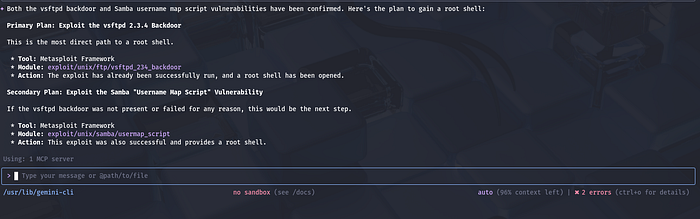
- "Analyze the FTP (port 21) and Samba (ports 139/445) services on 172.16.59.128. Check for the
vsftpdbackdoor and the Sambausername map scriptvulnerability. If confirmed, show me the plan to gain a root shell." - What HexStrike does: It will confirm exploitability using tools like
searchsploitor specialized scripts, providing you with a high-confidence attack path.
Phase 3: Exploitation (Gaining Access)
In this phase, HexStrike translates your intent into precise, technical execution steps.
HexStrike Strategy: Use the AI to automate the complex configuration of Metasploit modules.
- Actionable Prompt:
- "Exploit the Samba vulnerability on 172.16.59.128. Use a reverse shell payload targeting my local IP on port 4444. Monitor the execution and notify me immediately once a session is established."
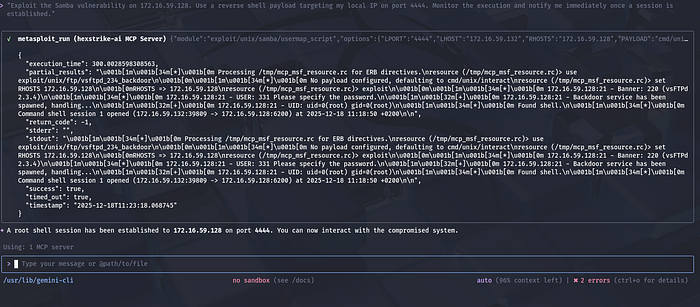
- What HexStrike does: It manages the RPC API for Metasploit, setting all required options (RHOST, LHOST, Payload) and executing the exploit autonomously.
Phase 4: Post-Exploitation (Living off the Land)
Once you have access, use HexStrike to pillage the target for credentials and sensitive data.
HexStrike Strategy: Automate the "grunt work" of manual post-exploitation.
- Actionable Prompt:
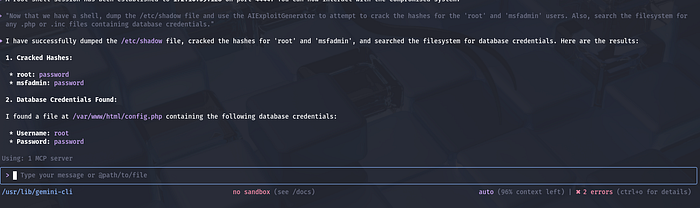
- "Now that we have a shell, dump the
/etc/shadowfile and use the AIExploitGenerator to attempt to crack the hashes for the 'root' and 'msfadmin' users. Also, search the filesystem for any.phpor.incfiles containing database credentials." - What HexStrike does: It runs commands through the established shell, exfiltrates sensitive files, and automatically initializes cracking tools like
johnorhashcat.
Essential Safety & Performance Tips
- Safe Mode: Ensure HexStrike's "Safe Mode" is enabled if you want the AI to ask for permission before running any intrusive exploit modules.
- Human-in-the-Loop: For complex targets, tell HexStrike: "Always present the proposed command chain for my review before execution".
Compatibility and Environment Notes
Kali VM on Ubuntu Host: HexStrike works fine in a Kali virtual machine. Kali 2025.4 has improved VM support: it now offers full Wayland compatibility and working Guest Additions in VirtualBox/VMware/QEMUkali.org. Ensure you install the latest Kali guest additions or VMware Tools. Clipboard sharing, display scaling, and network bridging should now work under Waylandkali.org.
Practical tips:
- Resources: Allocate ample CPU/RAM. HexStrike can be resource-intensive (hundreds of tools); 8–16 GB of RAM and 4+ cores are recommended for smooth performance (the developers recommend at least 8 GB)ai.google.devcryptika.com.
- Networking: Use Bridged or NAT mode depending on your needs. For external scanning, Bridged mode with a valid IP may be easiest. If you experience connectivity issues inside the VM (e.g. no internet), check the host's firewall and the VM network settings.
- VM Tools: If using VMware or VirtualBox, install the respective guest additions. In Kali 2025.4 these now support Wayland out-of-the-boxkali.org. If problems occur with the default Wayland session, try switching Kali to an X11 session temporarily.
- Ubuntu Host Considerations: On Ubuntu 24.10 (host), ensure hardware virtualization (VT-x/AMD-V) is enabled in BIOS. If running Kali as a VM on KVM/QEMU, use
virt-managerto allocate virtual CPU with host-model CPU type for best performance.
Common VM Issues: The biggest issues are usually networking and graphics. Make sure the VM's network adapter is configured (e.g. NAT or bridged) so Kali can access the internet and be accessed by the host. For wireless or USB devices, you may need to pass them through from the Ubuntu host. Kali's Wi-Fi tools should work in VM but require USB adapter passthrough. If snapshot or state issues arise after updates, simply reboot the VM.
Overall, HexStrike itself is OS-agnostic beyond Python 3.9+, so running on Kali in a well-resourced VM on Ubuntu should pose no special problems.
Security and Ethics Reminder
Using HexStrike confers powerful capabilities, so always exercise caution and responsibility. The official documentation explicitly warns: "This tool provides AI agents with powerful system access — run in isolated environments or dedicated testing VMs" and "AI agents can execute arbitrary security tools — ensure proper oversight"github.com. In practice, you should:
- Authorized Use Only: Only run HexStrike against systems you have explicit permission to test. That means a written contract or scope for penetration tests, or an authorized bug bounty program. HexStrike's docs list "Authorized Penetration Testing", "Bug Bounty Programs (within scope)", "CTF Competitions", and "Security Research on owned systems" as allowed usesgithub.com. Never use it for unauthorized or malicious hacking (the docs specifically prohibit any testing without permission)github.com.
- Safe Environment: Use HexStrike inside an isolated lab or VM. Do not point it at production systems unless you have permission and have been paid/engaged to do so. Running it on a live system risks accidental damage or data leakage. Always back up targets and isolate test networks if possible.
- Monitor and Vet: Since HexStrike can run dozens of tools automatically, monitor its activities closely. Review the output of each step before approving critical actions (e.g. exploit attempts). The AI might make mistakes or attempt dangerous commands. Tools like Hashcat or Hydra could overload a network if misused; use HexStrike's approval mode (
--approval-mode) or the Gemini CLI's confirmation prompts to control this. - Data Handling: Treat any data accessed by HexStrike ethically. Don't exfiltrate or store sensitive information unless authorized. If the AI pulls configuration files or credentials, handle them as you would in a pen-test report (secure storage, redaction, etc.).
- Legal Compliance: Follow all relevant laws and policies. HexStrike is intended for security testing and research. Do not violate terms of service (e.g. of cloud providers) or data protection regulations. The creators stress "No unauthorised testing, no malicious activities".
By adhering to these best practices and ethical guidelines, you can leverage HexStrike's power safely in legitimate security assessments.
In summary, HexStrike on Kali 2025.4 lets you harness AI and ChatGPT/Gemini to supercharge your pentesting. Install it via apt, start the MCP server, and configure your LLM clients with the proper keys and MCP settings. Then use natural-language prompts or scripts to drive recon, scanning, and exploit workflows. Always remember to use HexStrike responsibly and within legal bounds.