

Large Language Models are powerful — but they're also infamously unreliable when forced to guess. They respond with radical overconfidence. They hallucinate facts with alarming fluency. Sound familiar?
Retrieval-Augmented Generation (RAG) exists to eliminate the guessing by grounding LLM outputs in retrieved, verifiable data from your own private knowledge bases.
Over the last few years, RAG has matured into a core building block for any serious AI system — from agentic frameworks to developer copilots.
In this article, we'll build a complete, production‑grade RAG architecture using free, open‑source technologies. We'll use PDF versions of the full Kubernetes documentation as our example knowledge base and walk through the key design decisions you'll face along the way.
The solution is available on GitHub and runs locally, so you can experiment end‑to‑end on your own machine.
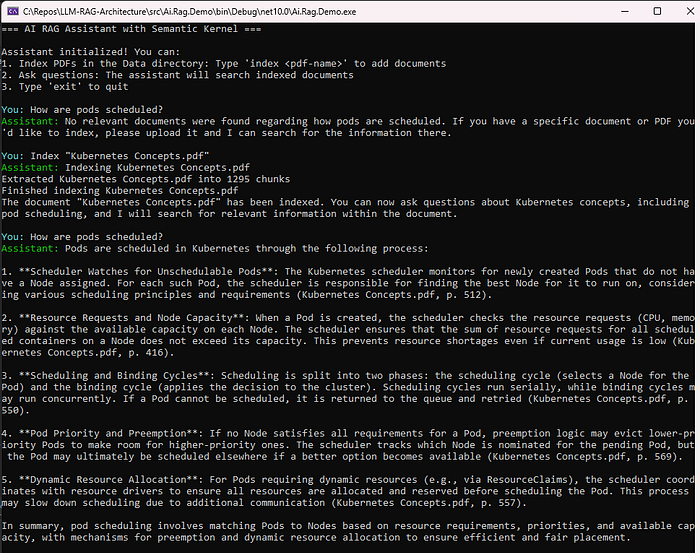
High Level Architecture
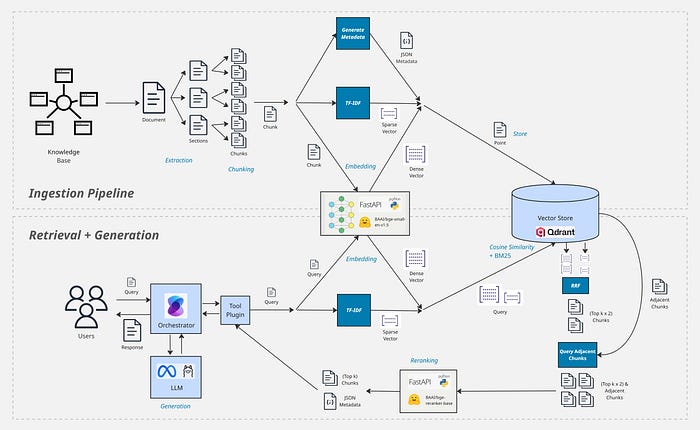
Let's start by looking at RAG at high level first and then dive deeper. RAG is composed of 2 separate processes:
Ingestion Pipeline
This first process is used to extract text from your knowledge bases and store it in a searchable format. This is the most important and complex part of a RAG system, if you don't get this right then your system will be useless. What makes this especially hard is that there are many different techniques that can be used and lots of configurations that you must decide based on the type of data you're working with.
Retrieval + Generation
Once your data is in a searchable format, you need a way to search for relevant extracts when a user writes a prompt (Retrieval) and inject it as context for your LLM in a format that can be utilized as best as possible (Generation).
Once these processes are in place, when a user asks a question through your LLM based app, it will be enriched with relevant information from your knowledge base before it responds.
Your Data. Your System.
There's a plethora of different techniques and tricks which can be used for RAG. That doesn't necessary mean that you NEED or SHOULD use them ALL. Unfortunately, there is also no "perfect design", which will work reliably for all types of data. The most important driver for all of the decisions that you make when architecting your system must be your data and how you want it to be consumed.
- What formats is your data in? (PDF, HTML, JSON, Free Form etc.)
- Is it highly structured? (Sections/Sub-Sections, Hierarchies, Tables, Legal References etc)
- Is there additional metadata which will need to be indexed?
- Any non-text? (E.g. images, videos, audio)
- Size and Volume of data
- How will users search for it?
What Type of Search?
This is the first and most important decision that you must make; everything else follows on from here.
Keyword Search (Sparse Vectors)
Keyword searches have traditionally been used by search engines for years. The words/tokens in a query are extracted and matched against words from each document in the knowledge base. Words are matched using a Sparse Vector, where an index for each word based on a vocabulary is created for each word in the query or document.
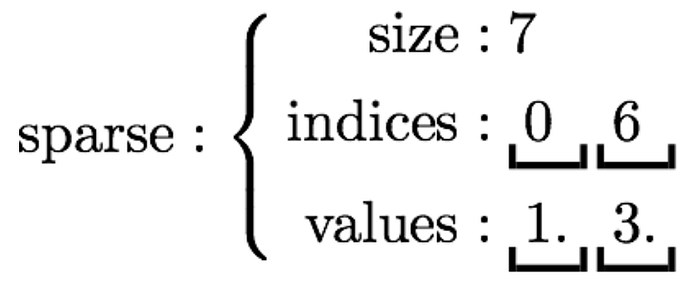
The matching method can vary from a simple word count to more complex approaches such as Best Match 25 (BM25), which assigns weights to tokens using Inverse Document Frequency (IDF) computed across the entire corpus. BM25 weightings reduce noise for words that appear frequently in lots of documents, to give a much more reliable match. Most fulltext databases, such as Lucene or ElasticSearch, use some variant of BM25.
Embedding Similarity (Dense Vectors)
Keyword searches miss the mark if the exact word in your query isn't in the knowledge base. Embeddings help with this issue by creating a Numeric Vector representation of text, known as an Embedding. Embeddings are created using a specific type of Machine Learning model, which captures the semantic meaning of words.

These are known as Dense Vectors because the models produce the same number of dimensions in every numeric vector which is generated from each text. Similar words will be closer to each other's vector space. Cosine Similarity is used to search for texts with a similar semantic meaning, hence this type of search often being referred to as a Semantic Search. Vector Databases are optimized to store numeric vectors, and they also natively support searching by Cosine Similarity. Relational databases, such as PostgreSQL and SQL Server, are also beginning to support vectors natively too.
Hybrid Search
Both Dense and Sparse Vector searches can be combined into a Hybrid Search, often producing the best results.
There aren't many databases which support Hybrid Searching out-of-the-box, it often requires some complex custom work to fuse the different search results together.
Decision: Hybrid Search
In this case we'll use Hybrid Search, as it is most likely to perform best across the Kubernetes docs. We will weight the search results 70% to embeddings, which we expect to perform best, and 30% to keywords (via BM25), which will allow searching by specific criteria/codes — this is a common ratio used in RAG.
Database: Qdrant
When choosing your database, its import to consider:
- Type of search functionality
- Budget: Open-Source or Commercial
- Privacy: does data need to be self-hosted?
- Popularity: better support and community
- SDK support
- Performance, based on your requirements
There are a few databases which do support Hybrid Searching. BM25 can be painful because it requires maintaining an index of document term frequencies across all of your texts, so I would suggest choosing a vector store which does this for you!
Qdrant allows both Dense and Sparse Vectors to be stored for your texts and can perform a hybrid query across both. The results are combined using Reciprocal Rank Fusion (RRF), which is the standard for RAG.
Qdrant is Open-Source and can be run in Docker, which makes it super easy to host. It also scores well for my use case against the above criteria, including excellent support for .NET, which I am using.
Other good database options which can perform Hybrid search are: Weaviate, Pinecone and Milvus.
Ingestion Pipeline
Now that we have decided we will be performing Hybrid Searches, we know that our Ingestion Pipeline will need to generate and store Dense Vector Embeddings and Sparse Vectors as well.
Our Kubernetes source docs are fairly long (very normal for RAG knowledge bases) and this will not work well for our search strategies, especially for embedding based. Embeddings try to distil the semantic meaning of text; however, long text will cover lots of different topics. Embeddings work best with fairly small chunks of text, where there is good semantic cohesion. We are also unlikely to be able to inject a whole long document into our LLM's context anyway; we want to take the most relevant bits based on the User's query. RAG systems work around this by splitting documents into Chunks before generating embeddings and storing.
An effective Ingestion Pipeline (especially the chunking strategy) is the most important aspect of a RAG system to achieve excellent retrieval recall.
Here's the key steps that make up a standard Ingestion Pipeline:
- Extract
- Pre-Process
- Chunk
- Generate Metadata
- Generate Dense and Sparse Vectors
- Store
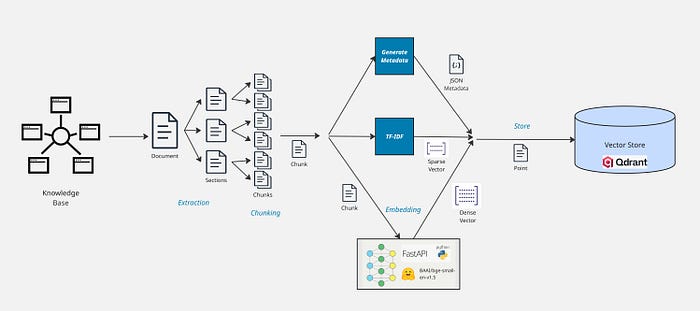
Extraction
The first step involves extracting text from your source documents. Any metadata that can be used to search or enrich responses should also be extracted e.g. document names, page numbers, summaries.
If a document has a specific structure and is broken down into sections, it's best to extract text by section. This helps with chunking after, as we can ensure that chunks don't span multiple sections.
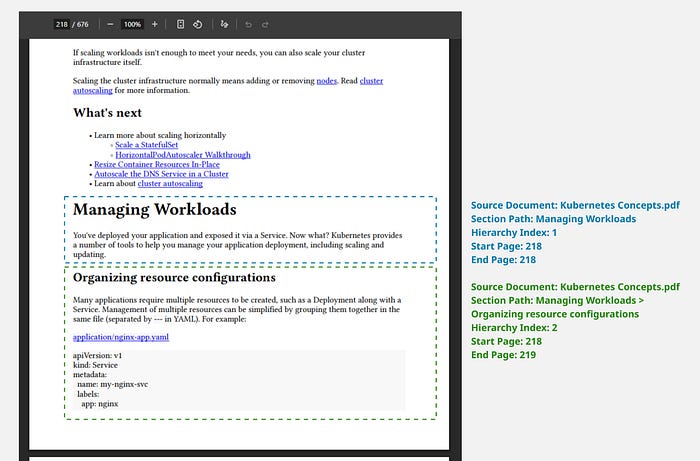
Sections are stored by pages, which allows us to stitch back together and understand which pages chunks belong to in the next step. I generally flatten the sub-sections into a single Section Path and specify how deep the structure hierarchy should be nested.
You'll generally need multiple strategies for extracting documents, since documents often have different layouts/structure. I have provided these in my demo repo:
- SimplePdfExtractor - All text from a PDF is extracted into a single section.
- BookmarkPdfExtractor - Bookmarks in the PDF are searched for and used to find sections and nested sections.
- FormatBasedPdfExtractor - Text formats are analyzed to guess sections, assuming that the heading titles are larger or bold, and reduce in size or weight as the sections are more deeply nested.
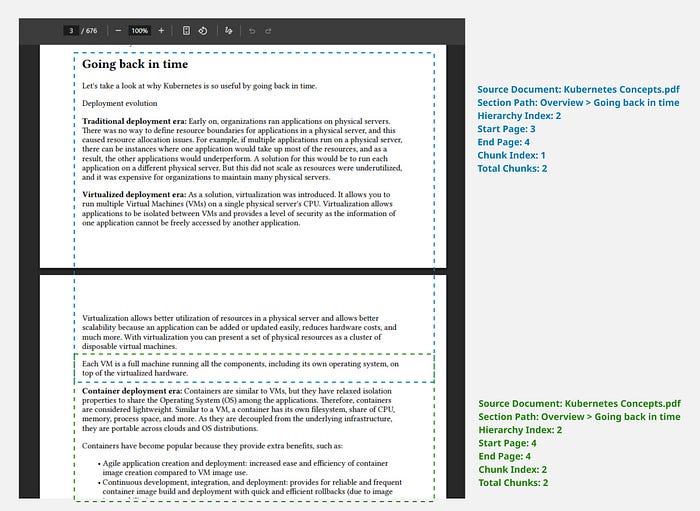
The Kubernetes documentation has very consistent heading formats, so the FormatBasedExtractor works perfectly. The following diagram shows an example of an extracted Section and Sub-Section, based on the header format.
Chunking
Once you have extracted your documents into sections/sub-sections, you're halfway towards effective chunking already. The next step is to chunk any long sections into smaller chunks, so they will generate good quality embeddings.
Chunk Length
Generally, chunk lengths of 200–300 tokens work well, however it's important to test different lengths with your data to see which provides better recall. For complex policy documents or legal documents, a higher length of up to 600 tokens may work better.
You'll also need to consider whether your embedding model has any limitations. Many Open-Source models have a strict limit of 512 tokens.
Chunk Breaks
It's best not to use a strict chunk size, in case you cut-off sentences. You should prefer to chunk between paragraph breaks, or at the very least sentence endings.
In more advanced cases, you can even use an embedding model or LLM to break chunks between text that appears semantically different.
Chunk Overlap
No matter how complex your chunking procedure is, you are likely to have some less-than-ideal chunk boundaries. This is why creating an overlap of 10–20% between chunks generally improves recall, without impacting precision or latency.
The Kubernetes docs have some fairly large sections, and I found the following worked well:
- Max chunk length: 400 tokens
- Chunk overlap: 50 tokens
Generating Metadata
Extra Metadata should be attached to chunks for 2 reasons:
- To enrich generation by the LLM e.g. adding citations and page numbers
- Performing custom searching or filtering on retrieval
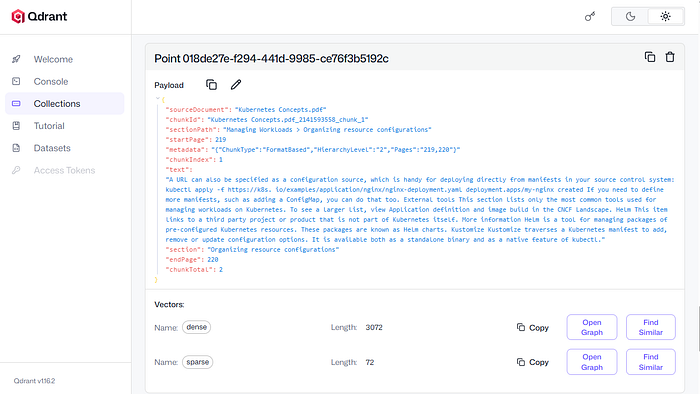
What metadata you store will depend on your data, but here's some examples:
- Source Document Name
- Page Numbers
- Section and Section Path
- Section Chunk Index and Total Chunks
- Reference IDs, Article Numbers, Rule/Error/Product Codes
- Summary of chunk contents (LLM Generated)
Generating Dense Vectors (Semantic Embeddings)
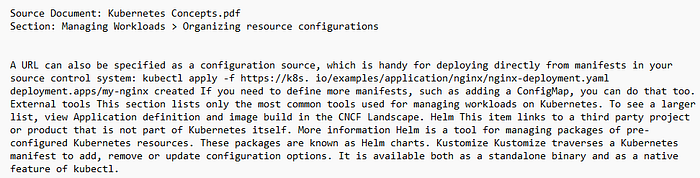
Embeddings are generated by your selected Embedding model, using text from the chunks. If it adds to the semantic relevance, then you should also add the Source Document Name and/or Section Path.
There's lots of different models to pick from. Some perform better with different types of data. More powerful models often produce vectors with a higher number of dimensions; however they take more compute and will require GPUs.
There are some brilliant free Open-Source embedding models. Here I have chosen BAAI/bge-small-en-v1.5, because it's small enough to run fairly fast on CPUs. It produces numeric vectors with 384 dimensions. I have hosted through a Python FastAPI app, using the Hugging Face model. You can find the code to run the service here.
Generating Sparse Vectors (BM25)
Sparse Vectors only contain the term frequencies for the terms appearing in a chunk. Rather than storing the term text, an integer ID must be assigned to each term. There's 2 ways of assigning term IDs:
- Use a vocabulary of terms and ID mapping
- Hash the term to generate an integer
I generally prefer to use a simple hash, so that I don't need to maintain a vocabulary. Something like xxHash is extremely fast and very very unlikely to get a hash collision.
Ingestion Schedule
How and how often you run your ingestion pipeline will depend on your data and use case.
- Manual — If your data rarely changes, then a manually run process might be fine.
- Scheduled Job — A scheduled job/cron job might be the way to go if your documents change fairly frequently. A common approach is to run daily.
- Realtime — If you have a document management layer and documents change often, then you can use an asynchronous event-driven process to run the pipeline every time source documents change.
Retrieval + Generation
Most of the decisions and complexities are tackled throughout Ingestion. Next, we just need a process to search for our chunks, based on the user's prompts.
Retrieval
We chose to use Qdrant because it performs both a BM25 Keyword search and embedding cosine similarity search for us out-of-the-box. It's recommended to apply weightings to the different search strategies the Hybrid Search. For RAG, the following weightings often work well:
- Dense Vector (Embeddings) 70%
- Sparse Vector (Keyword/BM25) 30%
Embeddings capture semantic meaning and often perform best, which is why we generally rely on that the most. But the ideal weighting will depend on your data and whether keyword queries are highly important.
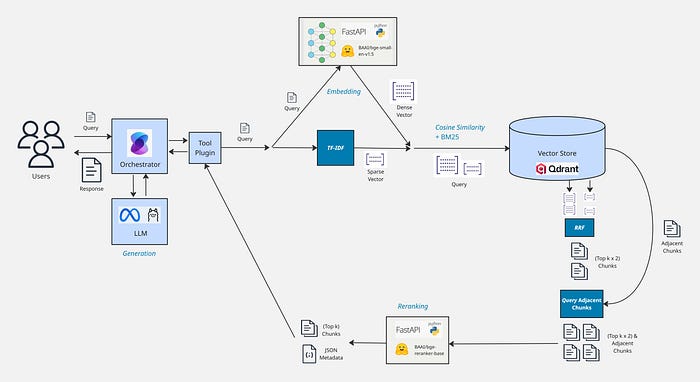
All we have to do first is run the user's query through some of the steps that we built in the Ingestion pipeline:
- Pre-Process
- Generate Dense and Sparse Vectors
- Search
When searching you should return more than 1 chunk, as there may be multiple chunks which match the query — this is usually knows as the "Top k" results. Top k of 5–10 is usually fine, depending on your data and chunking strategy. Smaller chunks normally require a larger Top k.
This approach works well but it is not bulletproof. Hybrid search is not perfect, especially if the user's query is particularly short. There are some other techniques which can be layered after the search to improve recall and precision.
Adjacent Chunks
We extracted text from our source documents into Sections and chunked over the sections. This means that adjacent chunks to our search results are highly likely to be relevant too, if they haven't been returned already by the search.
The first recommended next step is to enrich the search results with adjacent chunks. Generally, chunks within 1–2 indexes away, before and after the retrieved chunks works well. This is why it's important to store the Document Name, Chunk Index, Chunk Total and Section Path as metadata for chunks, so that adjacent chunks can easily be queried.
If your vector store supports Indexes, which Qdrant does, then you should put them on these fields, to enable querying adjacent chunks efficiently.
Reranking
Searches will often retrieve chunks which are not relevant at all; this is particularly problematic with keyword searches. Reranking can be used to sort the search results by relevance and filter out any irrelevant chunks. A powerful technique, if using a reranker, is to return 2–3x more results than your Top k when searching and then filter down to Top k most relevant chunks using the reranker.
Example: Top k = 5
- Hybrid Search returns Top k x 2: 10 chunks
- Adjacent chunks added to search results: 18 chunks
- Reranker sorts by relevance and returns Top k: 5 chunks
Reranking in this way can significantly boost precision for your retrieval.
Rerankers are specialized models which take a pair of text as inputs and provide a relevance score. We simply run each search result through the reranker alongside the user's query. We can also use the relevance scores to apply a minimum relevance to return for our search results, instead of just taking the Top k.
Cross Encoders
Cross Encoders are specialized Machine Learning models, trained for relevance scoring. They are much quicker at processing text, compared to an LLM.
The higher quality rerankers do still generally need to be run on GPUs to be usable in a production system. For this setup I have used the free Open-Source BAAI/bge-reranker-base model, because it performs fairly well and is fast enough to use on CPUs. I have hosted through a Python FastAPI app, using the Hugging Face model. You can find the code to run the service here.
LLM Reranking
Unfortunately, there aren't many cloud hosted reranking models out there at the moment. Another approach is to use an LLM to perform reranking, using a tailored System message. I recommend using a lightweight LLM model for reranking, such as GPT 4.1 Mini, so that the latency of your RAG system isn't dramatically affected.
The following System message can be used to perform reranking using an LLM:
Generation
Now that we have retrieval of our chunks sorted, all that's left is pumping them through an LLM to summarize.
Context Format
The best way to inject your chunks into the LLM conversation is as a Tool message, if your LLM supports them. In your System message you should add any rules and guardrails about how the LLM should interpret the search results and how to react if there are no matches found.
System message → rules, behaviour, guardrails
Tool message → retrieved context (chunks)
User message → question
System Message (rules only):
Tool Message (retrieved chunks):
It's important to include any metadata that you want the LLM to reference alongside your chunk content.
User Message (question):
e.g. How are pods scheduled?
Orchestration
A more manageable approach is to use an orchestrator to generate tool calls and outputs, such as Semantic Kernel or LangChain. Using an orchestrator also gives 2 extra benefits:
- The query to send to the RAG system is interpreted first by the LLM, so it can be improved/corrected if required.
- The knowledge base(s) can be used as part of a wider AI Agent/Copilot.
When using an orchestrator, you only need to worry about the System and User messages. The orchestrator handles calling the RAG search when required and adds data to the context as Tool messages (generally as JSON).
In the sample app, I used Semantic Kernel plugins to integrate Open AI style tool calling for enabling prompt-based Indexing and RAG Querying.
LLM Model
If you're building a system where RAG is the only function, then a fairly cheap LLM model will do the trick — all that's needed is basic summarisation of searched documents.
If you're using an orchestrator, then you'll need a model which is capable of tool calling. I have used Llama 3.2 3B Small Language Model (SLM) through Ollama, so that it can be run on CPUs, however a larger model will be much more reliable.
Hosting
I have packaged my Semantic Kernel RAG assistant into a CLI console application, which works fine for simple cases. If you want to make your assistant available to a wide group of users, then it's better to write a small web UI over the top using something like React or Angular.
Each service, such as the Reranker and Embedder, are run as separate processes. Hosting each service independently allows you to scale independently and use different infrastructure or resource requirements for each service e.g. you may find that the Reranker uses a lot of resource and needs to be scaled out to a high number or replicas and you are most likely to need to run the LLM on GPU infrastructure.
Containers work brilliantly for these types of processes, so that you can package together in isolation as a container image and get reliable operation across different hosting options. A container orchestrator is recommended so that services can easily be scaled up and down quickly; something like Kubernetes is ideal.
Self-Host vs Cloud Services
The sample solution has been put together with Open-Source tech, so that you can host everything yourself or run locally on CPUs if you want. Generally, I wouldn't recommend going down this route however, unless you have significant data risk at your company and are not comfortable using Cloud services. Bear in mind that most cloud services like Azure Open AI are designed for Enterprise use and are completely stateless i.e. no data from your prompts or responses is stored.
You may also find that a hybrid approach works, where some of the more lightweight models are self-hosted. The embedding and reranker models generally don't need as much juice as the LLM models. Ideally you need GPUs to run your LLM for generation reliably, and that is where the Cloud service options are generally much cheaper than running on your own infrastructure.
There's lots of generic off-the-shelf RAG solutions that you can use, however building your own architecture allows you to tailor everything to match your specific data requirements, which can often lead to superior recall and precision performance. Even if you do decide to use an external service for RAG, lots of the techniques discussed here, such as different chunking strategies and reranking, can be used in harmony with it.
The full code for the architecture discussed can be found on my GitHub below.