March 18, 2026
Agentic AI: The Five Design Patterns That Turn LLMs Into AI Agents
The core architectures behind modern AI agents: reflection, tools, planning, multi-agent systems, and human-in-the-loop

By Dr. Leon Eversberg
12 min read
Large Language Models (LLMs) are general-purpose AI systems that can handle an incredible variety of tasks. With the right prompt, an LLM can write code, answer complex questions, summarize long documents, and generate creative content.
However, LLMs are fundamentally reactive. They respond to prompts, but they lack the ability to achieve complex, long-term goals. This is where Agentic AI comes in.
AI agents use LLMs to actively achieve their given goal through clever system design. This article examines five essential design patterns that transform LLMs into AI agents capable of reasoning, planning, taking actions, and adapting autonomously.
What Are AI Agents?
An AI agent is a software system designed to achieve a specific goal. Unlike rule-based automation software, which follows a fixed script, an AI agent combines the power of LLMs with additional capabilities to work more independently and handle complex, multi-step problems. Think of an AI agent as a goal-oriented system that decides what to do next, takes action, and adapts along the way.
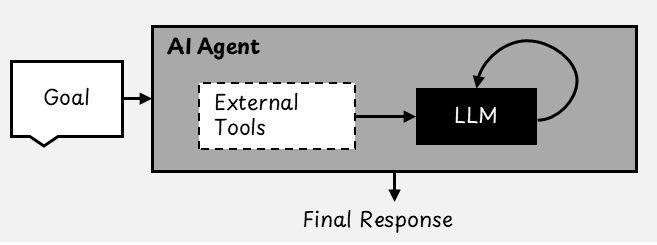
We use the term "agentic" because these systems can operate with varying degrees of autonomy. Rather than viewing "agent" as a categorical yes-or-no, it is more useful to think of agenticness as existing on a spectrum.
Agenticness Definition: "the degree to which a system can adaptably achieve complex goals in complex environments with limited direct supervision" [2]
Some systems are only lightly agentic, requiring significant human input and control. Others are highly agentic and capable of managing multi-step tasks and making decisions with little to no human supervision.
Reflection: How AI Agents Self-Critique and Improve Responses
The reflection pattern takes the output of one LLM and passes it to another LLM, often called a "critic," for review. The critic can be the same LLM model or a different one. Based on its review, the critic provides feedback to help improve the original response.
The original LLM can then revise its answer using this feedback. This process of review and improvement can be repeated several times automatically to refine the result.
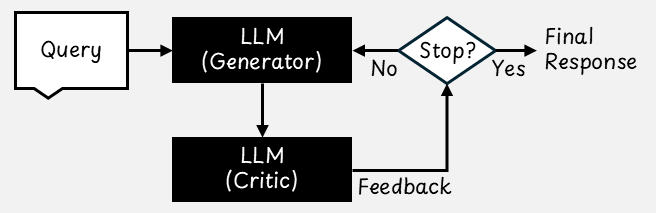
Reflection has been shown to improve task performance more consistently than generating a response in a single step without feedback [3]. By reviewing and revising its own output, the model can identify mistakes more effectively, follow instructions more precisely, and produce higher-quality responses, particularly for complex tasks.
Using External Feedback to Improve LLM Outputs
Reflection is especially great when we can provide external feedback, which is information that the model cannot figure out on its own. For example, suppose you are using an LLM to generate code. Instead of accepting the first result, you can:
- Run the generated code.
- Capture any error messages or test failures.
- Feed that information back to the LLM so it can try again, this time avoiding the mistakes.
Looping in real-world feedback, such as execution results, makes the AI much more reliable and useful.
Tool Use: Extending LLM Capabilities With External Systems
LLMs are powerful, but they have one major limitation. They can only "know" what was included in their training data. They do not have access to real-time information, nor do they have the ability to perform actions such as calculations or web searches on their own.
Tools, also known as functions, solve this problem. They extend LLMs' capabilities by connecting them to external systems that can perform tasks the models cannot do alone.
Below are some common tools used by AI agents:
- Web Search: Used to find up-to-date information online.
- Code Execution: For example, run Python code snippets to analyze data.
- RAG: Search for documents or conversation histories in a vector database.
- Database: Interacting with an SQL database, for example.
- File System: Used to look through folders and read or write documents.
LLMs do not execute these tools directly. Instead, we define a set of tools in advance and provide the LLM with information about each tool's functionality and usage. Each tool is defined by its schema, which includes the tool's name, description, and parameters. When the LLM determines that a tool could help answer a question or complete a task, it generates a structured request that aligns with the tool's specifications.
The agentic software application picks up the request, runs the tool, and sends the result back to the LLM as part of the conversation. The model can then use the new information to generate a response.
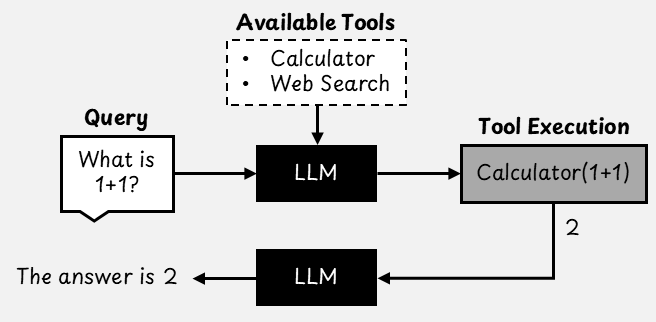
Rather than granting the LLM access to all tools by default, it is good practice to limit the number of available tools based on the specific goal. This helps reduce complexity and avoid incorrect or unnecessary tool use.
Code execution is especially efficient among all tools. Instead of creating a separate tool for every type of task, granting an AI agent the ability to write and run code enables it to solve a wide range of problems flexibly. For instance, if code execution is available, a separate calculator tool is unnecessary because the model can simply write a short program to do the math.
However, allowing AI to run code comes with risks. Automatically executing AI-generated code could cause unintended side effects. That is why it is important to run code execution in a controlled, isolated sandbox environment.
The special quality of tools is the decision-making power of the LLM regarding their use. This gives the AI agent a higher level of autonomy. For example, it can choose to use a calculator only when it needs to perform precise mathematical calculations or search the web only when asked a question it cannot answer.
To use tools effectively, it is important to use LLMs that are specifically trained for tool use [4]. These models are fine-tuned to correctly follow tool specifications within a structured chat format. This training enables them to recognize situations in which a tool would be useful and to generate requests that align with the tool's schema.
Model Context Protocol (MCP): A Standard for Connecting LLMs To Tools
Tools greatly expand the capabilities of LLMs. The model context protocol (MCP) is an open standard that defines how LLMs can connect to external systems. Today, there are many MCP-compliant tools available that can be integrated into agentic AI systems. Open-source tools, for instance, allow LLMs to interact with GitHub, Google Maps, Slack, SQL databases, the local file system, or even just fetch the current time.
An AI application that uses MCP is called an MCP host. It can access the tools provided by an MCP server, which communicates with an MCP client. This setup establishes a one-to-one connection: the client sends requests, and the server responds with tools and data. MCP servers can run either locally on your device or remotely in the cloud.
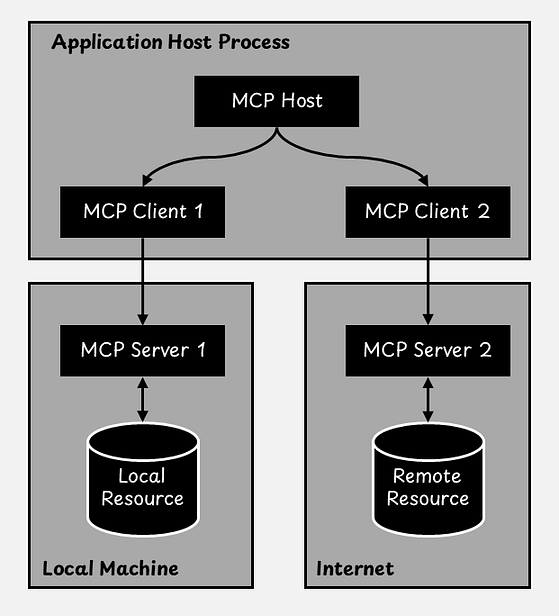
An MCP server exposes three main types of components to the LLM:
- Tools: These are active functions that the LLM can call.
- Resources: These provide read-only access to useful information. Examples include the contents of a document, a database schema, or API documentation that helps the model understand its environment.
- Prompts: These are reusable, predefined prompt templates that the LLM can use to produce consistent and effective outputs.
In agentic AI systems, MCP provides LLMs with a standardized method of accessing real-world data through interaction with external systems. This makes AI applications more capable and useful in practice.
Agent Skills: Reusable Instructions That Guide LLM Behavior
Agent skills are another way to extend the capabilities of an LLM. A skill usually resides in its own local folder and contains a file named SKILL.md. This plain text file provides structured instructions that teach the agent company-, domain-, or task-specific behavior.
A skill file must include the following three things:
- The name of the skill
- A short description of what the skill does and when it should be used
- The content of the skill, which contains the actual instructions, rules, examples, or templates that the agent should follow
After selecting a skill based on the given task, the agent reads the corresponding content into its context window before generating a response.
For example, imagine that you use agentic software at work to help with various tasks, including writing emails. Your company may have specific email templates and writing styles that employees are expected to follow. Rather than repeating these rules each time, you can store them in a skill file.
When the agent is asked to write an email, it can recognize that a relevant skill exists, read the instructions from that skill, and then write the email according to your company's standards.
In this example, the file write-emails/SKILL.md might look like this:
---
name: write-emails
description: Company email standards.
---
# How to Write Emails
## Writing Style
Always be extra friendly.

## Required Email Footer
MyCompany
www.mycompany.example
---
name: write-emails
description: Company email standards.
---
# How to Write Emails
## Writing Style
Always be extra friendly.
## Required Email Footer
MyCompany
www.mycompany.exampleAlthough skills are related to tools, they serve a different purpose. Tools are external software programs that perform actions, such as querying a database and returning the results. Skills, on the other hand, are reusable instructions that are loaded on demand to guide the LLM's behavior. Both tools and skills can be used alongside each other.
For a more detailed comparison of MCP vs. Skills vs AGENTS.md, I recommend another article of mine on that specific topic:
The Agentic AI Toolkit: MCP vs. Agent Skills vs. AGENTS.md Learn how these new standards for AI agent connectivity and behavior work and when to use each one
Planning: How AI Agents Break Down Complex Tasks
When solving complex problems, people do not typically try to do everything at once. Instead, they break things down into smaller steps. This is exactly what planning in agentic AI is all about. Rather than providing a single instruction and hoping for the best, we allow the AI to think ahead. What steps need to be taken? In what order? And how should they be carried out?
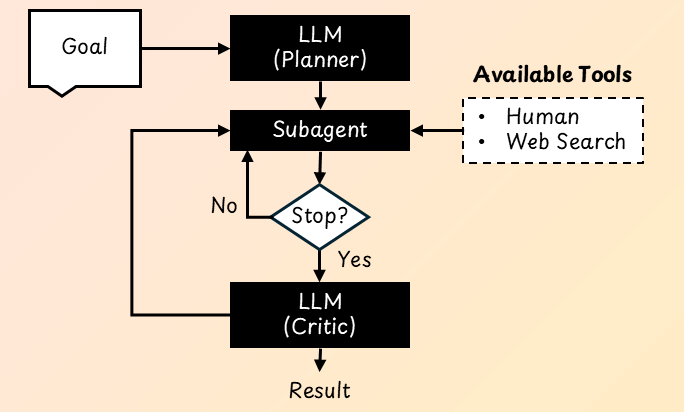
The planning design pattern begins by prompting an LLM to generate a plan for a specific task. This plan is usually a list of steps that the AI agent will follow. Once the plan is ready, the agent executes each step one at a time. At every stage, the LLM receives the current step and any results from the previous step so that it can respond appropriately and adjust as needed.
If some steps in the plan are independent of each other, they can be executed in parallel. Combining the results of these steps at the end can significantly speed up the overall process.
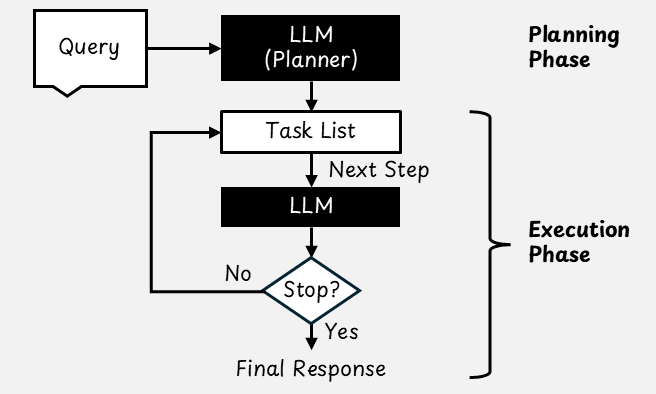
To make things concise and easy for humans and machines to understand, plans from AI agents are often written in JSON. Unlike plain text, JSON has a clear structure that makes it easier to parse and reliably execute each step. Each step typically includes a task description and, if necessary, information about which tool to use.
Below is an example of a simple three-step plan for writing a blog post on a given topic that an AI agent might create:
- Step 1: Use the "Web Search" tool to research
- Step 2: Write an outline based on the research.
- Step 3: Write the article using the outline and research notes.
However, not all complex tasks require a detailed plan. For example, when analyzing a dataset, it may be more efficient to let the LLM write and run code directly.
Programming languages provide a powerful way to structure logic by supporting loops for repeating tasks, variables for storing results, and functions for organizing complex behavior. In these cases, the code itself becomes the plan that is executed line by line [6].
Multiple Agents: How Multiple AI Agents Collaborate to Solve Complex Tasks
In this fourth design pattern, we build systems using multiple AI agents, each with a specific role or area of expertise. Similar to how people collaborate within a company, these agents work together by dividing a large task into smaller, more manageable parts.
Think of a typical workplace, where different professionals handle different responsibilities. For example, in a software development team, one person might write code, another might test it, and a third person might handle deployment. A multi-agent AI system operates similarly. Each agent is assigned a specific role and has access to tools tailored for that role.
Communication Patterns in Multi-Agent AI Systems
There are various possible communication patterns in multi-agent systems. The following two approaches are commonly used:
- Sequential Chat: Agents work in a predefined order. Each agent completes its task and passes the result to the next agent in line.
- Hierarchical Chat: A manager agent oversees the others and dynamically assigns tasks based on the situation.
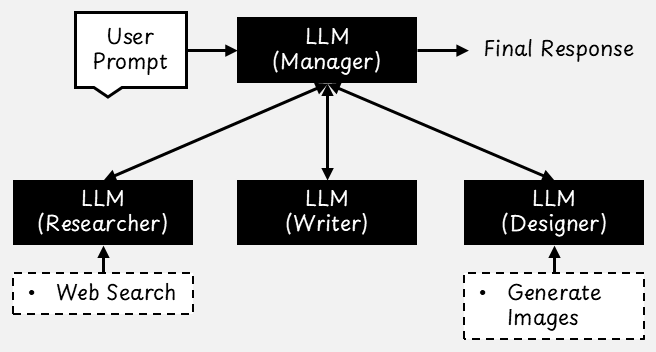
For this design pattern to work well, each agent should have a narrow, well-defined role. Instead of creating a generic "software developer" agent, it is more effective to define specialized agents, such as "Python backend developer," "senior DevOps engineer," and "quality assurance engineer." These agents can then be given system prompts that guide their behavior and the tasks they focus on.
The agents can use the same LLM or different ones. For example, a manager agent could use a general-purpose reasoning LLM, while developer agents could use a specialized LLM fine-tuned for coding tasks.
For very complex, multi-step tasks such as software development, multi-agent applications have been shown to outperform single-agent applications [7]. However, their high level of autonomy can lead to unpredictable results and systems that are difficult to debug.
Human-In-The-Loop: Adding Human Oversight to AI Agents
Although AI agents can operate with a high degree of autonomy, it is not always ideal to let them run entirely on their own. In many real-world situations, human judgment, oversight, and domain knowledge are still necessary. Human-in-the-loop (HITL) is an agentic design pattern that intentionally integrates human input into the workflow at key moments.
Consider this simple example: You use a shopping agent to assist you in purchasing items online. Would you hand over your credit card and let the agent make purchases without checking in with you? Probably not. Before completing a transaction, you would want the agent to pause and ask for your explicit approval. For actions with financial, legal, or safety implications, HITL is a must.
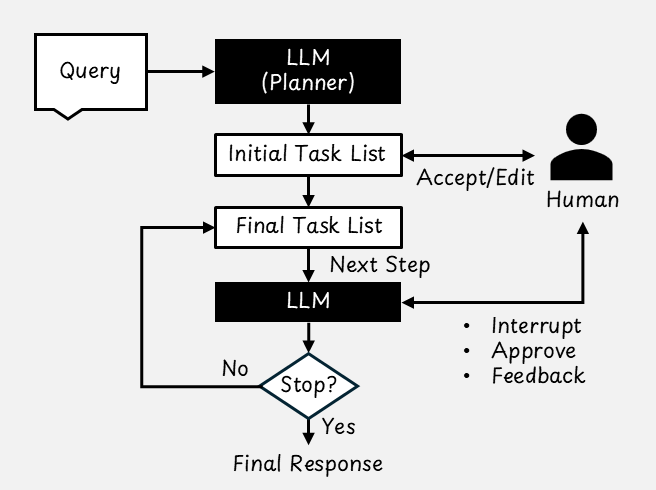
There are many ways to implement HITL. Two common interaction designs are collaborative planning and collaborative task execution [8].
Collaborative Planning: Letting Humans Review and Edit Plans
Imagine you are a software engineer who asks an AI coding agent to "clean up the codebase." The agent interprets this request broadly and begins refactoring multiple modules, rewriting documentation, and running extensive performance tests. After hours of computation and code changes, you realize that the agent misunderstood you: You only wanted consistent formatting and clearer comments.
Co-planning incorporates human supervision into the agent's planning process. After the AI agent generates an initial plan, the user can:
- Edit the plan directly
- Accept it as is
- Provide feedback so the agent can revise it
This approach increases transparency and improves the likelihood that the agent's actions will align with the user's goals. By reviewing the plan before execution, the user can prevent wasted time, unnecessary computation, and off-target results.
Collaborative Task Execution: Humans and AI Agents Working Together
Even with a solid plan, unexpected situations can arise during execution. Co‑tasking allows the user to stay involved while the agent is working. There are two primary forms of interaction:
- User-initiated intervention: The user can interrupt the agent at any time to provide guidance or corrections. For example, if the agent begins to drift in the wrong direction, the user can redirect it immediately.
- Agent-initiated requests: The agent can pause and ask the user for clarification or approval. One way to implement this is to treat the human as a callable "tool" that the agent can invoke. Another approach is to treat the user as one of several agents in a multi-agent system, where a manager LLM delegates tasks to the user "agent." Certain actions, such as deleting files or making irreversible changes, may always require explicit human approval.
Co-planning and co-tasking fit naturally into the planning workflow of an agentic AI system. Keeping the user in the loop makes the system more reliable, aligned with user expectations, and safer to operate.
Conclusion
This article covered reflection, tool usage, planning, multi-agents, and human-in-the-loop design patterns. These design patterns transform reactive LLMs into goal-oriented AI agents that can reason, act, and adapt autonomously.
If you use agentic AI software, you will notice these design patterns at work. For example, Claude Code creates a plan, spawns subagents to work on those tasks, and performs tool calls to interact with external systems (for example, use the "web search tool"). Sometimes, it also asks clarifying questions or requests confirmation during complex tasks.
If you are developing your own agentic AI application using LangChain/LangGraph or CrewAI, you can implement these design patterns to create better AI agents. However, it's good practice when designing AI agents to start with a simple workflow and only add complexity where necessary.
References
This article is largely based on a chapter from my book, "Understanding Large Language Models and Generative AI: Inside the Technology Behind the Hype"
Understanding Large Language Models and Generative AI: Inside the Technology Behind the Hype No prior machine learning knowledge is required. Each chapter builds on the last to provide a strong understanding of…
[1] L. Eversberg (2026), Understanding Large Language Models and Generative AI: Inside the Technology Behind the Hype, 2nd Edition
[2] Y. Shavit and others (2023), Practices for Governing Agentic AI Systems, OpenAI Technical Report
[3] A. Madaan and others (2023), Self-Refine: Iterative Refinement with Self-Feedback, Advances in Neural Information Processing Systems
[4] S. G. Patil and others (2025), The Berkeley Function Calling Leaderboard (BFCL): From Tool Use to Agentic Evaluation of Large Language Models, International Conference on Machine Learning (ICML)
[5] L. Eversberg (2026), The Agentic AI Toolkit: MCP vs. Agent Skills vs. AGENTS.md, AI Advances
[6] X. Wang and others (2024), Executable Code Actions Elicit Better LLM Agents, International Conference on Machine Learning (ICML)
[7] C. Qian and others (2024), ChatDev: Communicative Agents for Software Development, Proceedings of the 62nd Annual Meeting of the Association for Computational Linguistics
[8] H. Mozannar and others (2025), Magentic-UI: Towards Human-in-the-loop Agentic Systems, arXiv