
The Problem: MLX Couldn't Cut It
A few weeks ago, I set out to do something I thought was obvious: run a local LLM on my MacBook Pro and use it as the brain for AI agents.
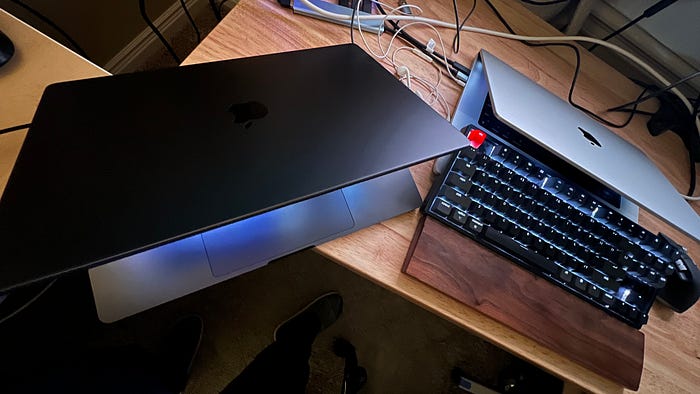
I have two MacBooks sitting on my desk:
- M1 Max, 64GB RAM — my daily driver
- M4 Max, 64GB RAM — sits next to it waiting to prove itself
Both have 64GB of unified memory. Both run Apple's MLX framework. Both should be capable, right?
I downloaded Qwen3.6–35B-A3B-UD in 4-bit MLX format (21GB), loaded it through the raw MLX framework, and fired up a simple test. I wanted to see if I could build AI agents that process long contexts — codebases, documents, conversation history — and respond in real time.
The results were… disappointing.
Here's what raw MLX gave me:
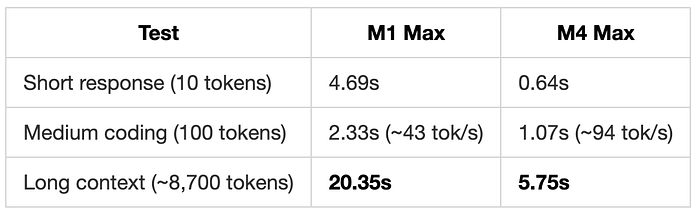
On my M1 Max, processing an 8,700-token context took 20 seconds. That's the length of a moderate-sized codebase or a detailed technical document. And that's before it generates a single token of output.
The M4 Max was better at 5.75 seconds, but still not great.
For an AI agent that makes dozens of requests per task — each one re-reading the entire context from scratch — it's unusable.
I was ready to give up.
Then I Found oMLX
I stumbled across oMLX on GitHub — an open-source LLM inference server built on top of MLX, specifically designed for Apple Silicon. It had 12,000+ stars and promised "continuous batching and tiered KV caching."
I'll be honest: I was skeptical. Another wrapper around MLX? How much faster could it possibly be?
I cloned it, set up a virtual environment, pointed it at my existing MLX model, and started the server:
git clone https://github.com/jundot/omlx.git
cd omlx
python3 -m venv .venv
source .venv/bin/activate
pip install -e ".[mcp]"

# Start the server with my existing models
omlx serve --model-dir ~/.lmstudio/models
That was it. The server started, discovered my Qwen3.6–35B model automatically, and was ready at http://localhost:8000/v1 — an OpenAI-compatible API.
I ran the exact same benchmarks I'd run on raw MLX.
I'm not exaggerating when I say I stared at the screen for a full ten seconds before believing the numbers.
The Results: From 20 Seconds to 1 Second
I ran the exact same benchmarks on both Macs, with raw MLX and with oMLX. Same model, same hardware, warm cache. Here's what I found.
Response Time: From Unbearable to Usable
Before oMLX, I tried both Qwen3-coder-next and Qwen3.6–35B-A3B-UD. The results were the same: waiting times that made any kind of AI agent work feel impossible. Twenty seconds just to read an 8,700-token context. Twenty seconds to stare at a loading screen while your productivity evaporated.
Then I switched to oMLX.
Look at that long context bar on the right. On my M1 Max with raw MLX, it took 20.35 seconds. With oMLX? 2.95 seconds. On my M4 Max with oMLX? 1.01 second.
That's the difference between "I can't work like this" and "this is actually usable." The short and medium responses improved too, but honestly, those were already tolerable. It was the long context that was the dealbreaker — and oMLX fixed it.
Output Generation Speed
Once the model finishes reading your context, it starts generating. This is where you see tokens appear on screen, one by one.
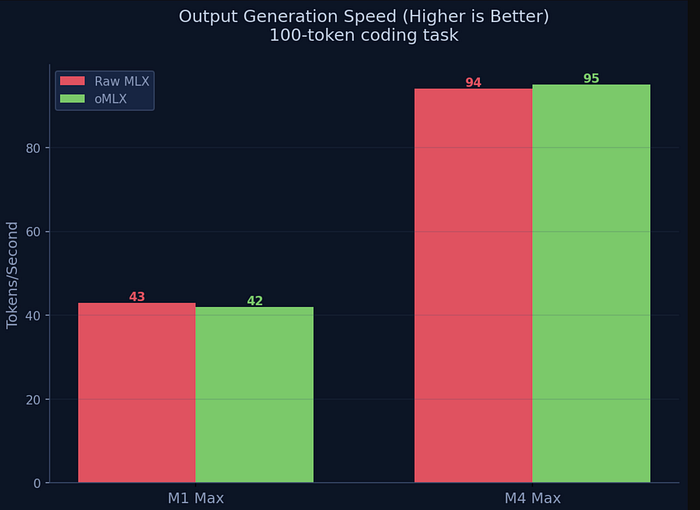
I am not surprised here, raw MLX and oMLX generate output at roughly the same speed. On the M1 Max, both hit around 42 tokens per second. On the M4 Max, both hit around 95 tokens per second.
oMLX doesn't make generation faster. But it doesn't need to — 95 tokens per second is already fast enough for real-time interaction. The real bottleneck was never output speed. It was prefill.
Prefill Speed: Where oMLX Actually Shines
Prefill is how fast the model reads your input before it starts thinking. For AI agents, this is everything. Agents process thousands of tokens of context: code files, system prompts, tool definitions, conversation history. If prefill is slow, your agent feels dead.
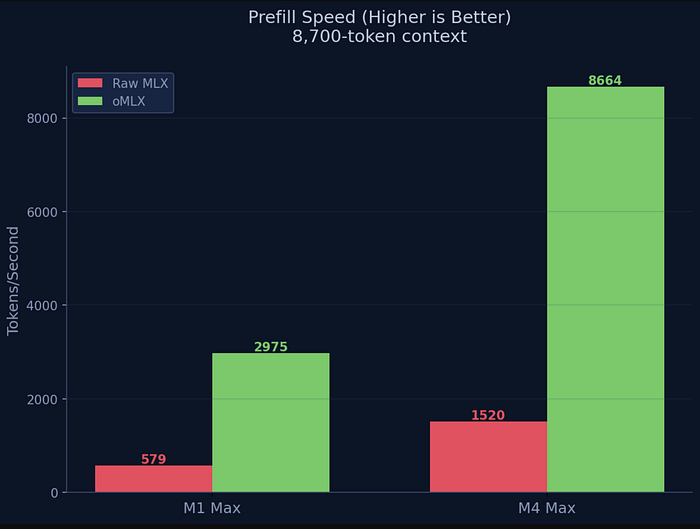
This chart is where the story gets interesting. On my M1 Max, raw MLX reads context at 579 tokens per second. oMLX? 2,975 tokens per second. That's 5.1x faster.
On my M4 Max, the gap is even more dramatic: from 1,520 tokens per second with raw MLX to 8,664 tokens per second with oMLX. That's 5.7x faster.
And here's the part that matters most: oMLX caches that context. Once the model reads your 8,700-token codebase, it stays cached. The next request doesn't re-read everything — it reuses what's already in memory. Raw MLX has no cache. It starts from zero every single time.
M4 Max vs M1 Max: Is the Upgrade Worth It?
I already had a perfectly good M1 Max. Was the M4 Max worth it? Let's look at the numbers.
For response time, the M4 Max is clearly faster. Short responses go from 1.08 seconds to 0.16 seconds. Long context drops from 2.95 seconds to 1.01 second. Across the board, the M4 Max is roughly 2–3x faster.
For speed, the M4 Max more than doubles output generation (42 → 95 tok/s) and nearly triples prefill speed (2,975 → 8,664 tok/s). If you're running AI agents all day, that's a meaningful difference.
But here's what I keep coming back to: even my older M1 Max with oMLX is fast enough for real work. The long context that took 20 seconds now takes 3. The output speed is interactive. The cache makes repeated requests instant.
For a MOE model like this Qwen3.6–35B-A3B model, I didn't need a new MacBook. I needed oMLX. But for a dense model like Qwen3.6–27B, M4Max or M5Max will be needed.
The prefill speed is where oMLX shines — up to 5.7x faster on M4 Max (1,520 → 8,664 tok/s). That's the game-changer for AI agents.
Why oMLX Is So Much Better Than Raw MLX?
It's not magic. oMLX adds four critical features that raw MLX simply doesn't have. Here's the architectural difference:
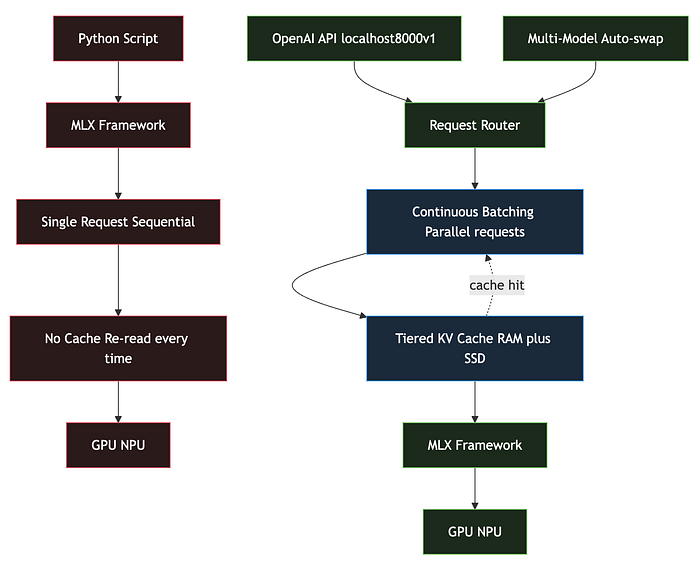
The raw MLX path is straightforward: one request at a time, no caching, start from zero every time. oMLX wraps MLX in a full inference server that adds batching, caching, and multi-model support.
Here's what each layer does:
1. Continuous Batching
AI agents don't make one request — they make dozens. Tool calls, follow-up questions, context updates, parallel lookups. Raw MLX processes them one at a time, sequentially.
oMLX batches multiple requests together and processes them in a single GPU pass. When your agent fires off three tool calls simultaneously, oMLX handles them in parallel.
Real-world impact: 2–5x faster when your agent is actually working (which is always).
2. Tiered KV Cache (RAM + SSD)
This is the feature that changed everything for me. oMLX stores context in a two-tier cache:
- Hot tier (RAM): Active conversation context, blazing fast
- Cold tier (SSD): Older context, still accessible, doesn't evict from RAM
Once the model reads your 8,700-token codebase, that context stays cached. The next request doesn't re-prefill — it reuses the cached KV pairs. Raw MLX has no caching. It reads everything from scratch every time.
Real-world impact: After the first request, your agent feels instant. Context switching between files? Cached. Going back to earlier conversation? Cached.
3. OpenAI-Compatible API
oMLX exposes http://localhost:8000/v1 — the exact same API endpoint as OpenAI. This means:
- Claude Code? Point it to localhost.
- Cursor? Point it to localhost.
- Your own agent framework? Point it to localhost.
- Any tool that speaks OpenAI? Point it to localhost.
Raw MLX gives you a Python library. You write your own server. Good luck with that.
4. Multi-Model Serving
oMLX auto-discovers all models in your directory and serves them simultaneously. Need an embedding model for retrieval and a 35B model for reasoning? oMLX handles both. It even auto-swaps models in and out of memory based on demand.
The Bottom Line
Six weeks ago, I concluded that running AI agents on a MacBook was impractical. Raw MLX was too slow, especially for long contexts. On my M1 Max, a single 8,700-token request took 20 seconds.
Today, I have oMLX running on both Macs:
- M1 Max: 8,700 tokens in 3 seconds (2,975 tok/s)
- M4 Max: 8,700 tokens in 1 second (8,664 tok/s)
Context cached. Subsequent requests instant.
The hardware wasn't the problem. The software was.
If you have a MacBook with Apple Silicon and 32GB+ of RAM, you already have a machine capable of running production-grade AI agents locally. You just need oMLX.
No cloud APIs. No monthly bills. No latency. Just your Mac, doing what it was built for.
Give it a try. I think you'll be surprised.
oMLX: github.com/jundot/omlx
Model used: Qwen3.6–35B-A3B-UD-MLX-4bit (21GB, 4-bit quantized)
Hardware tested: M1 Max MacBook Pro (64GB) + M4 Max MacBook Pro (64GB)
macOS: 26.x (Sequoia)
Have you tried oMLX? What speeds are you getting on your Mac? I'd love to hear in the responses.