
Boris' workflow is excellent. His colleagues do it differently. Git worktrees, two-Claude review, voice dictation, and 7 more patterns worth stealing.
A few weeks ago, I wrote about how Boris Cherny uses Claude Code. That article became an instant hit and sparked dozens of conversations about terminal setups, Plan mode, and the art of working alongside an AI agent. People bookmarked it. They tried the techniques. Some messaged me to say they'd completely restructured how they work.
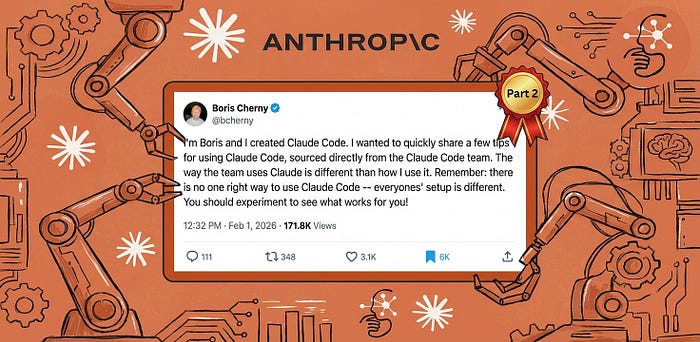
A few hours ago, Boris dropped a new banger thread.
"There is no one right way to use Claude Code," he wrote. "Everyone's setup is different."
What followed wasn't his personal workflow. It was a collection of practices from across the Claude Code team, the engineers who build and ship the tool every day. Some tips overlapped with his original 13 moves. Others contradicted them entirely.
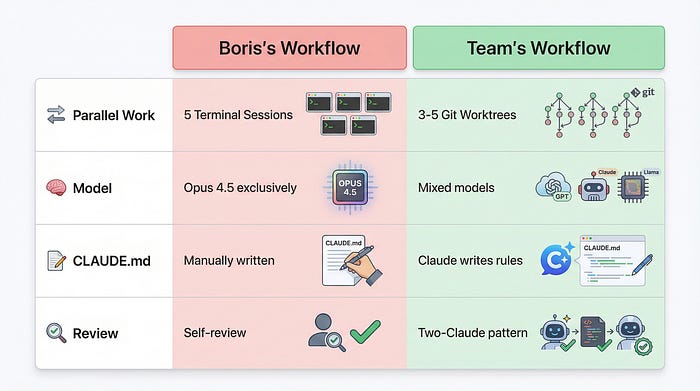
The creator uses five terminal sessions. His colleagues use git worktrees.
He swears by Opus 4.5 for everything. They route permission requests through hooks.
He writes his own CLAUDE.md rules. They have Claude write rules for itself.
This is what happens when you move beyond one person's workflow and into a team's collective wisdom. The patterns get messier. More varied. Far more interesting, to say the least.
I've spent the past few hours (and yes, I've actually delayed mowing the lawn again) pulling apart these 10 tips, and validating them against my own projects and patterns, and cross-referencing with the broader Claude Code ecosystem. What follows is everything the team does differently, why it works, and how you can adopt it without burning down your existing setup.
The original article, briefly
If you haven't read the first piece, here's what you need to know. Boris Cherny created Claude Code. His personal workflow involves five terminal sessions running simultaneously, each handling different aspects of a project. He uses Opus 4.5 exclusively, maintains a detailed CLAUDE.md file, and relies heavily on Plan mode for complex tasks. He also uses subagents to offload work and hooks to customise Claude's behaviour.
That workflow is excellent. It's also just one person's approach.
The team tips that follow build on those foundations while diverging in significant ways. Think of the original 13 moves as the solo developer's playbook.
These 10 tips are what emerges when a team of engineers iterates on the same tool for months.
Tip 1: Do more in parallel with git worktrees
Boris runs five terminal sessions. His team runs three to five git worktrees.
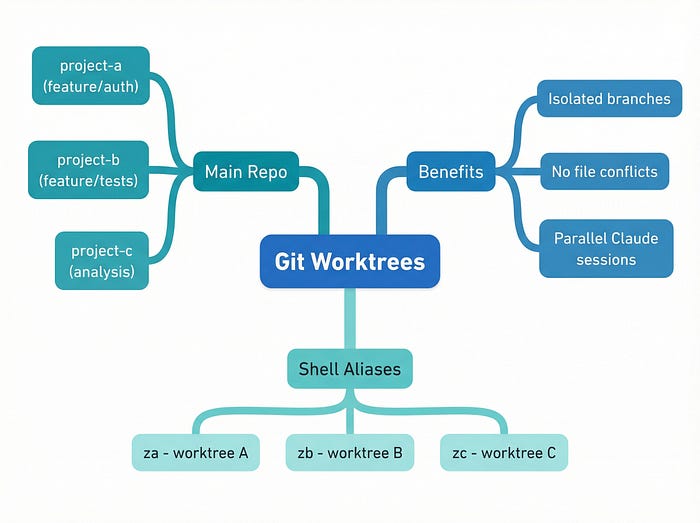
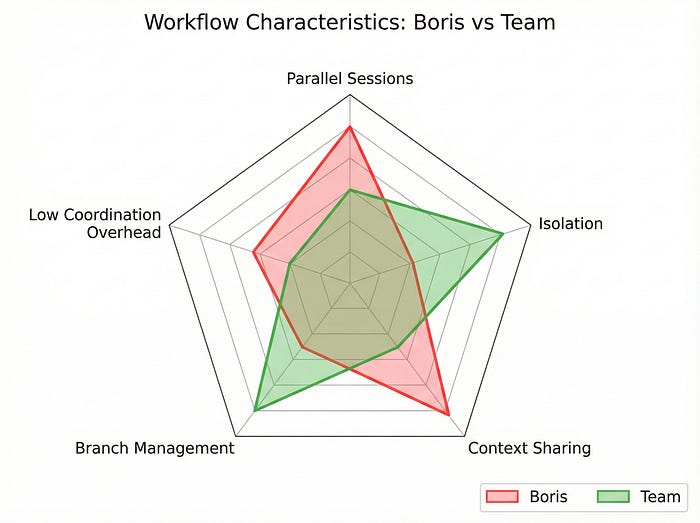
The difference matters. Terminal sessions share the same working directory. When Claude modifies a file in one session, every other session sees that change immediately. This creates coordination overhead. You need to remember which session is doing what, and you need to avoid stepping on your own toes.
Git worktrees solve this by giving each Claude instance its own complete copy of the repository. Each worktree has its own branch, its own staged changes, and its own working state. Claude in worktree A can refactor the authentication module while Claude in worktree B rewrites the test suite. They never interfere with each other.
The setup is simple:
# Create worktrees for parallel work
git worktree add ../project-a feature/auth-refactor
git worktree add ../project-b feature/test-rewrite
git worktree add ../project-c analysis
The team uses shell aliases to jump between worktrees instantly:
# Add to your .zshrc or .bashrc
alias za='cd ~/worktrees/project-a && claude'
alias zb='cd ~/worktrees/project-b && claude'
alias zc='cd ~/worktrees/project-c && claude'
Type za and you're in worktree A with Claude ready to go. Type zb and you're somewhere else entirely.
Git worktrees turn parallel Claude sessions from a coordination problem into an isolation solution.
The third worktree in that example is labelled "analysis." This is a pattern I've seen across multiple teams now. Keep one worktree dedicated to read-only investigation: reviewing logs, querying BigQuery, exploring unfamiliar codebases. Claude in this worktree never commits anything. It just answers questions.
incident.io published a case study showing their team running four to five parallel agents across worktrees. One engineer spent $8 in Claude credits and achieved an 18% performance improvement in their codebase. Another built a complete UI feature in 10 minutes that would have taken two hours manually. Ten minutes. (I had to read that twice.)
Claude Desktop now has native git worktree support, which suggests Anthropic sees this as the future of multi-agent workflows. If you're still juggling terminal sessions, worktrees are worth the migration.
Tip 2: Start complex tasks in Plan mode, then pour energy into the plan
Boris mentioned Plan mode in the original article. The team takes it further.
Their approach: treat the plan as the most important artefact. Don't rush through planning to get to implementation. A mediocre plan produces mediocre code, regardless of how capable the model is.
"A good plan is really important!" Boris wrote. The exclamation mark is his, and it's earned.
Here's what pouring energy into the plan looks like in practice:
/plan
I need to implement a rate limiting system for our API.
Requirements:
- Per-user limits (100 requests/minute for free tier, 1000 for paid)
- Per-endpoint limits (some endpoints are more expensive)
- Graceful degradation when Redis is unavailable
- Metrics emission for monitoring
- No breaking changes to existing endpoints
Before you plan, ask me clarifying questions about anything ambiguous.Notice the last line. The team has found that asking Claude to identify ambiguity before planning catches problems that would otherwise surface during implementation. Claude might ask whether "graceful degradation" means falling back to in-memory limits or simply allowing all requests. That question, asked early, saves hours of rework.
The two-Claude pattern
This is where it gets interesting. Some team members use two Claude instances for planning:
Claude A writes the plan. Claude B reviews the plan as a "staff engineer."
You can do this with two terminal sessions or two worktrees. The reviewing Claude gets a prompt like:
You are a staff engineer reviewing an implementation plan.
Be skeptical. Look for:
- Edge cases the plan doesn't address
- Assumptions that might not hold
- Simpler alternatives
- Potential performance issues
Here's the plan:
[paste plan from Claude A]This mirrors Anthropic's official best practices for code review. The second Claude catches things the first Claude missed, not because the first Claude is bad, but because a fresh perspective finds different problems.
When things go sideways
The team has a rule: when implementation starts failing, stop and re-plan immediately. Don't try to patch your way forward. Don't add more context hoping Claude will figure it out. Go back to Plan mode and start fresh.
This feels counterintuitive. You've already invested time in the current approach. But the team's experience suggests that re-planning from scratch, with the knowledge of what went wrong, produces better results than incremental fixes.
Tip 3: Invest in your CLAUDE.md, and let Claude write it
The original article covered CLAUDE.md as a configuration file you maintain. The team's approach inverts this.
When Claude makes a mistake, tell it: "Update your CLAUDE.md so you don't make that mistake again."
Claude then writes a rule for itself. The rule goes into CLAUDE.md. Next time Claude encounters a similar situation, it reads its own rule and avoids the mistake.
This is surprisingly effective. Claude is good at identifying what went wrong and articulating a principle to prevent recurrence. It's also good at following rules it wrote for itself, perhaps because the phrasing matches how it naturally thinks.
Here's an example. Say Claude generates a database migration that doesn't handle null values correctly. You catch it in review. Instead of just fixing the migration, you say:
That migration doesn't handle null values in the email column.
Update your CLAUDE.md with a rule to prevent this mistake in future migrations.
Claude might add:
## Database migrations
- Always check for null values in columns before adding NOT NULL constraints
- Include a data migration step if existing rows might have nulls
- Test migrations against a copy of production data, not just empty tablesOver time, your CLAUDE.md becomes a living document of lessons learned. It's not just configuration; it's institutional memory.
The notes directory pattern
One engineer on the team takes this further. They have Claude maintain a notes directory for every task:
/project
  /notes
    /auth-refactor
      context.md
      decisions.md
      open-questions.md
    /rate-limiting
      context.md
      decisions.md
      open-questions.md
Claude updates these files as it works. When you return to a task after a break, Claude can read its own notes and resume with full context. This is particularly valuable for long-running projects where context would otherwise be lost between sessions.
Let Claude write rules for itself. It's better at following instructions it authored.
The official guidance suggests keeping CLAUDE.md under 300 lines and editing ruthlessly. The team adds to this: review CLAUDE.md weekly as a team. Remove rules that no longer apply. Consolidate duplicates. Treat it like production code that needs maintenance.
Tip 4: Create your own skills for repeated tasks
If you do something more than once a day, make it a skill.
Skills in Claude Code are reusable prompts that encode complex workflows. They live in your configuration and can be invoked with a command. The team has built skills for everything from code review to database queries to Slack integration.
Here's a concrete example. Say you frequently need to identify duplicate code:
# /techdebt skill
When invoked, scan the codebase for:
1. Duplicate functions (>80% similarity)
2. Copy-pasted code blocks (>10 lines)
3. Similar implementations that could be consolidated
For each finding:
- Show the duplicate locations
- Estimate the maintenance cost
- Suggest a consolidation approach
- Rate the priority (high/medium/low)
Output as a markdown report suitable for a tech debt backlog.Now you type /techdebt and Claude produces a prioritised list of consolidation opportunities.
Integration skills
The team has built skills that bridge Claude Code with external systems:
▲ Slack sync: Pull messages from a channel, summarise discussions, identify action items
▲ GDrive sync: Read documents, extract requirements, flag inconsistencies
▲ Asana/GitHub sync: Update tickets based on code changes, close issues when tests pass
▲ Analytics agents: Generate dbt models from natural language descriptions
These skills turn Claude Code into a hub that connects your entire development workflow. Instead of switching between tools, you stay in the terminal and let Claude handle the integration.
The analytics engineer pattern
Several team members have built skills specifically for data work. They describe a metric in plain English, and Claude generates the dbt model, writes the tests, and documents the schema. This works because Claude can read your existing dbt project and match the patterns already established.
/analytics

Create a dbt model for daily active users.
Definition: users who performed at least one action in the past 24 hours.
Include: user_id, last_action_timestamp, action_count
Partition by: date
Claude produces a model that fits your project's conventions, complete with tests and documentation.
Tip 5: Claude fixes most bugs by itself
This tip surprised me. Honestly, I was sceptical when I first read it. The team's bug-fixing workflow is almost absurdly hands-off.
When a bug appears in Slack, they paste the thread into Claude and say "fix." That's it. No detailed reproduction steps. No hypothesis about the cause. Just the bug report and a single word.
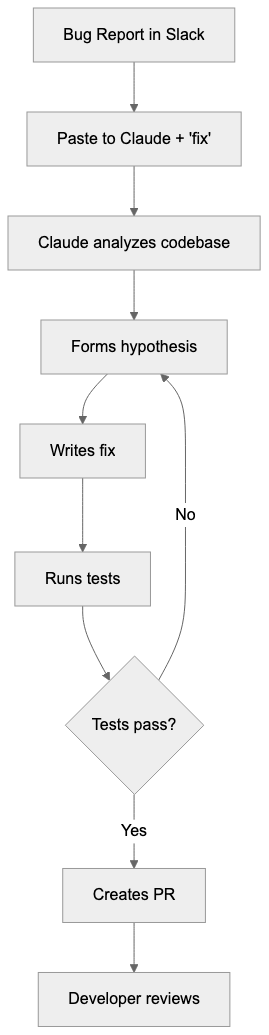
Claude reads the thread, identifies the relevant code, forms a hypothesis, writes a fix, and often writes a test to prevent regression. The developer reviews the PR. Most of the time, the fix is correct.
"Probably the most important thing to get great results out of Claude Code: give Claude a way to verify its work," Boris wrote.
This is the key insight. Claude can fix bugs reliably because it can verify its fixes. It runs the tests. It checks the logs. It confirms the behaviour changed. Without verification, Claude would be guessing. With verification, it's iterating toward correctness.
The CI pattern
When CI fails, the team's prompt is equally minimal:
Go fix the failing CI tests.Zero micromanagement. Claude reads the CI output, identifies the failures, traces them to code changes, and produces fixes. Sometimes the fix is in the code. Sometimes it's in the test. Sometimes it's in the CI configuration. Claude figures out which.
Distributed systems debugging
For distributed systems, the team points Claude at Docker logs:
Read the logs in docker-compose logs and identify why the payment service is timing out.Claude correlates timestamps across services, identifies the bottleneck, and suggests fixes. This works because Claude can process far more log data than a human can reasonably scan.
Tip 6: Level up your prompting with specific patterns
The team has developed prompting patterns that consistently produce better results. These aren't generic "be specific" advice. They're concrete phrases that change Claude's behaviour.
"Grill me on these changes"
Grill me on these changes and don't make a PR until I pass your test.This inverts the typical workflow. Instead of you reviewing Claude's code, Claude reviews your understanding. It asks questions about edge cases, error handling, and design decisions. Only when you've demonstrated understanding does it proceed.
This pattern is excellent for learning. It's also excellent for catching assumptions you didn't know you were making.
"Prove to me this works"
Prove to me this works by showing the diff in behaviour between the main branch and this branch.Claude runs both versions, captures the output, and shows you exactly what changed. This is verification you can see, not just tests passing in CI.
"Knowing everything you know now"
Knowing everything you know now, scrap this and implement the elegant solution.This prompt acknowledges that Claude has learned from the implementation attempt. It's gathered context, hit dead ends, and discovered constraints. Now it can use that knowledge to design something better.
The team uses this when an implementation feels clunky. Rather than refactoring incrementally, they ask Claude to start fresh with accumulated wisdom.
"Knowing everything you know now, scrap this and implement the elegant solution." This single prompt has saved me hours of incremental refactoring.
Write detailed specs
The team has found that ambiguity is the enemy of good output. When a prompt could be interpreted multiple ways, Claude picks one interpretation and runs with it. If that interpretation was wrong, you've wasted a generation.
The fix: write specs detailed enough that there's only one reasonable interpretation. Include examples of expected input and output. Specify error handling explicitly. Name the edge cases you're aware of.
This takes more time upfront. It saves far more time in iteration.
Tip 7: Optimise your terminal and environment
The team's terminal setups are highly customised. Some of these customisations are aesthetic. Others meaningfully improve the Claude Code experience.
▲ Ghostty terminal
Several team members use Ghostty, a GPU-accelerated terminal with features specifically useful for Claude Code:
➡️ Synchronised rendering: Output appears smoothly, even when Claude is generating rapidly
➡️ 24-bit colour: Syntax highlighting looks correct
➡️ Native Shift+Enter: Multi-line input without workarounds
Ghostty is open source and actively developed. If your current terminal feels sluggish during Claude sessions, it's worth trying. It's my daily driver since it went out of alpha.
▲ The statusline pattern
The team uses a custom /statusline command that displays:
➡️ Current context window usage (percentage)
️➡️ Active git branch
➡️ Worktree identifier
➡️ Time since last commit
This information sits in your terminal prompt or status bar, always visible. You never wonder which worktree you're in or how much context you've consumed.
▲ Colour-coded tabs
When running multiple Claude sessions, colour-code your terminal tabs:
🟢 Green: Main development worktree
🔵 Blue: Analysis/read-only worktree
🟠 Orange: Experimental/throwaway worktree
🔴 Red: Production debugging (be careful)
This visual system prevents the "wait, which terminal was I in?" problem that plagues parallel workflows.
▲ Voice dictation
This one changed my workflow more than any other tip.
On macOS, press fn twice to activate voice dictation. Speak your prompt. Claude receives it as text. You speak at roughly 150 words per minute. You type at roughly 40 words per minute. That's nearly 4x faster input.
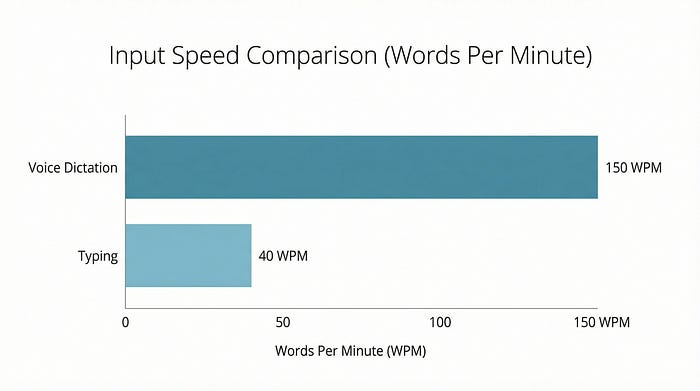
The team uses voice dictation for:
▲ Long, detailed prompts that would be tedious to type
▲ Stream-of-consciousness problem descriptions
▲ Explaining context that's easier to say than write
Tools like SuperWhisper and Wispr Flow offer enhanced voice-to-text with better accuracy and developer-specific vocabulary. But the built-in macOS dictation works surprisingly well for most prompts.
Voice dictation is 4x faster than typing. For long prompts, speak instead of type.
Tip 8: Use subagents strategically
Boris covered subagents in the original article. The team's usage patterns add nuance.
"Use subagents" as a suffix
The simplest pattern: append "use subagents" to any request.
Refactor the authentication module to use JWT instead of sessions. Use subagents.Claude spawns child agents to handle subtasks. The main agent coordinates. You get more compute applied to the problem without managing the parallelism yourself.
Context window hygiene
Subagents serve another purpose: keeping the main context window clean.
Every interaction with Claude consumes context. Long conversations accumulate context until you hit limits. Subagents run in their own context windows. When they complete, only their results return to the main agent.
The team uses subagents for:
▲ Research tasks: "Find all usages of this deprecated API" (subagent)
▲ Verification tasks: "Run the test suite and summarise failures" (subagent)
▲ Generation tasks: "Write documentation for these functions" (subagent)
The main agent stays focused on coordination and decision-making. The subagents handle the grunt work.
The auto-approval hook
This is advanced but powerful. The team routes permission requests through a hook that auto-approves certain operations:
// Hook that routes permission requests to Opus 4.5 for evaluation
export async function handlePermissionRequest(request: PermissionRequest) {
  const evaluation = await opus45.evaluate(request);
  if (evaluation.safe && evaluation.relevant) {
    return { approved: true };
  }
  return { approved: false, reason: evaluation.concern };
}
Instead of manually approving every file write or command execution, Opus 4.5 evaluates whether the request is safe and relevant. Safe requests proceed automatically. Suspicious requests pause for human review.
This dramatically speeds up workflows where Claude needs many small permissions. It also maintains safety by having a capable model evaluate each request.
Tip 9: Use Claude for data and analytics
Boris mentioned he hasn't written SQL in six months. The team's data workflows explain why.
BigQuery via CLI
The team accesses BigQuery through the bq command-line tool. Claude can invoke this tool directly:
Query BigQuery for the top 10 users by revenue in the past 30 days.
Use the bq CLI.
Claude writes the SQL, executes it via bq query, and presents the results. No context switching to a SQL client. No copy-pasting queries. Just natural language to results.
▲ The BigQuery skill
The team has a shared BigQuery skill in their codebase. It includes:
Schema documentation for common tables
Query patterns for frequent analyses
Cost estimation guidelines
Result formatting preferences
When any team member invokes the skill, they get consistent, well-structured queries that follow team conventions.
▲ Beyond BigQuery
This pattern works for any database with CLI access:
➡️ PostgreSQL: psql command
➡️️️️ MySQL: mysql command
➡️ MongoDB: mongosh command
➡️ Redis: redis-cli command
It also works with MCP servers that expose database connections, and with APIs that return structured data. The principle is the same: give Claude a way to query data, and it handles the translation from natural language to query language.
Tip 10: Learn with Claude, not just from Claude
The final tip shifts from productivity to growth.
Explanatory output style
In /config, you can set your output style to "Explanatory" or "Learning." Claude then explains its reasoning, not just its results. It tells you why it chose a particular approach, what alternatives it considered, and what tradeoffs it made.
This is slower for pure productivity. It's faster for building understanding.
Visual HTML presentations
The team has Claude generate interactive HTML presentations explaining code:
Create an HTML presentation explaining how our authentication flow works.
Include diagrams, code snippets, and step-by-step walkthrough.
Make it suitable for onboarding new engineers.
Claude produces a self-contained HTML file you can open in a browser. It includes syntax-highlighted code, flowcharts (often as SVG), and explanatory text. These presentations become documentation that actually gets read.
ASCII diagrams
For quick understanding, Claude generates ASCII diagrams of protocols and architectures:
Draw an ASCII diagram of the OAuth 2.0 authorization code flow.
┌──────────┐     ┌──────────┐     ┌──────────┐
│  Client  │     │  Auth    │     │ Resource │
│          │     │  Server  │     │  Server  │
└────┬─────┘     └────┬─────┘     └────┬─────┘
     │                │                │
     │ 1. Auth Request│                │
     │───────────────>│                │
     │                │                │
     │ 2. Auth Code   │                │
     │<───────────────│                │
     │                │                │
     │ 3. Token Request                │
     │───────────────>│                │
     │                │                │
     │ 4. Access Token│                │
     │<───────────────│                │
     │                │                │
     │ 5. API Request │                │
     │────────────────────────────────>│
     │                │                │
     │ 6. Response    │                │
     │<────────────────────────────────│
These diagrams render correctly in any terminal, any editor, any documentation system. They're version-controllable and diff-able.
Spaced-repetition learning
One team member built a spaced-repetition skill. After learning something new, they tell Claude:
Add this concept to my spaced-repetition queue:
[explanation of what they learned]
Claude stores the concept and periodically quizzes them during future sessions. It's Anki, but integrated into your development workflow.
Where to start
Ten tips is a lot. Here's a prioritised adoption path based on impact and effort:
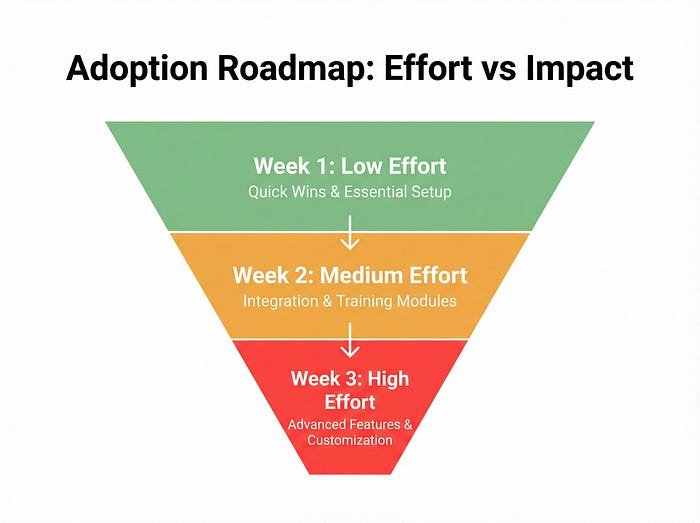
▲ Week 1: Low effort, high impact
Try voice dictation (fn x2 on macOS)
Use "Knowing everything you know now, scrap this" when implementations feel clunky
Add colour-coding to your terminal tabs
▲ Week 2: Medium effort, high impact
Set up git worktrees for parallel work
Create one skill for your most repeated task
Try the two-Claude review pattern for your next complex plan
▲ Week 3: Higher effort, transformative impact
Have Claude write rules for your CLAUDE.md
Set up BigQuery or database CLI access
Build an auto-approval hook for safe operations
▲ Ongoing
Review and prune CLAUDE.md weekly
Add skills as patterns emerge
Experiment with learning mode for unfamiliar domains
The bigger picture
Claude Code reached $1 billion in annual recurring revenue just six months after launch, and is now approaching $2 billion. The MCP ecosystem has grown to thousands of servers with millions of monthly SDK downloads. This isn't a niche tool anymore. It's becoming infrastructure.
The practices in this article represent the cutting edge of how developers work with AI agents. But they're also just a snapshot. The team continues iterating. New patterns emerge weekly. What's advanced today will be standard practice in six months.
"There is no one right way to use Claude Code," Boris wrote. He's right. But there are patterns that work better than others, and the team that builds the tool has discovered many of them.
Take what resonates. Ignore what doesn't. Build your own workflow from the pieces that fit your context. That's what the team does, and it's what they'd want you to do too.
The creator's workflow shot my guide to fame. His team's workflows might get you something more valuable: a fundamentally different relationship with your tools. And that's all I'm after at the end of the day.
Keep coming back to this guide; bookmark it, even. Tomorrow might reveal more information.
References
- Boris Cherny's team tips thread (February 1, 2026) — Source for the 10 tips in this article
- How the Creator of Claude Code Actually Uses It: 13 Practical Moves — The original article this piece follows up
- incident.io case study on parallel Claude agents — Real-world adoption patterns and ROI data
- Anthropic's best practices for Claude Code — Official guidance on Claude Code workflows
- Ghostty terminal — GPU-accelerated terminal with Claude Code-friendly features
- Claude Code documentation — Official setup and configuration guides