
You're deep in a codebase when you spot it: a constructor that passes an object as a parameter to a callback… during its own construction. The code works — JavaScript closures make sure of that — but every new developer who reads it will spend 10 minutes figuring out why.
Code like this accumulates. Not bugs, but confusion. Patterns that technically work but make your codebase harder to understand, maintain, and extend.
What if you had an agent that could spot these patterns and clean them up? One that understands your project's conventions and refactors for clarity — automatically?
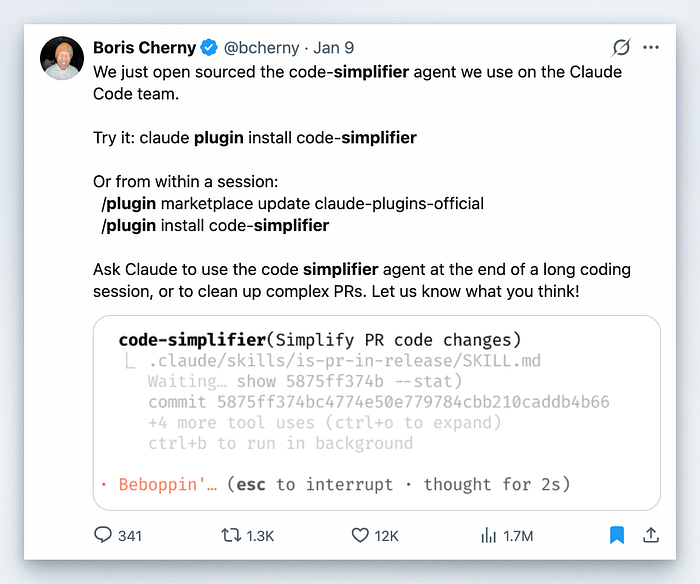
That's exactly what the code-simplifier plugin does. It's the same tool the Claude Code team at Anthropic uses internally to keep their own codebase clean. Developers who've tried it are seeing 20–30% reductions in token usage and dramatically clearer code.
The Problem Code-Simplifier Solves
AI-generated code has a verbosity problem. It's not that Claude writes bad code — it's that it errs on the side of being thorough. That thoroughness creates maintenance burden.
When you work with AI coding assistants for an hour, you might generate dozens of functions, several new modules, and hundreds of lines of code. Most of it works. But some patterns emerge that complicate things unnecessarily:
- Nested ternary operators that save one line but cost five minutes to understand
- Utility classes you thought you'd need but never use
- Overly compact one-liners that hide important logic
- Deeply nested conditionals that are hard to follow
- Callback configurations mixed into constructors
These patterns don't break anything. They just make your code harder to work with.
The code-simplifier plugin addresses this by running as a specialised cleanup agent. It's not a general-purpose linter — it's an AI that understands your project's conventions and refactors for clarity while preserving exact functionality.
How Code-Simplifier Works: The Core Principles
The code-simplifier agent runs on Opus, Anthropic's most capable model. It focuses on recently modified code in your current session unless you explicitly tell it to review a broader scope.
At its core, the agent follows five key principles that together make it reliable and practical:
1. Preserve Functionality
This is the cardinal rule. The simplifier never changes what your code does — only how it does it. If your function returns a specific value, handles certain edge cases, or produces particular side effects, all of that stays exactly the same.
This constraint is what makes code-simplifier safe to run without fear of breaking things. The agent optimises for clarity, not clever refactoring that might introduce subtle bugs.
2. Apply Project Standards
The agent reads your CLAUDE.md file — the configuration file where you document your coding standards — and follows the patterns you've established:
// code-simplifier will apply standards like these from your CLAUDE.md:
- Use ES modules with proper import sorting and .js extensions
- Prefer function keyword over arrow functions for named functions
- Use explicit return type annotations for top-level functions
- Follow proper React component patterns with explicit Props types
- Use proper error handling patterns (avoid try/catch when possible)
- Maintain consistent naming conventions
This is key — the agent isn't applying generic preferences. It's applying your project's conventions.
3. Enhance Clarity
This is where most of the magic happens. The agent looks for opportunities to:
- Reduce unnecessary complexity and nesting — Flatten deeply nested conditionals into sequential flows
- Eliminate redundant code and abstractions — Remove those three utility classes you didn't need
- Improve variable and function names — More descriptive, intuitive naming
- Consolidate related logic — Group things that belong together
- Remove unnecessary comments — Code should be self-documenting where possible
- Avoid nested ternary operators — Prefer switch statements or if/else chains
Critically, the agent chooses clarity over brevity. The goal isn't minimal lines of code — it's readable, maintainable code.
4. Maintain Balance
The agent knows when to stop. It actively avoids:
- Over-simplification that reduces clarity
- Overly clever solutions that are hard to understand
- Combining too many concerns into single functions or components
- Removing helpful abstractions that improve code organisation
- Prioritising "fewer lines" over readability (e.g., nested ternaries, dense one-liners)
- Making code harder to debug or extend
This balance is what makes code-simplifier practical. It won't produce terse, clever code that looks good on first glance but is painful to work with.
5. Focus Scope
By default, the agent only touches code that was recently modified in your current session. This prevents it from unexpectedly refactoring parts of your codebase you weren't working on.
You can explicitly ask it to review a broader scope — like "clean up this entire file" or "simplify all code in the services folder" — but the default is conservative and focused on your recent work.
To understand how code-simplifier works internally, you need to understand Claude Code's plugin system and agent architecture.
Plugin Structure
Claude Code plugins are extensions that add custom slash commands, specialised agents, hooks, and MCP servers to your development environment. The code-simplifier plugin follows the standard structure:
code-simplifier/
├── .claude-plugin/
│   └── plugin.json          # Plugin metadata (name, description, author)
├── agents/                  # Specialised agents
│   └── code-simplifier.md  # Agent definition with system instructions
└── README.md                # Documentation
The plugin.json file contains basic metadata:
{
  "name": "code-simplifier",
  "version": "1.0.0",
  "description": "Agent that simplifies and refines code for clarity, consistency, and maintainability while preserving functionality",
  "author": {
    "name": "Anthropic",
    "email": "support@anthropic.com"
  }
}
Agent Definition
The real intelligence of the plugin lives in the agent definition file — a markdown document that defines the agent's behaviour. The code-simplifier agent definition has three key sections:
Frontmatter — Basic configuration:
---
name: code-simplifier
description: Simplifies and refines code for clarity, consistency, and maintainability while preserving all functionality. Focuses on recently modified code unless instructed otherwise.
model: opus
---
This tells Claude Code:
- The agent's name (what you invoke it with)
- What it does (description that appears in UI)
- Which model to use (Opus for maximum reasoning capability)
System Instructions — The core directives that guide the agent's behaviour. This is where the five principles — preserve functionality, apply project standards, enhance clarity, maintain balance, focus scope — are defined in detail.
The system instructions also define the agent's refinement process:
Your refinement process:
1. Identify recently modified code sections
2. Analyze for opportunities to improve elegance and consistency
3. Apply project-specific best practices and coding standards
4. Ensure all functionality remains unchanged
5. Verify the refined code is simpler and more maintainable
6. Document only significant changes that affect understanding
Autonomous Operation — The agent is designed to operate proactively. It monitors for code writes or modifications and offers to simplify immediately, without you needing to explicitly request it each time.
The Agent Loop
When you invoke the code-simplifier agent, it operates in a loop similar to other Claude agents:
- Gather context — Read recently modified files, analyse the project structure, and understand the current state
- Identify opportunities — Find patterns that can be simplified while preserving functionality
- Apply refactorings — Make changes following the five core principles
- Verify work — Ensure functionality is preserved and code is cleaner
- Repeat — Continue until all recently modified code has been reviewed
This loop is what allows the agent to process large codebases efficiently while maintaining quality.
Code-Simplifier in Action: Real Examples
Let's look at concrete examples of what the code-simplifier agent does. These aren't hypothetical — they're patterns the Claude Code team has actually encountered and simplified.
Example 1: Decoupling Construction from Configuration
This is the example that inspired the code-simplifier plugin — confusing code in an AgentSessionManager:
// BEFORE: confusing - agentSessionManager passed as parameter during its own construction
const agentSessionManager = new AgentSessionManager(
    issueTracker,
    (childSessionId) => {
        // Handle child session creation
        logger.info(`Created child session: ${childSessionId}`);
        return childSessionId;
    },
    async (parentSessionId, childSessionId) => {
        // This works due to JavaScript closure semantics, but it's confusing
        // We're passing agentSessionManager to a callback during its own construction
        await this.handleResumeParentSession(parentSessionId, childSessionId, agentSessionManager);
    },
    this.procedureAnalyzer,
    this.sharedApplicationServer,
);
After running the code-simplifier agent:
// AFTER: clear - construction is separate from callback configuration
const agentSessionManager = new AgentSessionManager(
    issueTracker,
    this.procedureAnalyzer,
    this.sharedApplicationServer,
);

agentSessionManager.setParentSessionCallbacks(
    (childSessionId) => {
        logger.info(`Created child session: ${childSessionId}`);
        return childSessionId;
    },
    async (parentSessionId, childSessionId) => {
        await this.handleResumeParentSession(parentSessionId, childSessionId, agentSessionManager);
    },
);
What changed?
- Identified confusing pattern — The constructor was receiving its own instance as a parameter via callback
- Introduced a setter method —
setParentSessionCallbacks()to decouple construction from configuration - Removed unnecessary comment — An 8-line explanatory comment about JavaScript closures was no longer needed
- Made code read linearly — Create → Configure → Use
The result? Same functionality, dramatically better readability. The refactor touched multiple files and all 257 tests continued passing.
Example 2: Avoiding Nested Ternaries
AI-generated code often overuses nested ternary operators to be compact. The code-simplifier agent prefers clarity:
// BEFORE: compact but hard to follow
const getStatusColor = (status) => status === 'active' ? 'green' : status === 'pending' ? status === 'overdue' ? 'red' : 'orange' : 'yellow' : 'grey';
After code-simplifier:
// AFTER: explicit and easy to understand
function getStatusColor(status) {
    switch (status) {
        case 'active':
            return 'green';
        case 'pending':
            return 'yellow';
        case 'overdue':
            return 'red';
        default:
            return 'grey';
    }
}
The agent chose a switch statement over nested ternaries because:
- Each case is explicit and readable
- Adding new statuses is straightforward
- The default case is clearly visible
- No cognitive overhead from parsing nested conditions
Example 3: Flattening Nested Conditionals
Deeply nested conditionals create mental overhead. Code-simplifier flattens them:
// BEFORE: deeply nested
function validateUser(user) {
    if (user) {
        if (user.email) {
            if (user.email.includes('@')) {
                if (user.email.includes('.')) {
                    return true;
                }
            }
        }
    }
    return false;
}
After code-simplifier:
// AFTER: flattened and explicit
function validateUser(user) {
    if (!user) {
        return false;
    }

   if (!user.email) {
        return false;
    }
    if (!user.email.includes('@')) {
        return false;
    }
    if (!user.email.includes('.')) {
        return false;
    }
    return true;
}
The inverted approach (early returns for failure cases) is easier to reason through because:
- Each condition is independently checkable
- You read top-to-bottom instead of tracking nesting depth
- Adding new validation rules is straightforward
Installation and Workflow
Getting code-simplifier running takes about 30 seconds.
Installation
You have two options:
Option 1: Direct installation from any terminal
claude plugin install code-simplifierOption 2: From within a Claude Code session
First, make sure you have the official Anthropic plugin marketplace:
/plugin marketplace update claude-plugins-officialThen install the plugin:
/plugin install code-simplifierImportant: After installation, restart your Claude Code session for the plugin to become active. The agent doesn't live-load, so you'll need to exit and start a new session before it appears in your available subagents.
When to Use Code-Simplifier
After long coding sessions (we've had too many of those ones , eh?)
This is the primary use case. After Claude has been implementing features for an hour, ask it to run code-simplifier:
"Run code-simplifier agent on the changes we made today"
Claude will analyse all recently modified files and clean them up in one pass.
Before creating pull requests
Run the simplifier before opening a PR to ensure your code meets quality standards:
"Use code-simplifier to review and clean up these changes before we create the PR"
This catches over-engineering before it enters code review.
After complex refactors
When you've been making sweeping changes across multiple files, simplifier can ensure consistency:
"Use code-simplifier to normalise the patterns in the files we just refactored"
For cleaning up AI-generated code
If you've been using Claude Code heavily and suspect there's accumulated complexity, simplifier can audit and clean:
"Analyse the recent changes with code-simplifier and suggest improvements"
Best Practices
- Run it regularly — Don't wait for code to become a mess. Run simplifier after every significant coding session.
- Review changes — The simplifier is good, but not infallible. Always review what it changed before committing.
- Set up your CLAUDE.md — The more guidance you give in CLAUDE.md about your coding standards, the better the simplifier can match your patterns.
- Use with version control — Always run simplifier in a git-tracked directory so you can review and revert changes if needed.
- Combine with other workflows — Code-simplifier pairs well with:
- Plan mode (plan first, implement, then simplify)
- Code review agents
- Test runners (run tests after simplification to verify nothing broke)
The Token Efficiency Benefit
One underappreciated benefit: simplified code uses fewer tokens in future sessions.
When Claude reads your codebase to understand context, verbose code fills up the context window faster. By keeping code simple:
- Claude can read more of your codebase in the same token budget
- Subsequent sessions are cheaper
- Context windows stretch further
Developers who regularly use code-simplifier report 20–30% reductions in token consumption. That translates directly to lower API costs.
// Verbose AI-generated code: ~250 tokens
function processUserData(userData, options = {}) {
    const result = {
        processed: false,
        data: null,
        errors: []
    };
    if (userData && userData.id && userData.email) {
        try {
            const processedData = {
                id: userData.id,
                email: userData.email.toLowerCase().trim(),
                timestamp: Date.now(),
                ...options
            };
            result.data = processedData;
            result.processed = true;
        } catch (error) {
            result.errors.push(error.message);
        }
    }
    return result;
}
// After code-simplifier: ~180 tokens (28% reduction)
function processUserData(userData, options = {}) {
    if (!userData?.id || !userData?.email) {
        return { processed: false, data: null, errors: [] };
    }
    return {
        processed: true,
        data: {
            id: userData.id,
            email: userData.email.toLowerCase().trim(),
            timestamp: Date.now(),
            ...options
        },
        errors: []
    };
}
The simplified version removes unnecessary intermediate state (result object), redundant conditional checks, and verbose structure - while doing exactly the same thing.
How Code-Simplifier Compares to Manual Review
You might think: "Can't I just review code myself?"
You can. But here's what code-simplifier does that humans often don't:
- Consistency — It applies the same standards everywhere, every time
- Speed — It analyses thousands of lines in seconds
- No fatigue — It doesn't get tired after reviewing 20 files
- Objectivity — It doesn't have emotional attachment to clever solutions
- Knowledge of patterns — It knows dozens of simplification patterns instantly
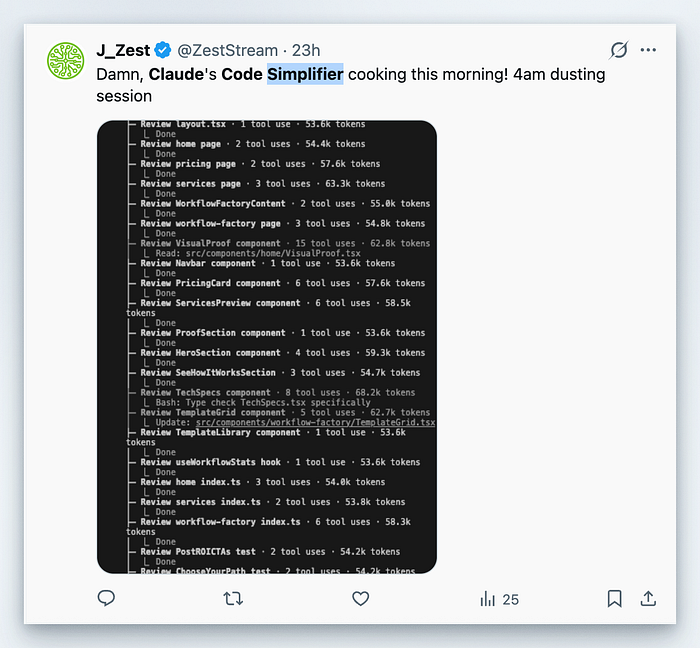
The code-simplifier isn't replacing human code review — it's augmenting it. Run the simplifier first, then humans review the simplified code.
Getting Yourself Started
Ready to try code-simplifier on your own codebase?
# Install the plugin
claude plugin install code-simplifier

# Restart Claude Code, then invoke the agent
> "Use the code-simplifier agent to clean up the changes we just made"
The plugin is open source. You can view the full agent definition at:
If you want to understand more about building specialised agents, Anthropic's engineering team has published extensive documentation on the Claude Agent SDK and best practices for building effective agents.
References
- Claude Code Plugins Directory — https://github.com/anthropics/claude-plugins-official
- Code-simplifier Agent Definition — https://github.com/anthropics/claude-plugins-official/blob/main/plugins/code-simplifier/agents/code-simplifier.md
- What is Claude Code's Code-Simplifier Agent? (Comprehensive guide) — https://www.atcyrus.com/stories/claude-code-code-simplifier-agent-guide
- Building Agents with Claude Agent SDK — https://www.anthropic.com/engineering/building-agents-with-the-claude-agent-sdk
- Claude Code Documentation — https://docs.claude.com/en/docs/claude-code/overview
- Boris Cherny on X announcing code-simplifier open source — https://x.com/bcherny/status/2009450715081789767