
Introduction:
Recent developments in artificial intelligence and computer vision have completely changed the landscape of digital art. The AI Virtual Painter, a unique project that blends computer vision methods with AI algorithms to produce magnificent digital artworks, is one outstanding example of this. This blog post examines the AI Virtual Painter's inner workings and how it is redefining the limits of artistic creation.
The Intersection of Computer Vision and Art:
The study of computer vision, a branch of artificial intelligence that focuses on giving computers the ability to comprehend and interpret visual data, has made a special relationship with the subject of art. Researchers have created AI systems capable of creating and modifying images using deep learning algorithms and neural networks, unleashing a completely new form of artistic expression.
Understanding the AI Virtual Painter:
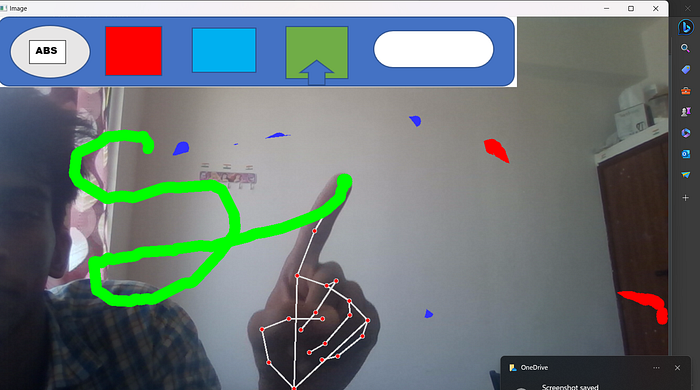
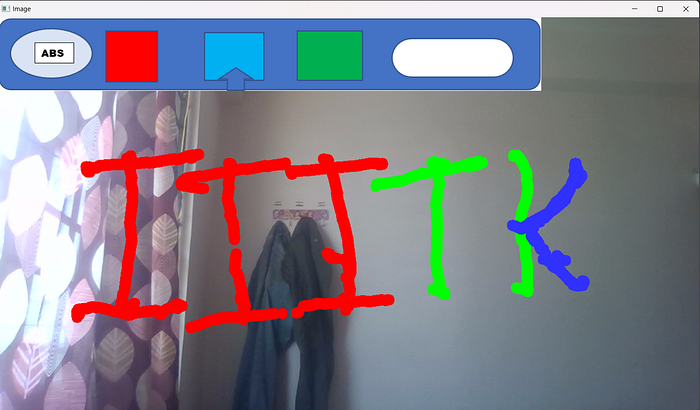
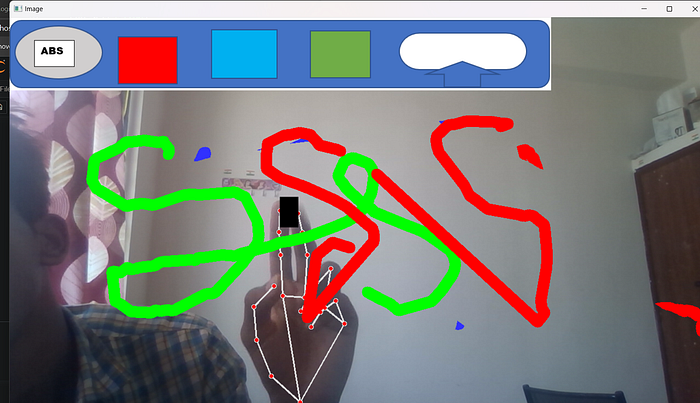
A computer vision project called The AI Virtual Painter uses algorithms for image production and recognition to analyse and comprehend visual input. The AI Virtual Painter can draw your art that was previously drawn with a mouse by extracting traits, patterns, and styles from a large dataset of artistic creations.
Unleashing Creative Possibilities:
The AI Virtual Painter brings up a universe of artistic possibilities, allowing creators and enthusiasts to play around with different aesthetics and methods. The AI Virtual Painter promotes discovery and offers a fresh perspective for people to observe and appreciate art.
Ethical Considerations and Attribution:
Although the AI Virtual Painter creates stunning artwork, it is important to think about the moral ramifications of employing AI-generated material. When using the AI Virtual Painter for artistic endeavours, correct credit and observance of intellectual property rights are paramount. The original authors of the genres and works that serve as the basis for the AI-generated art should be recognised and honoured by artists and enthusiasts.
Step 1: Import Necessary Libraries
First, we import the libraries that will be used in the program.
import cv2
import mediapipe as mp
import time
import numpy as np
import os- cv2: OpenCV library for computer vision tasks.
- mediapipe: Library for machine learning solutions such as hand tracking.
- time: To calculate frames per second (fps).
- numpy: For numerical operations and creating arrays.
- os: For interacting with the operating system.
Step 2: Set Up Initial Parameters
We define some parameters for brush and eraser thickness.
brushThickness = 20
eraserThickness = 120
Step 3: Create the Hand Detector Class
We create a class to detect and track hands using Mediapipe.
class handDetector():
    def __init__(self, mode=False, maxHands=2, modelComplexity=1, detectionCon=0.5, trackCon=0.5):
        self.mode = mode
        self.maxHands = maxHands
        self.modelComplex = modelComplexity
        self.detectionCon = detectionCon
        self.trackCon = trackCon
        self.mpHands = mp.solutions.hands
        self.hands = self.mpHands.Hands(self.mode, self.maxHands, self.modelComplex, self.detectionCon, self.trackCon)
        self.mpDraw = mp.solutions.drawing_utils
self.tipIds = [4, 8, 12, 16, 20]- init: Initializes the hand detector with given parameters.
- mpHands: Loads the hand detection model.
- hands: Configures the model with the specified parameters.
- mpDraw: Utility to draw the landmarks on the image.
- tipIds: IDs of the fingertips.
findHands Method
This method processes the image to detect hands and draws landmarks
def findHands(self, img, draw=True):
    imgRGB = cv2.cvtColor(img, cv2.COLOR_BGR2RGB)
    self.results = self.hands.process(imgRGB)
    if self.results.multi_hand_landmarks:
        for handLms in self.results.multi_hand_landmarks:
            if draw:
                self.mpDraw.draw_landmarks(img, handLms, self.mpHands.HAND_CONNECTIONS)
return img- findHands: Converts the image to RGB and processes it to find hands.
- self.results: Stores the hand landmarks found.
- draw_landmarks: Draws the landmarks on the image.
findPosition Method
This method finds the positions of the landmarks on the hands.
def findPosition(self, img, handNo=0, draw=True):
    self.lmList = []
    if self.results.multi_hand_landmarks:
        myHand = self.results.multi_hand_landmarks[handNo]
        for id, lm in enumerate(myHand.landmark):
            h, w, c = img.shape
            cx, cy = int(lm.x * w), int(lm.y * h)
            self.lmList.append([id, cx, cy])
            if draw:
                cv2.circle(img, (cx, cy), 5, (255, 0, 255), cv2.FILLED)
return self.lmList- findPosition: Finds the position of each landmark on the hand.
- self.lmList: List of landmark positions.
fingersUp Method
This method checks which fingers are up.
def fingersUp(self):
    fingers = []
    if self.lmList[self.tipIds[0]][1] < self.lmList[self.tipIds[0]-1][1]:
        fingers.append(1)
    else:
        fingers.append(0)
    for id in range(1, 5):
        if self.lmList[self.tipIds[id]][2] < self.lmList[self.tipIds[id]-2][2]:
            fingers.append(1)
        else:
            fingers.append(0)
return fingers- fingersUp: Determines which fingers are up by comparing landmark positions.
Step 4: Main Function
The main function initializes the camera, loads images, and processes the video stream.
def main():
    folderPath = "AirPaint"
    myList = os.listdir(folderPath)
    cap = cv2.VideoCapture(0)
    cap.set(3, 1280)
    cap.set(4, 720)

    detector = handDetector(detectionCon=0.85)
    xp, yp = 0, 0
    imgCanvas = np.zeros((720, 1280, 3), np.uint8)
    overlayList = []
    for imPath in myList:
        image = cv2.imread(f'{folderPath}/{imPath}')
        overlayList.append(image)
    header = overlayList[0]
    drawColor = (255, 49, 49)

    while True:
        success, img = cap.read()
        img = cv2.flip(img, 1)
        img = detector.findHands(img)
        lmList = detector.findPosition(img, draw=False)

        if len(lmList) != 0:
            x1, y1 = lmList[8][1:]
            x2, y2 = lmList[12][1:]
            fingers = detector.fingersUp()

            if fingers[1] and fingers[2]:
                xp, yp = 0, 0
                if y1 < 129:
                    if 215 < x1 < 395:
                        header = overlayList[0]
                        drawColor = (0, 0, 255)
                    elif 400 < x1 < 560:
                        header = overlayList[1]
                        drawColor = (255, 49, 49)
                    elif 570 < x1 < 734:
                        header = overlayList[2]
                        drawColor = (0, 255, 0)
                    elif 742 < x1 < 928:
                        header = overlayList[3]
                        drawColor = (0, 0, 0)

                cv2.rectangle(img, (x1, y1-25), (x2, y2+25), drawColor, cv2.FILLED)

            if fingers[1] and fingers[2] == False:
                cv2.circle(img, (x1, y1), 15, drawColor, cv2.FILLED)
                if xp == 0 and yp == 0:
                    xp, yp = x1, y1

                if drawColor == (0, 0, 0):
                    cv2.line(img, (xp, yp), (x1, y1), drawColor, eraserThickness)
                    cv2.line(imgCanvas, (xp, yp), (x1, y1), drawColor, eraserThickness)
                else:
                    cv2.line(img, (xp, yp), (x1, y1), drawColor, brushThickness)
                    cv2.line(imgCanvas, (xp, yp), (x1, y1), drawColor, brushThickness)

                xp, yp = x1, y1

        imgGray = cv2.cvtColor(imgCanvas, cv2.COLOR_BGR2GRAY)
        _, imgInv = cv2.threshold(imgGray, 50, 255, cv2.THRESH_BINARY_INV)
        imgInv = cv2.cvtColor(imgInv, cv2.COLOR_GRAY2BGR)
        img = cv2.bitwise_and(img, imgInv)
        img = cv2.bitwise_or(img, imgCanvas)

        h, w, c = overlayList[0].shape
        img[0:h, 0:w] = header

        cv2.imshow("Image", img)
cv2.waitKey(1)- folderPath: Path to the folder containing header images.
- myList: List of images in the folder.
- cap: Captures video from the webcam.
- detector: Instance of the handDetector class.
- imgCanvas: Canvas to draw on.
- overlayList: List of overlay images.
- header: Initial header image.
- drawColor: Initial drawing color.
Step 5: Run the Main Function
if __name__ == "__main__":
    main()
Summary
- Import Libraries: Load the necessary libraries for computer vision and hand tracking.
- Set Parameters: Define brush and eraser thickness.
- Create handDetector Class: Initialize and configure Mediapipe for hand detection.
- findHands Method: Detect hands and draw landmarks.
- findPosition Method: Find positions of landmarks.
- fingersUp Method: Check which fingers are up.
- Main Function: Initialize camera, load images, process video stream, and draw on the canvas based on hand movements.
This step-by-step explanation should help you understand how the code works and what each part does.
HERE IS COMPLETE SAMPLE CODE FOR YOUR REFERENCE :
##########HandTrackingModule###############################

"""
Hand Tracing Module
By: Abhijeet singh
"""
import cv2
import mediapipe as mp
import time
import numpy as np
import os
brushThickness = 20
eraserThickness = 120
class handDetector():
    def __init__(self, mode=False, maxHands=2,modelComplexity=1,detectionCon=0.5, trackCon=0.5):
        self.mode = mode
        self.maxHands = maxHands
        self.modelComplex = modelComplexity
        self.detectionCon = detectionCon
        self.trackCon = trackCon
        self.mpHands = mp.solutions.hands
        self.hands = self.mpHands.Hands(self.mode, self.maxHands,self.modelComplex,
                                        self.detectionCon, self.trackCon)
        self.mpDraw = mp.solutions.drawing_utils
        self.tipIds = [4,8,12,16,20]
    def findHands(self, img, draw=True):
        imgRGB = cv2.cvtColor(img, cv2.COLOR_BGR2RGB)
        self.results = self.hands.process(imgRGB)
        # print(results.multi_hand_landmarks)
        if self.results.multi_hand_landmarks:
            for handLms in self.results.multi_hand_landmarks:
                if draw:
                    self.mpDraw.draw_landmarks(img, handLms,
                                               self.mpHands.HAND_CONNECTIONS)
        return img
    def findPosition(self, img, handNo=0, draw=True):
        self.lmList = []
        if self.results.multi_hand_landmarks:
            myHand = self.results.multi_hand_landmarks[handNo]
            for id, lm in enumerate(myHand.landmark):
                # print(id, lm)
                h, w, c = img.shape
                cx, cy = int(lm.x * w), int(lm.y * h)
                # print(id, cx, cy)
                self.lmList.append([id, cx, cy])
                if draw:
                    cv2.circle(img, (cx, cy), 5, (255, 0, 255), cv2.FILLED)
        return self.lmList

    def fingersUp(self):

        fingers = []

        # For Thumb
        if self.lmList[self.tipIds[0]][1] < self.lmList[self.tipIds[0]-1][1]:
            fingers.append(1)
        else:
            fingers.append(0)

        # For Fingers
        for id in range(1,5):
            if self.lmList[self.tipIds[id]][2] < self.lmList[self.tipIds[id]-2][2]:
                fingers.append(1)
            else:
                fingers.append(0)
        return fingers


def main():

#     pTime = 0
#     cTime = 0
    folderPath = "AirPaint"
    myList=os.listdir(folderPath)
    #print(myList)
    cap = cv2.VideoCapture(0)
    cap.set(3,1280)
    cap.set(4,720)

    detector = handDetector(detectionCon=0.85)
    xp,yp = 0,0
    imgCanvas = np.zeros((720,1280,3),np.uint8)
    overlayList = []
    for imPath in myList:
        image = cv2.imread(f'{folderPath}/{imPath}')
        overlayList.append(image)
    #print(overlayList)
    header = overlayList[0]
    drawColor = (255, 49, 49)

    while True:
        #1. Import Image
        success, img = cap.read()
        img = cv2.flip(img,1)

        #2. Find Landmarks
        img = detector.findHands(img)
        lmList = detector.findPosition(img,draw=False)


        #print(overlayList[3].shape)
        #print(header)
        if len(lmList) != 0:
            #print(lmList)
            x1,y1 = lmList[8][1:]
            x2,y2 = lmList[12][1:]
            #print(x1,y1)

            #3. Check which Finger are up
            fingers = detector.fingersUp()
            #print(fingers)

            #4. If selection mode ---- Two fingers are up
            if fingers[1] and fingers[2]:
                xp,yp = 0,0
                #print("Selection mode")

                #Click
                if y1<129:
                    if 215<x1<395:
                        header = overlayList[0]
                        drawColor = (0, 0, 255)
                    elif 400<x1<560:
                        header = overlayList[1]
                        drawColor = (255, 49, 49)
                    elif 570<x1<734:
                        header = overlayList[2]
                        drawColor = (0, 255, 0)
                    elif 742<x1<928:
                        header = overlayList[3]
                        drawColor = (0, 0, 0)

                cv2.rectangle(img,(x1,y1-25),(x2,y2+25),drawColor,cv2.FILLED)


            #5. If Drawing Modee ----- One Finger is up
            if fingers[1] and fingers[2]==False:
                cv2.circle(img,(x1,y1),15,drawColor,cv2.FILLED)
                #print("Drawing Mode")
                if xp ==0 and yp ==0:
                    xp,yp= x1,y1


                if drawColor == (0,0,0):
                    cv2.line(img,(xp,yp),(x1,y1),drawColor,eraserThickness)
                    cv2.line(imgCanvas,(xp,yp),(x1,y1),drawColor,eraserThickness)
                else:
                    cv2.line(img,(xp,yp),(x1,y1),drawColor,brushThickness)
                    cv2.line(imgCanvas,(xp,yp),(x1,y1),drawColor,brushThickness)

                xp,yp = x1,y1

        imgGray  = cv2.cvtColor(imgCanvas,cv2.COLOR_BGR2GRAY)
        _, imgInv = cv2.threshold(imgGray,50,255,cv2.THRESH_BINARY_INV)
        imgInv = cv2.cvtColor(imgInv,cv2.COLOR_GRAY2BGR)
        img = cv2.bitwise_and(img,imgInv)
        img = cv2.bitwise_or(img,imgCanvas)

        #setting Paint header Images
        h,w,c = overlayList[0].shape
        img[0:h,0:w] =header
        #img = cv2.addWeighted(img,0.5,imgCanvas,0.5,0)

#         cTime = time.time()
#         fps = 1 / (cTime - pTime)
#         pTime = cTime
#         cv2.putText(img, str(int(fps)), (10, 70), cv2.FONT_HERSHEY_PLAIN, 3,
#                     (255, 0, 255), 3)
        cv2.imshow("Image", img)
        #cv2.imshow("Canvas", imgCanvas)

        cv2.waitKey(1)
if __name__ == "__main__":
    main()
HERE is images that will be used in the project:




Conclusion:
The AI Virtual Painter represents a compelling marriage between computer vision and artistic expression. Through the fusion of advanced algorithms, deep learning, and a vast database of artistic inspiration, this project showcases the potential of AI to transform everyday images into captivating works of art. As AI continues to evolve, projects like the AI Virtual Painter highlight the exciting future of technology's role in expanding human creativity.
If you have any questions, I will be happy to answer them in the comments section below!
And Don't forget to share this with the world to help make it a better place. Maybe your click will change someone's life
Don't Miss my upcoming updates. Join me:
https://abhijeetas8660211.medium.com/subscribe
Level Up Coding
Thanks for being a part of my journey! Before you go:
- 👏 Clap for the story and follow the author 👉