

Need to work with different JavaScript frameworks and therefore communicate between all the components of an application? One of the solutions available to you is to use custom events, native to browsers. Find out in this article.
Custom Event: What is it?
They are identical to classic events such as click, submit, focus…, except that they are created manually. There are two possibilities to create a customEvent, either by using CustomEvent (if you need to pass data) or by simply calling Event.
In the example below, the function is used to create the custom event:
Now just send the custom events:
documentis used as a single event handler for all custom events because it centralizes all event methods and decouples custom events from specific nodes on the page.
And the last step, you will have to listen to these events and implement the logic:
Remember to clean and delete event listeners when necessary, see the example below:
Also, one way to make sure that the event listeners are there and haven't been attached to the web page multiple times is to check this using the Chrome Developer Tools. Here's what it might look like:
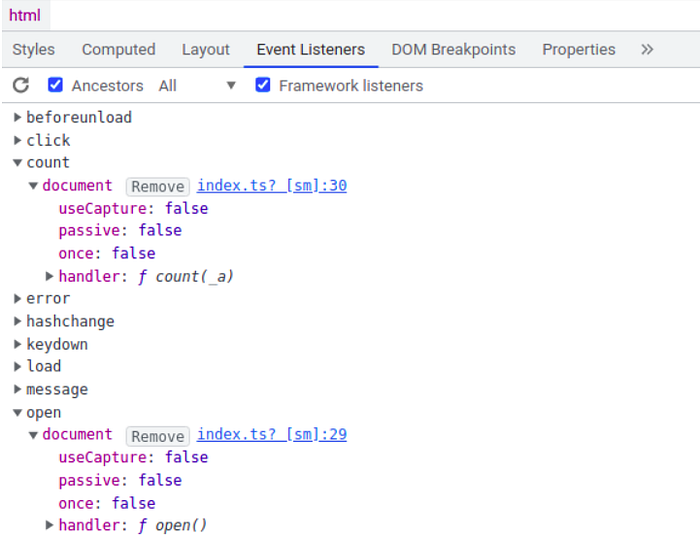
To go further, there is a third argument for the addEventListener method which was not mentioned previously. This is the once argument, which can be useful so that the event listener is only executed once and automatically destroyed after it is invoked.
Let's take an example with React
The app was created with Create React App and Chakra UI. It represents a classic course on e-commerce, that is to say, add a product to the basket, display the total amount of the basket and display the completed basket.
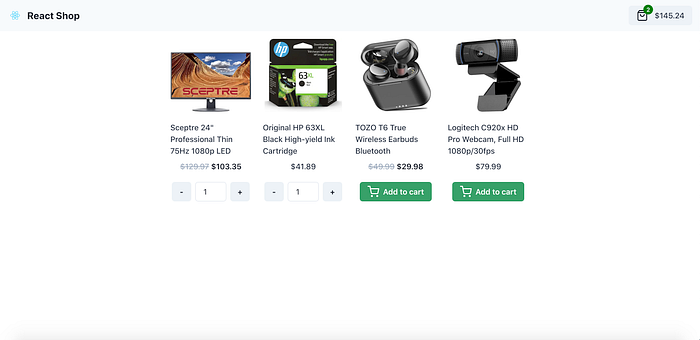
Here is the application container. Inside it are three containers (ViewCartButtonContainer, AddToCartButtonContainer, CartContainer).
All these containers are completely independent and communicate through an event bus system through the useCart hook.
This hook exposes the list of products in the cart as well as its total price but also the three custom methods and events:
- Updating the cart
updateCart.
For this, the updateCart event is listened to via the useEffect which triggers the onUpdateCart method. This method adds or changes the quantity of a product in the cart. It's best to remember the function using useCallback to avoid unnecessary renders. Note that in the useEffect, the listener is removed each time the method changes onUpdateCart . This is applied to all useEffects in the example.
- Clear the Cart
clearCart. - And the opening of this Cart
openCart.
For these last two events, the logic of the event listeners is similar.
Regarding the containers, the first of them CartButtonViewContainer displays the amount of the cart and allows you to go to it.
The second container AddToCardButtonContainer allows you to add a product to the cart and change its quantity.
And finally, the last container CartContainer displays the products in the cart.
The code can be accessed here.
Custom events are very popular with feature teams but also projects with a micro frontend architecture, as they can be independent of each other and also agnostic to the JavaScript framework.
More content at PlainEnglish.io. Sign up for our free weekly newsletter. Follow us on Twitter, LinkedIn, YouTube, and Discord. Interested in Growth Hacking? Check out Circuit.