
🚀 Introduction
Observability is the cornerstone of reliable cloud-native applications. In this first part of our series, we'll configure Prometheus and Loki alongside Grafana to enable metrics and log visualization. We'll also deploy Promtail to collect logs from Kubernetes pods and push them to Loki.
📂 Clone the Repository (First Step)
All necessary Helm values are pre-configured in this repo. Clone it before you begin:
git clone https://github.com/rehman4023/grafana-stack.git
cd grafana-stack/helm-values
🧱 Prerequisites
- Kubernetes cluster (local or cloud)
- Helm installed (v3+)
- kubectl configured
- Namespace: monitoring [kubectl create namespace monitoring]
1️⃣ Install Prometheus
We'll use the Prometheus Community Helm chart:
helm repo add prometheus-community https://prometheus-community.github.io/helm-charts
helm repo update
helm install prometheus prometheus-community/prometheus \
  --namespace monitoring -f values/prometheus-values.yaml
alertmanager:
  enabled: true
  persistentVolume:
    enabled: true
    size: 2Gi
    storageClass: standard
server:
  persistentVolume:
    enabled: true
    size: 8Gi
    storageClass: standard
  resources:
    requests:
      memory: 512Mi
      cpu: 250m
    limits:
      memory: 1Gi
      cpu: 500m
  retention: 15d
Key features in prometheus-values.yaml:
- enabling Alert Manager with PV
- Configuring Prometheus server with memory and CPU limitations
2️⃣ Install Loki (SingleBinary with MinIO backend)
Add the Grafana Helm repo:
helm repo add grafana https://grafana.github.io/helm-charts
helm repo update
helm install loki grafana/loki \
  -n monitoring \
  -f loki-values.yaml
deploymentMode: SingleBinary
loki:
  auth_enabled: false
  commonConfig:
    replication_factor: 1
  storage:
    bucketNames:
      chunks: loki-chunks
      ruler: loki-ruler
      admin: loki-admin
    s3:
      endpoint: minio.monitoring.svc.cluster.local:9000
      region: null
      accessKeyId: minio
      secretAccessKey: minio123
      s3ForcePathStyle: true
      insecure: true
  schemaConfig:
    configs:
      - from: "2024-04-01"
        store: tsdb
        object_store: s3
        schema: v13
        index:
          prefix: loki_index_
          period: 24h
  limits_config:
    allow_structured_metadata: true
    volume_enabled: true
  ruler:
    enable_api: true
resources:
  limits:
    memory: 2Gi
  requests:
    cpu: 500m
    memory: 1Gi
singleBinary:
  replicas: 1
# Zero out replica counts of other deployment modes
backend: { replicas: 0 }
read: { replicas: 0 }
write: { replicas: 0 }
ingester: { replicas: 0 }
querier: { replicas: 0 }
queryFrontend: { replicas: 0 }
queryScheduler: { replicas: 0 }
distributor: { replicas: 0 }
compactor: { replicas: 0 }
indexGateway: { replicas: 0 }
bloomCompactor: { replicas: 0 }
bloomGateway: { replicas: 0 }
minio:
  enabled: true
  rootUser: minio
  rootPassword: minio123
  mode: standalone
  buckets:
    - name: loki-chunks
    - name: loki-ruler
    - name: loki-admin
  resources:
    requests:
      memory: 128Mi
      cpu: 50m
    limits:
      memory: 256Mi
      cpu: 100m
chunksCache:
  enabled: false
Key features in loki-values.yaml:
- SingleBinary deployment mode
- MinIO as the backend with 3 buckets:
loki-chunks,loki-ruler,loki-admin - TSDB schema v13
- Authentication disabled (
auth_enabled: false) - Disables in-memory chunk caching.
- This simplifies the deployment and reduces memory usage, but may impact performance for log queries at scale.
3️⃣ Deploy Promtail
Install Promtail using:
helm install promtail grafana/promtail \
  -n monitoring \
  -f promtail-values.yaml
config:
  clients:
    - url: http://loki:3100/loki/api/v1/push
  positions:
    filename: /run/promtail/positions.yaml
  scrape_configs:
    - job_name: kubernetes-pods
      kubernetes_sd_configs:
        - role: pod
      relabel_configs:
        - source_labels: ["__meta_kubernetes_pod_label_app"]
          action: replace
          target_label: "app"
resources:
  requests:
    cpu: 25m
    memory: 64Mi
  limits:
    cpu: 50m
    memory: 128Mi
Key configurations in promtail-values.yaml:
- Auto-discovers pod logs via
kubernetes_sd_configs - Uses
applabel for structured relabeling - Pushes logs to:
http://loki-gateway.monitoring.svc.cluster.local/loki/api/v1/push
4️⃣ Install Grafana (Preconfigured Datasources)
Install Grafana:
helm install grafana grafana/grafana \
  -n monitoring \
  -f grafana-values.yaml
#grafana-values.yaml file
adminPassword: "admin"
persistence:
  enabled: true
  storageClassName: standard
  size: 5Gi
resources:
  requests:
    cpu: 50m
    memory: 128Mi
  limits:
    cpu: 100m
    memory: 256Mi
service:
  type: ClusterIP
datasources:
  datasources.yaml:
    apiVersion: 1
    datasources:
      - name: Prometheus
        uid: prom
        type: prometheus
        url: http://prometheus-server.monitoring.svc.cluster.local
        access: proxy
        isDefault: true
      - name: Loki
        uid: loki
        type: loki
        url: http://loki-gateway.monitoring.svc.cluster.local/
        access: proxy
Features from grafana-values.yaml:
- Prometheus and Loki datasources preloaded via
datasources.yaml - Default login:
admin / admin(please change in production) - Persistent volume enabled
- Service type:
ClusterIP
✅ Verification Steps
Access Grafana:
kubectl port-forward svc/grafana -n monitoring 3000:80Then open: http://localhost:3000
Login: admin / admin
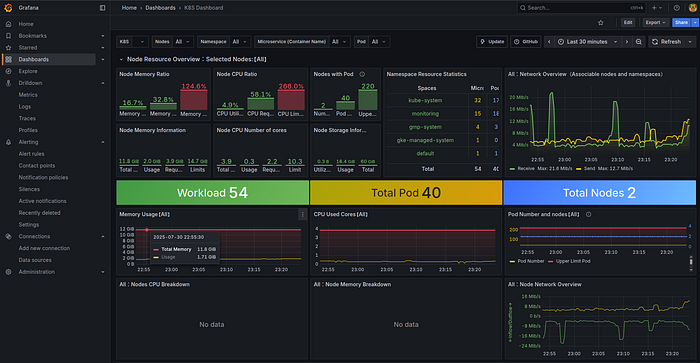
Visualize Metrics from Prometheus:
- Go to: Dashboards → + Import
- Use Dashboard ID:
1860(Node Exporter Full) as a sample
Check Logs via Loki:
- Navigate to Explore tab → Choose Loki
- Use log query:
{app=~".*"}
👉 Next Up: Stay tuned for 🔹 Part 2: Configuring Tempo for Distributed Tracing with Grafana on Kubernetes We'll walk through setting up Tempo for distributed tracing, integrating it with Grafana, and capturing traces from Kubernetes workloads.