

Discover how to evaluate and select the ideal open-source LLM for local deployment within enterprise infrastructure or high-performance personal projects. I will break down the VRAM necessary for top-performing open source LLMs, while optimizing performance through advanced quantization techniques.
In 2026, the conversation around AI has shifted. We've moved past the demo phase where everyone was just impressed by a chatbot. Today, serious companies are building their own internal solutions. They have realized that while external APIs are convenient, their company data is their most valuable asset, and they don't want to "rent" the brains that process it.
At the same time, we've hit a massive technical milestone: Open-source models have finally reached parity with proprietary ones. Whether you're looking at Llama 4, DeepSeek-V3, or Qwen 3, the performance gap has effectively vanished.
For an AI engineer today, simply knowing how to call an API key isn't enough anymore. If you want to build truly secure and cost-effective applications, you need to know how to work with the open-source LLMs.
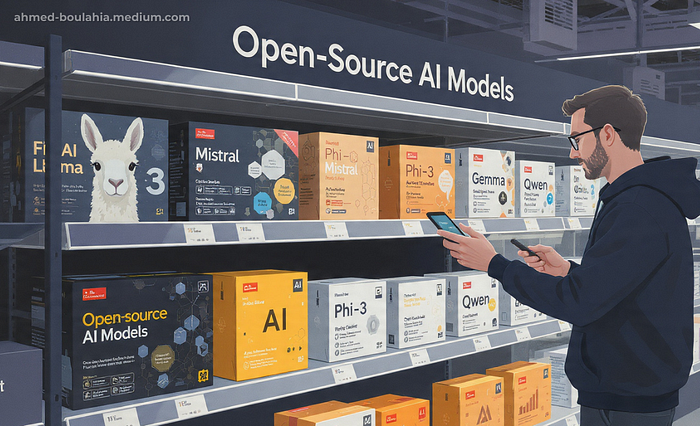
Why Every AI Engineer Should Be Comfortable Working With Open Source LLMs
Building with open source isn't just about saving money (though self-hosting can be 10x cheaper); it's about Taking full control. When you deploy a model locally, you own the versioning, you control the data residency, and you aren't vulnerable to a vendor suddenly changing their pricing for a model you rely on.
This guide is designed to be your technical roadmap for this new era. We aren't just going to look at benchmarks; we are going to dive into the fundamentals of integration. By the end of this blog, you'll understand:
- Different Model Architectures
- The VRAM Math
- Quantization
- Selection Strategy
1. What 3B, 7B, and 70B Really Mean
When you first encounter open-source LLMs, model size is usually the first thing you look at. The labels are simple and seemingly intuitive: 3B, 7B, 13B, 70B. It is natural to assume that a model with more parameters must be more capable. In practice, this assumption is often wrong.
The "B" in these model names refers to billions of parameters. Parameters are the internal numerical weights that allow a model to transform text into predictions. They define how much information a model can store and how complex its internal representations can be. What they do not define, on their own, is how efficiently that information is used. A higher parameter count increases potential capacity, but real-world performance depends just as much on architectural design and the quality of the training data.
Modern open-source LLMs are significantly more parameter-efficient than earlier generations. Improvements in attention mechanisms, normalization strategies, and training techniques allow newer models to extract more reasoning capability from fewer parameters.
A clear example is GPT-OSS-120B, which exceeds the performance of several models in the 150B+ parameter range despite being smaller.
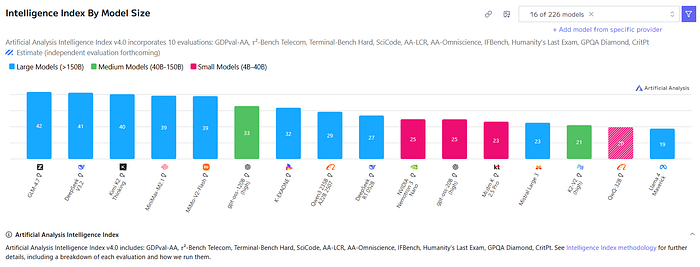
As a result, models in the 3B to 8B range can now outperform 70B models released only two years ago on many practical tasks.
A major driver of this shift is model distillation, where a smaller model is trained on the outputs of a much larger one to reproduce its reasoning behavior rather than memorize raw knowledge. This allows compact models to deliver strong reasoning performance with significantly lower memory and compute requirements.

For local deployment, these advances have immediate practical impact. Parameter count directly determines VRAM usage, latency, power consumption, and system complexity, making smaller, well-trained models far easier and cheaper to run in production.
As a result, model selection in 2026 should not start with the largest model you can afford to run, but with the smallest model that reliably meets your accuracy and latency requirements.
2. The Two Primary Architectures: Dense & MoE
Before model size or benchmarks, there is a more fundamental distinction in modern LLMs: whether the model activates all of its parameters for every token or only a selected subset. This choice separates today's models into dense architectures and Mixture of Experts (MoE) architectures, and it has direct implications for performance, cost, and deployment.
Dense models activate every parameter for each generated token. A model such as Mistral 3.1 14B Dense performs computation across all 14 billion parameters at every step, which makes its behavior stable, predictable, and easy to reason about. The downside is scalability: as dense models grow, compute cost increases linearly, quickly becoming expensive for larger sizes.
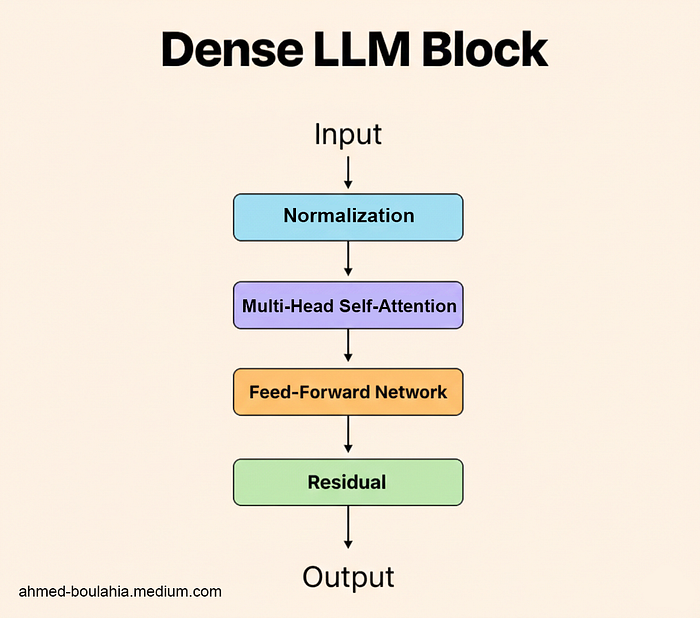
MoE models take a different approach by introducing specialization. While they may contain hundreds of billions of parameters in total, only a small subset of these parameters called experts is activated for any given token. A routing mechanism dynamically selects the most relevant experts, allowing the model to achieve the reasoning depth of a very large system while operating at the compute cost of a much smaller one. This is why MoE has become the dominant architecture for frontier open-source models such as DeepSeek V3 and Qwen3–235B.

Even though only a fraction of parameters are active at inference time, all experts must remain resident in VRAM so they are immediately available to the router. As a result, MoE models are compute-efficient but memory-intensive, while dense models remain simpler to deploy and scale down.
3. How Model Size Maps to Real-World Use Cases
Once architecture is understood, model size becomes far more meaningful. In practical deployments, size determines not just performance, but the type of work a model can reliably handle.
- 3B — 8B (The Edge Tier): These are ideal for local assistants, Personal projects, or on-device mobile applications. They are often fast enough to provide instantaneous responses on consumer laptops.
- 14B — 34B (The Professional Tier): This has become the "sweet spot" for specialized tasks like coding, medical transcription, and focused agentic workflows. They balance deep instruction-following with manageable hardware requirements.
- 70B+ (The Reasoning Tier/ Production Tier): These are the models used for complex planning, long-form document analysis, and high-level problem solving. They are typically deployed in multi-GPU server environments.
Understanding these tiers helps frame model selection correctly. When architecture and size are evaluated together, choosing the right open-source LLM becomes a disciplined engineering decision not just guessing and testing.
4. Which is more important RAM or VRAM ?
The most critical bottleneck for any AI project in 2026 is memory management. While general system RAM is important for the initial loading of a model, Video Random Access Memory (VRAM), the memory located directly on the Graphics Processing Unit (GPU) is the definitive factor in whether a model will run and how fast it will generate text.
In 2026, the introduction of the NVIDIA RTX 50-series and the Blackwell architecture has redefined the limits of what a single machine can achieve. Understanding how model size translates into VRAM consumption remains a core skill for any AI engineer working with open-source LLMs.
5. The Trio of VRAM Demands
VRAM on a GPU is consumed by three distinct components when running an LLM:
- Model Weights: This is the static memory required to store the parameters of the model itself. The amount of space needed depends on the "precision" or "quantization" of the weights.
- KV Cache (Key-Value Cache): This is the dynamic memory used to store the context of the conversation. As a chat gets longer, the KV cache grows. If the model is expected to read a 100-page document, the KV cache might actually consume more memory than the model weights themselves!
- Activation Memory: This is the temporary workspace used by the GPU during the actual mathematical calculations for each token.
6. Precision, Quantization, and Memory Savings
To fit large models into realistic hardware budgets, developers use quantization. This process reduces the numerical precision of the weights from their original 16-bit floating point format (FP16) to smaller formats like 8-bit (INT8), 4-bit (INT4), or the specialized 4-bit floating point (FP4) supported by the latest NVIDIA Blackwell chips.
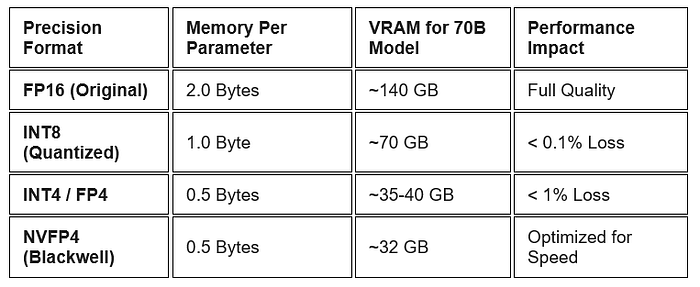
Quantization is no longer considered an "experimental" feature but a standard production tool. Using formats like GGUF or EXL2 allows a 70B parameter model, which would normally require around 140GB of VRAM, to run comfortably on a single machine with two 24GB GPUs or one 32GB RTX 5090 using aggressive 4-bit quantization.
7. The CPU Fallback: You May Have Heard of llama.cpp
Tools like Ollama and llama.cpp allow "RAM offloading" moving parts of a model that don't fit in VRAM into system memory. While this can get a model to run, it is a fallback, not a production strategy. The PCIe bus is far slower than GPU memory, so a model generating 50 tokens per second in VRAM might drop to just 1–2 tokens per second when offloaded. For any professional deployment, the full model including weights and context should fit comfortably in VRAM.
8. So Why VRAM Matters More Than RAM?
In 2026, the performance of an AI application is measured by two primary metrics: Time to First Token (TTFT) and Throughput (tokens per second).
Both of these are governed primarily by the VRAM bandwidth of the GPU. The NVIDIA Blackwell architecture, featured in the RTX 5090, provides a memory bandwidth of 1.79 TB/s, which is nearly double that of the previous generation.
This speed allows the GPU to "read" the model weights fast enough to sustain high-speed conversation and reasoning.
Keep in mind that the LLM inference is "memory-bound" meaning the processor (the GPU cores) is actually faster than the memory's ability to feed it data. Even if a model is small, it cannot generate text faster than the memory can stream the weights into the calculation engines. This is why a GPU with 32GB of high-speed GDDR7 VRAM will vastly outperform a CPU with 128GB of slower DDR5 RAM, even if the model fits in both.
9. Model Categories and When to Use Them
The term "LLM" is often used as if it describes a single, all-purpose AI engine. Modern models combine reasoning, vision, speech, and retrieval functions, and each is optimized for a different type of task. Selecting the right model is less about size or hype and more about understanding which type of intelligence your project actually needs.
General LLMs
These are the primary reasoning engines. They excel at following instructions, managing logic, and planning multi-step actions. It si the best choice for "agentic" capabilities, where the model is specifically trained to use tools like web browsers, database connectors, and code executors.
- Best Use Cases: Chatbots, autonomous agents, creative writing, and summarization.
- Best Open-source Models: gpt‑oss‑120B, Qwen3‑235B‑Instruct‑2507, and DeepSeek‑V3.2‑Exp
Vision-Language Models (VLM)
VLMs have evolved to handle not just static images but multi-page document streams and real-time video. Models like Qwen3-VL use a vision encoder (the "eye") connected to a language model (the "brain").
- Best Use Cases: OCR (Optical Character Recognition) for invoices, analyzing medical imaging, interpreting hour-long video feeds, and UI automation where the AI "sees" the computer screen to perform tasks.
- Best Open-source Models: Qwen2.5‑VL (72B variant), DeepSeek‑VL / DeepSeek‑OCR, and Llama 3.2‑Vision
Speech-to-Text (STT) and Audio Models
STT has moved beyond simple transcription. Modern models like Canary Qwen 2.5B and Granite Speech 3.3 utilize "thinking" modes to better handle noisy environments and accents. Furthermore, Text-to-Speech (TTS) models like Kokoro and VibeVoice now support expressive, human-like emotional ranges and multi-speaker dialogues.
- Best Use Cases: Real-time meeting assistants, automated call centers, and voice-operated devices.
- Best Open-source Models:Whisper Large V3, Canary Qwen 2.5B, and IBM Granite Speech 3.3
Embeddings and Rerankers
For projects using Retrieval-Augmented Generation (RAG) where the AI searches through a private database to answer questions, embeddings are essential. They don't generate text; they turn text into vectors so the retriever can find "similar" concepts. Rerankers then refine those search results to ensure the most relevant data is handed to the LLM.
- Best Use Cases: Private document search, recommendation engines, and high-accuracy knowledge bases.
- Best Open-source Models:intfloat/e5‑base‑v2, BAAI/bge‑base‑en‑v1.5, and nomic‑ai/nomic‑embed‑text‑v1
10. Deep Dive into Quantization
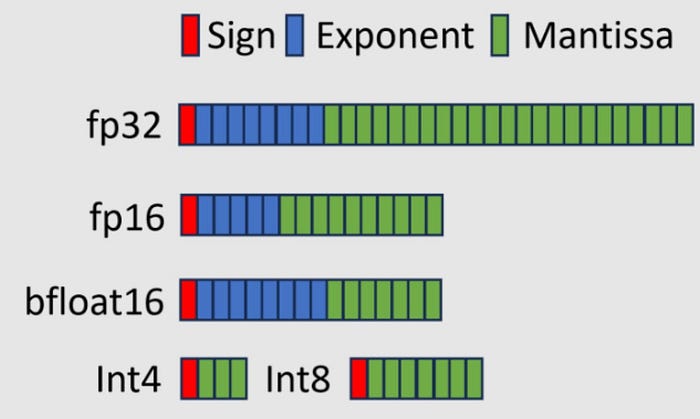
As we have mentionned in the previous sections Quantization is the process of reducing the precision of the model's weights from high-precision formats (like 32-bit or 16-bit floating point) to lower-precision formats (like 8-bit or 4-bit integers).
How it Decreases Model Weights
In a computer, numbers are stored in "bits." A 32-bit number (FP32) provides extreme detail but takes 4 bytes of memory. By "rounding off" these numbers to a simpler 4-bit format (INT4), we use only 0.5 bytes per parameter an 87.5% reduction in size. While this introduces a small "quantization error," modern techniques like 4-bit NormalFloat (NF4) ensure the model's logic remains intact.
How to Estimate the Minimum VRAM needed
To estimate how much VRAM you need for a model, you can use a simple rule of thumb:
VRAM (GB) ≈ model_parameters_in_billions × (bits_per_param / 8) × 1.2
(The 1.2 factor accounts for roughly 20% overhead needed for calculations and conversation context, more context under The Trio of VRAM Demands section).
Example 1: Running Llama 4 Scout (109B Parameters)
- In Full Precision (16-bit): 109 × (16 / 8) × 1.2 ≈ 261.6 GB of VRAM.
- Verdict: You would need four H100 GPUs ($100,000+ setup).
- In Quantized Precision (4-bit): 109 × (4 / 8) × 1.2 ≈ 65.4 GB of VRAM.
- Verdict: You can now run this on a workstation with two RTX 5090s.
Example 2: Running Qwen‑14B:
- Full precision (16‑bit): 14 × (16/8) × 1.2 ≈ 33.6 GB of VRAM
- Verdict: You would likely need a GPU with ~32 GB VRAM (e.g., RTX 6000 Ada, A40).
- Quantized precision (4‑bit): 14 × (4/8) × 1.2 ≈ 8.4 GB of VRAM
- Verdict: You can run this on mainstream cards like RTX 4090 (24 GB) comfortably.
11. Fine-Tuning and Adapters: LoRA, QLoRA, and GGUF
Partially no developer is capable of training his own model from scratch. Instead, we use "Adapters" to teach a base model new skills (like medical jargon or specific coding styles).
LoRA: Low-Rank Adaptation
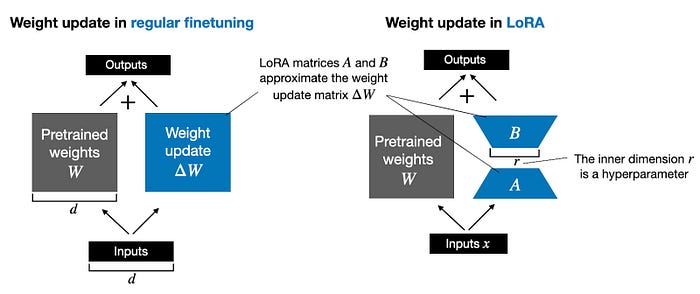
Instead of reprinting the whole Model (re-training all parameters), you freeze the original weights and only train a tiny set of new parameters. This reduces the training cost by up to 80% and results in a small "adapter file" (10–100MB) that can be easily shared.
QLoRA: Quantized LoRA
QLoRA (Quantized LoRA) takes this further by quantizing the base model to 4-bit before adding the LoRA adapters. This is the best practice that allows a developer to fine-tune a massive 70B parameter model on a single consumer GPU. It uses specialized "Paged Optimizers" to prevent the GPU from crashing when memory usage spikes during training.
The GGUF Extension and Deployment
Once a model is fine-tuned, it must be exported for use. In 2026, the GGUF (GPT-Generated Unified Format) is the industry standard for local deployment.
- LoRA to GGUF: You can "merge" your adapter directly into the model and convert it to GGUF using tools like
llama.cpp. - Universal Compatibility: Once in GGUF format, the model can run on almost any hardware (NVIDIA, Apple Silicon, or even a CPU) via software like Ollama.
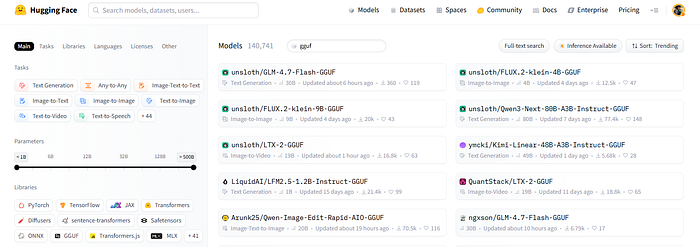
Next time you browse Hugging Face and see a model with GGUF in its name, you'll know exactly what it means and why it matters.
12. After Reading, We move to Action!
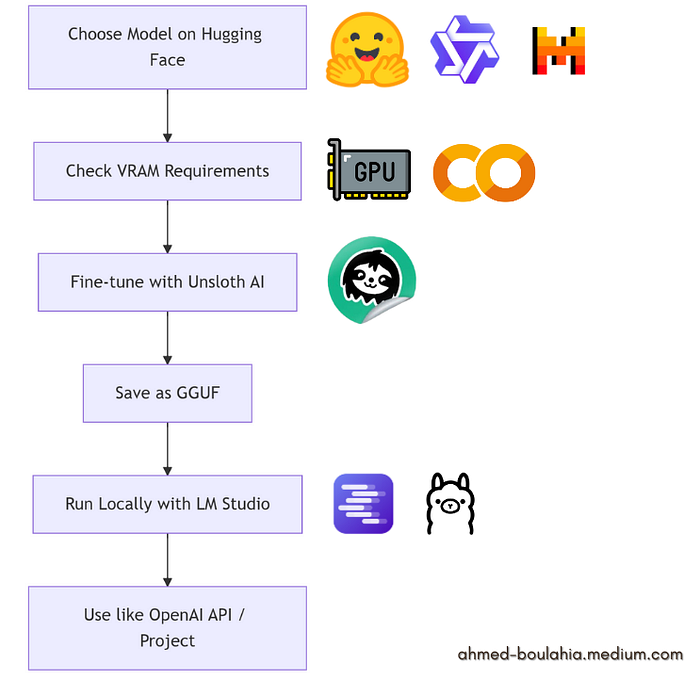
Now you can confidently select a model that fits your PC or Google Colab setup. Calculate the VRAM you have, fine-tune it with Unsloth AI, save it as a GGUF, and run it locally using LM Studio or Ollama. It's a perfect project to get hands-on with open-source LLMs and truly own your AI workflow!
And if you think you still need to learn more details about this: here is a tutorial I have created to show you exactly how:
Or you can refer directly to Unsloth AI Notebooks where you will find all you need to finetune a model on Google Colab:
Take Control of Your AI!
Choosing the right open-source LLM in 2026 is no longer about picking the biggest model you can afford. It's about understanding architecture, memory requirements, and functional specialization so you can select a model that fits your hardware, workflow, and goals.
By calculating VRAM needs, leveraging quantization, fine-tuning with tools like Unsloth AI, and running models locally, you can build powerful, private, and cost-effective AI systems.
Today, with the right knowledge and tools, every engineer can deploy, optimize, and experiment with high-performance models on their own terms. it's about truly owning the process!

If you found this helpful, why not share it with a friend? The more we learn together, the better we all become.
I'm working on a bi-monthly newsletter where I'll share exciting AI projects, the latest tools, and quick insights, subscribe here: DeBrief AI
Connect on LinkedIn: Let's chat about all things AI! [LinkedIn]
Subscribe on YouTube: Catch my latest videos and tutorials. [YouTube channel]