

Background of the Problem We Aimed to Solve
One of our applications exposes selected internal APIs to multiple consumers across different AWS accounts using several VPC Endpoint Services. At present, more than ten consumer accounts access these services by creating their own Interface VPC Endpoints.
However, this approach presents two key issues:
- Manageability becomes increasingly difficult as more consumers onboard.
- Cost increases significantly, since all consumer accounts are in one AWS Organization, each additional Interface Endpoint directly increases the total cost.
To address these challenges, we explored creating shared VPC Interface Endpoints for the respective endpoint services and sharing them with consumer accounts. With this setup, consumer accounts no longer need to create their own VPC Interface Endpoints to access the service.
This allows us to reduce the number of Interface Endpoints dramatically. For example, instead of maintaining ten separate consumer endpoints for a single endpoint service, we can consolidate this into just one shared endpoint.
Architecture
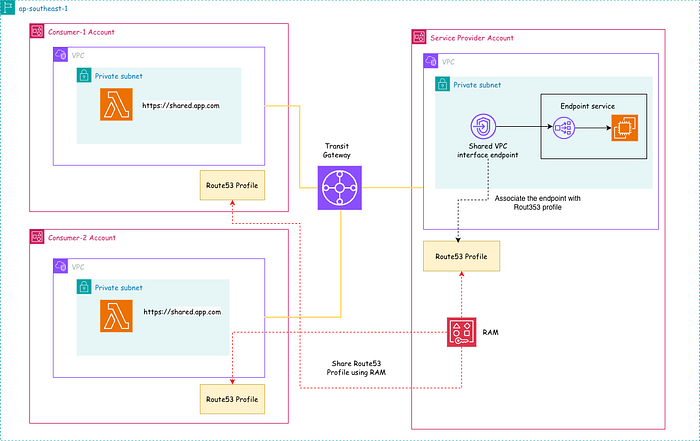
As shown in the diagram above, the service provider account hosts the shared VPC Endpoint Service, while all consumer accounts connect to it through an AWS Transit Gateway.
In the provider account, a VPC Interface Endpoint is created and associated with a Route 53 Profile. This Route 53 Profile is then shared with the consumer accounts using AWS Resource Access Manager (RAM).
This architecture is implemented using Terraform, and the complete code is available in this GitHub repository.
Steps in the Service Provider Account
- Set up the service provider VPC.
- Connect consumer accounts using the Transit Gateway.
- Deploy the application behind a Network Load Balancer.
- Create a VPC Endpoint Service to expose the application.
- Create a shared VPC Interface Endpoint.
- Create a Route 53 Profile and associate it with the Interface Endpoint.
- Share the Route 53 Profile with the consumer accounts using AWS RAM.
Set Up the Service Provider VPC
Note that I use terraform-aws-modules/vpc/aws module to create the service provider account VPC.
module "service_provider_account_vpc" {
  source  = "terraform-aws-modules/vpc/aws"
  version = "~>6.4"

  name = "${local.service_provider_app_name}-vpc"
  cidr = local.service_provider_vpc_cidr

  azs             = ["${local.aws_region}a", "${local.aws_region}b"]
  public_subnets  = local.service_provider_vpc_public_subnets
  private_subnets = local.service_provider_vpc_private_subnets

  enable_nat_gateway     = true
  single_nat_gateway     = true
  one_nat_gateway_per_az = false

  enable_dns_hostnames = true
  enable_dns_support   = true


  tags = {
    Name = "${local.service_provider_app_name}-vpc"
  }

  private_subnet_tags = {
    Name = "private-subnet"
  }

  public_subnet_tags = {
    Name = "public-subnet"
  }
}
Connect Consumer Accounts Using the Transit Gateway
All VPCs in the AWS organization are attached to a shared AWS Transit Gateway, enabling seamless cross-account connectivity. In this architecture, the shared Transit Gateway resides in the service provider account.
resource "aws_ec2_transit_gateway" "service_provider_tgw" {
  description = "Central TGW for cross-account VPC connectivity"

  default_route_table_association = "enable"
  default_route_table_propagation = "enable"

  tags = {
    Name = "main-cross-account-tgw"
  }
}
TGW attachment with central account VPC
resource "aws_ec2_transit_gateway_vpc_attachment" "service_provider_vpc_attachment" {
  transit_gateway_id = aws_ec2_transit_gateway.service_provider_tgw.id
  vpc_id             = module.service_provider_account_vpc.vpc_id
  subnet_ids         = module.service_provider_account_vpc.private_subnets

  tags = {
    Name = "service-provider-vpc-attachment-request"
  }
}
Route traffic to a consumer account via TGW
resource "aws_route" "service_provider_to_consumer_account_vpc_route" {
  for_each = {
    for idx, rt_id in local.service_provider_vpc_private_route_tables : idx => rt_id
  }

  route_table_id         = each.value
  destination_cidr_block = module.consumer_account_vpc.vpc_cidr_block
  transit_gateway_id     = aws_ec2_transit_gateway.service_provider_tgw.id

  depends_on = [module.service_provider_account_vpc]
}
Accept TGW attachment with consumer account VPC
resource "aws_ec2_transit_gateway_vpc_attachment_accepter" "consumer_account_vpc_attachment_accepter" {
  transit_gateway_attachment_id = aws_ec2_transit_gateway_vpc_attachment.consumer_account_vpc_attachment.id

  depends_on = [
    aws_ec2_transit_gateway_vpc_attachment.consumer_account_vpc_attachment
  ]
}
Deploy the Application Behind a Network Load Balancer
Since VPC Endpoint Services require either a Network Load Balancer or a Gateway Load Balancer, I deployed a simple application on an EC2 instance and placed it behind a Network Load Balancer.
module "ec2_instance" {
  source  = "terraform-aws-modules/ec2-instance/aws"
  version = "~>6.1"

  name                        = local.service_provider_app_name
  ami                         = data.aws_ami.amazon_linux.id
  instance_type               = local.instance_type
  vpc_security_group_ids      = [module.app_sg.security_group_id]
  subnet_id                   = module.service_provider_account_vpc.private_subnets[0]
  user_data_base64            = base64encode(local.user_data)
  user_data_replace_on_change = true
  monitoring                  = false
}
module "nlb" {
  source  = "terraform-aws-modules/alb/aws"
  version = "~> 9.13"

  name               = "${local.service_provider_app_name}-nlb"
  load_balancer_type = "network"
  vpc_id             = module.service_provider_account_vpc.vpc_id
  subnets            = module.service_provider_account_vpc.private_subnets
  internal           = true

  create_security_group      = false
  security_groups            = [module.app_sg.security_group_id]
  enable_deletion_protection = false

  listeners = {
    http_80 = {
      port     = 80
      protocol = "TCP"
      forward = {
        target_group_key = "nginx"
      }
    }

    https_443 = {
      port            = 443
      protocol        = "TLS"
      certificate_arn = aws_acm_certificate.app_acm.arn
      ssl_policy      = "ELBSecurityPolicy-2016-08"
      forward = {
        target_group_key = "nginx"
      }
    }
  }

  target_groups = {
    nginx = {
      name_prefix = "sp-"
      protocol    = "TCP"
      port        = 80
      target_type = "instance"
      target_id   = module.ec2_instance.id
      health_check = {
        enabled             = true
        interval            = 6
        path                = "/"
        port                = "80"
        healthy_threshold   = 2
        unhealthy_threshold = 3
        timeout             = 6
      }
    }
  }
}
Create a VPC Endpoint Service to Expose the Application
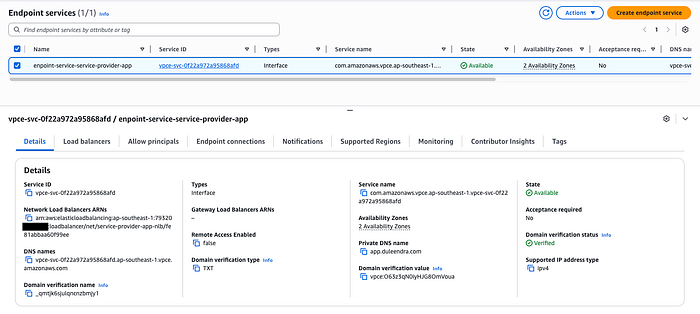
In this step, we configure a VPC Endpoint Service with private DNS enabled to make the application available to consumer accounts.
resource "aws_vpc_endpoint_service" "shared_endpoint_service" {
  network_load_balancer_arns = [module.nlb.arn]
  acceptance_required        = false
  private_dns_name           = local.app_domain
  supported_regions          = ["ap-southeast-1"]

  tags = {
    Name = "endpoint-service-${local.service_provider_app_name}"
  }
}
Create a Shared VPC Interface Endpoint
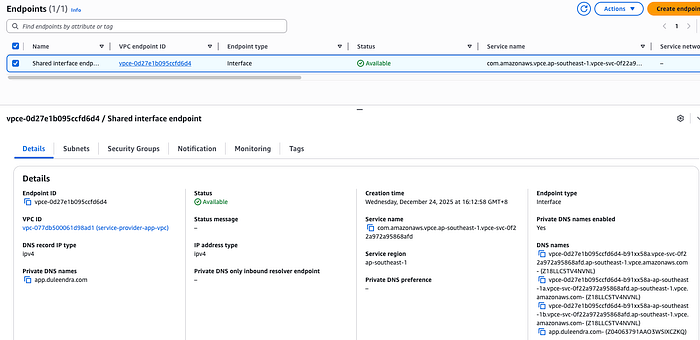
Next, we create a VPC Interface Endpoint to access the VPC Endpoint Service created in the previous step. This Interface Endpoint will later be shared with consumer accounts using a Route 53 Profile.
resource "aws_vpc_endpoint" "shared_interface_endpoint" {
  vpc_id              = module.service_provider_account_vpc.vpc_id
  service_name        = aws_vpc_endpoint_service.shared_endpoint_service.service_name
  vpc_endpoint_type   = "Interface"
  private_dns_enabled = true
  security_group_ids  = [module.app_sg.security_group_id]
  subnet_ids          = module.service_provider_account_vpc.private_subnets

  tags = {
    Name = "Shared interface endpoint"
  }

  depends_on = [aws_vpc_endpoint_service.shared_endpoint_service]
}
Create a Route 53 Profile and Associate the Shared Interface Endpoint.
In this step, we create a Route 53 Profile and associate the Interface Endpoint that was provisioned in the previous step.
resource "aws_route53profiles_profile" "service_provider_route53_profile" {
  name = "service-provider-route53-profile"
}
resource "aws_route53profiles_resource_association" "shared_interface_association" {
  name         = "shared-endpoint-association"
  profile_id   = aws_route53profiles_profile.service_provider_route53_profile.id
  resource_arn = aws_vpc_endpoint.shared_interface_endpoint.arn
}
Share the Route 53 Profile with Consumer Accounts Using AWS RAM
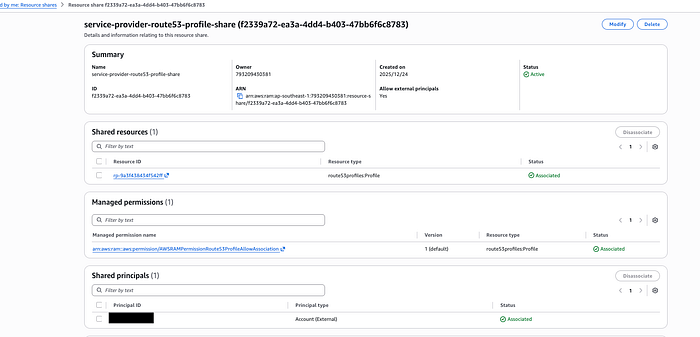
Here, we use AWS Resource Access Manager (RAM) to share the Route 53 Profile with consumer accounts. This enables those accounts to consume the Interface Endpoint and resolve its private DNS records seamlessly.
resource "aws_ram_resource_share" "route53_profile_share" {
  name                      = "service-provider-route53-profile-share"
  allow_external_principals = true
  tags = {
    Name = "service-provider-route53-profile-share"
  }
}
resource "aws_ram_resource_association" "route53_profile_resource_association" {
  resource_share_arn = aws_ram_resource_share.route53_profile_share.arn
  resource_arn       = aws_route53profiles_profile.service_provider_route53_profile.arn
}
resource "aws_ram_principal_association" "route53_profile_association" {
  resource_share_arn = aws_ram_resource_share.route53_profile_share.arn
  principal          = local.consumer_account_id
}
Steps in the Consumer Account
- Set up the service consumer VPC.
- Connect to the service provider account using the Transit Gateway.
- Accept the Route 53 Profile resource share from the service provider account.
- Associate the consumer account VPC with the shared Route 53 Profile.
- Test the application to verify connectivity and DNS resolution.
Set Up the Service Consumer VPC
Create the service consumer VPC.
module "consumer_account_vpc" {
  source  = "terraform-aws-modules/vpc/aws"
  version = "~>6.4"

  providers = {
    aws = aws.consumer-account
  }

  name = "${local.consumer_app_name}-vpc"
  cidr = local.consumer_vpc_cidr

  azs             = ["${local.aws_region}a", "${local.aws_region}b"]
  public_subnets  = local.consumer_vpc_public_subnets
  private_subnets = local.consumer_vpc_private_subnets

  enable_nat_gateway     = true
  single_nat_gateway     = true
  one_nat_gateway_per_az = false

  enable_dns_hostnames = true
  enable_dns_support   = true


  tags = {
    Name = "${local.consumer_app_name}-vpc"
  }

  private_subnet_tags = {
    Name = "private-subnet"
  }

  public_subnet_tags = {
    Name = "public-subnet"
  }
}
Connect Service Provider Account Using the Transit Gateway
TGW attachment with consumer account VPC
resource "aws_ec2_transit_gateway_vpc_attachment" "consumer_account_vpc_attachment" {
  provider = aws.consumer-account

  transit_gateway_id = aws_ec2_transit_gateway.central_tgw.id
  vpc_id             = module.consumer_account_vpc.vpc_id
  subnet_ids         = module.consumer_account_vpc.private_subnets

  depends_on = [
    aws_ram_resource_share_accepter.tgw_accepter_consumer_account
  ]

  tags = { Name = "consumer-vpc-attachment" }
}
Route traffic to service provider account via TGW
resource "aws_route" "consumer_to_provider_account_vpc_route" {
  for_each = {
    for idx, rt_id in local.consumer_account_private_route_tables : idx => rt_id
  }

  provider               = aws.consumer-account
  route_table_id         = each.value
  destination_cidr_block = module.service_provider_account_vpc.vpc_cidr_block
  transit_gateway_id     = aws_ec2_transit_gateway.service_provider_tgw.id

  depends_on = [
    module.consumer_account_vpc,
    aws_ec2_transit_gateway_vpc_attachment.consumer_account_vpc_attachment
  ]
}
Accept the Route 53 Profile Resource Share from the Service Provider Account
In this step, we accept the Route 53 Profile resource share that was shared by the service provider account.
resource "aws_ram_resource_share_accepter" "route53_profile_accepter_consumer_account" {
  provider  = "aws.consumer-account"
  share_arn = aws_ram_resource_share.route53_profile_share.arn
  depends_on = [
    aws_ram_principal_association.route53_profile_association
  ]
}
Associate the Consumer Account VPC with the shared Route 53 Profile
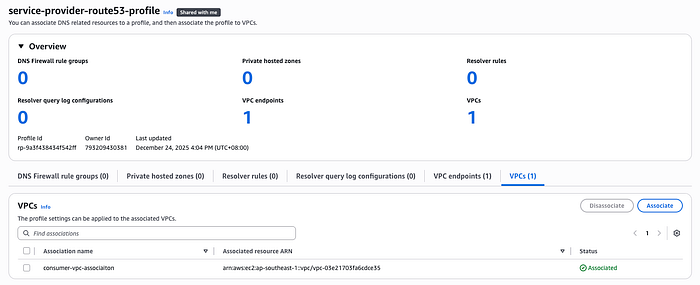
At this stage, we associate the consumer account VPC with the Route 53 Profile shared by the provider account to enable private DNS resolution for the endpoint.
resource "aws_route53profiles_association" "vpc_association" {
  provider    = "aws.consumer-account"
  name        = "consumer-vpc-association"
  profile_id  = aws_route53profiles_profile.service_provider_route53_profile.id
  resource_id = module.consumer_account_vpc.vpc_id
}
Test the Application to Verify Connectivity and DNS Resolution
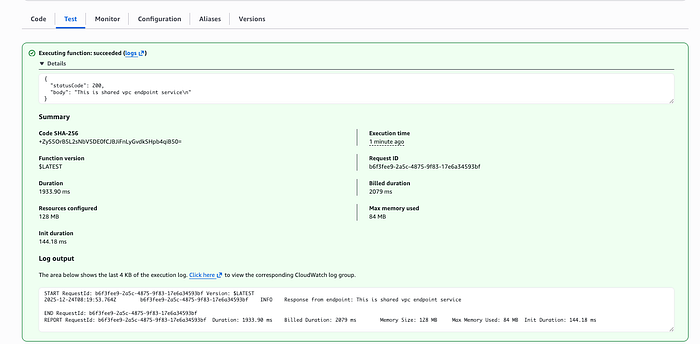
To test the shared VPC endpoint we created earlier, I set up a lightweight Lambda function in the consumer VPC. You can clone the complete implementation from this repository.
module "test_function_in_consumer_account" {
  source  = "terraform-aws-modules/lambda/aws"
  version = "~> 7.1"

  providers = {
    aws = aws.consumer-account
  }

  function_name = "test-function-in-consumer-account"
  description   = "Test function in the consumer account"
  handler       = "index.handler"
  runtime       = "nodejs22.x"
  source_path   = "${path.module}/lambda"

  vpc_subnet_ids         = module.consumer_account_vpc.private_subnets
  vpc_security_group_ids = [module.consumer_lambda_sg.security_group_id]

  create_role = false

  environment_variables = {
    APP_DOMAIN = local.app_domain
  }

  lambda_role = module.consumer_lambda_role.arn

  memory_size = 128
  timeout     = 40
}
export const handler = async (event) => {
    const url = "https://"+ process.env.APP_DOMAIN;

    if (!url) {
        return {
            statusCode: 500,
            body: JSON.stringify({ error: "APP_DOMAIN environment variable is not set" }),
        };
    }

    try {
        const response = await fetch(url);
        const data = await response.text();

        console.log("Response from endpoint:", data);

        return {
            statusCode: 200,
            body: data,
        };
    } catch (err) {
        console.error("Error calling endpoint:", err);

        return {
            statusCode: 500,
            body: JSON.stringify({ error: err.message }),
        };
    }
};
Note that if you encounter the error below, please wait until the endpoint service verification is complete.
Error: creating EC2 VPC Endpoint (com.amazonaws.vpce.ap-southeast-1.vpce-svc-xxxx): operation error EC2: CreateVpcEndpoint, https response error StatusCode: 400, RequestID: 75365b0c-7844–40e6–81e9–35483c6206b0, api error InvalidParameter: Private DNS can't be enabled because the service com.amazonaws.vpce.ap-southeast-1.vpce-svc-0f22a972a95868afd has not verified the private DNS name.