

You might have noticed that yesterday we launched US stocks on the Freetrade app.
They're already available for a few lucky people and we'll be bringing them to everyone in the next week. Who wouldn't want to purchase a few of those oh so shiny, no-emission Tesla shares? 🚗⚡️
As for the design work, you might think "It's not that hard, right? Just switch the £'s → $'s."
Sort of, but not quite!
The introduction of a foreign market brings a ton of complexities to address so let's walk through the few that have the most impact on the design of Freetrade.
"Just switch the £'s → $'s"
Right now the app is only available in the UK. So it's fair to assume that most of the people using Freetrade are familiar with investing in £'s. With the addition of US stocks, we needed to work out how to show the stock values in a way that you could relate to your whole portfolio.
So when you navigate to a stock, you'll see the current share price in dollars. However, the current value of your investment is shown in £'s for simplicity.
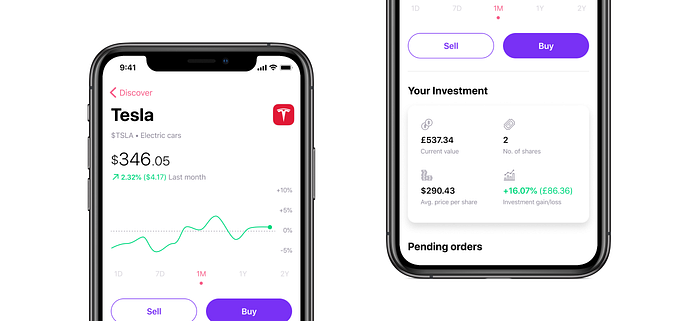
While we believe this is the best choice for us right now, we can also see arguments for handling this differently, especially as we add additional features so we'd love to hear your thoughts too.
GMT, BST, UTC, IDK…
With US stocks comes the exciting addition of new stock exchanges: in this case the New York Stock Exchange and NASDAQ. Their opening hours are obviously based on the time in the US, so in UK time, they're different from the open hours for the London Stock Exchange and UK stocks. Turns out Americans like daylight just as much as us!
Now I'm sure there's some of you among us, who "just know" that when it's 2pm here in the UK it's 9am in New York. I, however, am not one of those people.
At first, we explored showing the timezone in addition to the time to make it easier to look it up and do the maths for yourselves. But we thought we could do better.
So when we speak about the opening hours of foreign markets we'll try to make things easy by converting times to the equivalent time in your local timezone.

The first example of this — as shown above — is in our handy Market hours information drawer. But you'll also see this popping up in other areas of the app where relevant.
Currency conversion
The cash in your account is held in GBP so when you're purchasing US shares there's a little maths to be done to work out exactly how much you're putting into a stock. Rather than put that work on you, we've added the live conversion value underneath the amount you enter.
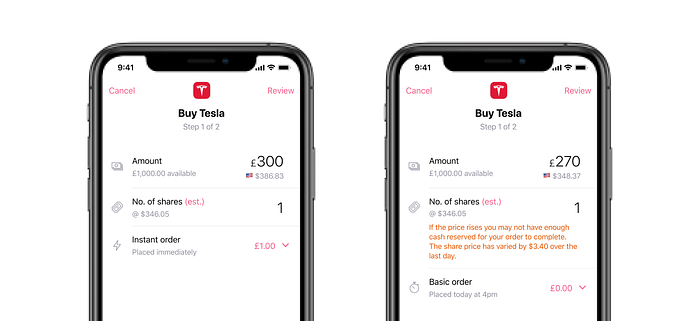
While we were designing for currency conversion, we were also working on another tweak. We know some people face issues with Basic orders failing due to price fluctuations between the time they queue the order and the time it goes through.
This would be particularly relevant for US stocks since they tend to have a higher price per single share which can lead to larger fluctuations.
So, as a simple solution, we added some code that tracks the daily price variance of a stock and some contextual text to help you know if you've reserved enough cash to avoid the price moving outside your range.
You can read more about this part of the project here on our community forum.
We know how much everyone's been waiting for US stocks and it's been great working on a feature that means so much to everyone.
Working on this has also created a model for how we build the app for all sorts of overseas stocks and exchanges. We're sure there'll be plenty of individual nuance for each market, but it's great to have got our first set in place.
We can't wait to activate US investing for everyone on the app next week. Stay tuned!
👩💻 Help us bring free investing to the UK and beyond, check out our open roles.