
Text nodes are necessary for highlighting keywords without modifications in the web page DOM. If the page contents are gradually loaded and removes as the web page is scrolled, then the set of the detected text nodes needs to be continuously updated and, thus, the search for text nodes needs to be fast.
In this post I assess performance of possible approaches to retrieve all child text nodes of an HTML element or all text nodes in the DOM. There are several options:
- recursion using
childNodes TreeWalkerNodeIteratordocument.evaluate()withtext()XPath function
During benchmarking, text nodes are identified in a sample HTML document that I created by combining HTML code of several popular websites. I reuse the code from a post about retrieval of elements.
The fastest approach to retrieve all child text nodes inside an element
I evaluate the performance of possible childNodes-based approaches in three functions a(), b() and c(). The code of the functions e(), f() and g() differs only in the used iterator TreeWalker, NodeIterator or XPathResult.
// measure.js

function a(el) {
    var nodes = [];

    function a0(el) {
        for (var i = 0; i < el.childNodes.length; i++) {
            var node = el.childNodes[i];
            if (node.nodeType == Node.TEXT_NODE) {
                nodes.push(node);
            } else a0(node);
        }
    }
    a0(el);
    return nodes;
}

function b(el) {
    return [...el.childNodes].flatMap(n => {
        if (n.nodeType === Node.TEXT_NODE) return n;
        return b(n);
    });
}

function c(el) {
    return [el, ...el.getElementsByTagName('*')].flatMap(el => [...el.childNodes]).filter(n => n.nodeType === Node.TEXT_NODE);
}

function e(el) {
    const treeWalker = document.createTreeWalker(el, NodeFilter.SHOW_TEXT);
    const nodes = [];
    while (treeWalker.nextNode())
        nodes.push(treeWalker.currentNode);
    return nodes;
}

function f(el) {
    const nodeIterator = document.createNodeIterator(el, NodeFilter.SHOW_TEXT);
    const nodes = [];
    let node;

    while (node = nodeIterator.nextNode())
        nodes.push(node);
    return nodes;
}

function g(el) {
    let iterator = document.evaluate("//text()", el, null, XPathResult.UNORDERED_NODE_ITERATOR_TYPE);
    const nodes = [];
    let node;

    while (node = iterator.iterateNext()) {
        nodes.push(node);
    }

    return nodes;
}

const ways = { a, b, c, e, f, g };


export function measure(el) {

    const results = Object.fromEntries(Object.values(ways).map(name => [name, []]));
    for (let i = 0; i < 10; i++) {
        Object.values(ways).forEach(func => {
            const start = performance.now();
            let r = func(el);
            results[func].push(performance.now() - start);

            if (r.length !== 100807) {
                throw 'wrong length ' + r.length;
            }
        })
    }

    return results;
}
The results are similar to what I obtained when searching for child elements:
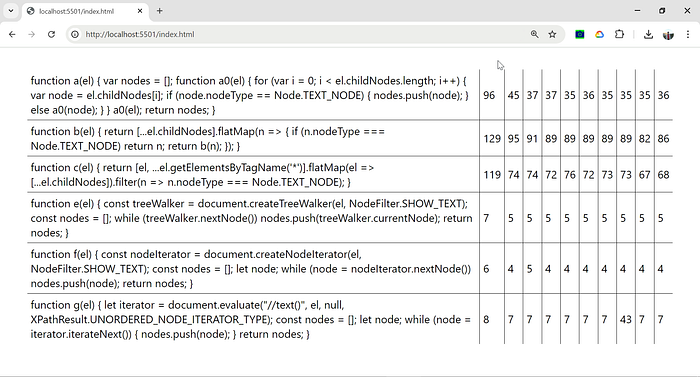
It is clearly better to avoid childNodes when searching for nested text nodes. By comparing the performance of the three childNodes-based methods it additionally seems that flatMap()-based chained code looks nice but performs even more poorly.
The approaches based on document.createTreeWalker(), document.createNodeIterator() and document.evaluate() seem to be about equally performant and over 5 times faster than childNodes-based recursion.
The fastest approach to identify child text nodes containing a substring
document.evaluate() is the only built in method allowing search for text nodes containing a string. Is there a difference in the performance between:
- extracting text nodes with
document.createTreeWalker()and then filtering nodes containing a string - searching only for text nodes containing a string using an XPath expression
To get an answer to this question I modified the above script measure.js. To search for all child text nodes containing a string "year", I use XPath expression //text()[contains(.,'year')]:
// measure2.js

function e(el, text) {
    const treeWalker = document.createTreeWalker(el, NodeFilter.SHOW_TEXT);
    const nodes = [];
    while (treeWalker.nextNode())
        nodes.push(treeWalker.currentNode);
    return nodes.filter(n => n.nodeValue.includes(text));
}

function g(el, text) {

    let iterator = document.evaluate(`//text()[contains(.,'${text}')]`, el, null, XPathResult.UNORDERED_NODE_ITERATOR_TYPE);
    const nodes = [];
    let node;

    while (node = iterator.iterateNext()) {
        nodes.push(node);
    }

    return nodes;
}

const ways = { e, g  };


export function measure(el) {

    const results = Object.fromEntries(Object.values(ways).map(name => [name, []]));
    for (let i = 0; i < 10; i++) {
        Object.values(ways).forEach(func => {
            const start = performance.now();
            let r = func(el, 'year');
            results[func].push(performance.now() - start);

            if (r.length !== 311) {
                throw 'wrong length ' + r.length;
            }
        })
    }

    return results;
}
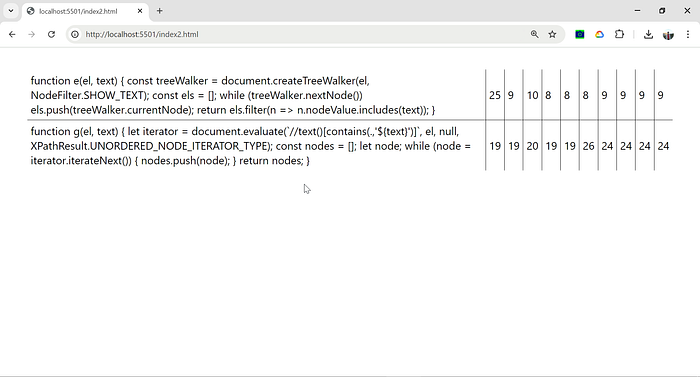
So it seems it is faster first approach is faster than document.evaluate() with a condition:
Conclusions
document.createTreeWalker() and document.createNodeIterator() are the best options for retrieving all nested text nodes of an HTML element. Then nodes without the needed substring can be filtered out.
The complete source code can be downloaded from https://github.com/marianc000/childTextNodes
You can see the results of the two assessments https://marianc000.github.io/childTextNodes/ and https://marianc000.github.io/childTextNodes/index2.html