

Happy 2022! I feel joyful for this year. The Macs received much love from Apple, especially for Apple Silicon for Pro users. I hope we see improved energy use for M1 chips with a redesign from technologies like vertically stacked transistors.
Without any further reading, let's dive into the list of apps.
1. Tiny Softbox — Alexander Sandberg
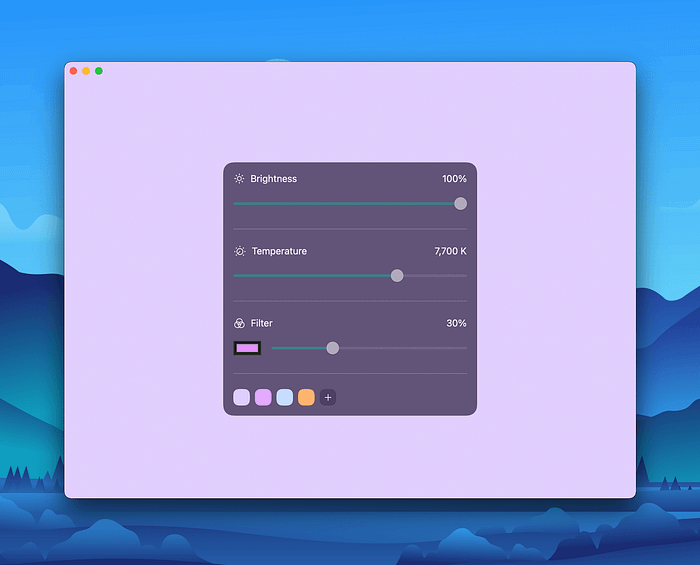
Tiny Softbox provides a straightforward experience for people who want to use their Mac display as a softbox. The user interface is simple and uses Apple's design elements. If you want a professionally lit photograph of anything, you will benefit from this app.
No matter your profession, you will need a professional photo, and instead of purchasing an expensive softbox, you can use this app and let your display do the heavy lifting for you. I used this app on my 27" 4K monitor and put the brightness to 100%, then took photos for my profile photo. The result is night and day.
👁🗨 Privacy 10/10
- App Meets Modern Privacy Standards
💲 Price Worth It
- App Costs $1.99
🦋 Design & Compatibility UX (8) UI (9)
- Works on iPhone, iPad, Mac and Has a Great Design
◾️ Download The App & Find Out More Here
2. Speedliness — Sindre Sorhus

Test your internet connection as fast as you can using Speedliness. It offers a straightforward user experience allowing you to check your internet connection speed just by opening the app. You also get additional properties of your network connection, such as RPM and Ping.
I think speed test apps are in dire need of simplification and user experience improvement. Speedliness is a great start, and after using it a couple of times on my Mac, I can get clear insight from my network connection. That being said, I wish it came with more features like a gauge to signify my speed fluctuation during the speed test.
👁🗨 Privacy 7/10
- Developer Can Improve Its Privacy Practices
💲 Price Valuable
- App Is Free
🦋 Design & Compatibility UX (7) UI (8)
- Works on Mac, and Has a Good Design
◾️ Download The App & Find Out More Here
3. Pippo — Jordi Bruin

Pippo is an extension for your Mac that adds rewind and forward buttons to your PiP window. Setting up the app is straightforward. Just run it and let Shortcuts install the extension. After enabling it, you can forward or rewind the video for 15 seconds.
Pippo is an extension that many people need, and I think Apple might add the same features in the default PiP window in the future releases of macOS. I hope by that time, we get the options in System Preferences window.
👁🗨 Privacy 2/10
- Developer Hasn't Disclosed Privacy Practices
💲 Price Valuable
- App Is Free
🦋 Design & Compatibility UX (8) UI (7.5)
- Works on Mac, and Has a Good Design
◾️ Find Out More Here
4. Ground Zero — Developer
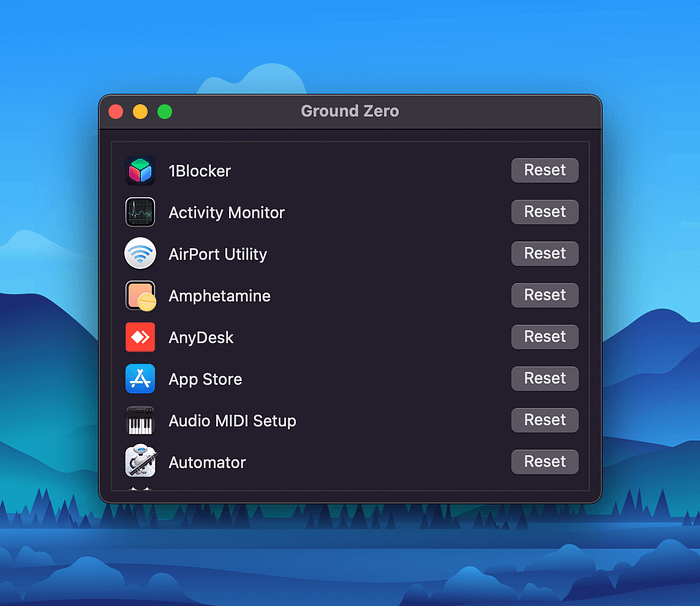
Ground Zero is an excellent petit utility to help you reclaim disk space and reset any App on your Mac to its default state. The user interface is straightforward, and there isn't any difficulty using it to reset apps.
Every Mac owner needs an app like this to restore their apps. Sometimes we alter the preferences of apps without worrying about any repercussions of our change. Ground Zero is an excellent CMD + Z for those who want to start over and set up any app as new without the need for a reinstall.
👁🗨 Privacy 1/10
- Developer Hasn't Disclosed Privacy Practices
💲 Price Worth It
- App Costs $0.99
🦋 Design & Compatibility UX (5) UI (3)
- Works on Mac, and Has a Decent Design
◾️ Download The App & Find Out More Here
5. Baking Soda — Tube Cleaner — Zhenyi Tan
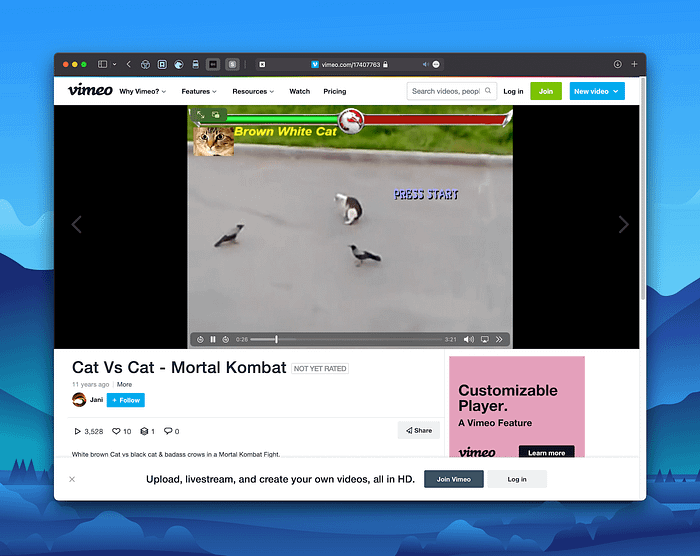
In December, I featured 10 Great iPhone Apps. Amongst them was a Safari extension called Vinegar which brought an HTML5 video player and replaced it with YouTube's default player. The same developer brought another app that does the same job but for all other websites and not only YouTube. Using Baking Soda (which is an interesting name for an app), you can control the video players from most websites without relying on their default player.
This app is handy for those who rely on troubling internet connections. Of course, usability, an important factor in user experience design, is elevated for most Safari users. I've been using this extension for around 10 days and it It has been reliable, without noticeable bugs.
👁🗨 Privacy 10/10
- App Meets Modern Privacy Standards
💲 Price Worth It
- App Costs $1.99
🦋 Design & Compatibility UX (8) UI (8)
- Works on iPhone, iPad, Mac, and Has a Good Design
◾️ Download The App & Find Out More Here
6. Sip — André Gonçalves & Rui Aureliano

Sip is a color picker tool that resides on your menubar to help identify any color on your screen and save it to your clipboard. Using this app, you can create your own pallets and use them in a plethora of apps. I've seen many experienced designers using this app to find the primary color code of a beautiful website.
I've been a Sip user for more than two years, and the app has worked flawlessly. It doesn't take much memory, and I haven't encountered many bugs. The user interface is simple, and the app offers shortcut customization for experienced users.
👁🗨 Privacy 2/10
- Developer Hasn't Disclosed Privacy Practices
💲 Price Worth It
- App Costs $10.00
🦋 Design & Compatibility UX (7.5) UI (8)
- Works on Mac, and Has a Good Design
◾️ Find Out More Here
7. Advanced Uninstall Manager — Shrishail Rana

As the name suggests, Advanced Uninstall Manager is here to help you completely remove app(s) from your Mac. That means no residue after deleting the .app file from your Applications folder. You can also check which apps launch when you turn on your Mac and disable them to save memory and shorten the startup time.
I've been using the app for almost ten days, and it works well. The user interface tends to be simple, yet it feels cluttered, which might be due to the use of layout hierarchy. Nevertheless, it does the job, and I suggest this app to anyone who tries and installs many Mac apps.
👁🗨 Privacy 5.5/10
- Developer Can Improve Its Privacy Practices
💲 Price Worth It
- App Costs $4.99
🦋 Design & Compatibility UX (7.5) UI (6.5)
- Works on Mac, and Has a Good Design
◾️ Download The App & Find Out More Here
8. Obsidian 2FA Authenticator — Tommaso Carpi

Obsidian is a gorgeous minimal app that hosts your two-factor authentication codes in an organized view. An app in this category should be unique in its design, and Obsidian doesn't disappoint. You can backup your codes, synchronize them across your Apple devices using iCloud, and categorize them by folders.
App Store doesn't have a shortage of apps hosting your two-step verification codes. Obsidian is a relatively new app that brings a semi-straightforward user experience without asking for too many steps from its user.
👁🗨 Privacy 10/10
- App Meets Modern Privacy Standards
💲 Price A Little Expensive
- Subscription Plan $9.99 Per Year
🦋 Design & Compatibility UX (6.5) UI (6.5)
- Works on Apple Watch, iPhone, iPad, Mac, and Has a Good Design
◾️ Download The App & Find Out More Here
9. Cheatsheet — Overdesigned, LLC

Cheatsheet is an organization app embedded with note-taking tools. You can use it to remember valuable and essential information. As a reference tool for your notes, it is an excellent option since it allows putting its widgets on your Mac's notification center.
I've seen many people who write important information on their note app; Information that could easily get lost within other notes. Doing so is not feasible nor appropriate for your data. Using CheatSheet, I categorize essential information and easily access them on my Mac. The user interface is simple and looks good. It looks like many other Mac apps, which is a good thing. Users no longer have to recall as they recognize what each section does for them.
👁🗨 Privacy #/10
- Developer Can Improve Its Privacy Practices
💲 Price Worth It
- App Costs $4.99
🦋 Design & Compatibility UX (7) UI (6.5)
- Works on Apple Watch, iPhone, iPad, Mac, and Has a Good Design
👍🏻 Scores 4.5/5
◾️ Download The App & Find Out More Here
10. MindNode — Developer

MindNode is a mind mapping application to help you visualize your ideas in an organized structure. It is minimal and functional, providing great options for pro users. You can easily capture your thoughts and present them in a mind map without worrying about saving them since files synchronize with iCloud.
Since January 2021, I've been using MindNode to visualize my ideas for the articles I write on Medium, and it has become a part of my workflow. The app is reliable and frequently receives updates.
👁🗨 Privacy 4/10
- App Collects Variety of Data
💲 Price Worth It
- Subscription Plan Start From $2.49 Per Month
🦋 Design & Compatibility UX (7.5) UI (7.5)
- Works on Apple Watch, iPhone, iPad, Mac, and Has a Great Design
👍🏻 Scores 4.7/5
◾️ Download The App & Find Out More Here
It is a new year that means an updated version of my stories. As you may have noticed, my story has cleaner, more organized writings. The new format is concise while providing more apparent detail. Let me know if you enjoy this new format.
Thank you for reading this story. I hope you enjoyed finding out about all these apps. If you know other cool apps, let me know in the response section, and I will reply as soon as I can.
I would appreciate it if you support me by becoming a Medium member using the link below: