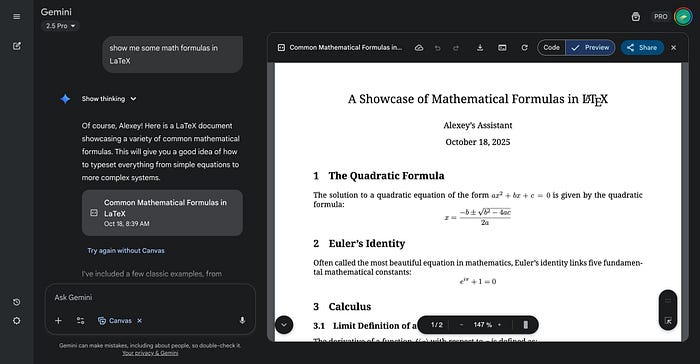


Listen. I'm an engineer. I've spent countless nights wrestling with equations in Word, fighting with Google Docs, and crying over broken LaTeX exports. If you've ever tried to write a technical document with actual math in it, you know exactly what I'm talking about.
Last week, something incredible happened.
The Breaking Point
It was 2 AM. I was working on a machine learning tutorial for Medium, trying to copy a simple gradient descent formula from Gemini into my Google Doc. The equation came out looking like alphabet soup had a fight with a calculator. Again.
I almost threw my laptop.
That's when I saw it — a small announcement buried in Gemini's release notes. Something about LaTeX. Something about Canvas. Something that made me sit up straight and forget I was exhausted.
I had to try it.
What Actually Changed (And Why I'm Losing My Mind)
Google just rolled out three features that sound boring on paper but are absolutely game-changing in real life:
Copy LaTeX directly from responses. Not the rendered pretty version — the actual LaTeX code. Clean. Perfect. Ready to paste anywhere.
Edit formulas inline inside Canvas. No more switching tabs, no more external editors, no more copy-paste hell. You click the equation, you change it, it updates instantly.
Export that actually works. Download to Docs, Markdown, or PDF — and the math stays beautiful. Every. Single. Time.
I know, I know. This sounds too good to be true.
That's what I thought too.
My Real Test: Could It Handle My Chaos?
I decided to stress-test Gemini with the messiest scenarios I could think of — the exact situations that made me rage-quit ChatGPT and Claude before.
Test 1: Physics Tutorial with Multiple Equations
I asked Gemini to explain Einstein's mass-energy equivalence with all the derivations. Not just E=mc2E=mc2 — the whole damn thing.
It gave me beautifully rendered equations. Inline math with $formula$. Display equations with $$formula$$. Perfect spacing. Zero formatting issues.
I clicked on one of the equations. A "Copy LaTeX" button appeared.
I clicked it.
I pasted it into Overleaf.
It. Just. Worked.
No editing. No fixing. No "wait, where did that bracket go?"
I literally said "holy sh*t" out loud at 2:30 AM.
Test 2: Live Editing in Canvas
Here's where it got wild.
I opened Canvas (Gemini's built-in document editor) and asked it to create a data science guide with matrix operations. The document loaded with all the math perfectly formatted.
Then I tried something crazy: I clicked directly on a matrix equation and started editing the LaTeX inline.
Changed variables. Added terms. Fixed notation.
The equation updated in real-time as I typed.
No lag. No crashes. No "please refresh and try again."
I've been using AI tools since GPT-3 dropped. This was the smoothest math editing experience I've ever had. Period.
Test 3: The Export Challenge
The final boss fight: exporting to Google Docs.
This is where every AI tool I've tried has failed. The formulas either vanish, turn into code blocks, or look like they went through a blender.
I clicked "Export to Google Docs."
Held my breath.
Opened the doc.
Every equation was perfect. Rendered. Beautiful. Professional.
I checked the Markdown export. Perfect.
I checked the PDF. Perfect.
At this point, I realized I might never go back to my old workflow.
Why This Matters More Than You Think
Look, I write AI tutorials for Medium. I create technical content almost daily. Before this upgrade, my workflow was a disaster:
- Get math from AI (ChatGPT, Claude, whatever)
- Copy to a LaTeX editor to fix formatting
- Export to Word or Docs
- Manually fix every equation that broke
- Cry
- Publish
Now? It's literally:
- Ask Gemini
- Edit if needed (in Canvas, instantly)
- Export
- Publish
I'm saving hours every week. Hours I can spend creating more content instead of fighting with tools that should just work.
The Features Nobody's Talking About (But Should Be)
It Understands Context
Ask Gemini to "explain that formula using different notation" and it actually gets it. You're not starting over — you're having a conversation about math.
Canvas Is Secretly Brilliant
I thought Canvas was just another gimmick. Wrong. It's basically Google Docs meets Overleaf meets ChatGPT, and somehow it doesn't suck at any of them.
You can structure your document with headers, add regular text, drop in code blocks, and scatter equations throughout — and it all just flows naturally.
The Google Ecosystem Integration
If you live in Google Drive (like I do), this is a dream. Create in Gemini Canvas, export to Docs, share with collaborators, everything syncs. No third-party tools. No conversion nightmares.
How I Actually Use It Now (Step-by-Step)
Let me show you my exact workflow for creating technical content:
Step 1: Start in Canvas
Instead of the regular Gemini chat, I click "Canvas" and choose "Content Mode." This gives me a proper document editor with all the LaTeX features enabled.
Step 2: Describe What I Need
I write prompts like "Create a tutorial on backpropagation with all the mathematical derivations" or "Explain Bayes' theorem with step-by-step examples in LaTeX."
Gemini generates a structured document with headers, explanations, and perfectly formatted math.
Step 3: Edit Live
I click on any equation to edit it inline. Maybe I want to change notation, add a step, or fix a typo. It happens right there in the equation, and I see the rendered result instantly.
Step 4: Copy Specific Formulas
Need just one equation for a tweet or LinkedIn post? Click it, hit "Copy LaTeX," and paste it wherever. Works perfectly in Notion, Obsidian, or any Markdown editor.
Step 5: Export and Publish
When I'm done, I export to Google Docs for Medium, or Markdown for my GitHub. The formatting stays perfect. No cleanup needed.
The Stuff That Still Sucks (Let's Be Honest)
Not everything is perfect. Here's what I've run into:
Sometimes Gemini still defaults to code blocks. If you don't explicitly say "use rendered LaTeX," it might wrap equations in code blocks instead. Just add that to your prompt and you're good.
Free tier has limits. Canvas access is rate-limited on the free plan. If you're serious about this, Gemini Advanced is worth it for the extended access and higher token limits.
It's not perfect for super complex notation. Really advanced stuff like commutative diagrams or complex tensors can still be wonky. But for 95% of STEM work, it's more than enough.
Who This Actually Helps
This isn't just for engineers and researchers. Here's who should care:
Students: Write homework, notes, and study guides with proper math formatting. Your professors will actually be impressed.
Teachers: Create lesson plans, quizzes, and tutorials that look professional without spending hours on formatting.
Content Creators: If you write about tech, data science, or anything math-heavy, this speeds up your workflow massively.
Anyone Who's Frustrated: If you've ever said "why is math so hard to work with digitally?" — this is your answer.
Why Gemini Finally Caught Up (And Why That Matters)
For years, ChatGPT has been the go-to for math-heavy AI work. Claude had great LaTeX support too. Gemini was… fine. Mediocre. The thing you used only if you were already deep in the Google ecosystem.
This update changes that.
Gemini isn't just catching up — in some ways, it's leaping ahead. The Canvas integration, the seamless Google Workspace exports, the live editing — these aren't features ChatGPT has nailed yet.
And with Gemini 2.5's massive 1M token context window, you can work on massive documents with thousands of equations without the AI forgetting what you're doing.
The Real Reason I'm Writing This
I'm not being paid by Google. I'm not an influencer trying to sell you a course.
I'm an engineer and creator who spent way too much time fighting with tools that should just work. When something actually does what it promises, I want to tell people about it.
This upgrade genuinely changed how I work. I'm faster. Less frustrated. More creative because I'm not spending mental energy on formatting hell.
If you've ever struggled with math in digital documents — and I know you have — you owe it to yourself to try this.
Try It Yourself
Here's what I want you to do right now:
- Go to gemini.google.com
- Click "Canvas"
- Ask it: "Explain the Pythagorean theorem with a full LaTeX proof"
- Watch the magic happen
- Click on an equation and edit it
- Try copying the LaTeX code
- Export to Google Docs
If this doesn't make you say "holy shit" at least once, come back and tell me I'm wrong.
But I don't think you will.
The Bottom Line
I don't write math in Microsoft Word anymore. I don't fight with formatting. I don't waste hours on copy-paste cleanup.
I use Gemini Canvas. I write. I edit. I export. I publish.
And for the first time in years, working with math actually feels… easy.
That's worth writing about.