Overview:
In my previous blog we had seen how to setup localstack on docker container. In this blog we are going to look at how to setup localstack on kubernetes cluster.
Pre-requisites
- kubernetes cluster
- aws cli
- helm cli
Note: If you dont have any kubernetes cluster you can create kind cluster quickly. Refer to this for setting up kind cluster.
Installing localstack on k8s cluster
Execute the below commands to install localstack.
helm repo add localstack https://helm.localstack.cloud
helm install localstack localstack/localstack -n localstack --create-namespace
wait until the localstack pod comes into up and running status.
kubectl get pods -n localstack
you can also find a localstack service created. Execute the below command.
kubectl get svc -n localstacklocalstack service is exposed as nodeport. Execute the port-forward command to access the localstack service from our laptop.
kubectl -n localstack port-forward svc/localstack 4566:4566port-forward command runs in foreground and listens on port 4566. Open a new terminal or tab to execute the further commands.
Testing
set an alias for aws cli using the below command.
alias aws="aws --endpoint-url=http://localhost:4566"Now lets setup aws access key, secret key environment variables. Execute the below command.
export AWS_ACCESS_KEY_ID=test
export AWS_SECRET_ACCESS_KEY=test
export AWS_DEFAULT_REGION=us-east-1
Note: you can set any values for the above environment variables.
Now lets test some aws api calls.
aws s3api list-buckets
As you can see from the above screenshot there are no buckets exist.
Lets try to execute someother api calls.
Execute the below command to create a new iam user
aws iam create-user --user-name purushotham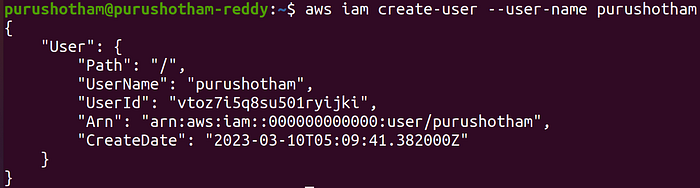
Lets try to attach the EC2FullAccess policy to the newly created user. Execute the below command.
aws iam attach-user-policy --user-name purushotham --policy-arn=arn:aws:iam::aws:policy/AmazonEC2FullAccessTo list the attached policies to the user, Execute the below command.
aws iam list-attached-user-policies --user-name purushotham
Now lets try to create an access key & secret key for the new user.
aws iam create-access-key --user-name purushotham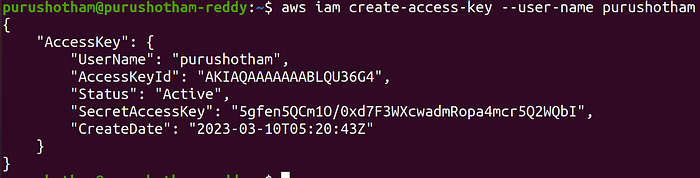
So this way you can create various different aws services by making api calls via cli.
Hope you have learned something new in this blog. We can explore more about localstack in my upcoming blogs.