

MENUS!
A new feature was added to Apple Notes on IOS not so very long ago. I ignored it completely because I didn't see that I could make any use of it. Today I suddenly realized how wrong I was.
The feature Apple added is linking. This new IOS feature lets you add a links from one note to other notes. I saw no value in it, but there is.
Macs have this linking too, but they can also do it in a different way. See the bottom of this page.
Menus
I have hundreds of notes. What I've done in the past is pin the ones I access most frequently so I can find them more easily. Unfortunately, the number of pinned notes has increased to the point where I often find myself searching for a pinned note. That's not efficient.
Linking lets me create ONE pinned note that is a menu leading to all my other important and frequently used Notes. Even better, nothing stops me from adding links to submenus for categories that have links to more notes. So, I can link to a Financial Menu and a Health Menu that link to more notes.
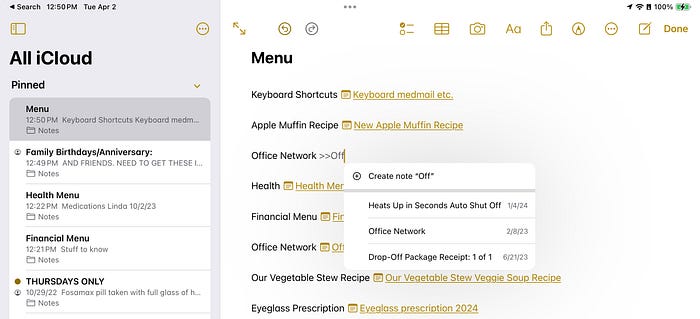
Linking is easy. With or without preceding text, simply type two greater-than signs: ">>" followed immediately by some part of the file name you want to link to. Here you see me starting to type ">>Off":

The menu that comes up offers to create a new Note named whatever I have typed or to create a link to any of the Notes it sees that have some of what I have typed in their name. It is that easy.
Once I have all my menus items created, I will unpin all Notes except my "Menu" Note, leaving it forever at the top when I open the Notes app.
Some details:
Multiple links to the same note
There likely is some limit, but I have Notes that belong in multiple menus. This simply works, and if you change the name of the note, all links to it in all menus will be updated.
Changing the name of a linked note
This does not hurt your menu. Your menu will adjust immediately to show the new name of the Note.
Change the linking text
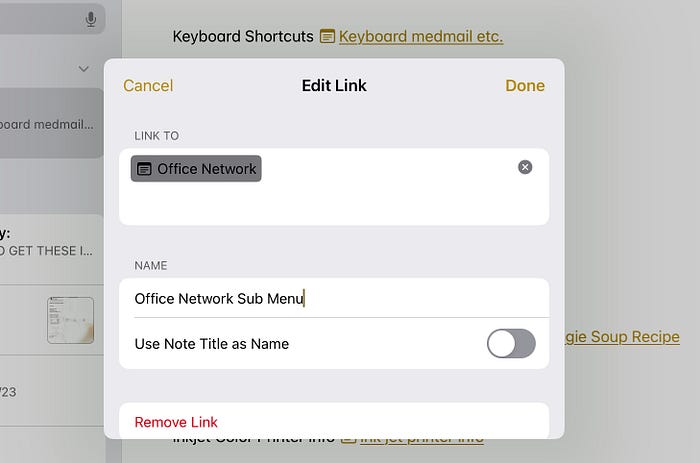
You can set your own text by touch-holding on the link and choosing Edit Link. As above, changing the name of the linked Note later does not affect this.
What if I want to type ">>"?
Leave a space after typing ">>" instead of typing a letter. If you must have a word directly after the double greater-than (">>THIS"), simply type a word or sentence that does not match any file name and press Enter.
Getting back to a menu Note
Apple seems to have forgotten about this. If you have a lot of notes like I do, you might want to add a return link.
Link to Webpages
This isn't new. Just type out the https:// address. No ">>" needed.
Link to Apps?
On a Mac, you can do this. On IOS, you cannot without using a Shortcut script, which is much more annoying to update.