

This article will create a program to retrieve all the game data we are looking for, found on one of the biggest game-selling websites, Steam. Our program will retrieve all data in the form of title, link, price, and release date. This program will scrape all the data according to the game keywords we entered. And finally, the results of the scraping are extracted into JSON, CSV, and excel files. We use packages requests and Beautifulsoup4 to fetch all the data we want. Then we also need the JSON and pandas packages for data extraction in JSON, CSV, and excel. Then finally, there is the os package to create a file that holds the data extraction results.
First of all, we import all the packages we need. If they don't exist, you can first install them. You can install openpyxl if an error occurs during data extraction. Because our program aims to collect all game data we have searched for, we first create a link variable containing the link https://store.steampowered.com/search/results.
Then, we create a game variable that functions to accommodate the game keyword input that we want to find. So if our program is run, then our program will ask for input for the game we want to find, then our program will scrape all data from Steam according to the keywords entered.
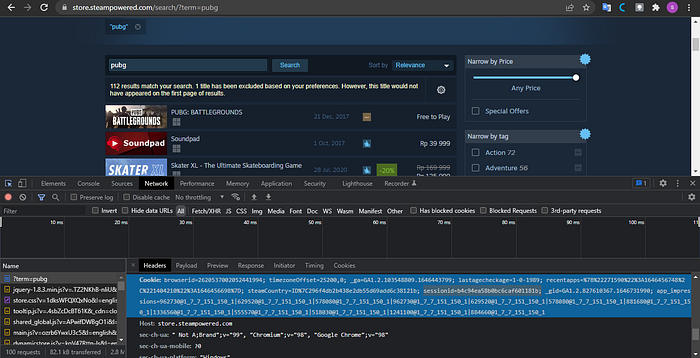
Third, we create a head variable in a dictionary containing the session id. This variable functions as an additional parameter when calling requests not to be detected as scraping the web. To find the session id, you can use inspect, select the network menu, select the top file, and look for the session id in the cookies section.
Then the third one, we create a new folder every time we run the program, accommodating all extracted files. Still, we use error handling with the aim that if the folder does not exist, then we create the folder, but if it already exists, then there is no need to create the folder. Creating a folder it's pretty easy. You can use the mkdir function found in the os package and enter the folder's name as you like.
Like our code at this early
Then, we will create a function to find the last page of game data we are looking for. We name the function is get_pagnition(). In this function, we first create a param variable. The function of this param variable is the same as the head variable, namely as an additional parameter when we call package requests. The difference is that in this param variable, there are two values, namely term, which has a game variable value which means the value of the term is the keyword that we have entered. The second is a page with a value of 1. For this page, I use a value of 1 because this is only needed to retrieve the total existing pages. Later, this page will change according to the number of existing pages in the next function.
Next, we create a req variable containing package requests with the get function. There are additional params and headers parameters. Then we create a soup variable that functions to accommodate the beautifulsoup package, input the req.text variable, and use an HTML parser. After that, we look for where the page tag is located.
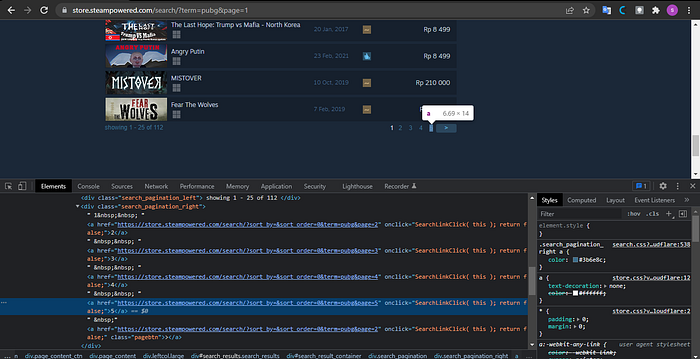
If we look at the HTML structure above, we need to first find the search_pagination_right class, then find_all tag a so that we get all the numbers in the search_pagination_right class. Then we store this function in a new variable called page_item, so it's easy to call. Remember that because the page_item variable is at the end of doing find_all, then the data type of this variable is a list. To get the last number in the page_item list, we use error handling in the order that a number in the 5th list is the largest number. We do the same thing until the last one. We take the order value of one if it only has one page. Suppose we can return 1 + total_page that we got. In that case, the goal must be added to the number one because the calculation on the computer starts from zero. We must add one if we want to get the number that suits our wishes.
Like the get_pagination function code that we have created
Next, we create a scraping function of all the data we name scrap(). To make this function, we first create a count variable with zero. This variable serves to create a serial number for each data we have. We also create a data variable with a list data type that serves as a container for all the data. Next, we create a loop to access all of our existing pages with a range of 1 to the get_pagnition function that we created earlier. We create a param variable whose value is the same as the param variable in the get_pagination() function. Still, the difference is that the page item has an increasing value because we are looping. Next, we create the req and soup variables the same as in the get_pagination() function.
Then it's time for us to take all the data we want. We first have to look at the target tag that we will take.
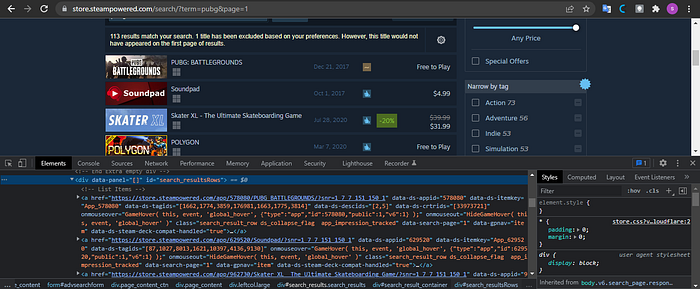
Suppose you look at the HTML structure above. In that case, the data for each game is in a div tag with the id search_resultsRows. Each game is in the a tag, so we first find the div tag with the search_resultsRows id, then find_all tag a so that we get all the data on the game and accommodate in a variable named content. After we get all the data in the game, we parse it according to the data we need using looping because the data from the content variable is in the form of a list. We will take link, title, price, and release date data. After we get all the data, we input the data into the dictionary variable and enter the dictionary into the data variable that we previously created. This makes extracting data to JSON, CSV, and Excel files easier. And don't forget to give the syntax i+=1 so that the count that we have continues to grow. And finally, we print all the data that we have taken. Like this code we have made.
What needs to be considered when retrieving title data there is a strip and replace syntax, which functions to remove the space in front of the text that we take and eliminate newlines in each data. When we collect price data, we use the try-except function with the condition that if the game data is discounted, we take all the data from the discount tag. If the price data we take does not have a price, we value none. And at the time of taking the data release also do the same thing.
We have got all the data we need, now we extract the data we have. You have to write the code outside the loop for data extraction, so you don't do data extraction repeatedly. The first is that we extract data into a file in JSON format. Using open and writing down the file location and file name can vary according to the game variables that we have created. And we create the JSON file from the data variable we created. Next, we extract the data into a file with CSV and Excel formats. For both of these formats, we use pandas. The file name can vary according to the game variable we have created. Don't forget to give the index a false value. It should be noted that you have to install the openpyxl package to extract data with pandas. This is how the whole scrap function code we've made.
When our program is finished, we can run our program according to what we expected at the beginning. This program can retrieve all the game data we are looking for, found on one of the largest game sales websites, Steam. Our program will retrieve all data in the form of title, link, price, and release date. This program will scrape all the data according to the game keywords that we have entered. And finally, the results of the scraping are extracted into JSON, CSV, and Excel files. I've also put this code in the Github repository here. You can clone and then change the code.