

This article is a step-by-step guide to create, package, deploy and run AWS Lambda Function using Cloudformation, CLI and GO language. You can read more such articles here.
AWS Lambda is a highly available and scalable compute service, which runs the function code written in many programming languages like GO, Java, NodeJS, to name a few, without managing and provisioning the servers. This makes the developers focus more on business logic of the application/system rather than platform complexities.
But writing and deploying the first Lambda function is not very straightforward — there are so many moving parts which are tricky to grasp in the beginning.
In this document I have written a step-by-step guide with a running example, to,
- Create and initialize GO language module
- Create a AWS Lambda function
- Build the GO module on different platforms
- Package Lambda function code into an archive file (.zip)
- Create an AWS S3 bucket to host the Lambda function archive file
- Import that archive file to S3 bucket
- Create and deploy AWS Cloudformation stack to automate the creation of resources and provisions
- Test a deployed Lambda function
- Check logs in AWS Cloudwatch
- Delete Cloudformation stack to clean-up the resources
Prerequisites:
- Install Go language
- Install AWS Command Line Interface (CLI)
- We need an AWS account, if you do not have one already then AWS provides a free tier account for a limited time duration, allowing many AWS services to explore for free
Having all prerequisites, let's have some hands-on experience of Lambda function.
Create a GO module
First of all, create a directory for the module code, and then initialize a GO module by following command on console,
go mod init <your-namespacel>/aws-lambda-demo-goProvide any preferred namespace in place of <your-namespacel>/aws-lambda-demo-go
This should create a go.mod file in your project, where we define all the dependencies required by the module.We requires aws-lambda-go library to import in to go.mod file, add a line
require github.com/aws/aws-lambda-go v1.36.0
module <your-namespacel>/aws-lambda-demo-go

go 1.19

require github.com/aws/aws-lambda-go v1.36.0
Resolve the dependencies by running,
go mod tidy
go mod vendor
Now create an event handler lambda function HandleRequest and start it inside main(). AWS Lambda will trigger the HandleRequest function on an external event.
package main

import (
 "context"
 "fmt"

 "github.com/aws/aws-lambda-go/lambda"
)

type MyBook struct {
 ID    string `json:"id,omitempty"`
 Title string `json:"title,omitempty"`
}

func HandleRequest(ctx context.Context, book MyBook) (string, error) {
 msg := fmt.Sprintf("ID: %s, Title: %s", book.ID, book.Title)
 fmt.Println(msg)

 return msg, nil
}

func main() {
 lambda.Start(HandleRequest)
}
We have defined a struct MyBook, which is used by the Lambda function to unmarshal JSON events.
HandleRequest function receives two input parameters; first is Context which holds request information, and second is MyBook object. It does not do much fancy stuff — just prints out concatenated JSON string fields and returns it. Of course you can add more flesh into this based on your business logic.
Building Go Module
We are done with writing our function code, now time to build it,
GOOS=linux go build main.goSetting GOOS to linux ensures that the compiled executable is compatible with the Go runtime, even if you compile it in a non-Linux environment[1].
Creating a .zip file
On Windows:
# Download the lambda library from GitHub,
go get github.com/aws/aws-lambda-go/lambda

# Download the build-lambda-zip tool from GitHub, it is used to zip the lambda package,
go.exe install github.com/aws/aws-lambda-go/cmd/build-lambda-zip@latest

# Set environment variable
set GOOS=linux
set GOARCH=amd64
set CGO_ENABLED=0

# Add build-lambda-zip path (%USERPROFILE%\Go\bin) to GOPATH environment variable
# Create a deployment package (.zip file) by build-lambda-zip,
build-lambda-zip.exe -o aws-lambda-demo-go.zip main
On Linux and Mac OSX:
# Download the lambda library from GitHub,
go get github.com/aws/aws-lambda-go/lambda

# Compile executables:
GOOS=linux GOARCH=amd64 go build -o main main.go

# ZIP the package
Zip main.zip main
Create a S3 bucket:
There are several ways we can point function code to AWS Lambda, like using Lambda code editor in AWS management console or importing code archive file to S3 bucket and instruct Lambda to read code from that location.
If you do not already have a S3 bucket, then create a new one by AWS CLI command,
aws s3api create-bucket - bucket my-demo-s3-bucket --create-bucket-configuration LocationConstraint=eu-west-1Upload zip file to aws S3 bucket using AWS CLI
aws s3 cp aws-lambda-demo-go.zip s3://my-demo-s3-bucket/demo-lambda/aws-lambda-demo-go.zipDeploy Lambda function using Cloudformation stack:
AWS Cloudformation (CF) speeds up repeatable cloud resource deployment and provisioning by Infrastructure as Code.
In very few words, Cloudformation allows us creating an AWS cloud resource template as JSON or YAML file, which consists of details of all the resources to create like Lambda function, API Gateway, SNS, SQS, EC2 instances, VPC, DynamoDB, Security groups, Roles, Policies etc. required by our application and/or backend stack.
The stack creates an IAM role, lfnLambdaRole ( "Type": "AWS::IAM::Role"), which is required by the lambda function to execute in the AWS environment ("Service": "lambda.amazonaws.com").
In that IAM role lfnLambdaRole we also define a Policy ("PolicyName": "observability") to create Cloudwatch logs. This is very handy to troubleshoot lambda functions.
Then define a lambda function ("Type": "AWS::Lambda::Function") in section lfnMyDemoLambda (logical name), which has a name "my-demo-lambda" ("FunctionName": "my-demo-lambda") whose build archive file resides at S3 bucket ( "Ref": "pLambdaCodeBucket") and file key ("Ref": "pLambdaCodeS3KeyPath").
Note: pLambdaCodeBucket and pLambdaCodeS3KeyPath are parameters names, passed to Cloudformation deploy command (explained in next section), which is a way to pass dynamic values to CF template. Parameters can be read by the special function Ref as written below.
We assign the lfnLambdaRole to the lambda function lfnMyDemoLambda, by passing the IAM role ARN to the lambda function in another CF function "Fn::GetAtt" which is used to read the attribute value of other resources.
{
    "AWSTemplateFormatVersion": "2010-09-09",
    "Description": "A CF template to create a lambda function",
    "Parameters": {
        "pLambdaCodeBucket": {
            "Type": "String"
        },
        "pLambdaCodeS3KeyPath": {
            "Type": "String"
        }
    },
    "Resources": {
        "lfnLambdaRole": {
            "Type": "AWS::IAM::Role",
            "Properties": {
                "AssumeRolePolicyDocument": {
                    "Version": "2012-10-17",
                    "Statement": [
                        {
                            "Effect": "Allow",
                            "Principal": {
                                "Service": "lambda.amazonaws.com"
                            },
                            "Action": "sts:AssumeRole"
                        }
                    ]
                },
                "Policies": [
                    {
                        "PolicyName": "observability",
                        "PolicyDocument": {
                            "Statement": [
                                {
                                    "Effect": "Allow",
                                    "Action": [
                                        "logs:CreateLogGroup",
                                        "logs:CreateLogStream",
                                        "logs:PutLogEvents"
                                    ],
                                    "Resource": "*"
                                }
                            ]
                        }
                    }
                ]
            }
        },
        "lfnMyDemoLambda": {
            "Type": "AWS::Lambda::Function",
            "DependsOn": [
                "lfnLambdaRole"
            ],
            "Properties": {
                "Architectures": [
                    "x86_64"
                ],
                "Runtime": "go1.x",
                "Handler": "main",
                "Code": {
                    "S3Bucket": {
                        "Ref": "pLambdaCodeBucket"
                    },
                    "S3Key": {
                        "Ref": "pLambdaCodeS3KeyPath"
                    }
                },
                "Description": "This is my demo lambda function",
                "FunctionName": "my-demo-lambda",
                "Role": {
                    "Fn::GetAtt": [
                        "lfnLambdaRole",
                        "Arn"
                    ]
                },
                "Timeout": "120"
            }
        }
    }
}
We are ready to deploy this cloudformation stack,
aws cloudformation deploy \
--template-file ./deploy/cf.json \
--stack-name my-demo-lambda-stack \
--capabilities CAPABILITY_IAM \
--parameter-overrides \
 pLambdaCodeBucket=azam-demo-s3-bucket \
 pLambdaCodeS3KeyPath=demo-lambda/aws-lambda-demo-go.zip
This should trigger a Cloudformation stack deploy, which may takes few minutes depending on how many resources we are going to deploy,
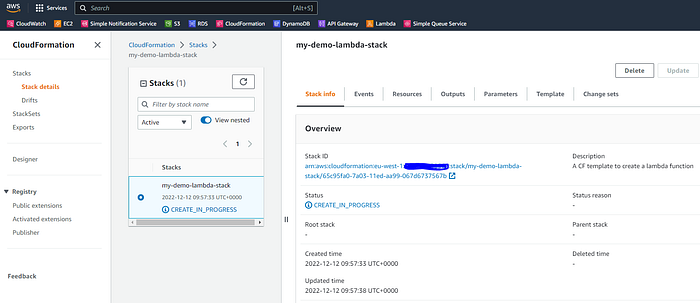
After the deployment is completed, we should be able to see the lambda function created. Select Lambda in AWS Management Console and search by function name, in this case my-demo-lambda
Test Lambda Function
AWS Management Console provides built-in functionality to Test lambda function by pushing an input event. In this case, we pass JSON event to the function HandleRequest which will be unmarshalled to MyBook struct,
If you follow all the above steps correctly, your Test should successfully trigger the lambda function.
Cloudwatch logs:
Select Couldwatch from AWS Management Console and click on Log groups from the left menu, filter logs groups by lambda function name something like "/aws/lambda/my-demo-lambda". Select one of the log stream item as given below which echos log items.
Delete stack:
In case we want to un-deploy all the resources deployed as a part of the cloudformation stack, AWS cloudformation provides delete-stack commands for that purpose,
aws cloudformation delete-stack - stack-name my-demo-lambda-stackNote: As in this example I have created S3 bucket using AWS CLI, ie. not in the Cloudformation stack, so delete-stack will not clean up S3 bucket, we have to do it manually (if no more needed).
Final Words:
I hope you have followed all the above steps correctly and are able to create, package and deploy your first AWS Lambda function.