
Ever wondered what happens to your objects after you're done using them in C#? Who cleans up the mess? Meet the unsung hero of .NET — the Garbage Collector (GC).
Friend link :- Read full story for free!
Note — Used AI assistance to refine the article, verified by me.
🧠 Why Garbage Collection Was Introduced
Before GC, developers had to manually allocate and deallocate memory (think C/C++). This led to:
- 🐛 Memory leaks
- 💥 Dangling pointers
- 😵 Hard-to-debug crashes
.NET introduced automatic memory management to make developers' lives easier and applications more robust.
🔍 What Is Garbage Collection in C#?
Garbage Collection is the process of automatically reclaiming memory occupied by objects that are no longer in use.
Think of it like a Roomba 🧽 that quietly cleans your memory floor while you focus on building your app.
🧬 Internal Architecture of the GC
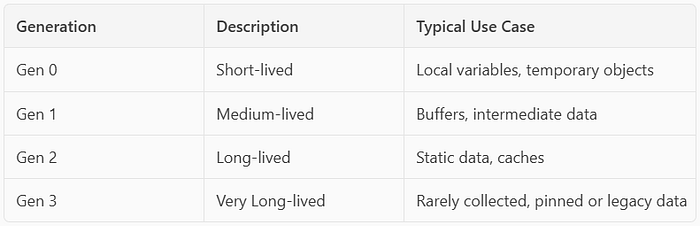
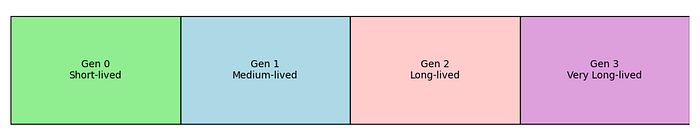
C# uses a generational garbage collector. Memory is divided into four generations:
- Gen 0: Short-lived objects (e.g., local variables)
- Gen 1: Medium-lived objects (e.g., buffers)
- Gen 2: Long-lived objects (e.g., static data)
- Gen 3: Very long-lived or pinned objects (e.g., legacy interop data, rarely collected)
🧠 Fun Fact: Most objects die young — over 90% of objects are collected in Gen 0!
🔄 Phases of Garbage Collection
- Mark 🖊️: Identify live objects.
- Sweep 🧹: Remove dead objects.
- Compact 📦: Rearrange memory to reduce fragmentation.
Diagram: GC Lifecycle
[Allocate] → [Mark] → [Sweep] → [Compact] → [Free Memory]🛠️ Manual Garbage Collection
You can manually trigger GC using:
GC.Collect();But beware! 🚨 Manual GC can:
- Freeze your app
- Hurt performance
- Interrupt optimizations
Use it only when you know what you're doing (e.g., after a large object graph is no longer needed).
🎯 GC Tuning: Make It Work For You
1. Server vs Workstation GC
- Server GC: Optimized for throughput, uses multiple threads.
- Workstation GC: Optimized for responsiveness, single-threaded.
Set in runtimeconfig.json:
{
  "runtimeOptions": {
    "configProperties": {
      "System.GC.Server": true
    }
  }
}
2. SustainedLowLatency Mode
Ideal for real-time apps (e.g., games, trading systems):
GCSettings.LatencyMode = GCLatencyMode.SustainedLowLatency;🚀 Performance Tips
- ✅ Use
usingblocks for disposable objects. - ✅ Avoid unnecessary object allocations in tight loops.
- ✅ Use value types (structs) when appropriate.
- ✅ Pool expensive objects (e.g.,
StringBuilder,MemoryStream). - ✅ Profile with tools like dotMemory, PerfView, or Visual Studio Profiler.
🧪 Real-World Use Case
Scenario: High-frequency trading app
Problem: GC pauses were causing latency spikes.
Solution:
- Switched to Server GC
- Used object pooling
- Enabled SustainedLowLatency
Result: 🚀 40% reduction in GC-induced latency
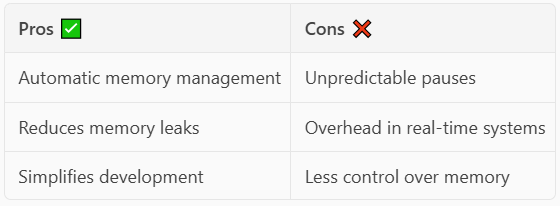
✅ Pros and ❌ Cons of GC
🔍 Curious to Go Deeper?
- What's the difference between Ephemeral and LOH (Large Object Heap)?
- How does Concurrent GC work?
- Can you write your own GC-aware data structures?
👉 Stay tuned for Part 2: "Inside the Mind of the GC: Advanced Internals"
📚 Resources
- Microsoft Docs on GC
- CLR via C# by Jeffrey Richter
- dotMemory by JetBrains
💬 Final Thoughts
Garbage Collection is like the invisible janitor of your .NET app — quiet, efficient, and often overlooked. Understanding how it works can help you write faster, leaner, and more reliable applications.