

In Part 1, we established the theoretical blueprint for our journey. We explored what an LLM is, its architecture, and the three-stage process we'll follow to build one.
Now, it's time to get our hands dirty and take the first practical step: Tokenization.
Before a Large Language Model can understand or generate text, it must first see the text in a language it understands — the language of numbers. Tokenization is the crucial process of converting a raw string of text into a sequence of integers, where each integer represents a "token."
This article is the start of our coding journey. We will:
- Explore different tokenization strategies and their trade-offs.
- Build a simple, word-based tokenizer from scratch using Python.
- Dive deep into Byte Pair Encoding (BPE), the sub-word tokenization algorithm that powers modern LLMs like GPT.
- See how a professional-grade tokenizer like OpenAI's
tiktokenworks in practice.
Let's start coding.
Chapter 1: The Tokenization Dilemma: Words, Characters, or Something in Between?
How should we split up a sentence? The answer isn't as obvious as it seems. There are three main strategies, each with its own set of pros and cons.
1. Word-Based Tokenization
This is the most intuitive approach. We simply split a sentence by spaces and punctuation.
- Example:
My hobby is playing cricket->['My', 'hobby', 'is', 'playing', 'cricket'] - Problem: This leads to a massive vocabulary. What happens when the model encounters a word it has never seen before, like "snowboarding"? This is the Out-of-Vocabulary (OOV) problem. Furthermore, "boy" and "boys" would be treated as two completely separate words, losing their semantic connection.
2. Character-Based Tokenization
Here, we split the text into its individual characters.
- Example:
My hobby->['M', 'y', ' ', 'h', 'o', 'b', 'b', 'y'] - Pros: The vocabulary is very small (e.g., ~256 characters for English), solving the OOV problem completely.
- Cons: It destroys the inherent meaning of words. The token sequence also becomes extremely long, making it computationally expensive for the model to learn meaningful patterns.
3. Sub-word Tokenization
This is the modern approach that offers the best of both worlds. It balances vocabulary size and sequence length by breaking words into smaller, meaningful sub-units.
- Rule 1: Frequently used words (like "the", "is") remain as single tokens.
- Rule 2: Rare words (like "tokenization") are broken down into smaller sub-words (e.g.,
['token', 'ization']).
This method allows the model to handle OOV words gracefully and understand the relationship between words with a common root, like "token," "tokens," and "tokenizing." The most popular algorithm for this is Byte Pair Encoding (BPE).
Chapter 2: From Scratch: A Simple Word-Based Tokenizer
Let's build our first tokenizer to understand the core mechanics. We'll use a simple approach based on regular expressions to split text by punctuation and whitespace.
First, let's load some text to work with. We'll use "The Verdict" by Edith Wharton.
# Assuming 'the-verdict.txt' is in a 'data/' folder
with open("data/the-verdict.txt", "r", encoding="utf-8") as f:
    raw_text = f.read()

print(f"Total characters: {len(raw_text)}")
print(raw_text[:100])
Now, we can use a regex to split the text. This pattern splits by spaces and also keeps punctuation like commas and periods as separate tokens.
import re

# Split the text into tokens
preprocessed = re.split(r'([,.?_!"()\']|--|\s)', raw_text)
# Remove empty strings and strip whitespace
preprocessed = [item.strip() for item in preprocessed if item.strip()]
With our list of tokens, we can now build a vocabulary and map each unique token to a unique integer ID.
# Create a vocabulary of all unique tokens
all_tokens = sorted(list(set(preprocessed)))
vocab_size = len(all_tokens)
vocab = {token: integer for integer, token in enumerate(all_tokens)}

# Our vocabulary now maps each token to an ID
# e.g., {'!': 0, '"': 1, "'": 2, ... 'a': 115, ...}
Finally, we can wrap this logic in a simple tokenizer class with encode (text to IDs) and decode (IDs to text) methods.
class SimpleTokenizerV1:
    def __init__(self, vocab):
        self.str_to_int = vocab
        self.int_to_str = {i: s for s, i in vocab.items()}

    def encode(self, text):
        preprocessed = re.split(r'([,.?_!"()\']|--|\s)', text)
        preprocessed = [item.strip() for item in preprocessed if item.strip()]
        ids = [self.str_to_int[s] for s in preprocessed]
        return ids

    def decode(self, ids):
        text = " ".join([self.int_to_str[i] for i in ids])
        # A little regex magic to clean up spacing around punctuation
        text = re.sub(r'\s+([,.?!"()\'])', r'\1', text)
        return text
This works! But it has a major flaw: what if it sees a word not in its vocabulary? It will crash.
Chapter 3: Handling the Unknown with Special Tokens
To make our tokenizer more robust, we need to handle unknown words and provide context markers. We'll introduce two special tokens:
<|unk|>: Represents an unknown word (Out-of-Vocabulary).<|endoftext|>: A special marker used to separate different documents or text passages.
Let's create SimpleTokenizerV2 by adding these tokens to our vocabulary and modifying the encode method to handle unknown words.
# Add special tokens to the vocabulary
all_tokens.extend(["<|endoftext|>", "<|unk|>"])
vocab = {token: integer for integer, token in enumerate(all_tokens)}

class SimpleTokenizerV2(SimpleTokenizerV1): # Inherits from V1
    def encode(self, text):
        preprocessed = re.split(r'([,.?_!"()\']|--|\s)', text)
        preprocessed = [item.strip() for item in preprocessed if item.strip()]
        # If a token is not in the vocab, replace it with '<|unk|>'
        preprocessed = [
            item if item in self.str_to_int
            else "<|unk|>" for item in preprocessed
        ]
        ids = [self.str_to_int[s] for s in preprocessed]
        return ids
Now, our tokenizer can handle any text without crashing. If it encounters a word like "brunch" (which wasn't in "The Verdict"), it will gracefully map it to the <|unk|> token ID.

Chapter 4: The Industry Standard: Byte Pair Encoding (BPE)
Our simple tokenizer is a great start, but modern LLMs use a more sophisticated sub-word algorithm like Byte Pair Encoding (BPE).
BPE was originally a data compression algorithm. For LLMs, it works by iteratively merging the most frequent pair of consecutive tokens in the vocabulary.
Let's walk through a simplified example. Imagine our dataset consists of these words with their frequencies: {"old": 7, "older": 3, "finest": 9, "lowest": 4}
- Initialization: We start by splitting every word into characters and adding a special
</w>token to signify the end of a word.{"o l d </w>": 7, "o l d e r </w>": 3, ...}
2. Iteration 1: We find the most frequent consecutive pair of tokens. Let's say it's e and s. We merge them into a new token, es.
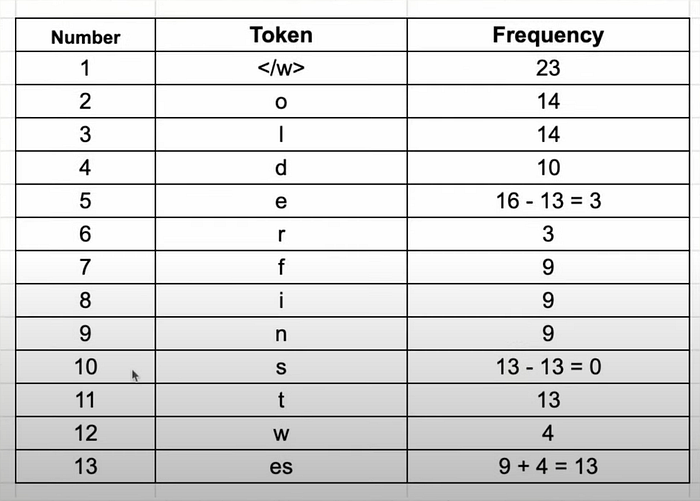
3. Iteration 2: Now, the most frequent pair might be es and t. We merge them to form est.
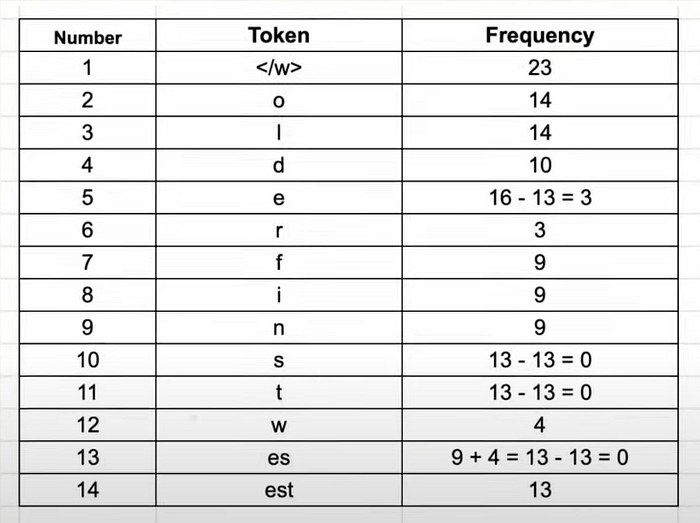
4. And so on…: We continue this process for a set number of merges. We might merge est with </w> to get est</w>, or o with l to get ol.
This process creates a vocabulary that contains both individual characters and common sub-words. When the tokenizer sees a new word, it tries to build it using the longest possible tokens from its vocabulary.
- A known word like "lowest" might be tokenized as
['low', 'est</w>']. - An unknown word like "hugging" might be tokenized as
['hugg', 'ing</w>'].
This approach elegantly solves the OOV problem and keeps the vocabulary size manageable.

Chapter 5: Using a Professional-Grade Tokenizer: tiktoken
Building a BPE tokenizer from scratch is complex. In practice, we use highly optimized, pre-trained tokenizers. Let's look at tiktoken, the library used by OpenAI for its GPT models.
First, install it: pip install tiktoken
Now, we can load a pre-trained GPT-2 tokenizer and use it.
import tiktoken

# Get the tokenizer for the GPT-2 model
tokenizer = tiktoken.get_encoding("gpt2")

text = "Hello, do you like tea? <|endoftext|> Akwirw ier"
integers = tokenizer.encode(text, allowed_special={"<|endoftext|>"})

print(integers)
# Output: [15496, 11, 466, 345, 588, 8887, 30, 220, 50256, 33901, 86, 343, 86, 220, 959]

strings = tokenizer.decode(integers)
print(strings)
# Output: "Hello, do you like tea? <|endoftext|> Akwirw ier"
Notice how it handles the nonsensical word "Akwirw ier." Instead of mapping it to <unk>, the BPE algorithm breaks it down into sub-word tokens it does know: ['A', 'kw', 'ir', 'w', ' ', 'ier']. This is the power of sub-word tokenization in action!
🧑💻 Full Code
You can find the complete, interactive code for this part in our GitHub repository:
- Jupyter Notebook: llm-from-scratch/notebooks/part02_tokenization.ipynb
- Python Script: llm-from-scratch/src/part02_tokenization.py
Feel free to clone the repo, run the code, and experiment!
Conclusion & What's Next
We've made significant progress in this part. We've gone from the basic theory of tokenization to building our own simple tokenizer, understanding the sophisticated BPE algorithm, and finally using a production-grade library.
Tokenization is the gateway for getting data into our LLM. Now that we can convert an entire text into a long sequence of token IDs, we need a way to prepare this sequence for training.
In Part 3, we will create a data loader for our language model. We'll learn how to take our token sequence and efficiently create input-target pairs in batches, which is the exact format our model will need for the pretraining stage.
Stay tuned, and happy coding!
Acknowledgments
This series is heavily inspired by the amazing educational content available in the AI community. A special thank you to the creators of the courses and videos that have made these complex topics accessible to a wider audience. We stand on the shoulders of giants.