
Learn how today's CSS can handle toggles, effects, and interactions natively — cutting your JS load, improving performance, and making your frontend feel magical.
Introduction
For years, JavaScript was the superhero of front-end interactivity. Need an animation? JS. Want to toggle visibility? JS. Dropdown menus, modals, sticky headers — all JavaScript.
But modern CSS has quietly evolved into something astonishingly powerful. With selectors like :has(), properties like scroll-snap-type, and capabilities like CSS variables and animations, we can now achieve things once thought impossible without JS.
In this article, we'll explore 10 CSS tricks that outperform JavaScript hacks — not because JS is bad, but because CSS is faster, cleaner, and often more elegant for the same job.
Let's start redefining how much JavaScript you really need.
1️. The Checkbox Hack — Pure CSS Toggles Without JavaScript
Ever used JS just to open and close a menu, modal, or accordion?
You can do all that using a simple <input type="checkbox"> and the magic of sibling selectors.
The Old JS Way
<button id="toggle">Toggle Menu</button>
<nav id="menu" class="hidden">...</nav>

<script>
  const btn = document.getElementById('toggle');
  const menu = document.getElementById('menu');
  btn.addEventListener('click', () => {
    menu.classList.toggle('hidden');
  });
</script>
The CSS Way
<input type="checkbox" id="toggle">
<label for="toggle">☰ Menu</label>
<nav>...</nav>
#toggle { display: none; }

nav {
  max-height: 0;
  overflow: hidden;
  transition: max-height 0.4s ease;
}

#toggle:checked + label + nav {
  max-height: 500px;
}
Explanation:
When you check the hidden checkbox, the adjacent nav expands — no JavaScript required!
It's a staple of "pure CSS" UI patterns and can power dropdowns, sidebars, and accordions.
2️. CSS Variables & calc() — Dynamic Values Without JS
You might think you need JS to adjust layouts or spacing dynamically. But CSS variables combined with calc() let you perform runtime math directly in CSS.
Example
:root {
  --sidebar-width: 250px;
  --content-width: calc(100vw - var(--sidebar-width));
}

.layout {
  display: grid;
  grid-template-columns: var(--sidebar-width) var(--content-width);
}
Now, you can update CSS variables in real time (even via media queries):
@media (max-width: 600px) {
  :root {
    --sidebar-width: 0px;
  }
}
No resize listener, no JS layout recalculations — just pure CSS math.
3️. Smooth Scrolling — No More scrollTo() Functions
Smooth scrolling once required JS animation loops or window.scrollTo() with easing.
Now it's a one-liner.
html {
  scroll-behavior: smooth;
}
Clicking any <a href="#section"> link will smoothly scroll to its target.
It's supported in all modern browsers — lightweight, elegant, and accessible.
Bonus Tip: Combine it with scroll-margin-top to offset fixed headers.
section {
  scroll-margin-top: 80px;
}
4️. Modals with :target Selector — No JS Required
The :target pseudo-class lets you style an element when its ID matches the URL hash.
Example
<a href="#modal">Open Modal</a>
<div id="modal" class="modal">
  <a href="#" class="close">✖</a>
  <p>This is a pure CSS modal!</p>
</div>
.modal {
  opacity: 0;
  pointer-events: none;
  transition: opacity 0.3s ease;
}

.modal:target {
  opacity: 1;
  pointer-events: auto;
}
How it works:
When you click the link, the URL becomes #modal, activating :target.
Clicking the close link resets the hash, hiding the modal.
All with zero JS.
5️. Hover & Focus-Within Menus — Interactivity Without Events
Dropdown menus often rely on mouseover and mouseleave events in JS.
But with the :hover and :focus-within pseudo-classes, CSS handles this beautifully.
Example
<nav class="menu">
  <ul>
    <li>
      <a href="#">Products</a>
      <ul class="dropdown">
        <li><a href="#">AI Tools</a></li>
        <li><a href="#">APIs</a></li>
      </ul>
    </li>
  </ul>
</nav>
.dropdown {
  display: none;
  position: absolute;
}

.menu li:hover .dropdown,
.menu li:focus-within .dropdown {
  display: block;
}
You now have a keyboard-accessible dropdown — no JS needed.
6️. CSS Counters — Auto Numbering Without JavaScript
Ever wrote JS to number sections or list items dynamically? CSS counters can do it declaratively.
body {
  counter-reset: section;
}

h2::before {
  counter-increment: section;
  content: counter(section) ". ";
  color: #999;
}
Every <h2> automatically gets numbered — even if you add more dynamically.
Useful for generating outlines, documentation, or FAQs.
7️. Keyframe Animations — Replace JS Timers and Loops
You can simulate complex motion and transitions without setInterval() or GSAP.
Modern CSS animations can chain multiple effects elegantly.
@keyframes bounce {
  0%, 100% { transform: translateY(0); }
  50% { transform: translateY(-20px); }
}

.ball {
  animation: bounce 1s infinite ease-in-out;
}
Need more control? Add delays, iteration counts, or use animation-play-state for pauses.
.ball:hover {
  animation-play-state: paused;
}
Smooth, performant, and offloaded to the GPU.
8️. Sticky & Scroll Snap Layouts — Dynamic Positioning Without JS
Sticky headers used to require scroll listeners. Now we have position: sticky and scroll snapping.
Sticky Header
header {
  position: sticky;
  top: 0;
  background: white;
  box-shadow: 0 2px 5px rgba(0,0,0,0.1);
}
Scroll Snap
.carousel {
  display: flex;
  overflow-x: scroll;
  scroll-snap-type: x mandatory;
}

.slide {
  scroll-snap-align: center;
  flex: 0 0 100%;
}
These make carousels and scroll-driven UIs silky smooth — with zero JS event listeners.
9️. Filter & Blend Modes — Visual Effects Without Canvas or JS
CSS filters and blend modes now rival simple canvas effects.
img.grayscale {
  filter: grayscale(100%) brightness(1.2);
}

.hero {
  background-image: url(bg.jpg);
  mix-blend-mode: multiply;
}
Combine them for parallax, hover effects, or dynamic theming — all GPU-accelerated.
10. The :has() Selector — CSS Finally Gets Parent Power
The long-awaited :has() selector is the biggest leap for CSS interactivity.
It lets you style a parent based on its child's state — something that once always required JS.
Example
<div class="card">
  <input type="checkbox" id="expand">
  <label for="expand">Details</label>
  <p>Extra content here...</p>
</div>
.card:has(#expand:checked) {
  background: #f3f3f3;
  box-shadow: 0 0 10px rgba(0,0,0,0.2);
}
When the checkbox inside .card is checked, the parent .card changes style — effectively mimicking "if-child-active-then-parent" logic, without JS.
Support is now strong across all evergreen browsers.
Performance & Accessibility Benefits
Why prefer CSS over JavaScript for these tricks?
- Less code = faster load time CSS executes natively in the rendering engine — no JS parsing or blocking.
- Better accessibility
Pseudo-classes like
:focus-withinmaintain keyboard usability. - Declarative logic No need to manage event listeners or cleanup.
- Reduced bundle size Every line of JS you remove is one less potential bug or kilobyte.
- GPU acceleration Transforms, transitions, and filters run smoother than JS-driven DOM animations.
When You Should Still Use JavaScript
Of course, not everything can (or should) be replaced with CSS:
- Dynamic data manipulation
- Complex state management
- API interactions
- Game loops or logic-based UIs
The goal isn't to eliminate JS — it's to use it intentionally, not habitually. CSS can now handle the presentational layer astonishingly well on its own.
Conclusion
CSS has quietly become a full-fledged interactive language. You can toggle, animate, scroll, and even respond to states — all declaratively. For many UI patterns, writing JavaScript today is like reaching for a hammer when you only need a feather.
By mastering these ten CSS techniques, you'll:
- Ship faster, lighter, more maintainable UIs
- Improve accessibility
- Impress your peers with JS-free elegance
So next time you instinctively open your script.js, pause — and ask:
"Can CSS do this already?"
Chances are, it can.
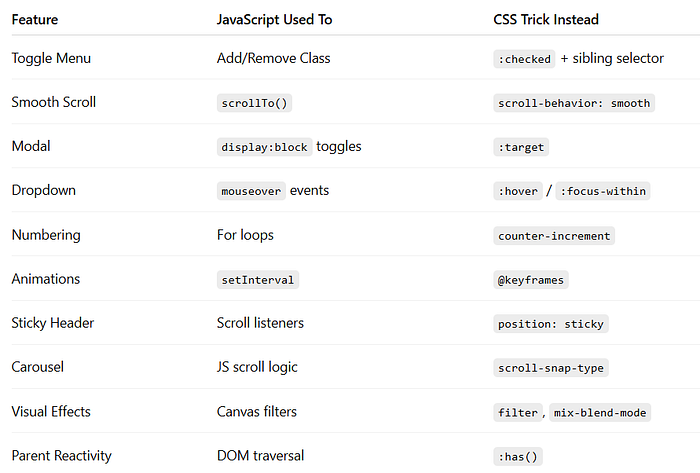
Bonus Section: Shareable Snippet Summary
Further Reading
If you found this article helpful, you might also enjoy my previous articles on essential CSS concepts and techniques:
- :is() vs :where() in CSS The Tiny Difference That Can Break Your Entire UI
- Why Your Website Still Looks Amateur (and 10 CSS Fixes That Make It Look World-Class)
- 20 Modern CSS Tricks Every Frontend Developer Needs to Know in 2025
- Top 20 CSS Box Model Mistakes That Are Breaking Your Layout (And How to Fix Them)
- The Ultimate Guide to CSS in 2025: 20 New Features You Should Be Using
- The Ultimate Guide to Meta Tags: Why They Matter for SEO
- Master Web Development in 2025: Everything You Need to Know to Succeed
- Revolutionize Your Web Development with HTMX: The HTML-First Approach
- Top 10 CSS Frameworks Every React Developer Should Know in 2025