

I often found myself wishing for a guide to Apache Spark that would break down its complexities using relatable analogies and tangible examples, much like the approach I've taken in this article. This piece, and those that will follow, are akin to entries in my personal diary. They chronicle my journey; how I embarked on the path of understanding Spark, gradually unraveling its intricacies, and ultimately gaining mastery over it.
As we delve into these narratives, you'll discover that they're not merely technical articles; they're recollections of my learning experience, rich with analogies designed to make complex concepts digestible. As we journey together through these pages, my hope is that they will serve as your friendly companion in your quest to conquer Apache Spark.
Introduction
Imagine a group of superheroes, each with unique abilities but working together to solve a massive problem that would be otherwise impossible for them to solve individually. That's exactly what Apache Spark is like in the world of big data processing!
Apache Spark is an open-source, distributed computing system used for big data processing and analytics. But let's break it down. Imagine you have a giant puzzle to solve, too big for one person to complete quickly. How would you go about it? You'd probably call over some friends and distribute the pieces among them. Each person would work on their own part, and in the end, you'd put together everyone's work. That's basically what "distributed computing" means.
Now, let's embark on our journey to understand Spark.

Apache Spark and its Superheroes (Architecture)
In the realm of Apache Spark, our superheroes are the elements of its architecture: the Driver, Executors, and Cluster Manager.
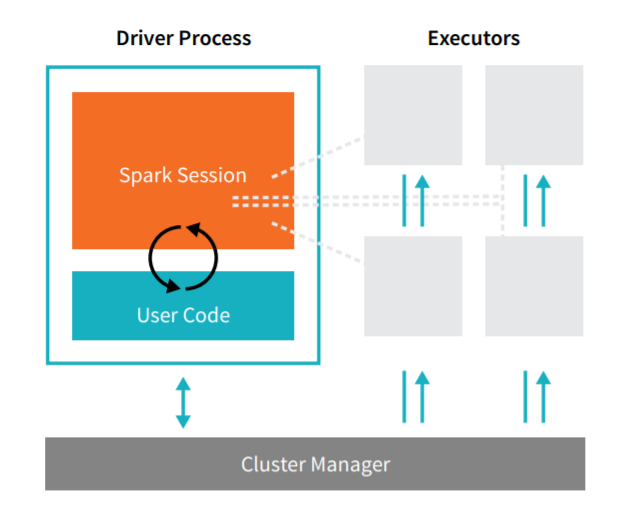
Driver: Think of the Driver as the team leader of our superheroes. It's responsible for the main() function of your application and creating the SparkContext. This is where the task gets divided into smaller subtasks.
Executors: Executors are the worker superheroes. Each executor is responsible for executing the tasks assigned by the Driver and returning the results. They have their own JVMs and operate independently of each other. They are the ones dealing directly with the data and performing operations on it.
Cluster Manager: The Cluster Manager is like the team coordinator. It's responsible for managing and allocating resources so that our team of superheroes can operate efficiently. Examples of Cluster Managers in Spark are YARN, Mesos, or the standalone Spark cluster manager.
RDD: The Secret Weapon
Resilient Distributed Datasets (RDDs) are the backbone of Apache Spark. They are an immutable collection of objects that are split across multiple nodes in a cluster to run parallel processing. That's a mouthful, isn't it?
Let's simplify it: Imagine you're at a party and there's a giant pizza to share. What do you do? You slice it up and distribute the pieces. Each slice, or piece, can be thought of as a "partition". Now, everyone can enjoy their piece of pizza at the same time. This is similar to how an RDD works. The pizza is your dataset, and it's cut up into smaller pieces (partitions) and given to different workers (executors) to process at the same time (in parallel).
The cool thing is, if someone accidentally drops their slice, no worries! The RDD is resilient, meaning it can rebuild lost data using a thing called lineage information (basically, remembering how you made or transformed the RDD).
Transformations and Actions: Let's Get to Work!
Now that we have our RDDs, what can we do with them? There are two main types of operations: transformations and actions.
Transformations are operations on RDDs that return a new RDD, like map (applying a function to each element) and filter (choosing certain elements based on criteria). Imagine you have a bag of unpopped popcorn kernels. Applying heat is a transformation that gives you a new bag of popped popcorn!
Since RDDs are immutable (contents cannot to changed), everytime you perform a transformation on an RDD, a new RDD is created.
Actions are operations that return a result to the Driver program or write it to an external data store. An example is count (which gives you the number of elements in the RDD) or first (which gives you the first element). Using our popcorn analogy, counting the number of popped kernels in your bag would be an action.
Remember, transformations in Spark are lazy, meaning they don't compute their results right away — they just remember the transformations applied to some base dataset (like a series of map and filter operations). They only compute their results when an action requires a result to be returned to the driver program.
This is like having a to-do list: you won't actually do the tasks (transformations) until necessary (an action is called). For instance, you wouldn't go buy groceries (action) until you've made a shopping list (transformation).
Here are some common transformations:
- map(func): Return a new RDD by applying a function to each element of the RDD.
- filter(func): Return a new RDD by selecting only the elements of the original RDD on which func returns true.
- flatMap(func): Similar to map, but each input item can be mapped to multiple output items.
- union(dataset): Return a new RDD that contains the union of the elements in the source RDD and the argument.
- distinct([numPartitions])): Return a new RDD that contains the distinct elements of the source RDD.
- groupByKey([numPartitions]): When called on a dataset of (K, V) pairs, returns a dataset of (K, Iterable<V>) pairs.
- reduceByKey(func, [numPartitions]): When called on a dataset of (K, V) pairs, returns a dataset of (K, V) pairs where the values for each key are aggregated using the given reduce function func.
Here are some common actions:
- reduce(func): Aggregate the elements of the RDD by applying a function func (which takes two arguments and returns one). The function should be commutative and associative so that it can be computed in parallel.
- collect(): Return all the elements of the RDD as an array to the driver program. This can be useful for testing and debugging but be careful not to use it on large RDDs, as all the data is loaded into the memory of the driver program.
- count(): Return the number of elements in the RDD.
- first(): Return the first element of the RDD.
- take(n): Return the first n elements of the RDD.
- takeOrdered(n, [ordering]): Return the first n elements of the RDD, using either their natural order or a custom comparator.
- saveAsTextFile(path): Write the elements of the RDD out to a text file.
- foreach(func): Run a function func on each element of the RDD. This is usually done for side effects such as updating an accumulator variable or interacting with external storage systems.
Project:
To get your hands dirty, let's start with a simple project. Find a large text file — perhaps a free book from Project Gutenberg. Copy the text and paste it into a notepad and name it eBook.txt. Load the text file as an RDD, and try some transformations and actions. Here are a few ideas:
- Use the
maptransformation to create a new RDD that converts each line to lowercase. - Use the
filtertransformation to count the number of lines that contain a certain word. - Use the
flatMaptransformation to create an RDD of words, and then see how many words are in the book. - Try to chain transformations together to find the most common words in the book.
Remember, the goal of this project is to get familiar with creating RDDs, applying transformations, and calling actions. Happy coding!
But first, let's set up our Spark Environment:
Step 1: Launch an EC2 Instance or just your Local Machine is fine for now.
Step 2: Install Java
Spark requires Java, so you'll need to install it on your instance.
- Connect to your EC2 instance using SSH.
- Once you're logged in, update the packages list:
sudo yum update -y. - Install Java:
sudo yum install -y java-1.8.0
Step 3: Install Spark
- Download Spark from the official website. As of my last update in 2021, the command to download Spark 3.1.2 would be:
wgethttps://dlcdn.apache.org/spark/spark-3.4.0/spark-3.4.0-bin-hadoop3.tgz. - Extract the downloaded file using
tar -xzf spark-3.4.0-bin-hadoop3.tgz. - Move the extracted files to a dedicated directory:
sudo mv spark-3.4.0-bin-hadoop3 /usr/local/spark.
Step 4: Configure Environment Variables
- Open ~/.bashrc for editing:
nano ~/.bashrc. - Add these lines to the end of the file:
export SPARK_HOME=/usr/local/spark
export PATH=$PATH:$SPARK_HOME/bin:$SPARK_HOME/sbin
3. Save and exit the file.
4. Load the new environment variables: source ~/.bashrc.
Step 5: Install Jupyter Notebook
pip3 install jupyterRemember, running Spark in standalone mode on a single EC2 instance is fine for testing, but for processing large datasets, you'll likely need to set up a cluster of EC2 instances and use a cluster manager like Hadoop YARN or Mesos.
Step 6: Run Jupyter Notebook and Start Coding
jupyter-notebookThe CODE:
from pyspark import SparkConf, SparkContext

# Set up the Spark context
conf = SparkConf().setMaster("local").setAppName("TextAnalysis")
sc = SparkContext(conf = conf)

# Load the text file
lines = sc.textFile("/path/eBook.txt")

# Split lines into words
words = lines.flatMap(lambda line: line.split())

# Transformation: map() to create word pairs (word, 1)
word_pairs = words.map(lambda word: (word, 1))

# Transformation: reduceByKey() to count word occurrences
word_counts = word_pairs.reduceByKey(lambda a, b: a + b)

# Action: first() to get the first word-count pair
print("First word-count pair:", word_counts.first())

# Transformation: filter() to get word-count pairs where count > 1
more_than_once = word_counts.filter(lambda x: x[1] > 1)

# Action: take(10) to get 10 such word-count pairs
print("Words that appear more than once:", more_than_once.take(10))

# Transformation: distinct() to get distinct words
distinct_words = words.distinct()

# Action: count() to get the number of distinct words
print("Number of distinct words:", distinct_words.count())

# Transformation: union() to join the original words RDD and the distinct words RDD
all_words = words.union(distinct_words)

# Action: collect() to get all words as a list (use with caution as it returns all data to the driver)
# Here we're only printing the first 100 words to avoid overloading the driver
print("All words (first 100):", all_words.take(100))

# Action: saveAsTextFile() to save the word-count pairs as a text file
word_counts.saveAsTextFile("/path/word_counts.txt")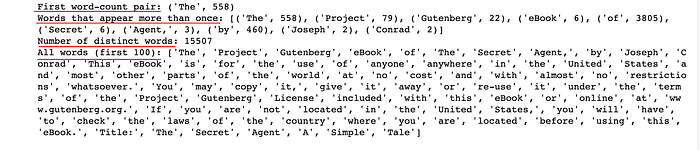
In Conclusion
So, there you have it! Apache Spark is a team of superheroes (Driver, Executors, and Cluster Manager) that works together to handle big tasks (large datasets) by breaking them into smaller tasks (distributed computing). They use a secret weapon, RDDs, to process data. They can transform this data (like turning unpopped kernels into popped popcorn), and perform actions on it (like counting the number of popcorn kernels).
In the next part of our journey, we'll delve into more powerful tools Spark provides for working with data: DataFrames and Spark SQL. But for now, why not try to create some RDDs and apply some transformations and actions on them? Use a simple dataset and try out different operations. Enjoy exploring the superpowers of Apache Spark!
Thanks for Reading!
If you like my work and want to support me…