
Amidst this digital skirmish, reconnaissance plays a pivotal role, offering the initial glimpse into a target. WebCopilot, an ingenious automation tool designed to help hackers and enthusiasts alike with comprehensive reconnaissance capabilities.
What is WebCopilot?
WebCopilot is not just another tool in the cybersecurity arsenal; it's a swiss army knife to unlocking detailed insights into the digital footprint of your target. Crafted with precision and efficiency in mind, WebCopilot automates the enumeration of subdomains and bugs detection, leveraging an array of reputable open-source tools. From assetfinder to amass, and from gobuster to nuclei, WebCopilot orchestrates these tools to paint a detailed picture of your target's presence and potential vulnerabilities.
Features at a Glance
Subdomain Enumeration Galore: Utilizes top tools like assetfinder, sublist3r, subfinder, and more for comprehensive subdomain discovery.
Active Subdomain Hunting: Employs gobuster and amass to uncover active subdomains using SecLists/DNS wordlist.
Insightful Analysis: Extracts titles and snaps screenshots of live subdomains using aquatone & httpx.
Endpoint and Vulnerability Mapping: Crawls subdomains for endpoints with waybackurls & gauplus and identifies potential XSS, SQLi, SSRF, and more with gf patterns.
Vulnerability Detection: Seamlessly integrates various open-source vulnerability scanners like dalfox, nuclei, sqlmap, etc., providing a consolidated view of potential weaknesses.
Getting Started with WebCopilot
Imagine having a Swiss Army knife for digital reconnaissance; that's WebCopilot for you. Here's how you can start leveraging its power:
Installation: Clone the repository with git clone https://github.com/h4r5h1t/webcopilot, navigate into the webcopilot/ directory, and run the installation script. Remember to make webcopilot executable and move it to /usr/bin/ for global access.
Usage: Initiate a scan by simply invoking webcopilot -d <target>. Whether you aim to conduct a full-fledged analysis or focus solely on subdomain enumeration, WebCopilot offers a variety of flags to tailor the scan to your needs.
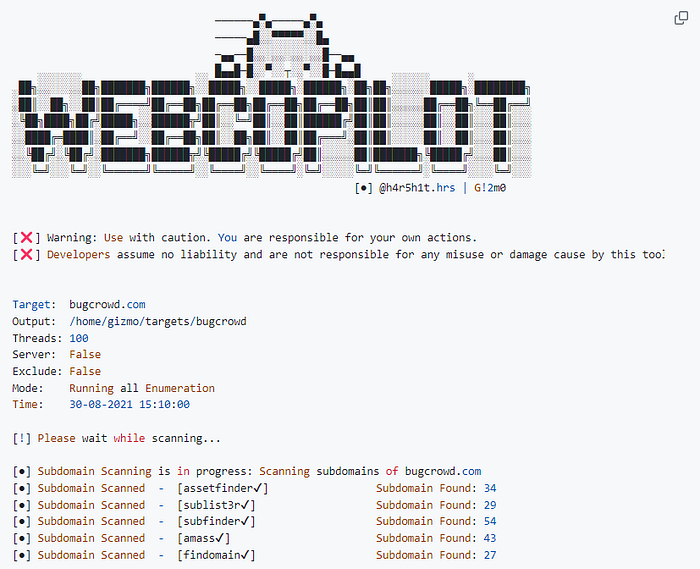
In Action: Scanning with WebCopilot Let's take bugcrowd.com as our target. To kickstart a comprehensive scan, you'd execute:
webcopilot -d bugcrowd.com
This command sets in motion, activating a sequence of tools that first enumerate subdomains, then probe these subdomains for active statuses, extract titles, take screenshots, and finally dive deep into the vulnerabilities that reside within.
For those who prefer a more granular approach, WebCopilot offers flags to customize your scan, from specifying output directories to focusing solely on subdomain enumeration or accelerating the process with increased threads.
Download it here: https://github.com/h4r5h1t/webcopilot