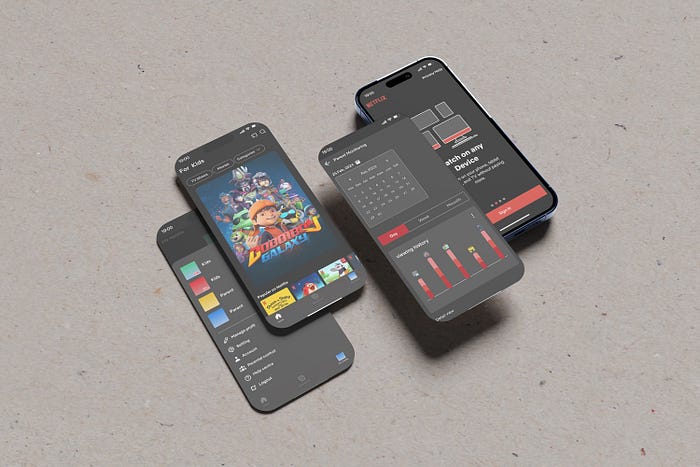
Peace of Mind for Parents: Navigating Netflix Parental Controls in Indonesia.
For parents seeking a safe and controlled streaming experience for their children, Netflix's current parental control features fall short, prompting some to consider switching platforms.

Some viewers are turning to Disney+, a platform perceived as offering a more controlled and family-friendly environment. In the face of subscriber churn and Disney+'s growing appeal, Netflix Kids could be a strategic weapon in the fight to regain lost ground, offering a safe and controlled environment specifically tailored to families.
Netflix Kids, a dedicated section for children aged 12 and below, offers a diverse range of age-appropriate content, including animated series, educational shows, and family-friendly movies. The platform is distinguished by its original productions, crafting exclusive animated series and movies designed specifically for kids. However, the current state of Netflix's parental control feature is neither easily accessible nor comprehensive. This issue has gained significance in light of the strong presence of Netflix's main competitor, Disney+, which has positioned itself as a family-friendly platform.
Process
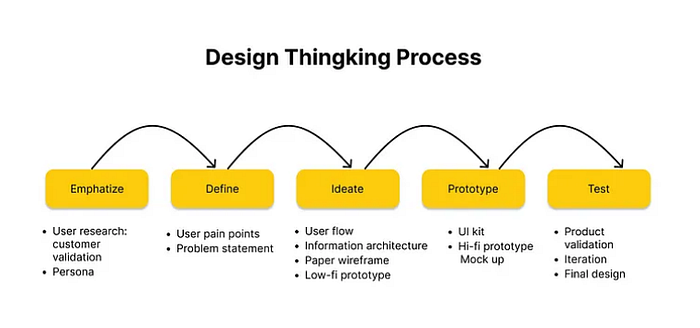
We've got a user-friendly system to guide you through the process.
Research
1 — Understanding the Problem and Users
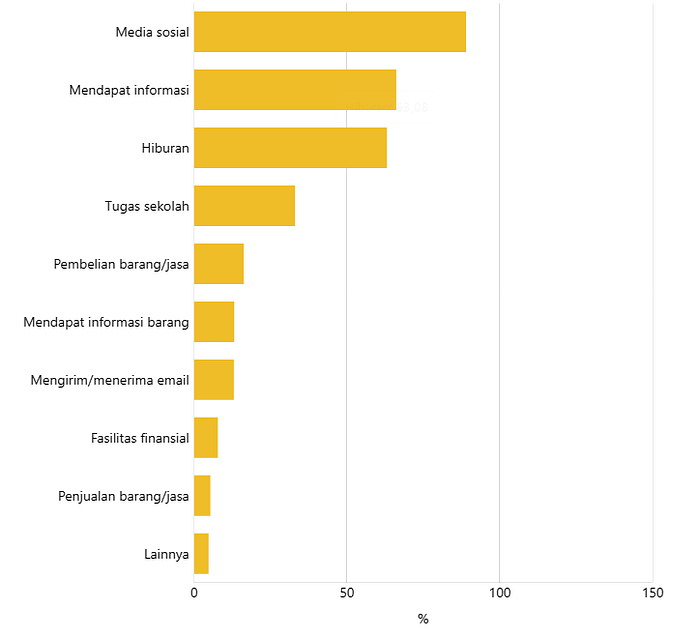
A Study by BPS Indonesia found that 63% of children aged 5 and over in Indonesia are using the internet for entertainment, making it the third most popular use of the internet after social media and getting information. This means that more than half of Indonesian children are using the internet to watch videos, play games and listen to music.
"Over-the-top (OTT) media services have a parental control feature, but the percentage of users who use it is still very low. This means that parents and adults need to learn how to use this feature in the shows and movies that children can watch. This will help to protect children from inappropriate content." said Naswardi, Chairman of Commission III of the LSF, at the press conference in Jakarta on Monday (18/12)

Despite the availability of parental control feature on OTT platforms, many parents in Indonesia lack the knowledge and awareness to use them effectively. This is concerning, given the high internet usage for entertainment among children in Indonesia (63.08%, BPS data). Mr Naswardi (Chairman, Commission II, LSF) has emphasized the need for parents to utilize these features to protect their children from inappropriate content. This research aims to address this issue by investigating the effectiveness of parental control features and providing parents with education and resources on how to use them. The research assumes that a lack of knowledge and parents with education and resource will increase their usage and effectiveness ultimately leading to a safer online environment for children.
buat turunan data seberapa lama anak yang menonton OTT platforms
Preparation
— Research objectives
Improving the usability and navigation of the "Parental Controls" feature on Netflix, for a more user-friendly experience.
Imagine navigating a vast library of content, some age-restricted, with the responsibility of managing your child's access. Unfortunately, current "Parental Controls" features on platforms like Netflix can be cumbersome and lack of user-friendliness, making this responsibility more challenging than necessary.
— Formulation of the Problem
- Lack of Parental Supervision:
- Parents struggle to monitor their children's screen time.
- Parents struggle to monitor content choices due to busy schedules.
This can lead to children spending excessive time on Netflix, watching age-inappropriate content, or being exposed to harmful online influences.
2. Underutilization of Netflix Parental Control Features:
- Many parents are unaware of the existence of Netflix's parental control features or find them difficult to use.
This can prevent parents from effectively managing their children's Netflix experience and protecting them from potential risks.
— Research Metode
While concerns regarding the lack of parental supervision and underutilization of Netflix's parental control features highlight potential risks for children, a combined approach of desk research and in-depth interviews can provide valuable insights into the scope of the problem and guide the development of a more user-friendly and effective solution.
— User Criteria
- Parents who are looking for kid-friendly content on streaming services.
— Research Recap
We understand the importance of keeping your kids safe online, so we've developed two levels of parental control to fit your needs.
Level 1: Basic Protection
This level is perfect for parents who want to make sure their kids are only watching content that's appropriate for their age. You can set screen time limits, block certain types of content, and even require your kids to enter a PIN before they can watch anything.
Level 2: Advanced Protection
This level is perfect for parents who want to be more involved in their kids' streaming experience. You can see exactly what your kids are watching, set limits on how much time they can spend on each app, and even watch with them to help them understand what they're seeing.
No matter which level you choose, our parental control features give you the peace of mind knowing that your kids are safe and entertained.
2 — Defining the Problem Statements
Based on the data, the user pain points we found are:
- Parent want to be involved in their children's online activities
They want to know what their children are watching and how much time they are spending online.
- Parent want to protect their children from harmful content.
They want to make sure that their children are not exposed to violence, pornography, or other inappropriate material.
We use "how might we" formula to define the problem and we have 2 problem statements to solve:
How might we help parents easily see what type of content their children are watching?
How might we make it simple for parents to set and manage screen time limits for their children's?
User Persona
Meet Sandrine, our ideal early adopter! Here's what we learned about them based on our research.
— Frustration Point
While parents naturally want their children to enjoy the vast possibilities of the online world, concerns often arise due to a lack of insight. This can lead to:
- Feeling in the Dark:
2. Constant Monitoring:
3. Fear of exposure:
The ever-expanding digital landscape can feel like an overwhelming minefield for parents.
— Product Goals
Understanding these frustrations, we've designed a suite of features that empower parents and protect children. By offering:
1. Parental Access Only:
- Transform playtime! Give parents the power to ensure only authorized users access the platform.
2. Watch Time Reminder:
- Beat screen time blues! Gentle reminders keep both kids and parents informed about viewing duration.
3. Parental Dashboard:
- Stay in the know! Gain a clear view of your child's viewing habits from a dedicated and user-friendly dashboard.
4. Content Restriction:
- Create a safe space! Choose the content categories your child can access, ensuring a worry-free experience.
5. Screen Lock:
- Time for a break! Take control with a screen lock feature that encourages real-world activities.
6. Watch Time Control:
- Strike a balance! Set healthy viewing limits and empower your child to develop responsible digital habits.
"Parents need tools and resources to help them navigate the digital world with their children." — Dr. Jane Doe, child development expert
User Flows
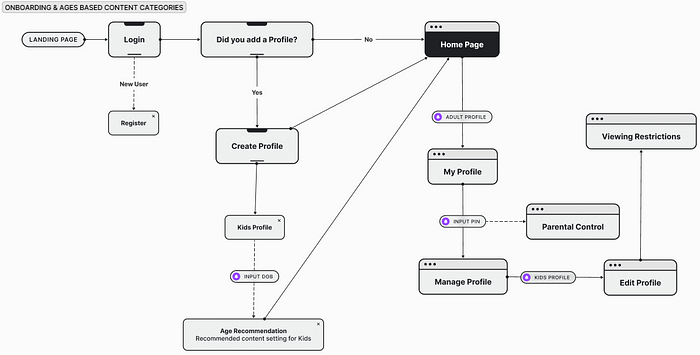
Knowing the pain points of parents, we meticulously mapped out user flows with a focus on creating a seamless and stress-free experience. By analyzing these user flows, we were able to design like this.
Prototype
With a clear understanding of the challenges, we translated our learnings into a tangible prototype. This interactive experience allows you to explore our features.
— Wireframe
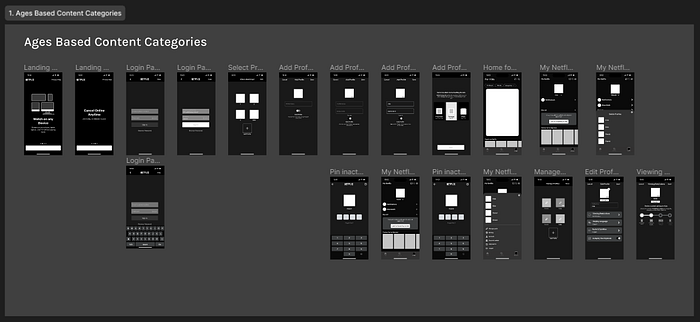
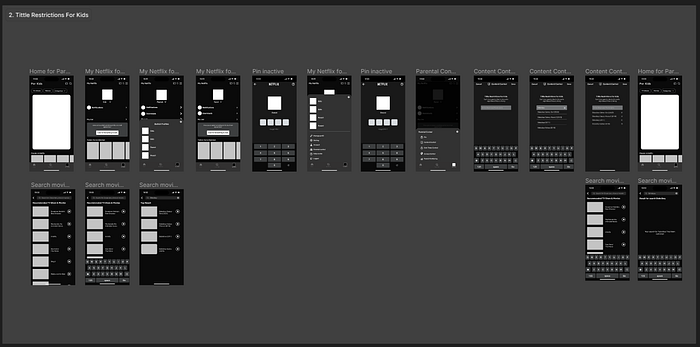
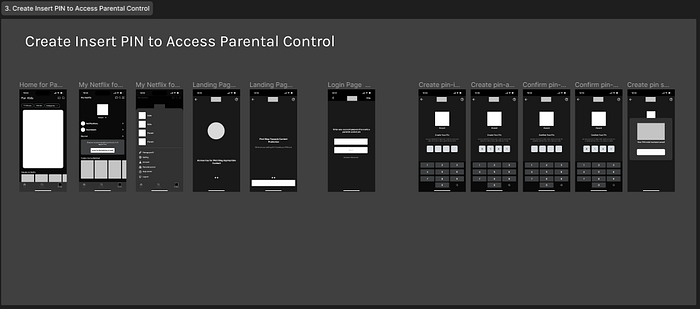
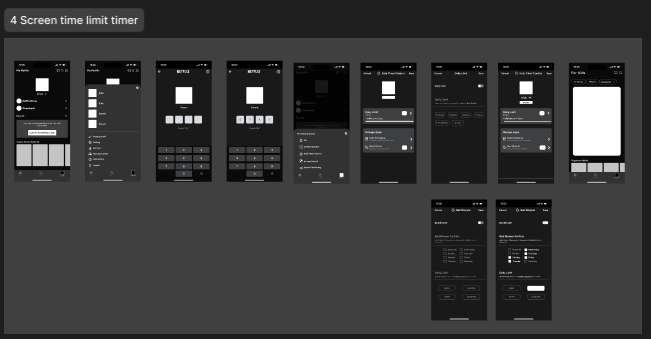
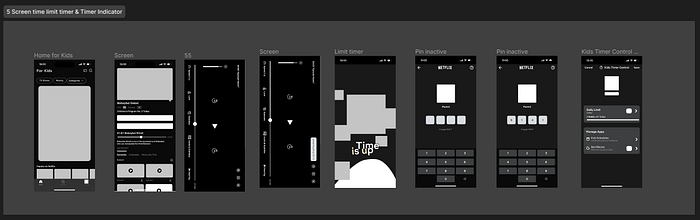
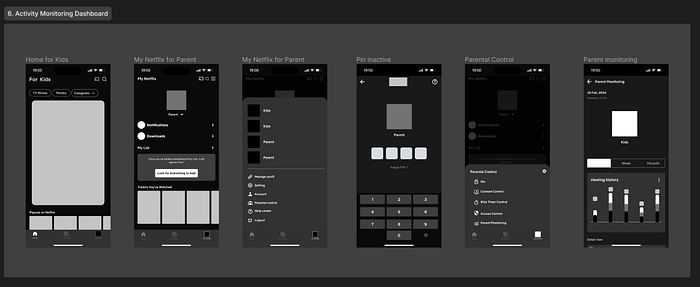
Taking the first steps towards a solution, our low-fidelity wireframes offer a basic blueprint for the user interface. These wireframes demonstrate how various elements will be arranged to facilitate parent.
A. Age Base Content Categories
B. Tittle Restriction for Kids
C. Pin for Parental Control
D. Screen Time Limit Timer
E. Screen Time Limit Timet & Timer Indicator
F. Activity Monitoring Dashboard
— Design System
To ensure a consistent and user-friendly experience across all components of our parental control features, we developed a comprehensive design system.

— High Fidelity

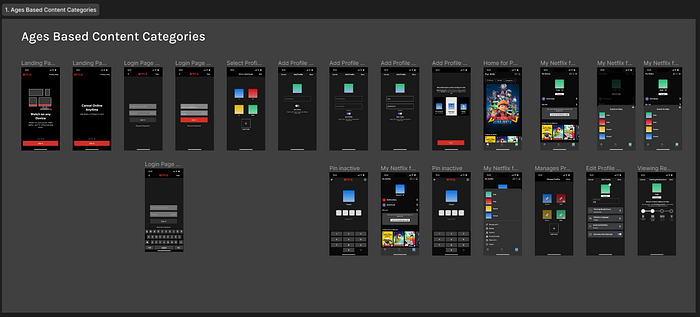
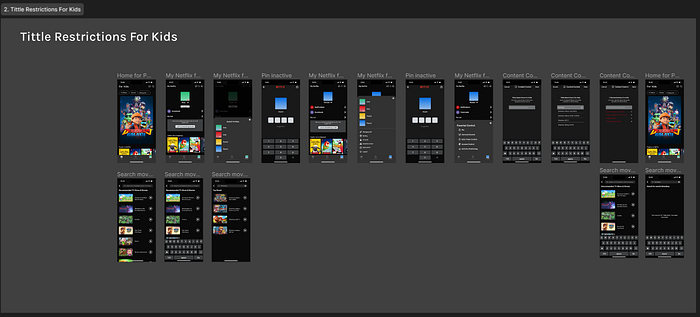
Taking the next step, we present our high-fidelity mockups that provide a clear and detailed picture of how parents can interact with the various features.
A. Age Base Content Categories
B. Tittle Restriction for Kids
C. Pin for Parental Control
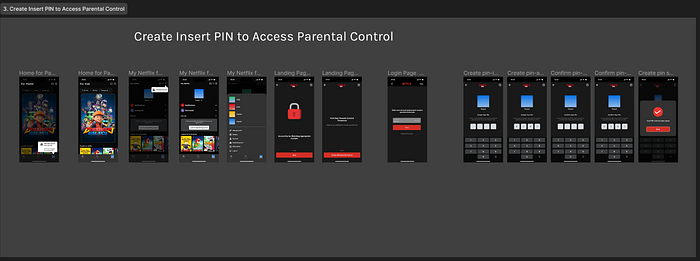
D. Screen Time Limit Timer
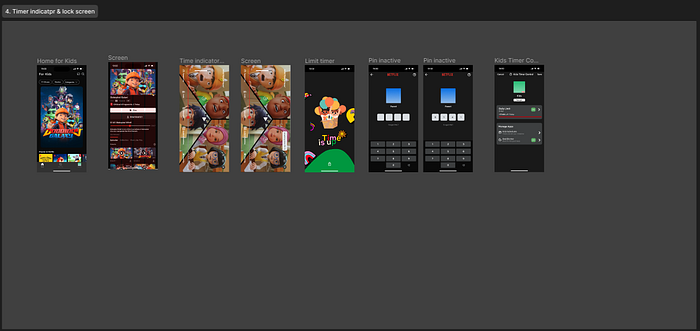
E. Screen Time Limit Timet & Timer Indicator

F. Activity Monitoring Dashboard
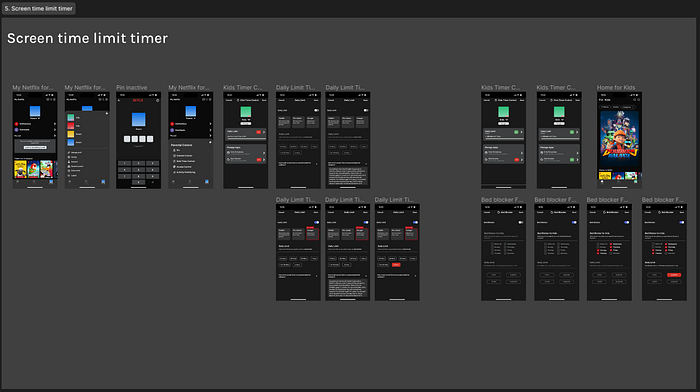
— Prototype
Step into the future of parental control! This interactive prototype showcases a user-friendly solution designed to empower parents and protect children.
A. Ages Based Content Categories
B. Create Insert PIN to Access Parental Control
C. Tittle Restrictions for Kids
D. Timer Indicator
E. Activity Monitoring Dashboard
USABILITY TESTING
Can we truly empower parents and protect children online? We're putting our solution to the test! Join us as we observe real parents interacting with our prototype and gain valuable insights into our usability testing.
— Usability Testing Plan
This usability testing plan outlines our strategy for evaluating our proposed solution, designed to empower parents and address their concerns about their children's online activity.
— Usability Execute
Ready to unveil the user experience! Explore the key observations and insights gathered during our usability testing execution with parents.
- Create Pin Parental Control
Our parental control PIN creation task had a 39% success rate, with 68.3% of users experiencing missclicks and an average completion time of 156.8 seconds. The main issue was that users got stuck on the onboarding page for creating the PIN.
Note: Users were able to drag back to the previous page.
We also included a difficulty rating feature for users to assess the usability of the prototype. The scale ranged from 1 (very difficult) to 5 (very easy). Two out of three users rated the difficulty as 4, while one user rated it as 5.
and we've got some feedback from our participant.
Feedback on Task 1:
- User 1: "I didn't have any problems or difficulties creating a parental control PIN."
- User 2: "It was easy to understand."
- User 3: "I was confused at first because it's a new feature and I didn't know where everything was, but overall I found it very helpful."
Overall, the feedback for Task 1 was positive. Users found the task to be easy to understand and complete. However, one user was confused by the layout of the new feature.

2. Parental Timer Control for Children
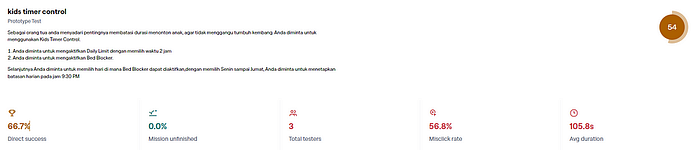
The high number of misclicks suggests that the design of the timer control may be confusing or difficult to use. The average completion time of 105.8 seconds indicates that the task may be too time-consuming for some users. The fact that one user's test results were not recorded by Maze suggests that there may be some technical issues with the testing software.
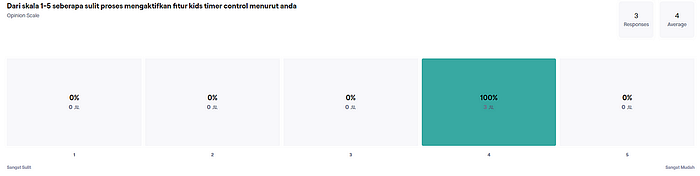
We also included a difficulty rating feature for users to assess the usability of the prototype. The scale ranged from 1 (very difficult) to 5 (very easy). Two out of three users rated the difficulty as 4, while one user rated it as 5.
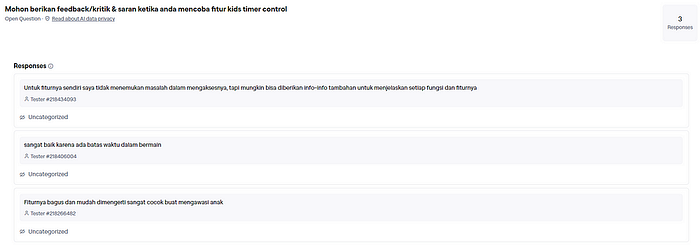
User Feedback on Features:
- User 1: "I didn't have any problems accessing the features, but it might be helpful to provide additional information explaining each function and feature."
- User 2: "I really liked that there was a time limit for playing."
- User 3: "The features are great and easy to understand. This is perfect for monitoring children."
Overall, the feedback on the features was positive. Users found the features to be easy to access and use. However, one user suggested that additional information be provided to explain each function and feature.
This feedback will be helpful in identifying areas where the prototype can be improved to make it more user-friendly.
3. Timer Screen Indicator

The success rate for this task was 48%. There were a moderate number of missclicks (21.7%), with an average completion time of 61.6 seconds. The direct success rate for this task was 0% due to an error bug in the Maze prototype itself. All three users successfully completed the task, but their results were not recorded.
The error bug has been reported to Maze and they are working on a fix. In the meantime, we will continue to test the prototype and make improvements as needed.

We also included a difficulty rating feature for users to assess the usability of the prototype. The scale ranged from 1 (very difficult) to 5 (very easy). Two out of three users rated the difficulty as 4, while one user rated it as 5.
User Feedback on Features:

- User 1: "Accessing the features was also easy and not confusing."
- User 2: "I really liked that the screen locks when the time is up."
- User 3: "It was very easy to use."
Overall, the feedback on the usability was positive. Users found the features to be easy to access and use. They also appreciated the fact that the screen locks when the time is up.
This feedback will be helpful in making improvements to the usability.
4. Activity Monitoring Dashboard

The success rate for this task was 56%. There were a high number of misclicks (82.6%), with an average completion time of 48.6 seconds. The direct success rate for this task was 66.7%. One user's test result were not recorded by Maze.
The high number of missclicks suggests that the design of the timer control may be confusing or difficult to use. The average completion time of 48.6 seconds indicates that the task may be too time-consuming for some users. The fact that one user's test results were not recorded by Maze suggests that there may be some technical issues with the testing software.
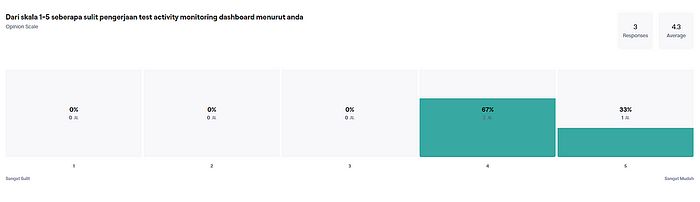
We also included a difficulty rating feature for users to assess the usability of the prototype. The scale ranged from 1 (very difficult) to 5 (very easy). Two out of three users rated the difficulty as 4, while one user rated it as 5.
User Feedback on Features:

- User 1: "It's clear that all the features are in one dashboard."
- User 2: "This is great for supervising children so that you can still limit their screen time and provide a list of what they can watch per day or week."
- User 3: "It could be more detailed, but the features are already very helpful."
Overall, the feedback on the overall design was positive. Users appreciated the fact that all the features are in one dashboard and that it can be used to supervise children's screen time. However, one user suggested that the features could be more detailed.
Based on valuable user insights gathered from feedback on features, usability, and difficulty, we've identified areas for improvement. This will guide us in refining the design and making our features even more user-friendly and accessible.
— Design Refinement
After users completed their tasks, we conducted an evaluation and observed some difficulties they encountered while conducting usability testing (UT) on the redesigned Netflix Parental Control app. We also asked them for feedback to dig deeper and understand their experience in seeing and using the features.
Based on the feedback and observations, we identified several areas for improvement and made the following design refinements:
- Create Insert PIN to Access Parental Control
We found that users were confused by the introduction to the parental control PIN creation process. To address this, we added a "Next" button. Previously, users had to swipe left to proceed, which was confusing for many users.
We believe that this change will make the PIN creation process more intuitive and user-friendly.
- Kids Tier Control
We received excellent feedback from one participant on the daily limit section. The participant suggested that we add information about the recommended screen time for children according to experts.
We believe that this is a valuable suggestion, and we will explore ways to incorporate this information into the app.
- Activity Monitoring Dashboard
We received feedback from one participant on the Parent Monitoring section. The participant suggested that the Activity Monitoring Dashboard feature is good but lacks detail. To address this feedback, we are adding the ability to check viewing history through the calendar menu.
We believe that this change will make the Activity Monitoring Dashboard more useful and informative for parents.
We've Reached the Finish Line!
We've finally reached the conclusion of this case study. While it has presented its challenges, it has also been a deeply rewarding journey.
Personally, I'm incredibly grateful to have collaborated with Fauzi Eka and Ahmad Ridho maulana on the UI/UX team. We fostered a fantastic collaborative spirit, openly discussing any differing opinions from our unique perspectives. Ultimately, we used the research data to guide our final decisions, ensuring they were data-driven and user-focused.
Valuable Learnings
This case study has provided several valuable takeaways. Firstly, the critical importance of understanding user needs and validating them with data was reaffirmed. Secondly, the power of strong team collaboration and communication became even more evident. Finally, the necessity of critical and creative thinking when tackling design challenges was also emphasized.
Expressing Gratitude
I extend my heartfelt gratitude to everyone who contributed to this case study. A special thank you goes to Fauzi Eka and Ahmad Ridho maulana for their exceptional collaboration and teamwork. Thanks also to the participants who generously offered their time and valuable feedback. Finally, a sincere thank you to all who have read and learned from this case study.
Closing Thoughts
It is my sincere hope that this case study will prove beneficial to designers, researchers, and stakeholders who aim to understand and improve user experiences within the Netflix Parental Control application.
Looking Ahead
As we move forward, I hope the Netflix Parental Control app continues to evolve and offer the best possible user experience. Additionally, I hope this case study serves as inspiration for further research and development efforts regarding Parental Control applications in general.
A Final Note to Readers
If you have any questions or comments concerning this case study, please don't hesitate to reach out. I'd be happy to discuss it further with you.